bz Review
 叫我包仔786 downloads
bz Review has AI build and tidy cards so you focus on reading. FSRS-7 schedules by stability, adapts to your history: fewer reviews, stronger memory.
- Overview
- Scorecard
- Updates4

bz Review(复习)
bz Review 把制卡、整卡交给 AI,让你专注阅读与复习。
内置 FSRS 间隔重复算法,依据记忆稳定性动态排期,并按你的复习记录自适应拟合参数。用更少的复习次数,记得更牢。
QQ 群 1130883117 · 支持作者
简体中文 · English
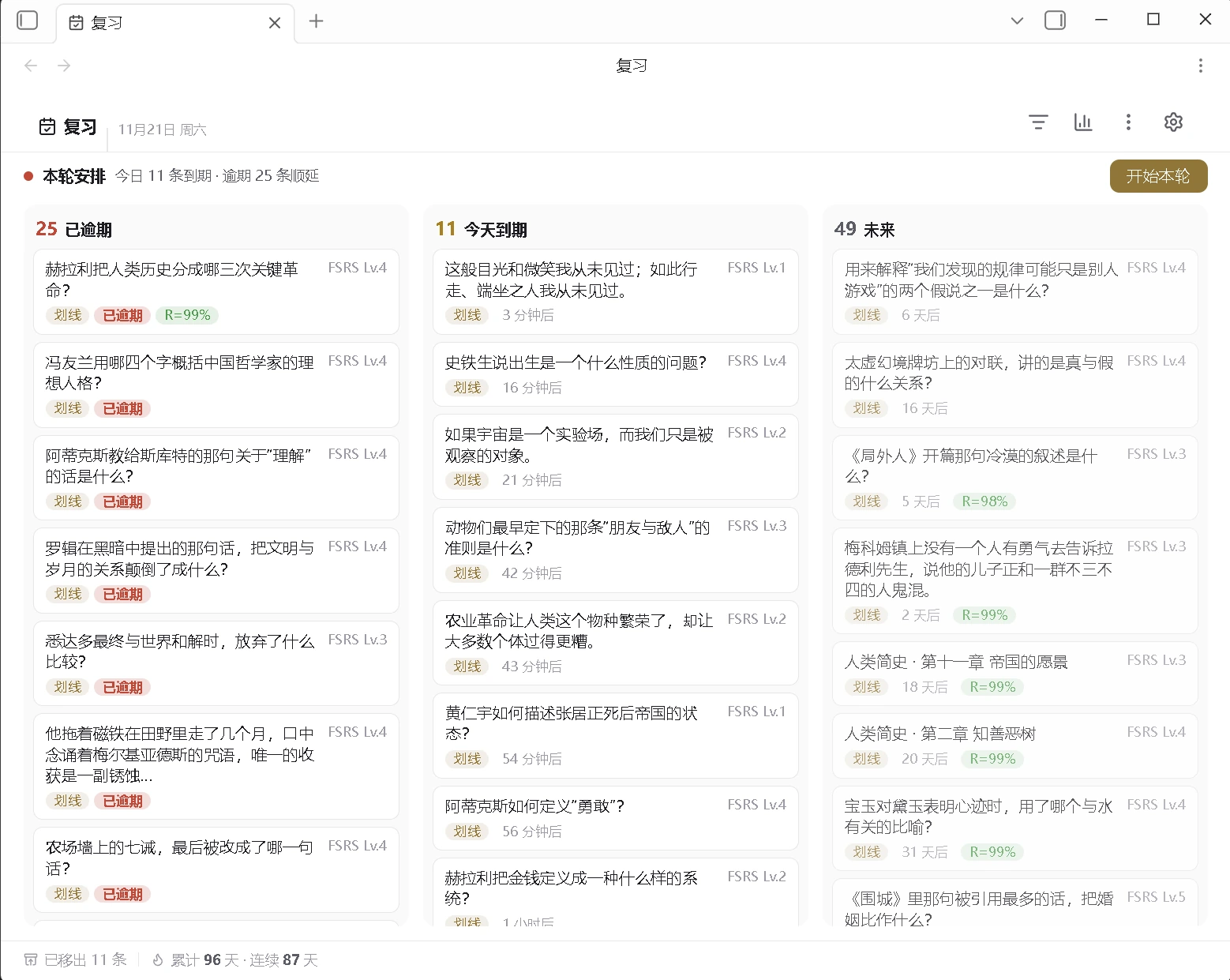
复习计划 · 今日到期 · 逾期 · 未来
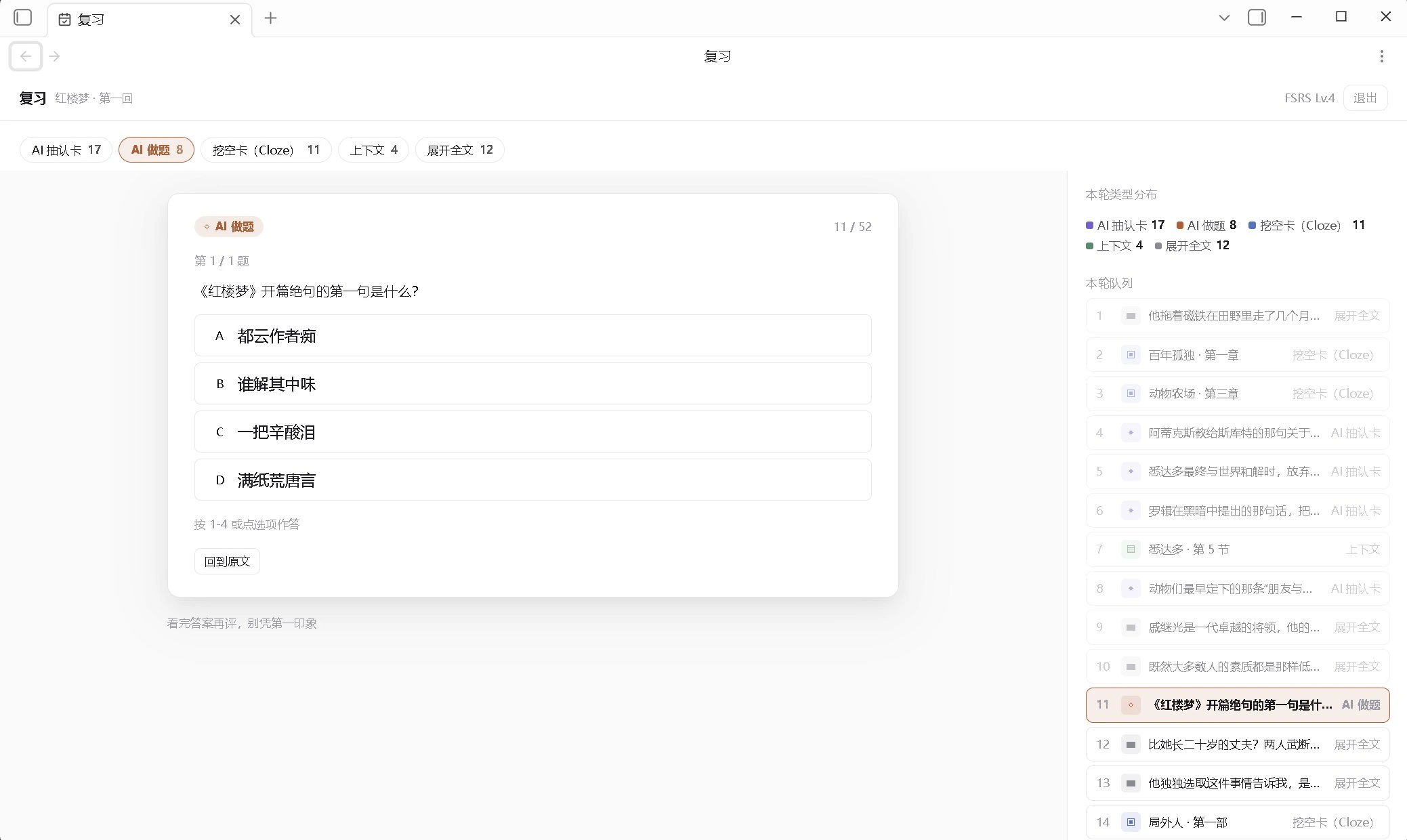
AI 做题 · 四选一 · 即时判分
安装
在社区市场安装:
- 打开 设置 → 第三方插件,关闭安全模式。
- 点 浏览,搜索 bz Review,安装。
- 启用后左侧出现日历勾图标,点开就是复习计划。
搜不到时,用 BRAT 添加本仓库安装,或手动下载 Release 里的 main.js、manifest.json、styles.css,放进 <你的库>/.obsidian/plugins/bz-review/ 后启用。
视频教程
视频制作中,做好后在这里和插件里的「看视频教程」按钮同步更新。
功能
基础版免费、不限时,复习笔记 + 划线卡合计 50 条;高级版不限量。两版功能完全一样,以后新增的功能也一样。
| 类别 | 功能 | 基础版 | 高级版 |
|---|---|---|---|
| 数量 | 复习条目(笔记 + 划线卡) | 合计 50 条 | 不限 |
| 制卡 | 选中文字加一张 | ✓ | ✓ |
| 划线一键加入 | ✓ | ✓ | |
| 整本书批量挑:按划线 / 重点 / 章节 | ✓ | ✓ | |
| 手动写一张 | ✓ | ✓ | |
| Markdown 笔记导入 | ✓ | ✓ | |
| Anki 牌组导入 | ✓ | ✓ | |
| 模板与图片 / 音频 | ✓ | ✓ | |
| 复习 | 抽认卡 | ✓ | ✓ |
| 做题(四选一) | ✓ | ✓ | |
| 挖空 | ✓ | ✓ | |
| 上下文 | ✓ | ✓ | |
| 展开全文 | ✓ | ✓ | |
| 媒体卡(图片 / 音频) | ✓ | ✓ | |
| 图片遮挡 | ✓ | ✓ | |
| 排期 | FSRS-7 排期 | ✓ | ✓ |
| 参数自动拟合 | ✓ | ✓ | |
| 学习步骤 | ✓ | ✓ | |
| 负荷预测与假期 | ✓ | ✓ | |
| 管理 | 卡片管理器:挂起 / 埋藏 / 手动排期 | ✓ | ✓ |
| 牌组与标签 | ✓ | ✓ | |
| AI 重新生成卡片 | ✓ | ✓ | |
| 数据与备份 | 记忆分析 | ✓ | ✓ |
| 统计与成就 | ✓ | ✓ | |
| 按书报告 | ✓ | ✓ | |
| 导出 Markdown / CSV | ✓ | ✓ | |
| 快照备份 | ✓ | ✓ | |
| 一键回滚 | ✓ | ✓ | |
| 联动 | 听卡片(本地 TTS) | ✓ | ✓ |
| 跳回原文 | ✓ | ✓ | |
| 书架复习页签 | ✓ | ✓ | |
| 文件夹监听自动加入 | ✓ | ✓ |
合计 31 项功能,两版完全一致,仅「制卡数量」一项不同;以后新增的功能也一律两边都有。已有数据超过免费上限不会被删,只是不能再加新的。
完整的同款对照长图见 assets/plan-compare/shots/pro-compare.png(店铺详情也只放这一张)。

付费说明
基础版免费,功能完整、不限时。高级版需要付费购买激活码:购买页面,具体价格以该页面为准。
- 激活码在 复习计划 → 设置 → 授权 里填入;签名在本地验算,首次激活和试用码会联网核对停用名单与最新版。
- 不绑定设备数:换电脑或手机时,在新设备的同一位置再填一次即可。
- 桌面端与移动端是同一个包,买一次两边都能用。
- 激活码范围:赞助人与专属定制码(码里带
patron标记)在 bz Reader 和 bz-review 都能激活;两款插件的普通高级版码各自独立,只在对应插件激活。
复习方式
每张卡在制卡时就定好自己的方式,一轮里可以混排,切到哪张就实时换成哪种题面:
| 方式 | 怎么考 | 要不要 AI |
|---|---|---|
| 抽认卡 | 正面一句问句,背面划线原文 | 有 AI 更准,没有就用内置提示 |
| 做题 | AI 从划线 / 笔记出选择题,按正确率自动定难度 | 要 AI |
| 挖空 | 把关键的一两处挖掉,凭上下文补回 | 有 AI 更准,没有就按规则挖 |
| 上下文 | 藏起划线,用前后各一段回忆 | 不要 |
| 全文回忆 | 整段划线直接回忆 | 不要 |
| 媒体卡 | 图片直接显示、音频直接播放 | 不要 |
| 图片遮挡 | 一张图盖住几处,点开看标签 | 不要 |
排期是怎么算的
- Anki 式学习步骤:新卡先在当天按 1 分钟、10 分钟重复两次(可在设置里改/关),走完才毕业进入 FSRS——照搬 Anki 的主流设计,新卡不会因为首次点「简单」就被扔到几十天后。已经毕业的卡点「忘了」也会先走同样的当天重学步骤。
- FSRS-7 全量调度:官方最新版算法,毕业后每一步都由 FSRS 排期。记忆状态用长期/短期双稳定性 + 难度动态描述,两条遗忘曲线加权算出当前留存率,再按目标留存率反推下一次间隔。
- 目标留存率可调:默认 90%(官方推荐值,记得牢与复习量的平衡点),可在设置里调高(更勤、间隔更短)或调低(更省时、忘得更多)。
- Anki 间隔抖动(fuzz):2.5 天以上的间隔前后随机挪一点(越长挪得越多),学习步骤也多 0~25%(≤5 分钟),把扎堆到期的卡摊到相邻几天;可在设置里关。Easy 毕业间隔保证比 Good 至少长 1 天。
- 四档评级:忘了 / 困难 / 一般 / 简单。评完立刻重排,并给出撤销。
- 参数可自调:34 个权重按你的复习记录自动拟合,也能手填;另有间隔缩放系数与最长间隔上限,防止算出几千天等于不再出现。
- 提前与逾期:留存率掉到阈值以下会提前进入本轮;逾期有每日上限与常驻提醒,提醒不列题目、只报篇数,点「去复习」走完整流程。
- 假期:设一个结束日期,之前不提醒、不算逾期;那天计划整体顺延,回来不会一屏欠账。
- 负荷预测:按未来 30 天排程算出每天的复习量,提前看到哪天要挤时间。
排期算法的长期仿真验证
排期直接用插件在跑的代码(src/review/fsrs.ts)做蒙特卡洛仿真:虚拟学生每天新增 05 张卡,按模型算出的真实留存概率答题。十年实际留存率稳定在 87%88%,日均复习量由每天加卡量决定。脚本见 scripts/fsrs7-sim-real.ts。
另跑过一套九类人群 × 3 随机种子 × 1 个月到 10 年的多场景仿真(学生、考研、上班族、医生、程序员、中老年爱好者等),实际留存率全程 90.1%~91.4%,见 多场景长期仿真报告 与 FSRS-7 对抗审查与真机验证。
记忆分析
独立面板「守着一炉记忆的火」,把整库状态画成图:忘坡、水位、欠账、阶石、墨晶、矿层、批改环、四驻。数据页另给复习量账本、24 小时与星期节律、近一年热力、按阶段遗忘率、未来 30 天到期与逾期分档,可导 CSV;徽章单列在「成就」页。
进阶功能(两版都有)
- 听卡片:复习时点一下喇叭,用你自己的本地 TTS 服务念卡片(服务地址、音色、格式在设置里填)。合成结果缓存,换卡或退出自动释放,长文本只念前 200 字;离线可用,不按次收费。
- 回到原文:揭示答案后出现按钮,跳回 bz Reader 里那一句。协议按原文片段定位,不能还原高亮色;老版本 Reader 推来的卡也能靠卡片钥匙兜底跳转。
- 按书档案:按书名 / 文件夹汇总卡片数、章节数、平均留存率、忘了率与逾期,一键导出 Markdown 报告。
- 卡片管理器:搜索筛选,挂起 / 埋藏 / 恢复 / 手动排期 / 移出。挂起和埋藏只影响进不进本轮,FSRS 排期字段一个都不动。
数据
- 复习数据:
bz-review/storage/review.json(默认在库根,跟 bz Reader 的bz-reader/storage同形制,设置里可改目录); - 与 bz 的
CONFIG/STORAGE/review.json分开存,两个插件同时装不会互相覆盖; - 设置里有一键「从 bz 导入」,只导一次、不覆盖、不动 bz 的数据;
- 挂起、埋藏状态一并写进排期表,不依赖运行时内存;
- 支持整包 JSON 备份与恢复、CSV 导出、统计 CSV、划线卡导出为笔记、按书报告导出 Markdown。
划线从哪来
划线卡由 bz Reader 推送:在书里划一句,选「加入复习」,就会出现在排期表里。Reader 一并给出划线前后各一段与一条跳回原文的链接,复习时可以点「回到原文」。
不装 Reader 也能用:笔记可以直接做成抽认卡 / 做题 / 挖空,从 Markdown 也能批量导入,写法是 问题 :: 答案 或 {{挖空}}。
网络访问
插件本体不含账号体系。主动外连有四种:生成问句或题目时,划线会发给你自己配置的 AI 服务商;点「听卡片」时,卡片文字会发给你自己的本地 TTS 服务;首次激活时联网核对停用名单;用试用码时联网确认最新版。签名验算、统计、排期、备份仍然离线完成。
常见问题
- 会和其他插件打架吗? 不会。界面是自己的标签页,生成的 DOM 与 CSS 都限定在插件自己的作用域内(统一挂
data-bzrv),不污染别人的样式;数据也和 bz 分开存。 - 和 bz 里的复习计划是什么关系? 从 bz 独立出来的插件,bz 里那份原样保留。两边各存各的,可以同时装、互不覆盖,也能一键把 bz 的计划导进来。
- 超过免费上限会删我的卡吗? 不会。已有的笔记和卡继续照常复习,只是合计满 50 条后不能再加新的;升级后立即放开。批量导入时如果这次会越过 50 条,仍会让你整批加进去,只提醒一句下次要先升级。
- 换电脑怎么办? 库同步过去,排期和复习历史跟着走;高级版在新设备上重新填一次激活码。
- 手机上要单独买吗? 不用,同一个包,桌面与移动都包含在内。
- 没装 bz Reader 能用吗? 能。笔记照样能排进计划,抽认卡、做题、挖空都能用。
插件推荐
- bz —— 日记、备忘,收藏,归物、读书观影、游戏、剪藏、番茄钟,复习、安全加密(密码本+保险库),ai知识库(知识盒+第二大脑),工具坞,还有一只桌宠猫
- bz Reader —— 把 Obsidian 变成一个能读书的地方。桌面端 + 移动端、多格式(包括 PDF,漫画),多语言、AI 锚定追问 / 全书问答 / 语义搜索 / 知识库、离线听书、双链,统计,数据全部本地。
支持作者

微信扫一扫,请作者喝杯咖啡
插件的开发、维护和教程视频都是作者一个人在做。
购买高级版:点击这里
许可
本项目以 MIT 许可发布。
English
Review plan · Due today · Overdue · Upcoming
AI quiz · Multiple choice · Instant feedback
Let AI make and organize your cards — you just read and review. Built on FSRS spaced repetition, it schedules reviews from memory stability and fits its parameters to your own history — so you remember more with fewer reviews. Desktop and mobile, all data stays local in your vault.
It was split out of bz — the original copy there stays untouched. It pairs with bz Reader, which pushes highlights into the queue, but Reader is not required.
Installation
Install from the community directory:
- Open Settings → Community plugins and turn off Restricted mode.
- Click Browse, search for bz Review, and install.
- Enable it — a calendar-check icon appears in the left ribbon.
If search doesn't find it, install with BRAT, or download main.js, manifest.json, and styles.css from the Release and place them in <your vault>/.obsidian/plugins/bz-review/, then enable the plugin.
Video tutorial
Still in production — the link will be added here and to the plugin's "video tutorial" button once ready.
Features and pricing
The free edition is complete and unlimited in time: 50 review notes and highlight cards combined. The purchased edition only removes the count — both editions are identical in features, and every future feature will be too. Existing data above the free limit is never deleted.
A single build covers desktop and mobile. License keys are verified locally, offline, and are not tied to a device count — re-enter yours on a new machine. Purchase at the store page. bz-review accepts its own keys plus patron keys issued for bz Reader; regular bz Reader licenses do not work here.
Review modes
Flashcards, AI-generated multiple-choice quizzes, cloze, context, full-text recall, media cards and image occlusion. Each card keeps its own mode, and a round can mix them.
Scheduling
Anki-style learning steps first: new cards repeat at 1m / 10m on the day they are added (configurable), then graduate to FSRS-7. Long- and short-term stability plus difficulty drive each interval from a target retention you set (90% by default, the official recommendation). Ratings are Again / Hard / Good / Easy; the 34 weights fit your own review history. Overdue cards get a daily cap and a reminder, a vacation date shifts the whole plan, and a 30-day workload forecast shows what's coming.
Data and network
Review data lives in bz-review/storage/review.json, separate from bz's. Backup/restore is JSON or CSV; CSS and generated DOM are scoped to the plugin. No account, no telemetry. Two opt-in connections only: AI generation sends the selected text to the endpoint you configured, and "speak card" sends card text to your local TTS service. Everything else runs offline.
FAQ
- Does it conflict with other plugins? No. Its view is a separate tab, styles are scoped, and data is stored separately.
- Do I lose cards when I hit the free limit? No. They keep reviewing; you just can't add more until you upgrade.
- Do I need bz Reader? No. Notes work on their own; every review mode is available without it.
- Do I pay again on mobile? No. One build covers both.
Recommended plugins
- bz — Diary, memos, collections, belongings, books and films, games, web clippings, pomodoro, review, secure encryption (password book + vault), AI knowledge base (knowledge boxes + second brain), tool dock, and a desktop pet cat.
- bz Reader — Turn your vault into a reading app: desktop and mobile, multiple formats (including PDF and comics), multilingual, AI follow-ups / whole-book Q&A / semantic search / knowledge base, offline audiobooks, backlinks, reading stats — all kept locally.
License
Released under the MIT license.