BrainCore LifeOS
 囍樂2k downloads
Obsidian 知识库的「核心呼吸机」,它由 7 大模块组成,涵盖了时间感知、极速收集、工作流转、习惯养成与知识内化。一切信息从这里输入,最终也会在这里沉淀。
- Overview
- Scorecard
- Updates37
付费 · 48 小时试用 · ¥49.9 永久激活
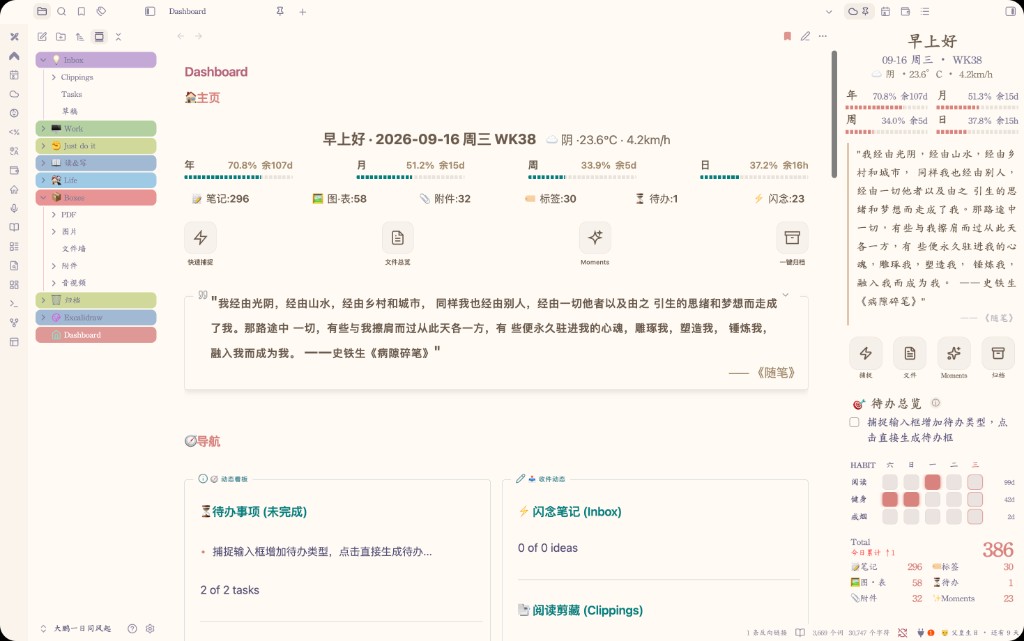
知识库侧边栏控制台(LifeOS)——捕捉、待办、周工作、习惯、统计与知识内化。
当前公开版本:4.1.24 · 48 小时试用
界面预览
控制台 — 捕捉、待办、周工作与习惯一屏看清
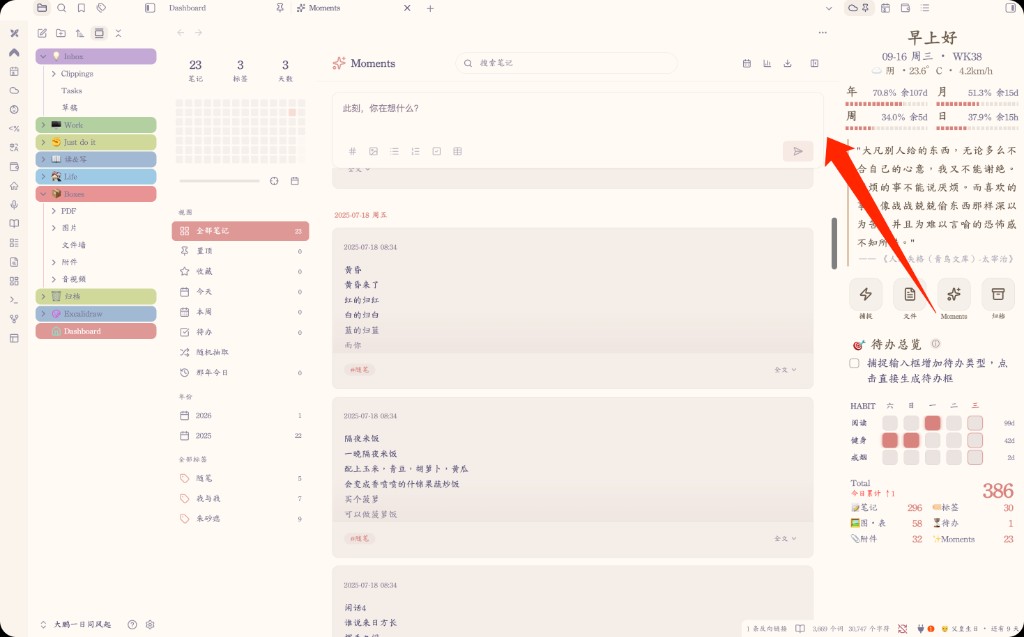
Moments — 速记、筛选与分享图
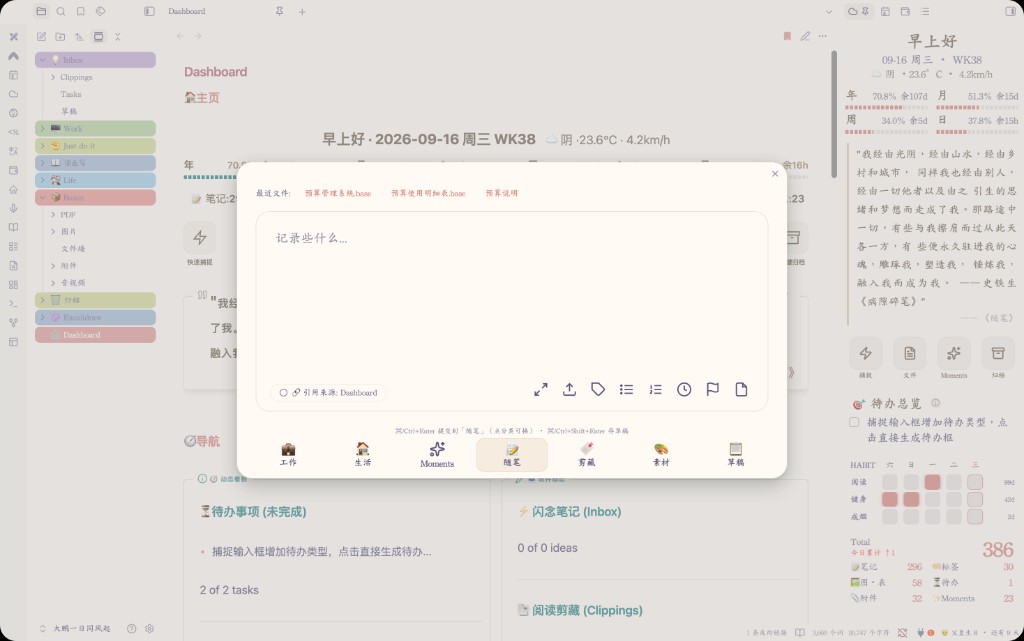
捕捉 — 快速收集想法与待办
定价与购买
| 项目 | 说明 |
|---|---|
| 试用 | 插件内开启后 48 小时全功能 |
| 付费 | ¥49.9 一次付费,按设备指纹永久激活 |
| 购买 | 小红书联系作者下单 → 复制设备指纹 → 粘贴激活码 |
作者:github.com/xileshuo · 小红书:下单入口
LifeOS 三插件互跳
同一作者的 LifeOS 系列,可在社区插件里互相打开,或前往 GitHub:
| 插件 | 社区插件(已上架后) | GitHub |
|---|---|---|
| BrainCore LifeOS | 打开插件页 · 搜索 BrainCore LifeOS |
BrainCore LifeOS |
| PlainLedger | 打开插件页 · 搜索 PlainLedger |
PlainLedger |
| jinianri | 打开插件页 · 搜索 jinianri |
jinianri |
安装与上手
- 设置 → 第三方插件 → 浏览 → 搜索 BrainCore LifeOS → 安装并启用
- 点侧栏云图标,开启 48 小时试用
- 试用满意后:复制指纹 → 小红书下单 → 粘贴激活码
其他安装方式
BRAT:添加仓库
https://github.com/xileshuo/BrainCore-LifeOS
手动:下载 Latest Release 的 main.js、manifest.json、styles.css 到 .obsidian/plugins/braincore-lifeos/
使用说明(精简)
完整说明可在启用后打开插件内「使用说明」;下面是社区页够用的上手版。
打开控制台
启用后点左侧边栏 ☁️ 云朵图标,进入 BrainCore 控制台。
七大模块
- 问候语与天气 — 日期、问候、天气
- 时间进度 — 今日 / 本周 / 本月 / 本年进度
- 快捷工具 — 捕捉 · 文件 · Moments · 归档
- 待办总览 — 聚合日常待办与本周工作事项
- 习惯打卡 — 长期坚持项(与一次性待办分开)
- 每日金句 — 从读书笔记与随笔抽取
- 数据统计 — 笔记 / 标签 / 待办 / Moments 等概览
顶部 Hero(问候 + 时间进度 + 金句)一眼看清今天;下方推进待办与习惯。模块可在设置里开关与排序。
捕捉
点「捕捉」打开面板,分类一次展开:
| 分类 | 写入 |
|---|---|
| 工作 | 本周 Work →「本周待办」 |
| 生活 | 生活待办文件 |
| Moments | 读&写/Moments 年文件 |
| 随笔 / 剪藏 / 素材 / 草稿 | 对应路径(可在设置修改) |
⌘/Ctrl + Enter 发送;空内容不会静默提交。
Moments
- 记录写入
读&写/Moments/年份.md(按年汇总) - 支持搜索、筛选、置顶、收藏、那年今日、分享图与年度报告
- 图片统一进
Boxes/图片,年文件只存引用
待办与周工作
- 待办用标准勾选语法:
- [ ] 任务 - 打开控制台时会生成本周 Work;跨周尽量迁未完成项
- 待办总览会聚合周工作与日常待办,方便当天推进
习惯打卡
适合「每天都要做」的事项。项目可在设置 → 打卡里增删、改图标,并支持导入 / 导出。
推荐日常流程
- 早上:☁️ 打开控制台 → 看 Hero → 扫待办
- 白天:有事就捕捉;该推进的从待办总览点进去
- 晚上:习惯打卡;需要时归档已完成项
- 每周:在 Work 文件里复盘本周、安排下周
建议与注意
- Dataview 可选:没有也能用捕捉 / 待办 / 习惯 / Moments;装了统计更完整(建议开 DataviewJS)
- 不要随意删核心目录(Work、读&写、Boxes 等)或改插件文件夹名
- 手机与电脑共用同一库时:两端各用本机指纹各激活一次
更新日志
4.1.24(当前)
- 捕捉:保存成功会写明写入哪篇笔记,并可点「打开」
- 捕捉:随笔、待办、草稿、Moments、剪藏等目标不存在时自动建好,并回填设置
- 随笔:每条时间改为年月日加时刻(如 2026.09.28 13:24:55),年 / 月 / 周层级不变
- 周工作:编辑和实时预览按区块标题上色,去掉加粗或斜体也不会丢色;笔记属性栏不再显示
4.1.23
- 修复:更新弹窗关掉也会记版本,重启不再反复弹出
- 修复:版本升级不再自动强开使用说明 MD(仅首次安装)
- 外观:侧栏四键去掉灰底;捕捉分类/输入框压过主题默认按钮样式
4.1.22
- 审核:首启卡改回浏览器 localStorage,去掉高于 minApp 的 App 存储 API
4.1.21
- 审核:天气仅 open-meteo;自动定位改系统定位,去掉 IP 库 / wttr Disclosure
- 审核:去掉设置页 inline !important;CSS 去 !important;manifest 英文 description
4.1.20
- 体验:首启 / 套装提示可点「去了解」打开套装说明
- 外观:手机设置顶距与 PlainLedger / 纪念日对齐(不再额外顶 spacer)
- 设置:关于页套装入口与 LifeOS 三插件文案统一
4.1.19
- 外观:设置页无痕滚动(隐藏滚动条,保留滑动)
4.1.18
- 恢复:天气保留 IP 库定位(第三方 IP 定位)与 备用天气源 降级
4.1.17
- 审核:天气仅 open-meteo;自动定位改系统定位,去掉 IP 库 / wttr Disclosure
4.1.16
- 审核:manifest.description 改以英文句号结尾(Scorecard 不认中文 。)
4.1.15
- 设置:体验包激活后标题显示「公版」,不再写「体验版/48小时体验版」
下方为英文说明(社区审核)。
BrainCore LifeOS
Paid · 48-hour trial · ¥49.9 permanent unlock
LifeOS sidebar console for capture, tasks, weekly work, habits, Moments, stats, and knowledge review.
Latest: Release · tag Paid (includes free trial)
LifeOS family
Companion plugins by the same author — open each other in Community Plugins, or on GitHub:
| Plugin | Community (after listed) | GitHub |
|---|---|---|
| BrainCore LifeOS | Open plugin page · search BrainCore LifeOS |
BrainCore LifeOS |
| PlainLedger | Open plugin page · search PlainLedger |
PlainLedger |
| jinianri | Open plugin page · search jinianri |
jinianri |
Installation
- Prefer Community Plugins: Settings → Community plugins → Browse → search BrainCore LifeOS → Install → Enable
- Or install with BRAT using this repository:
https://github.com/xileshuo/BrainCore-LifeOS
- Or download Latest Release and place
main.js,manifest.json, andstyles.cssin.obsidian/plugins/braincore-lifeos/ - Click the cloud ribbon icon, then start the 48-hour trial
- After the trial, unlock with an activation code from Xiaohongshu
Usage
- Morning: open the cloud icon → check greeting / progress / quote → scan tasks
- Daytime: capture ideas as they appear; push work from the task overview
- Evening: complete habit check-ins; archive finished items when needed
- Weekly: review the current Work note and plan the next week
BrainCore LifeOS is a paid LifeOS sidebar console for Obsidian vaults. It brings capture, tasks, weekly work, habits, Moments notes, daily quotes, weather, time progress, and vault stats into one sidebar.
| Item | Details |
|---|---|
| Trial | Start a 48-hour full trial inside the plugin |
| Unlock | ¥49.9 one-time payment, permanent activation per device fingerprint |
| Purchase | Contact the author on Xiaohongshu, send your device fingerprint, then paste the activation code |
Moments notes live under 读&写/Moments/YYYY.md. Images go to Boxes/图片.
Dataview is optional. Do not delete core folders (Work, Boxes, 读&写).
Full help is also inside the plugin Usage Guide. Author: https://github.com/xileshuo