Search...Search plugins and themes...
⌘K
Sign in
  • Get started
  • Download
  • Pricing
  • Enterprise
  • Account
  • Obsidian
  • Overview
  • Sync
  • Publish
  • Canvas
  • Mobile
  • Web Clipper
  • CLI
  • Learn
  • Help
  • Developers
  • Changelog
  • About
  • Roadmap
  • Blog
  • Resources
  • System status
  • License overview
  • Terms of service
  • Privacy policy
  • Security
  • Community
  • Plugins
  • Themes
  • Discord
  • Forum / 中文论坛
  • Merch store
  • Brand guidelines
Follow us
DiscordTwitterBlueskyThreadsMastodonYouTubeGitHub
© 2026 Obsidian

Book Bibliography Card

the-townthe-town161 downloads

Display book cover and bibliography from ISBN (OpenBD). Write ISBN in a code block to show a book card.

Add to Obsidian
  • Overview
  • Scorecard
  • Updates1

This is an Obsidian plugin that fetches and displays book covers and bibliography from ISBN.

It fetches data from OpenBD.

https://openbd.jp/

Disclosures

Network use. This plugin accesses the OpenBD API (https://api.openbd.jp/) over the network. OpenBD is used to retrieve book cover images and bibliography (title, author, publisher, publication date) by ISBN. No other remote services are used.

Usage

isbn
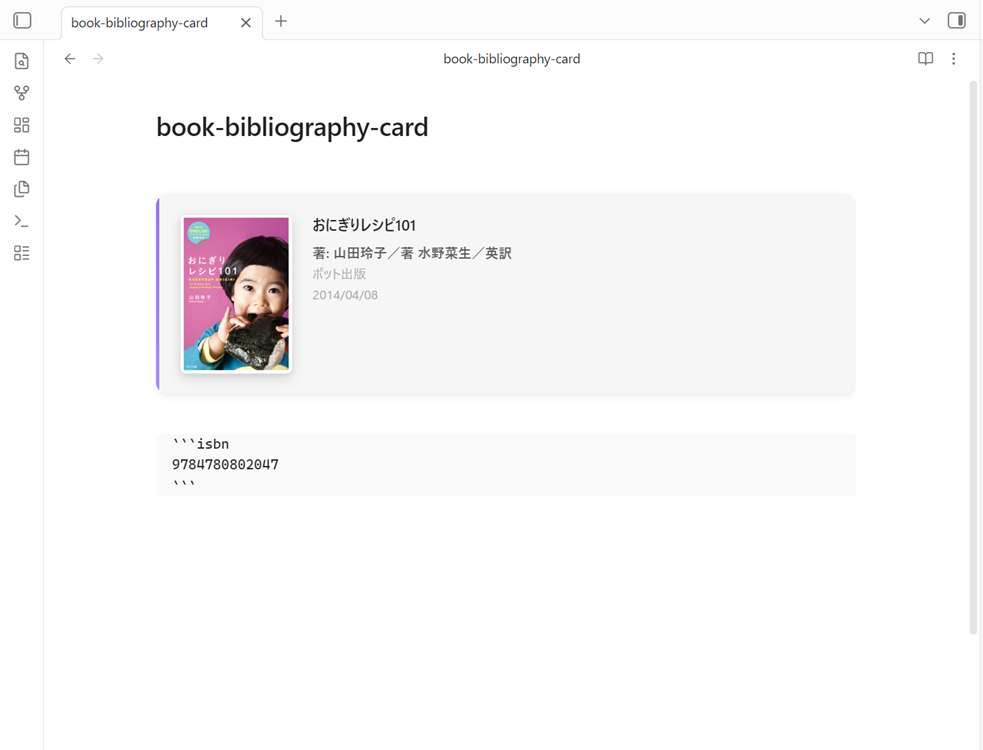
usage

HealthGood
ReviewSatisfactory
Details
Current version
1.0.1
Last updated
8 months ago
Created
8 months ago
Updates
1 release
Downloads
161
Compatible with
Obsidian 0.15.0+
Platforms
Desktop, Mobile
License
Apache-2.0
Report bugRequest featureReport plugin
Author
the-townthe-town
note.com/the_town/n/n0bbae2cc413d
GitHubthe-town
  1. Community
  2. Plugins
  3. Book Bibliography Card

Related plugins

Notebook Navigator

A better file browser and calendar inspired by Apple Notes, Bear, Evernote and Day One.

Importer

Convert your data to Markdown files you can use in Obsidian. Works with Apple Notes, OneNote, Evernote, Notion, Google Keep, and many other formats.

Advanced Canvas

Supercharge your canvas experience. Create presentations, flowcharts and more.

Minimal Theme Settings

Control the colors and fonts in Minimal Theme.

Homepage

Open a note, base, or workspace on startup, or set it for quick access later.

Linter

Format and style your notes. Linter can be used to format YAML tags, aliases, arrays, and metadata; footnotes; headings; spacing; math blocks; regular Markdown contents like list, italics, and bold styles; and more with the use of custom rule options.

TaskNotes

Note-based task management with calendar, pomodoro and time-tracking integration.

Hider

Hide interface elements such as tooltips, status bar, titlebar, and more.

BRAT

Easily install a beta version of a plugin for testing.

Excalidraw

Visual PKM powerhouse. Create and edit Excalidraw drawings.