Blueprint Renderer
 goderyu1k downloads
Render Unreal Engine Blueprint nodes as interactive visual diagrams using BlueprintUE rendering engine
- Overview
- Scorecard
- Updates2
How can I record my UE blueprint code in Markdown notes? Taking a screenshot is very troublesome. Can't I just copy the blueprint code and paste it in a code block, and then render it as a blueprint diagram?
OK, you can now!
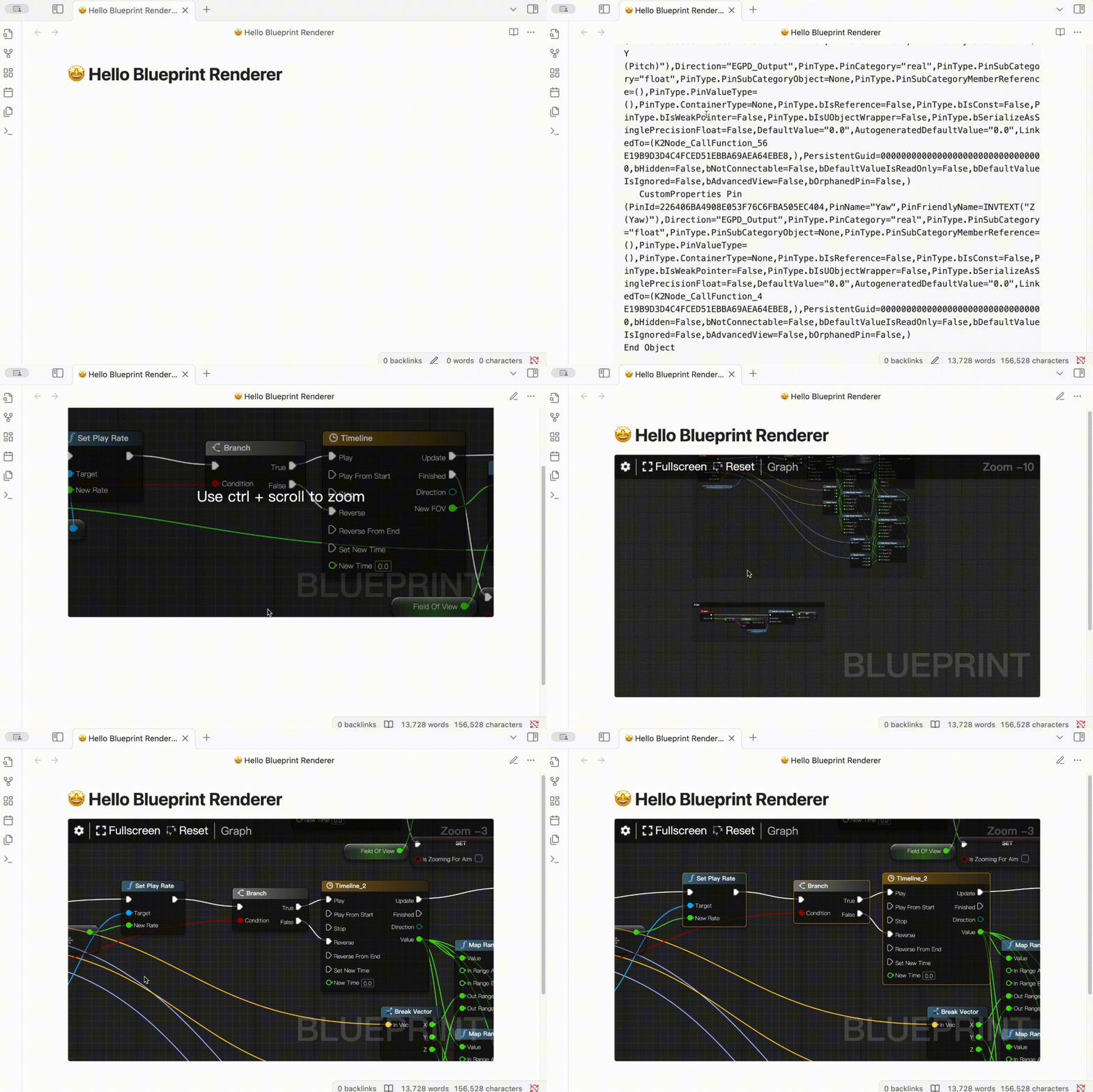
This is an Obsidian plugin based on BlueprintUE Self-Hosted Edition for rendering Unreal Engine Blueprint nodes as interactive visual diagrams in Obsidian notes.
Architecture Overview
This plugin adopts a simplified architecture directly based on the original BlueprintUE project's single-file system:
Core Features
- ✅ 100% Compatibility: Directly uses original render.js and render.css
- ✅ Zero Refactoring Risk: Avoids complex TypeScript refactoring
- ✅ Complete Functionality: Supports all node types, connections, and interactions
- ✅ Easy Maintenance: Simple architecture, easy to understand and maintain
How It Works
- Dynamic Loading: Uses fetch to load and execute original render.js
- Global Exposure: Original project exposes main class via
window.blueprintUE.render.Main - Simple Wrapper: main.ts creates minimal wrapper for Obsidian integration
- Style Isolation: Uses CSS scoping to ensure no conflicts with Obsidian styles
Usage
Create a code block in Obsidian:
```blueprint
Begin Object Class=/Script/BlueprintGraph.K2Node_Event Name="K2Node_Event_0"
   EventReference=(MemberName="BeginPlay")
   NodePosX=0
   NodePosY=0
   NodeGuid=A1B2C3D4-E5F6-7890-ABCD-EF1234567890
   CustomProperties Pin (PinId=12345678-90AB-CDEF-1234-567890ABCDEF,PinName="exec",Direction="EGPD_Output",PinType.PinCategory="exec")
End Object

Begin Object Class=/Script/BlueprintGraph.K2Node_CallFunction Name="K2Node_CallFunction_0"
   FunctionReference=(MemberName="Print String")
   NodePosX=300
   NodePosY=0
   NodeGuid=B2C3D4E5-F6G7-8901-BCDE-F12345678901
   CustomProperties Pin (PinId=23456789-01BC-DEF1-2345-6789ABCDEF01,PinName="exec",Direction="EGPD_Input",PinType.PinCategory="exec",LinkedTo=(K2Node_Event_0 12345678-90AB-CDEF-1234-567890ABCDEF,))
   CustomProperties Pin (PinId=45678901-23DE-F123-4567-89ABCDEF0123,PinName="In String",Direction="EGPD_Input",PinType.PinCategory="string",DefaultValue="Hello World!")
End Object
```
Build
npm install
npm run build
License and Attribution
Plugin License
This plugin is released under the MIT License.
Third-Party Component Attribution
This plugin uses rendering engine code from the BlueprintUE Self-Hosted Edition project:
lib/render.js- Blueprint rendering enginelib/render.css- Blueprint stylesheet
Original Project Information:
- Project: BlueprintUE Self-Hosted Edition
- Repository: https://github.com/blueprintue/blueprintue-self-hosted-edition
- License: MIT License
- Copyright: © BlueprintUE Contributors
According to MIT license terms, we have retained the original copyright notice and explicitly attributed it here. Thanks to the BlueprintUE project team for providing the excellent rendering engine.
Compatibility Statement
This project is fully compatible with and complies with the MIT license terms of the BlueprintUE Self-Hosted Edition project. All used code has been properly attributed and maintains the original license requirements.
Installation
From Obsidian Community Plugins (Recommended)
- Open Obsidian Settings
- Go to Community Plugins
- Search for "Blueprint Renderer"
- Install and enable the plugin
Manual Installation
- Download the latest release from GitHub
- Extract the files to your vault's
.obsidian/plugins/obsidian-blueprint-renderer/directory - Reload Obsidian
- Enable the plugin in Community Plugins settings
Using BRAT (Beta)
- Install the BRAT plugin
- Add this repository:
goderyu/obsidian-blueprint-renderer - Enable the plugin
Support
- Issues: Report bugs on GitHub Issues
- Discussions: Join discussions on GitHub Discussions
- Documentation: See README_zh.md for Chinese documentation
Contributing
Contributions are welcome! Please read our contributing guidelines and submit pull requests for any improvements.
Mobile Support
Mobile Limitations
- There is currently a certain conflict between the chart interaction on the mobile end and the original interaction of Obsidian.
Support
If you find this plugin useful and would like to support its development, you can support me.