
- Overview
- Scorecard
- Updates18
Blue Star is an Obsidian plugin that simplifies the process of creating Anki flashcards from your notes. With a variety of built-in parsing modes and customization options, Blue Star empowers you to efficiently turn your knowledge into memorable study material.
Features
- Two Ways to Create Cards:
- Create cards from current file using the star (⭐) icon or command
- Create cards from a specified directory using the moon-star (🌙) icon or command
- Multiple Parsing Modes: Choose from pre-defined modes based on headings, sections, or custom delimiters. Craft powerful flashcards using regular expressions for advanced control.
- Directory and Tag Filtering: Generate flashcards from specific directories or files tagged with particular keywords, enabling focused learning.
- Granular Control: Decide whether to add new cards only or update existing ones in Anki. Configure default decks, models, and tags for seamless workflow integration.
- Document-Level Settings: Fine-tune card creation behavior within individual notes. Override default settings for ultimate flexibility.
- Intuitive Setup: Clear instructions guide you through the initial AnkiConnect configuration.
Installation
- In Obsidian, go to
Settings->Community plugins. - Click
Browseand search for "Blue Star". - Click
Installand thenEnableto activate the plugin.
Getting Started
1. Install AnkiConnect
Blue Star requires the AnkiConnect plugin for communication with Anki.
- Search for AnkiConnect (code: 2055492159) in Anki's Add-ons menu.
- After installation, restart Anki.
- Optional but Recommended: Install a Markdown plugin in Anki (e.g., "Markdown and KaTeX", code: 1786114227) for enhanced card display.
If the connection fails, check the AnkiConnect configuration as follows:
{
    "apiKey": null,
    "apiLogPath": null,
    "ignoreOriginList": [],
    "webBindAddress": "127.0.0.1",
    "webBindPort": 8765,
    "webCorsOrigin": "http://localhost",
    "webCorsOriginList": [
        "http://localhost",
        "app://obsidian.md"
    ]
}
2. Configure Blue Star
- Access Blue Star's settings in Obsidian's plugin settings.
- Configure your preferred parsing mode, default Anki settings, and directory settings.
- Set up directory path and optional file tags for batch processing.
3. Generate Flashcards
You have two ways to generate flashcards:
From Current File:
- Click the star (⭐) icon in the ribbon
- Or use the command
Blue Star: Create Anki cards from current file
From Directory:
- Click the moon-star (🌙) icon in the ribbon
- Or use the command
Blue Star: Create Anki cards from directory - Make sure to configure the directory path in settings
Monitor the progress notifications in Obsidian's status bar.
Parsing Modes
Blue Star offers the following parsing modes:
- Section :: Subsection: Creates two-field cards from headings and their immediate subheadings.
- Heading :: Paragraph: Generates two-field cards from headings and their corresponding content blocks.
- Multi-Subsection: Produces multi-field cards by extracting content from all subheadings under a main heading.
- Multi-Subparagraph: Creates multi-field cards by dividing content under a heading into separate fields based on paragraphs.
- Regex: Empowers you to define custom card and field extraction rules using regular expressions.
- Custom Delimiter: Allows you to specify unique start, end, and field separator strings for card generation.
Below is an example text demonstrating the built-in generation modes (The setting for heading level is 2):
# Example

## export and import
Named Export and Import

### export
- Named Export
```js
export function foo()...
```

### import
- Named Import
```js
import {foo} from './example'
```
Section :: Subsection
Generates cards with 2 fields based on heading and subheading blocks. Example card:
Front:
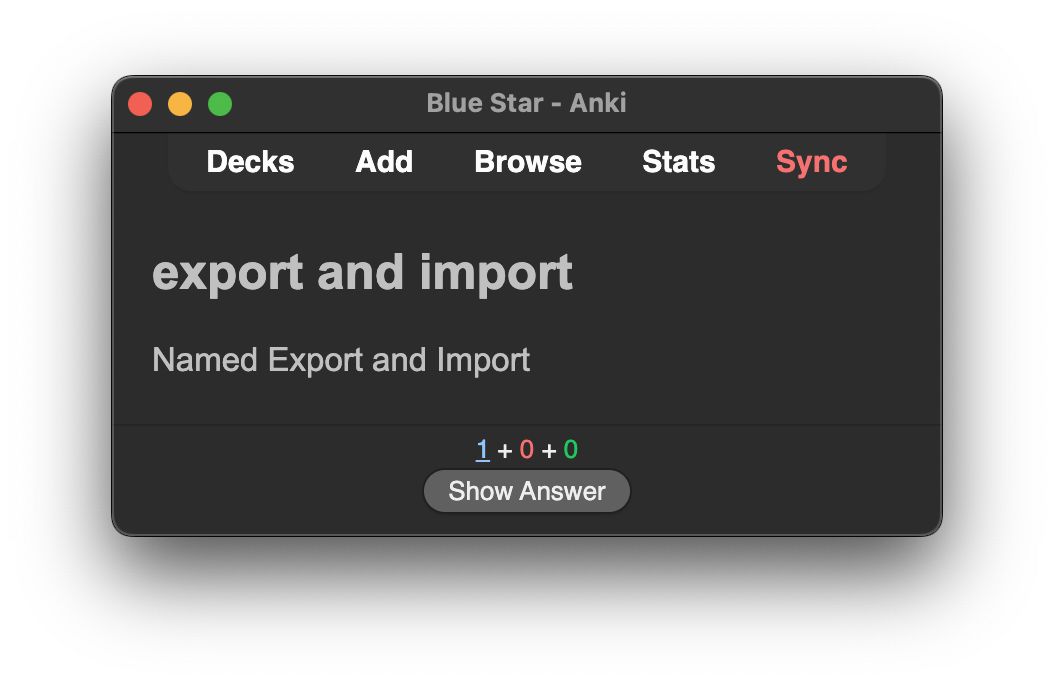
Back:

Heading :: Paragraph
Generates cards with 2 fields based on heading and the content block under the heading. Example card:
Front:

Back:

Multi-Subsection
Generates cards with multiple fields based on each subheading block under a heading. Example card:
Front:

Back:

Multi-Subparagraph
Generates cards with multiple fields based on each content block under a heading. Example card:
Front:

Back:

Custom delimiter
Generates cards based on custom start, field separator, and end delimiters.
Note:
# Example

<!-- card start -->
Custom Delimiter Card Front
<!-- field separator -->
Custom Delimiter Card Back
<!-- card end -->
Front:

Back:

Single delimiter
Generates cards based on custom start, field separator, and end delimiters.
Note:
# Example

Custom Delimiter Card Front
<!-- field separator -->
Custom Delimiter Card Back
Front:
Back:
Regex
Generates cards based on regular expressions. If you create a useful regex, please share it on the plugin's GitHub page. Many thanks!
If you are not familiar with writing regular expressions (don't worry, neither am I), the Obsidian_2_Anki plugin provides some useful regex patterns. You can find them on its introduction page, which also includes usage examples. Many thanks to Obsidian_2_Anki.
When using regex patterns from Obsidian_2_Anki with this plugin, set the regex flags to gm. Obsidian_2_Anki regex introduction page: Regex.
Document-Level Configuration
You can configure Anki card generation for a specific document. Document-level settings override the default settings. You don't need to configure all options; only the ones specified in the document block will override the defaults.
Customize card creation for individual notes using code blocks with the following format:
```anki
deck: YourDeckName
model: YourModelName
tag: YourTagName
parser: section-subsection
```
or
```
anki
deck: YourDeckName
model: YourModelName
tag: YourTagName
parser: section-subsection
```
Available options:
deck/anki-deckmodel/anki-model/note-type/anki-note-typetag/anki-tag/card-tag/anki-card-tagparser/parser-mode/match/match-mode(Options:section-subsection,heading-paragraph,multi-subsection,multi-subparagraph,regex,custom-delimiter,single-delimiter)heading/heading-levelregexflags/regex-flag/flag/regex-flagscard-startfield-separator/field-split/fieldcard-endupdate/upsert(Values:trueorfalse)single/single-field(Values:trueorfalse)html/html-break/html-line-break(Values:trueorfalse)ignore(Values:trueorfalse)
Deck Tip
You can specify Anki's multi-level decks using ::, for example: Deck::SubDeck.
Support and Feedback
Encountered an issue or have a suggestion? Please open an issue on the GitHub repository.