Better Pandoc Reference List
 JuanTejedor106 downloads
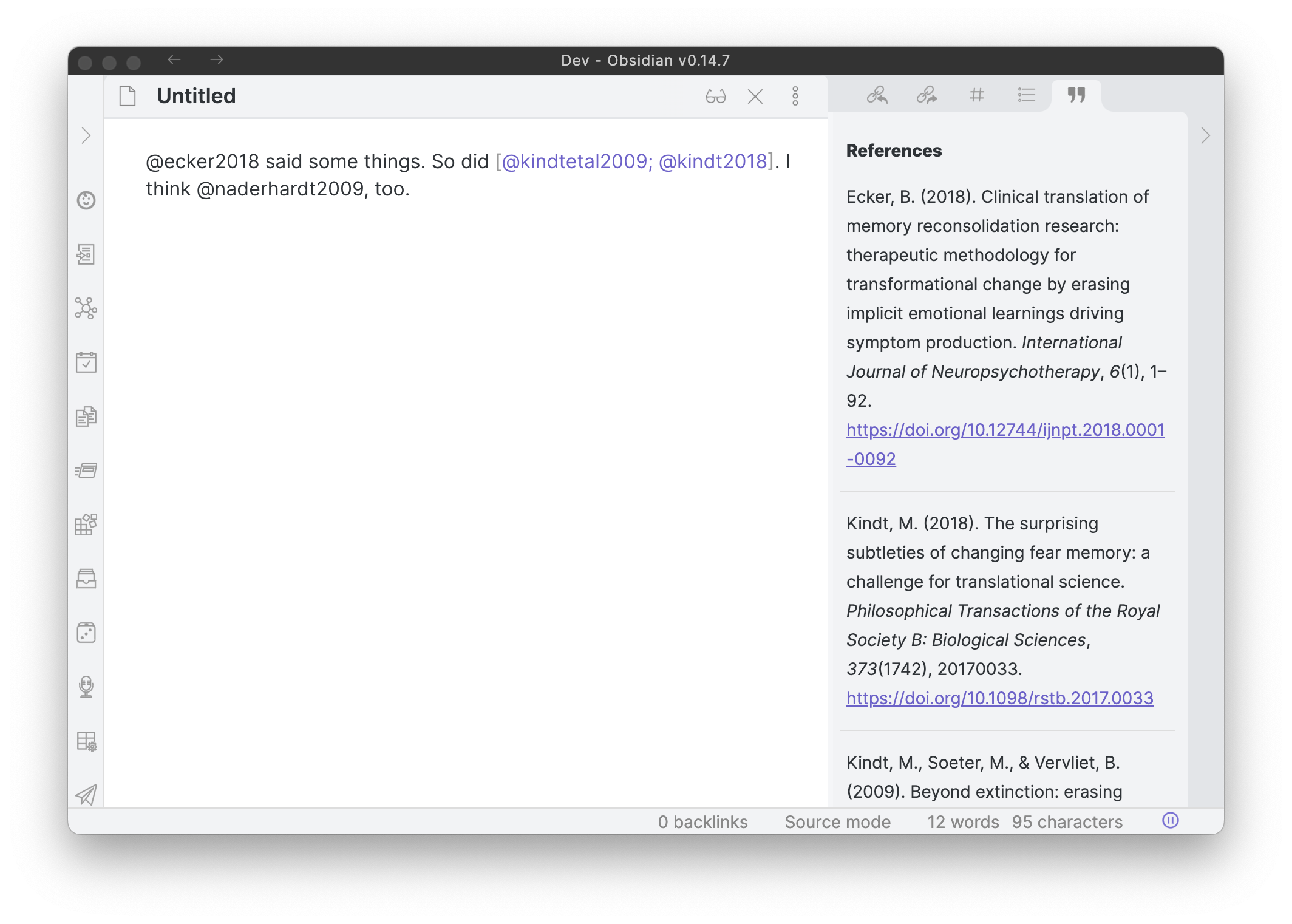
A maintained fork of Pandoc Reference List. Shows a formatted reference in the sidebar for each pandoc citekey in the current document.
- Overview
- Scorecard
- Updates7
An Obsidian plugin that turns Pandoc citations in your notes into formatted references. Write [@smith2020] and the plugin shows "(Smith, 2020)" in your text and the full reference in the sidebar, in the citation style you choose (APA, Chicago, Vancouver and thousands more).
It is a maintained fork of Pandoc Reference List by Matthew Meyers, which is no longer maintained.
How it works
- You cite. In a note, type a citation in Pandoc format, for example
[@smith2020],[@smith2020, p. 14]or@smith2020 says that.... The part after the@is the citation key of a reference. - The plugin finds the reference. It reads your reference library and matches each citation key to a reference.
- The plugin formats it. Using the citation style you picked (a CSL style), it renders the citation in your text, shows a tooltip when you hover over it and builds the list of references in the sidebar. You can copy that list into your note.
The plugin needs to know where your references are; you pick one of two sources in the plugin settings: Zotero or Better BibTeX.
Option 1: Zotero (recommended)
Every reference in Zotero has a Citation Key. Other tools use the same key, such as the Zotero Integration plugin for Obsidian, so what you insert from there matches what this plugin reads. If you use Better BibTeX, it fills in that field for you.
The plugin reads your library straight from the Zotero app running on your computer. No extra Zotero add-on is needed.
To set it up:
- In Zotero, open Settings → Advanced and turn on "Allow other applications on this computer to communicate with Zotero".
- In Obsidian, open the plugin settings and turn on "Pull bibliography from Zotero".
- Pick the libraries to include (your own library and any group libraries).
Keep these in mind:
- Zotero must be running to get new references. If it is closed, the plugin keeps working with what it already knows.
- References with no Citation Key cannot be cited, so they are not listed.
Option 2: Better BibTeX
If the direct connection to Zotero is not available, the plugin can ask Better BibTeX (a Zotero add-on) for your library instead. In the settings, set "Zotero data source" to "Better BibTeX". The default, "Automatic", tries Zotero first and falls back to Better BibTeX by itself.
Not using Zotero?
Set "Path to bibliography file" to a bibliography file that Pandoc can read (.bib, .json, .yaml and so on). In this case Pandoc must be installed (version 2.11 or newer), because the plugin uses it to read the file. You can also set bibliography in a note's frontmatter to use a different file for that note.
Staying up to date
You do not need to do anything when you add a reference in Zotero. The plugin checks for changes:
- when you switch back to Obsidian
- when you type
@and the suggestions open - when you run "Refresh bibliography" (see Commands)
A check is very cheap: the plugin only downloads what changed, so it stays fast even with a large library.
The first time
The first time you turn the plugin on, it imports your whole Zotero library. With a big library this takes a few seconds and a message shows the progress. It happens once; after that only changes are downloaded.
Where the data is stored (the cache)
To start quickly and keep working when Zotero is closed, the plugin keeps a copy of your reference list, called the cache. It is stored on your computer, outside your vault, so it is not synced between your devices:
| System | Location |
|---|---|
| Windows | %LOCALAPPDATA%\better-pandoc-reference-list\ |
| macOS | ~/Library/Caches/better-pandoc-reference-list/ |
| Linux | ~/.cache/better-pandoc-reference-list/ |
Each device builds its own cache. You can delete it safely; the plugin will import your library again. The downloaded citation styles and languages are kept in a hidden .pandoc folder inside your vault.
If something goes wrong
- If Zotero is closed or cannot be reached, the plugin keeps using its cache and tries again in the background. The
@icon in the status bar (bottom right of Obsidian) turns to a warning colour; hover over it to see why. - A failed update never empties your bibliography.
Commands
Open the command palette (Ctrl/Cmd + P):
- "Show reference list": opens the sidebar with the references of the current note.
- "Insert references": inserts the reference list of the current note at the cursor, under a heading. The same action is the second button at the top of the sidebar, next to the copy button. You can choose the heading level and text in the plugin settings.
- "Refresh bibliography": checks Zotero (or re-reads the bibliography file) right now. The same action is in the
@status bar menu. - "Rebuild Zotero cache": deletes the cache and imports the whole library again. Use it if something looks wrong.
Troubleshooting
"No citation found for ..."
- Is the key spelled exactly like the Citation Key in Zotero?
- Is Zotero running, with "Allow other applications on this computer to communicate with Zotero" turned on?
- Run "Refresh bibliography". If it still fails, run "Rebuild Zotero cache".
- Check that the reference really has a Citation Key in Zotero.
The sidebar says it cannot connect to Zotero
Start Zotero. The plugin reconnects by itself.
Coming from Pandoc Reference List
If you used the original plugin, turn it off before using this one, because running both formats every citation twice. The settings are not shared between the two, so copy your choices over once.
Credits and license
Based on obsidian-pandoc-reference-list by Matthew Meyers, released under the GNU GPL v3. This fork keeps that license.