Better Flashcards
 Mihir Patel (fork of reuseman/flashcards)323 downloads
Sync Obsidian flashcards to Anki using tags, inline separators, and cloze syntax. Fork of the original Flashcards plugin with bug fixes.
- Overview
- Scorecard
- Updates7
 Anki integration for Obsidian.
Attribution
This plugin is a fork of reuseman/flashcards-obsidian, originally by Alex Colucci and Noah Rousell, with bug fixes and small tweaks maintained by Mihir Patel.
Features
🗃️ Simple flashcards with #card
🎴 Reversed flashcards with #card-reverse or #card/reverse
📅 Spaced-only cards with #card-spaced or #card/spaced
✍️ Inline style with Question::Answer
✍️ Inline style reversed with Question:::Answer
📃 Cloze with ==Highlight== or {Curly brackets} or {2:Cloze}
🧠 Context-aware mode
🏷️ Global and local tags
🔢 Support for LaTeX
🖼️ Support for images
🎤 Support for audios
🔗 Support for Obsidian URI
⚓ Support for reference to note
📟 Support for code syntax highlight
For other features check the wiki.
How it works?
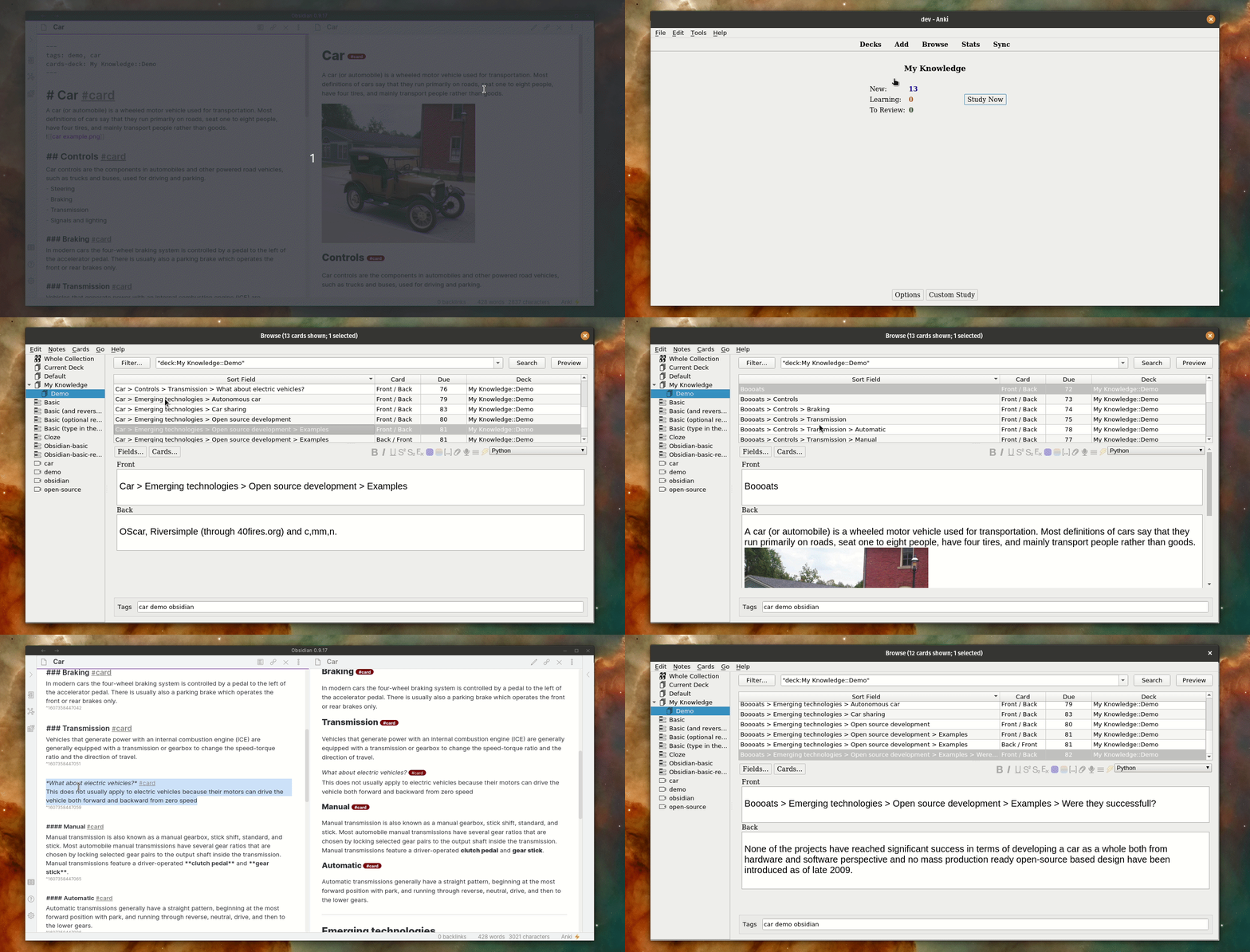
The following is a demo where the three main operations are shown:
- Insertion of cards;
- Update of cards;
- Deletion of cards.
How to use it?
The wiki explains in detail how to use it.
How to install
From the community plugin store
Install this plugin on Obsidian:
- Open Settings > Community plugins
- Make sure Safe mode is off
- Click Browse community plugins
- Search for "Better Flashcards"
- Click Install
- Once installed, close the community plugins window and activate the newly installed plugin
Install AnkiConnect on Anki
- Tools > Add-ons -> Get Add-ons...
- Paste the code 2055492159 > Ok
Open the settings of the plugin, and while Anki is opened press "Grant Permission"
Manual install from source
To build and install from this repository, see the Build and release guide.
Privacy
This plugin only reads vault files when you explicitly run a generate command (current file or all files in vault). It uses file paths locally to find flashcard syntax and sends card content to Anki on your machine via AnkiConnect. No data is sent to external servers. Use the Ignored directories setting to exclude folders from vault-wide generation.
Contributing
Contributions via bug reports, bug fixes, are welcome. If you have ideas about features to be implemented, please open an issue so we can discuss the best way to implement it. For more details check Contributing.md
Support
If this plugin is useful to you, consider starring the repository or sponsoring on GitHub.