Bases Property Repair
 theluckystrike1 downloads
Repair exact property references in Base files after a property rename.
- Overview
- Scorecard
- Updates1
Bases Property Repair changes the property references in your Base files after you rename a property. Enter the old key and the new key. The plugin reads the .base files of your vault, shows each change in a preview, and writes only the files that you check.
Obsidian does not tell plugins when a property gets a new name, so you start the repair yourself with a command. The plugin does not change the frontmatter of your notes.
Features
Scan and preview
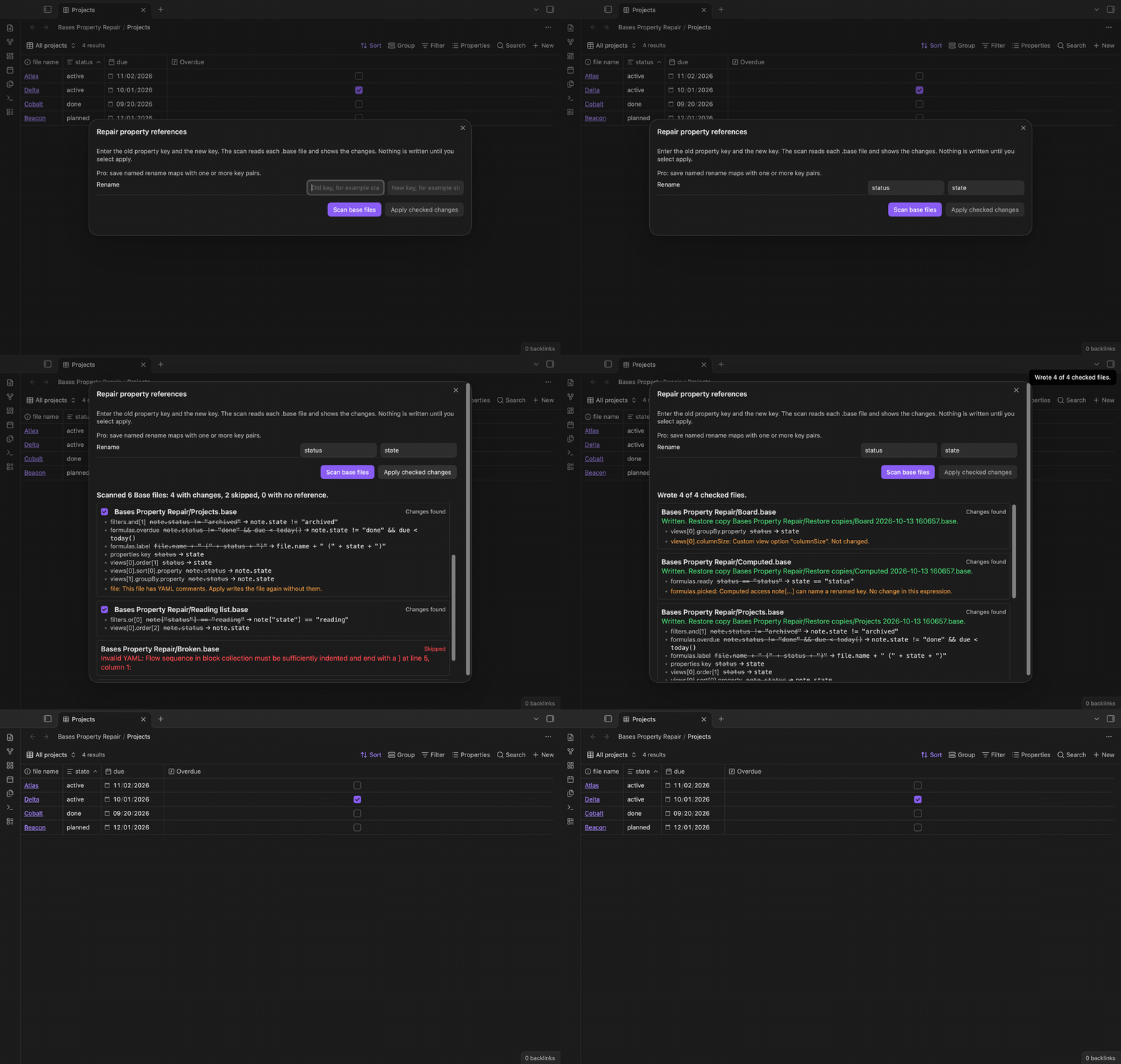
Run "Repair property references in base files", enter the old key (for example status) and the new key (for example state), then select "Scan base files". The preview lists each Base file with changes first, then the skipped files, then the files with no reference. Under each file you see where the change is, the old text and the new text.
The scan changes these places: filters (with and, or and not), formulas, the keys of the properties section, and in each view the column order, sort, groupBy and the keys of summaries. A property ID keeps its form: status becomes state and note.status becomes note.state.
Strings and other namespaces stay
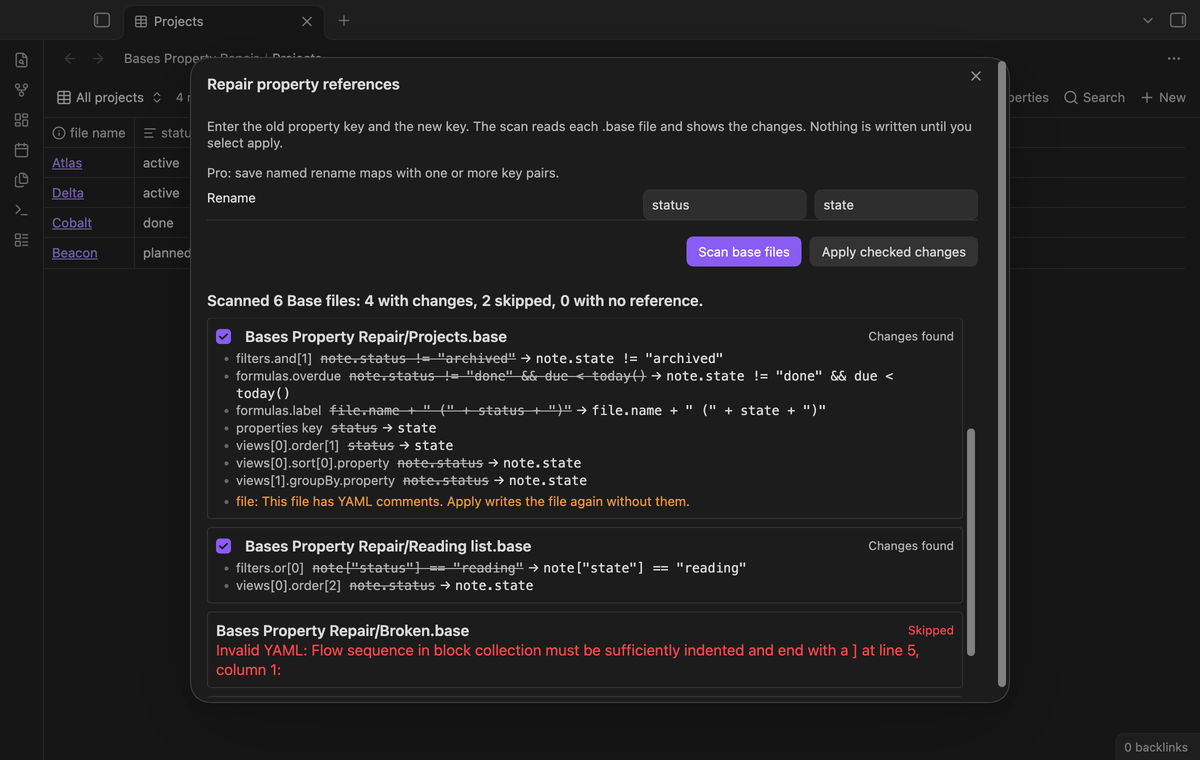
The scanner reads each expression token by token. Text in quotes stays, so status == "status" becomes state == "status". A method name after a dot stays. formula.status and file.status are not note properties, so they stay too. A key that only starts with the old key, such as status_code, stays.
When the new key has a space or another character that a bare name cannot have, expressions get note["new key"]. Stored property IDs get the complete key, for example note.new key.
![note["status"] changes in Reading list.base; an invalid YAML file and a file with a clash are skipped](https://raw.githubusercontent.com/theluckystrike/bases-property-repair/HEAD/docs/strings-and-namespaces.png)
Unknown syntax is listed, not changed
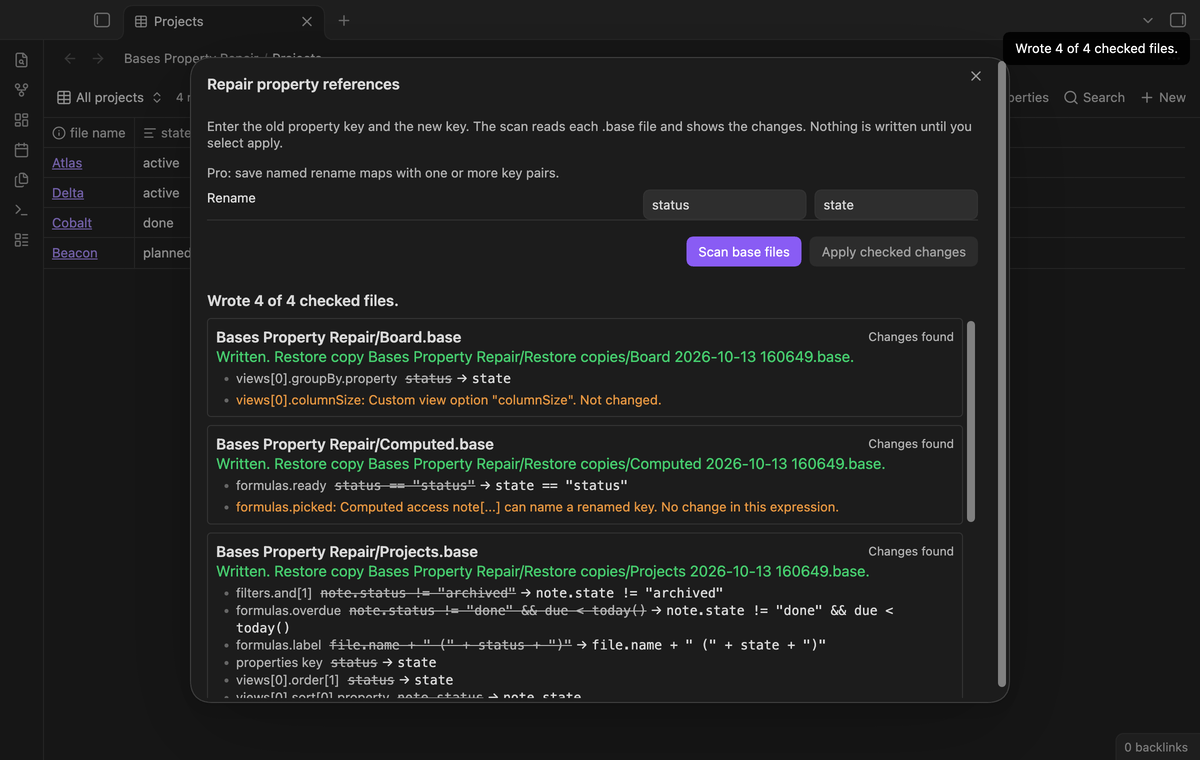
If an expression has a character that the scanner does not know, or a computed access such as note[field], the plugin changes nothing in that expression and shows a warning. View keys that the plugin does not know, such as columnSize or image, are custom view options. The preview lists them when they name the old key and leaves them as they are.
A file with invalid YAML is skipped with the parser message. A file that already has a setting for the new key in properties (or summaries) is skipped, so that two settings do not merge.
![Warnings for a custom view option and for a computed note[field] access](https://raw.githubusercontent.com/theluckystrike/bases-property-repair/HEAD/docs/unknown-syntax.png)
Restore copies, then apply
Select "Apply checked changes" to write the checked files. For each file the plugin reads the file again. If the text is not the same as at the scan, it does not write the file and reports a stale preview. Otherwise it first creates a restore copy of the old text in the restore copy folder, then writes the new text. If the file changes between the copy and the write, the write stops too.
The restore copy has the date and time in its name. If that name is taken, the plugin adds a number.
Saved rename maps (Pro)
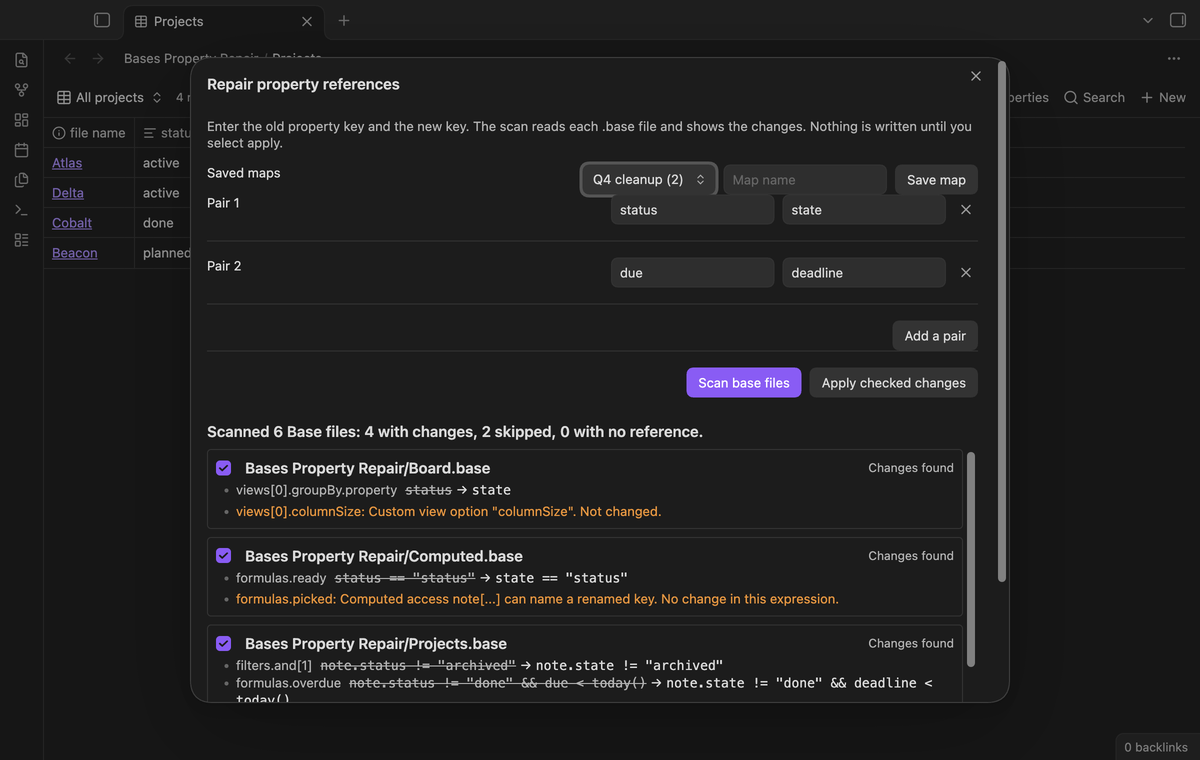
Save the current pairs under a name and load them again later. With Pro you can also add more pairs to one map. The pairs change at the same time, so a swap of two keys works.
Change journal and guarded restore (Pro)
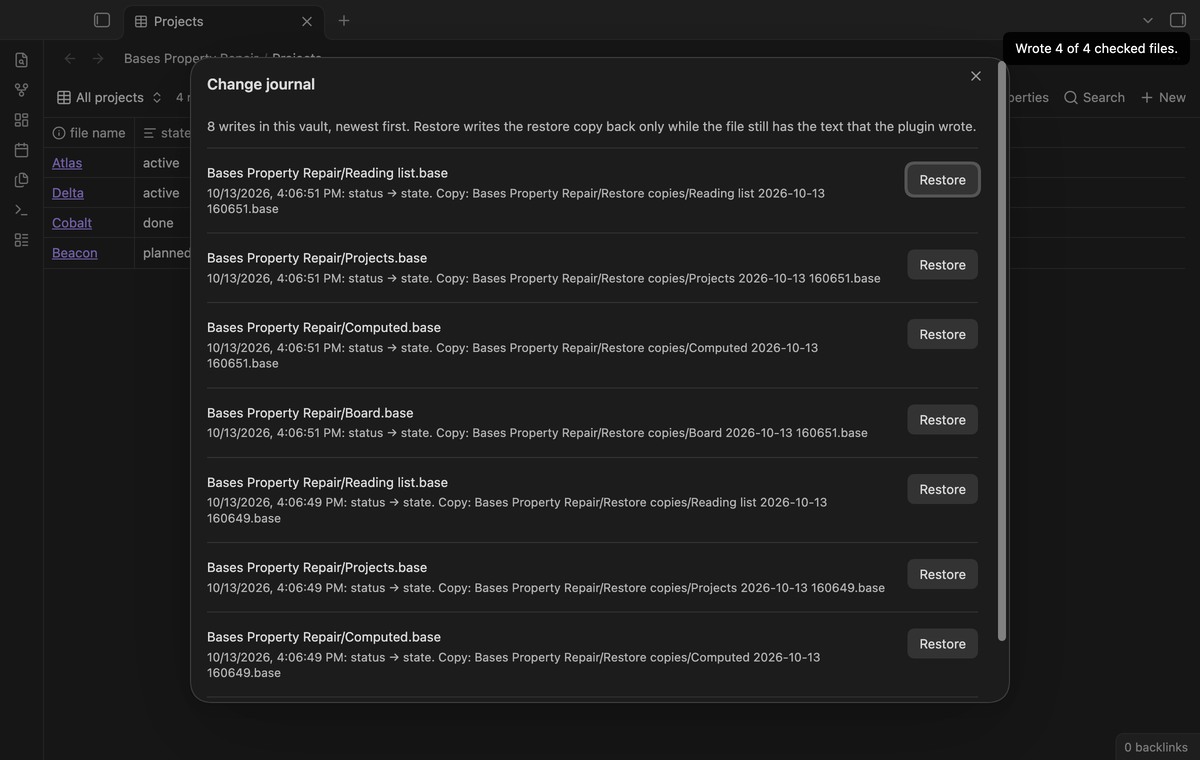
The plugin keeps a local journal of the files it wrote. With Pro, "Show the change journal" lists the entries, newest first, each with a Restore button. "Restore the last change from the journal" restores the newest entry that is not restored. Restore writes the restore copy back only while the file still has the text that the plugin wrote. If you edited the file after the repair, restore stops and tells you where the copy is.
Install
- Open "Settings → Community plugins", select "Browse" and search for "Bases Property Repair".
- Select "Install" and "Enable".
For manual installation, copy the release files into <vault>/.obsidian/plugins/bases-property-repair/ and enable the plugin. You need Obsidian 1.13.4 or later.
Usage
- Rename the property in your notes first, for example with the property menu of Obsidian.
- Open the command palette and run "Bases Property Repair: Repair property references in base files".
- Enter the old key and the new key without a prefix. Enter
status, notnote.status. - Select "Scan base files" and read the preview. Clear the check box of a file that you want to keep as it is.
- Select "Apply checked changes". The result for each file shows in the modal.
The plugin parses each Base file and writes it again with the YAML writer of Obsidian. YAML comments and the original layout of the file are not kept. The preview shows a note for each file that has comments. The restore copy keeps the old text with its comments.
Pro
The free version scans, previews, makes restore copies and applies one pair of keys. It has no file limit.
Pro adds named rename maps with one or more key pairs, and the change journal with a guarded restore. To get it:
- Sponsor theluckystrike on GitHub Sponsors with $5 a month, or $15 once. Read the account and network conditions below.
- In Obsidian, open the settings of Bases Property Repair and select "Sign in with GitHub".
- The plugin copies a code and opens github.com/login/device. Paste the code there and approve.
Settings
| Setting | What it does |
|---|---|
| Restore copy folder | Vault folder for the restore copies. Default Bases Property Repair/Restore copies. The scan skips this folder. |
| Pro | Sponsor link, GitHub sign in, account status, Refresh and Sign out. |
The plugin saves the folder, the saved maps and the journal (up to 200 entries) in its data.json file in your vault. The journal has the file path, the restore copy path, the keys and a short hash of the written text. It records entries in the free version too, so a new Pro user can restore earlier changes.
FAQ
Does it rename the property in my notes?
No. It changes Base files only. Use the property rename of Obsidian or another tool for the notes.
Does it read Base code blocks inside Markdown notes?
No. This version reads .base files only.
What does it do with this.status?
this reads the note that embeds the base. The plugin does not change it and lists it in the preview.
What did you not test?
The unit tests and golden vectors cover the scanner, the planner, restore copies, stale previews and restore. The end-to-end test runs the scan and apply in Obsidian 1.13.4 and 1.14.4 on desktop. We did not test the plugin on a phone or a tablet, with very large vaults, with a sync service that writes during the scan, or with Base files that other plugins write. We did not compare the result with each view type of other plugins.
Payment, account and network
The core features are free. Pro features need a GitHub Sponsors sponsorship of theluckystrike: $5 a month or more, or $15 once. A total payment of $15 meets the payment requirement for Pro without further payment. Sign-in and the checks below still apply. Your notes stay readable and editable with or without Pro.
GitHub handles the payment. Sponsor at https://github.com/sponsors/theluckystrike. You need no account for the free features. Pro needs the GitHub account that sponsors.
Until you select "Sign in with GitHub" in the settings, Bases Property Repair makes no network requests. Sign in uses the GitHub device flow. Bases Property Repair sends its public client ID and the scope read:user to https://github.com/login/device/code and shows you a code. While you enter the code at https://github.com/login/device, it asks https://github.com/login/oauth/access_token every few seconds to check the sign-in status. The scope permits profile reads only. GitHub needs this access to show the sponsorship tier. It grants no repository scope and no write access.
After sign in, Bases Property Repair sends one query to https://api.github.com/graphql. It checks if the signed-in account sponsors theluckystrike. It asks for the tier and the total payment to theluckystrike. The plugin reuses a successful check for 7 days. Failed checks can retry after 6 hours. Select Refresh to request an earlier check. It sends no note content, file names or other vault data, and it has no telemetry.
After a successful check, Pro can work offline for up to 14 days. Sign out or a negative sponsorship answer turns Pro off. The plugin stores the GitHub token through the secret storage API of Obsidian. It does not put the token in its saved settings or its local sponsorship data. The local storage of this device keeps your GitHub login, the tier and the time of the last check. Sign out clears the token. You can also revoke the access in your GitHub settings, under Applications.
Support
Report bugs and feature requests in this repository's issues. Add your Obsidian version and, if possible, a small sample Base file.