AutoGallery
 Jasper Hwang43 downloads
Automatically arrange images and captions in notes.
- Overview
- Scorecard
- Updates4
 AutoGallery
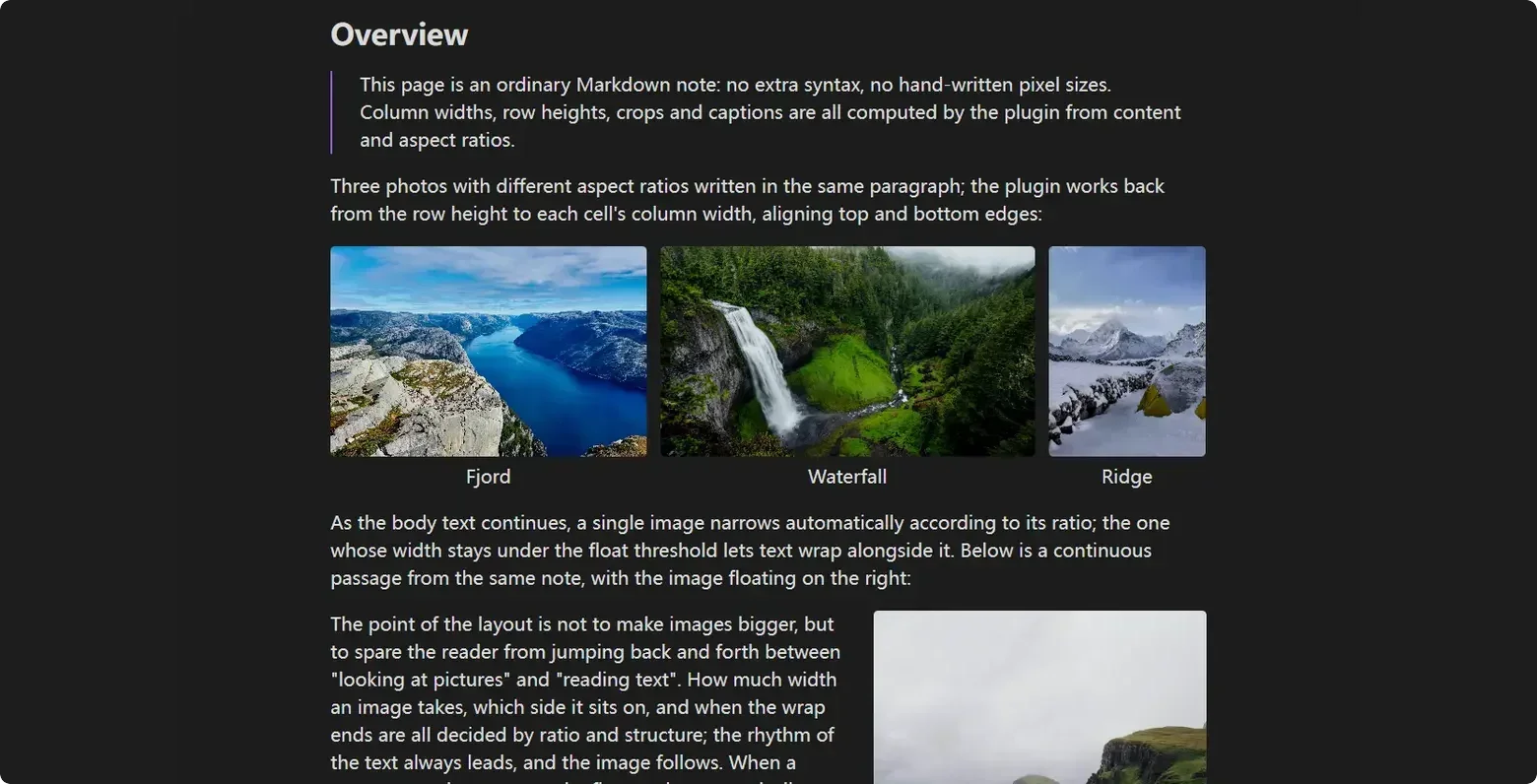



Overview
AutoGallery handles image layout in Obsidian notes: consecutive images become rows, single images take their width from their aspect ratio, text can wrap around them, crops are stored as ratios, and PDF export follows the reading view.
It never rewrites Markdown image links or stores pixel dimensions. Layout comes from parameters in the image caption and from exportable layout templates. Disable the plugin and the note renders natively again.
- Built for illustrated notes, portfolios, tutorials and documents meant to be printed.
- Not a pixel-level canvas or an image editor.
Install
Requires Obsidian 1.5 or newer; desktop and mobile share the same build.
- Community plugins (after listing): Settings → Community plugins → turn off Safe mode → Browse → search AutoGallery → Install and enable.
- Manual: download
main.jsandmanifest.jsonfrom Releases, place them in the plugin folder, then restart Obsidian.
<vault>/.obsidian/plugins/obsidian-autogallery/
  main.js
  manifest.json
These two files are all that is needed; there is no styles.css. Once enabled, an AutoGallery section appears in Settings, and two or three consecutive image lines should become one gallery row.
Community install · Manual install
Quick start
Three image lines with no blank lines between them become one row of equal height. A blank line ends the gallery.
![[photo-01.jpg]]
![[photo-02.jpg]]
![[photo-03.jpg]]
Two images side by side get a taller row, so details stay readable:
![[photo-04.jpg]]
![[photo-05.jpg]]
Three operations cover most edits:
- Give one image its own row: separate it with body text or a heading, or write
ag:isolate. - Set images per row: write
ag:rows=2,2on the first image of the group. - Change a single image's width: drag its bottom-right grip in Live Preview;
ag:widthis written on release.
Full tutorial: Quick start · Three common operations
Five core concepts
- Grouping reads the source, not the screen: Grouping rules
- Two or more adjacent images are always a gallery: Row splitting
- A single image gets its width from its ratio: Width routing
- The closer the declaration, the higher the priority: image parameters > template > global settings; Annotation syntax
- The container decides what is possible: lists, tables and callouts behave differently; Nested scopes
Full explanation: Five core concepts
Capability map
Grouped by workflow; each group maps to one section of the documentation.
Galleries — consecutive images form rows; ag:rows splits them and ag:group locks a row; row-height ceilings and orphan images; five kinds of handle.
Grouping · Row splitting · Height and orphans · Gallery handles
Single images — automatic width from ratio; left/right floats and text wrapping; drag to resize, align with arrows, reset in one click. Width routing · Float and wrap · Resize, align, reset
Annotations and crops — ten ag: parameters; crop any region by ratio; scope rules for lists, tables and callouts; caption dialog and reset.
Annotation syntax · Cropping · Nested scopes · Dialog and reset
Templates and routing — define a whole width rhythm with range rules; import/export templates; switch by frontmatter. Layout templates · Import and export · Frontmatter routing
PDF export — reflow to paper size; layout and paginated previews; margins, page numbers and pagination. Export dialog · Pagination · Troubleshooting
Reference — settings defaults; commands and entry points; compatibility; common misreadings. Settings · Commands · Compatibility · Pitfalls
Annotations and gestures
Parameters live in the image caption, separated by |. Omit them and automatic routing applies. Both standard Markdown and ![[...]] embeds work.
| Parameter | Common values | Effect |
|---|---|---|
ag:layout |
auto gallery float center |
Override automatic layout |
ag:side |
left right center |
Alignment and float side |
ag:width |
10%–100% |
Width of an image or float unit |
ag:crop + ag:top |
16:9 + 0:50:0 |
Crop ratio and top-edge position |
ag:rows / ag:group |
3,2 / 7 |
Split rows / lock a row |
ag:isolate / ag:exclude |
flag | Cut grouping / hand back to Obsidian |
![[cover.jpg|Cover|ag:side=center|ag:width=61%]]
![[chart.png|Chart|ag:crop=16:9|ag:top=0:50:0]]

All ten parameters: Annotation syntax.
Gestures (Live Preview)
- Drag the bottom-right grip to resize; double-click to reset → Corner grip
- Drag a divider to change column widths, or the bar under a row to change its height → Five handles
- Use the side buttons to swap or merge, and the link button to lock a row → Locking a row
- Use the arrows in the free space beside an image to change alignment → Alignment arrows
PDF export
Run Export PDF (AutoGallery) from the command palette, or export from the file context menu. The plugin renders in the main window, measures against the paper size, and paginates.
- Two previews: layout preview shows continuous flow; paginated preview shows real page boundaries, margins, page numbers and heading breaks.
- Controls: paper size, orientation, margin presets and mirrored margins, scale, header/footer page numbers.
- Pagination: gallery rows never split, a single image can shrink to the page foot, headings can start a page, and trailing orphan lines are pulled back.
Export dialog · Pagination · Troubleshooting
Development
npm install
npm run build
The build output is main.js in the repository root. Copy it and manifest.json into a test vault at .obsidian/plugins/obsidian-autogallery/ and reload the plugin. There is no test script; static checks are npm run build, git diff --check and npm run check:docs.
The rendering pipeline and architectural constraints are in CONTRIBUTING-EN.md; design notes live in specifications/. Read the contributing guide before opening a pull request.
Credits
- Adjustable Media — layout blocks and media typography.
- Better Export PDF — PDF preview, headers/footers and page-number templates.
Full changes: Changelog; the complete map: Documentation map.
Support
If AutoGallery saves you time, you can support its development:
License
This project is licensed under the GNU General Public License v3.0 or later (GPL-3.0-or-later). See LICENSE for the full text.