Search...Search plugins and themes...
⌘K
Sign in
  • Get started
  • Download
  • Pricing
  • Enterprise
  • Account
  • Obsidian
  • Overview
  • Sync
  • Publish
  • Canvas
  • Mobile
  • Web Clipper
  • CLI
  • Learn
  • Help
  • Developers
  • Changelog
  • About
  • Roadmap
  • Blog
  • Resources
  • System status
  • License overview
  • Terms of service
  • Privacy policy
  • Security
  • Community
  • Plugins
  • Themes
  • Discord
  • Forum / 中文论坛
  • Merch store
  • Brand guidelines
Follow us
DiscordTwitterBlueskyThreadsMastodonYouTubeGitHub
© 2026 Obsidian

Auto Sort Checked Items

tom-untom-un198 downloads

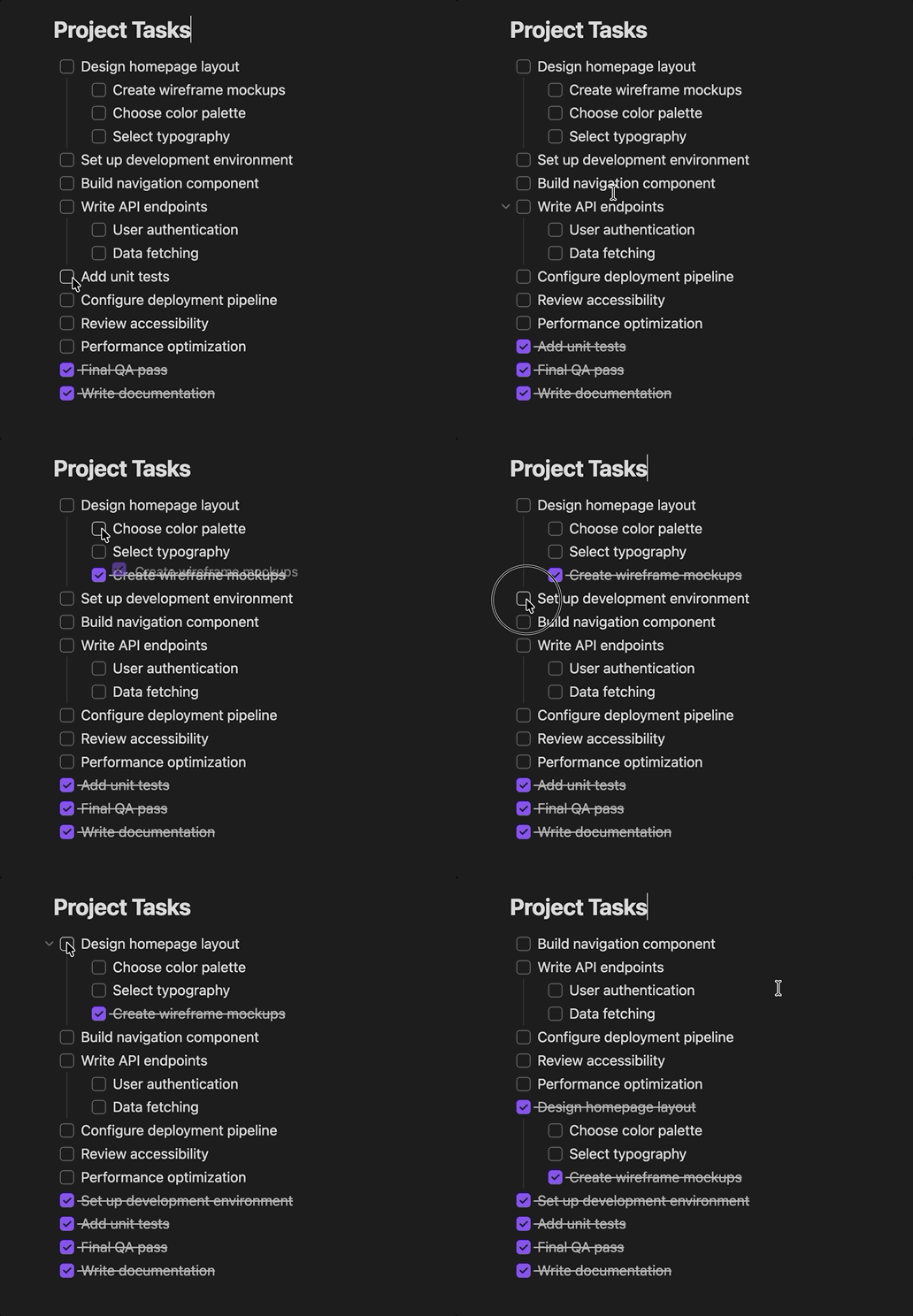
Automatically move checklist items to the bottom of the list as they are checked.

Add to Obsidian
Auto Sort Checked Items screenshot
  • Overview
  • Scorecard
  • Updates4

Auto Sort Checked Items demo

An Obsidian plugin that replicates Apple Notes' "Automatically sort checked items" behavior: when you check off a to-do item, it automatically moves to the bottom of the list so your focus stays on what's left to do.

Features

  • ✅ Auto-reorder — Checked items slide to the bottom of their checkbox group
  • 🪆 Nesting-aware — Items with sub-items move as a group, and indented items reorder within their own level
  • ✨ Smooth animation — A ghost of the checked row visually slides to its new position
  • ↩️ Clean undo — Cmd/Ctrl+Z undoes both the check and the move in one step

Installation

Manual

  1. Download main.js and manifest.json from the latest release
  2. Create a folder called checkbox-reorder in your vault's .obsidian/plugins/ directory
  3. Place both files inside it
  4. In Obsidian, go to Settings → Community Plugins and enable "Checkbox Reorder"

From source

git clone https://github.com/tom-un/obsidian-checkbox-reorder.git
cd obsidian-checkbox-reorder
npm install
npm run build

Then copy the folder (or symlink it) into your vault's .obsidian/plugins/ directory.

Development

npm run dev    # Watch mode — rebuilds on file changes
npm run build  # Production build

License

MIT

HealthExcellent
ReviewPassed
About
Move checked items to the bottom of their checkbox group when marked, keeping active tasks at the top. Preserve nesting by moving parents with their sub-items and reorder indented items within their level, with a clean undo that reverses check and move in one step.
TasksOutlining
Details
Current version
1.0.3
Last updated
2 months ago
Created
2 months ago
Updates
4 releases
Downloads
198
Compatible with
Obsidian 1.0.0+
Platforms
Desktop, Mobile
License
MIT
Report bugRequest featureReport plugin
Author
tom-untom-untom-un
GitHubtom-un
  1. Community
  2. Plugins
  3. Tasks
  4. Auto Sort Checked Items

Related plugins

Draggable List Items

Drag list items to reorder them.

TaskNotes

Note-based task management with calendar, pomodoro and time-tracking integration.

Tasks

Track tasks across your vault. Supports due dates, recurring tasks, done dates, sub-set of checklist items, and filtering. Maintained by Clare Macrae and Ilyas Landikov, created by Martin Schenck.

Day Planner

Turn tasks from daily notes, the Tasks plugin, and calendars into time blocks on an editable timeline, with built-in time tracker.

Outliner

Work with your lists like in Workflowy or Roam Research.

Project Manager

Full-featured project management: stunning Gantt charts, Kanban boards, Table views, customizable fields, due date notifications.

Day Planner OG

Day planning from a simple task list in a Markdown note (bare bones, preserves the features and behavior of the original plugin).

Checklist

Consolidate checklists across all files into a single view.

Task Collector

Change task status and collect tasks within a document using hotkeys and context menus.

Base Board

Organize notes into Kanban boards using frontmatter properties. Drag and drop cards between columns powered by Bases.