Search...Search plugins and themes...
⌘K
Sign in
  • Get started
  • Download
  • Pricing
  • Enterprise
  • Account
  • Obsidian
  • Overview
  • Sync
  • Publish
  • Canvas
  • Mobile
  • Web Clipper
  • CLI
  • Learn
  • Help
  • Developers
  • Changelog
  • About
  • Roadmap
  • Blog
  • Resources
  • System status
  • License overview
  • Terms of service
  • Privacy policy
  • Security
  • Community
  • Plugins
  • Themes
  • Discord
  • Forum / 中文论坛
  • Merch store
  • Brand guidelines
Follow us
DiscordTwitterBlueskyThreadsMastodonYouTubeGitHub
© 2026 Obsidian

Auto-Properties

aarongillyaarongilly4k downloads

Create automated properties based on note content and rules.

Add to Obsidian
  • Overview
  • Scorecard
  • Updates8

An Obsidian plugin that automatically fills note frontmatter properties using configurable rules. Pairs well with Bases, Templates, and Dataview.

See the wiki for examples and full documentation.


How it works

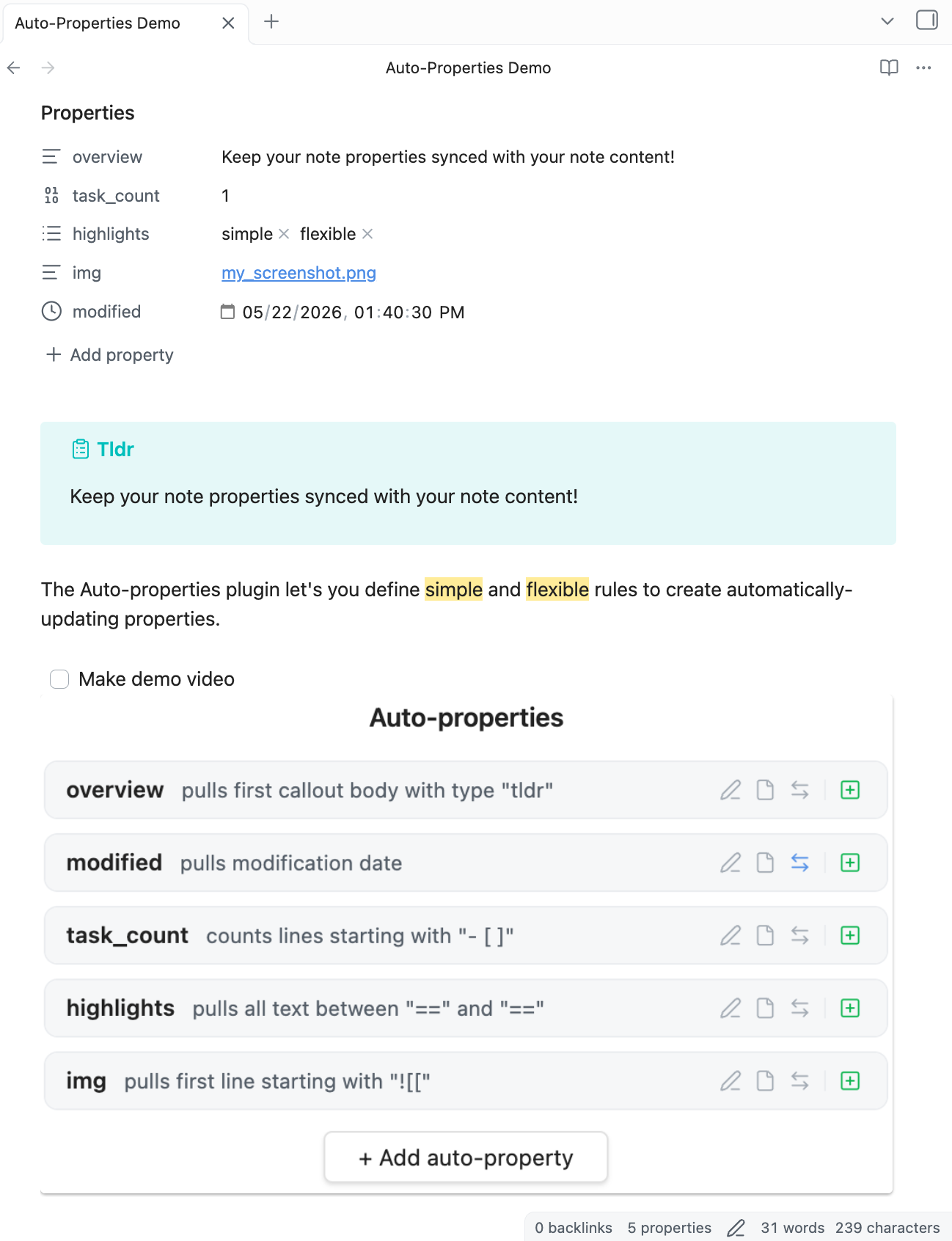
You define rules in the plugin settings. Each rule watches note content and writes a value to a frontmatter property when its trigger fires. Note bodies are never modified — only frontmatter properties are written.
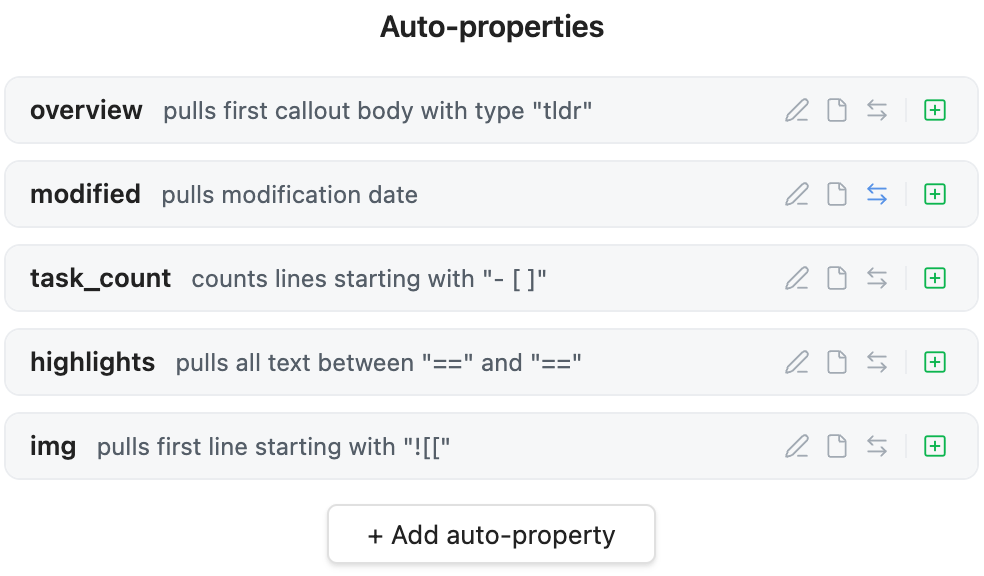
Example Rules Screenshot


Rule types

Lines

Pulls lines that match a pattern. Match modes: Starting with, Ending with, Containing, Regex.

Options: pull first / all / count of matching lines, omit the search string from the result, ignore indentation, pull the next line instead of the matched one, case sensitive.

Between

Pulls content found between two delimiter strings (e.g. ==highlighted==, [[, ![[).
Options: separate start and end delimiters, retain delimiters in result, multiline matching, pull first / all / count of matches, case sensitive.

Headings

Pulls content from under a heading, targeted by level (1–6) or heading text.

Options: heading text only or full section content, include the heading line itself, include subheadings.

Callouts

Pulls content from callouts, optionally filtered by callout type.

Options: extract header, body, or both; include type label.

File

Pulls file metadata: name, full path, folder, extension, created date, modified date, or file size.


Triggers (per rule)

Each rule independently controls when it runs:

Trigger When
Modify Shortly after the note content changes
Open Once when the note is first opened
Focus When you navigate away from the note

Rules with no triggers enabled are effectively manual-only — run them via the command palette (Auto-Properties: Update Auto-Properties).


Behaviors

Option Effect
Enabled Toggle a rule on/off without deleting it
Auto-add Creates the property in frontmatter if it doesn't exist yet
No overwrite Skips the rule if the property already has a non-empty value

Output & Filters

These apply to the pulled value before it's written:

Option Effect
Pull First match, all matches (as a list), or count of matches
Strip markdown Removes markdown formatting from the result
Trim whitespace Strips leading/trailing whitespace
Value format Template string wrapping the result, e.g. https://example.com/${result}

Available format variables: ${result}, ${filename}, ${folder}, ${path}, ${created}, ${modified}.


Scope (per rule)

Each rule can be limited to run only in certain folders, or skipped in others:

  • Run in folders — only process notes whose path starts with one of these
  • Ignore folders — skip notes whose path starts with one of these

Ignore wins if both match. Leave both empty to run on all notes.


Import / Export

Rules can be exported as JSON to your clipboard and imported back (append to existing or replace all). This makes sharing rule sets or moving between vaults easy.

Example rules

Rules in Use

[
  {
    "key": "overview",
    "autoadd": true,
    "strip_markdown": true,
    "type": "callouts",
    "callout_type": "tldr"
  },
  {
    "key": "modified",
    "autoadd": true,
    "trigger": [
      "focus_change"
    ],
    "type": "file",
    "file_pull": "modified"
  },
  {
    "key": "task_count",
    "autoadd": true,
    "value": "- [ ]",
    "pull": "count",
    "ignore_indentation": true
  },
  {
    "key": "highlights",
    "autoadd": true,
    "type": "between",
    "pull": "all",
    "start": "=="
  },
  {
    "key": "img",
    "autoadd": true,
    "value": "![["
  }
]

Design principles

  • Note bodies are never changed. Only frontmatter properties are written.
  • Everything optional except the property key. Sane defaults cover all omitted fields.
  • No dependencies. Zero npm dependencies beyond the Obsidian API.

Installation

Listed in the Obsidian Community directory!

Or install via BRAT:

  1. Install & enable BRAT
  2. In BRAT settings, click Add Plugin
  3. Paste this repo's URL
  4. Done
92%
HealthExcellent
ReviewPassed
About
Create auto-updating frontmatter properties from note content using user-defined rules. Define rules like pull first/all lines, count lines, match regex, or detect starts/contains/ends, and choose triggers (on edit pause, on file-focus change, or manual) to keep metadata current.
PropertiesAutomation
Details
Current version
2.0.2
Last updated
5 hours ago
Created
5 months ago
Updates
8 releases
Downloads
4k
Compatible with
Obsidian 1.4.4+
Platforms
Desktop, Mobile
License
MIT
Report bugRequest featureReport plugin
Sponsor
Buy Me a Coffee
Author
aarongillyaarongilly
aarongilly.com
GitHubaarongilly
  1. Community
  2. Plugins
  3. Properties
  4. Auto-Properties

Related plugins

MetaEdit

Manage your metadata.

Update modified date

Automatically update a frontmatter modified date field when the file is modified.

Fold Properties By Default

Always have editor/metadata properties folded by default

Advanced Canvas

Supercharge your canvas experience. Create presentations, flowcharts and more.

QuickAdd

Quickly add new notes or content to your vault.

Templater

Create and use dynamic templates.

Homepage

Open a note, base, or workspace on startup, or set it for quick access later.

BRAT

Easily install a beta version of a plugin for testing.

Meta Bind

Make your notes interactive with inline input fields, metadata displays, and buttons.

Readwise Official

Sync highlights from Readwise to your vault.