Auto LLM Wiki
 youzhixiaomutou1k downloads
Maintain a Karpathy-style LLM Wiki with AI-assisted ingest, query, lint, and previewed file changes.
- Overview
- Scorecard
- Updates14
English | 简体中文
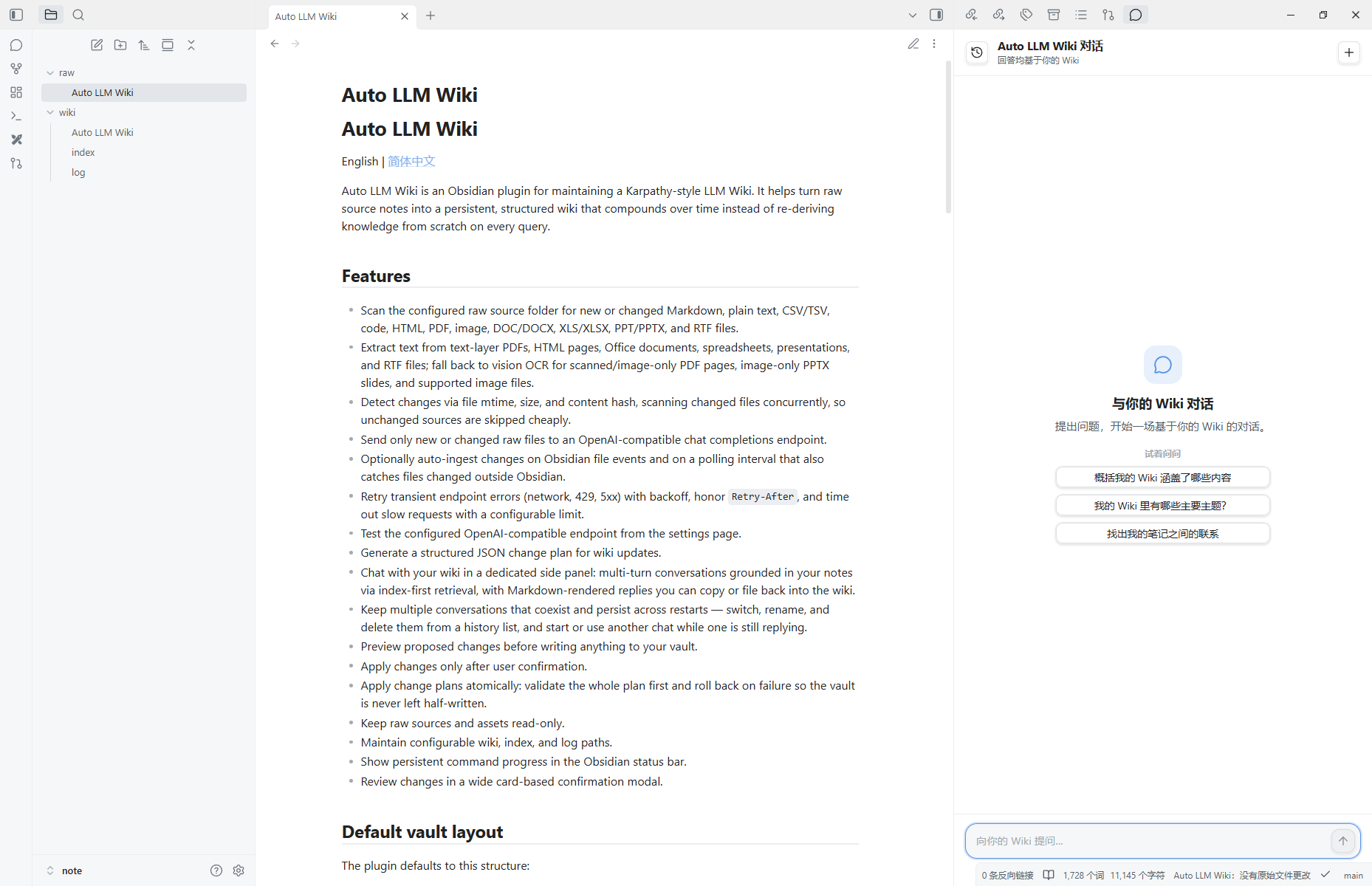
Auto LLM Wiki is an Obsidian plugin for maintaining a Karpathy-style LLM Wiki. It helps turn raw source notes into a persistent, structured wiki that compounds over time instead of re-deriving knowledge from scratch on every query.
Features
- Scan the configured raw source folder for new or changed Markdown, plain text, CSV/TSV, code, HTML, PDF, image, DOC/DOCX, XLS/XLSX, PPT/PPTX, and RTF files.
- Extract text from text-layer PDFs, HTML pages, Office documents, spreadsheets, presentations, and RTF files; fall back to vision OCR for scanned/image-only PDF pages, image-only PPTX slides, and supported image files.
- Detect changes via file mtime, size, and content hash, scanning changed files concurrently, so unchanged sources are skipped cheaply.
- Send only new or changed raw files to an OpenAI-compatible chat completions endpoint.
- Optionally auto-ingest changes on Obsidian file events and on a polling interval that also catches files changed outside Obsidian.
- Retry transient endpoint errors (network, 429, 5xx) with backoff, honor
Retry-After, and time out slow requests with a configurable limit. - Test the configured OpenAI-compatible endpoint from the settings page.
- Generate a structured JSON change plan for wiki updates.
- Chat with your wiki in a dedicated side panel: multi-turn conversations grounded in your notes via index-first retrieval, with Markdown-rendered replies you can copy or file back into the wiki.
- Keep multiple conversations that coexist and persist across restarts — switch, rename, and delete them from a history list, and start or use another chat while one is still replying.
- Preview proposed changes before writing anything to your vault.
- Apply changes only after user confirmation.
- Apply change plans atomically: validate the whole plan first and roll back on failure so the vault is never left half-written.
- Keep raw sources and assets read-only.
- Maintain configurable wiki, index, and log paths.
- Show persistent command progress in the Obsidian status bar.
- Review changes in a wide card-based confirmation modal.
Default vault layout
The plugin defaults to this structure:
raw/             # immutable source notes
raw/assets/      # source attachments
wiki/            # LLM-maintained wiki pages
wiki/index.md    # content index
wiki/log.md      # newest-first ingest/chat/lint log
All paths are configurable in the plugin settings.
Supported raw formats
- Text and code:
.md,.txt,.csv,.tsv,.json,.yaml,.yml,.log,.ts,.js,.py,.go,.rs,.java,.cpp,.sql,.sh - Web pages:
.html,.htm - Documents:
.doc,.docx,.rtf - Spreadsheets:
.xls,.xlsx - Presentations:
.ppt,.pptx - PDFs:
.pdf - Images for OCR:
.png,.jpg,.jpeg,.webp,.gif
PDFs and PPTX files are parsed directly when they contain readable text. PDF pages, PPTX slides, and image files only use vision OCR when text is not directly extractable.
Installation
Install from Obsidian community plugins
- Open Settings → Community plugins in Obsidian.
- Turn off Restricted mode if needed.
- Select Browse and search for Auto LLM Wiki.
- Install and enable the plugin.
Installation for development
Install dependencies:
npm installBuild the plugin:
npm run buildCopy these files into your Obsidian vault plugin directory:
<your-vault>/.obsidian/plugins/auto-llm-wiki/manifest.json
<your-vault>/.obsidian/plugins/auto-llm-wiki/main.js
<your-vault>/.obsidian/plugins/auto-llm-wiki/styles.css
Enable Auto LLM Wiki in Obsidian community plugin settings.
Configuration
Open the plugin settings and configure:
Raw folder: folder containing immutable source files. Supported raw inputs include Markdown, plain text, CSV/TSV, common code files, HTML, PDF, PNG/JPEG/WebP/GIF images, DOC/DOCX, XLS/XLSX, PPT/PPTX, and RTF.
Wiki folder: folder where generated wiki pages should be written.
Assets folder: read-only attachment folder.
Index path: wiki index file path.
Log path: wiki log file path.
OpenAI API URL: chat completions endpoint, for example:
https://api.openai.com/v1/chat/completionsOpenAI API key: API key for your OpenAI-compatible provider.
OpenAI model: model name to use.
Auto ingest raw file changes: disabled by default. When enabled, supported raw file changes are analyzed automatically after a short debounce and validated model changes are applied without opening the review modal.
Auto ingest debounce (seconds): when auto ingest is on, how long to wait after the last file change before analyzing. Defaults to 3.
Auto ingest poll interval (seconds): when auto ingest is on, how often to scan the raw folder for changes made outside Obsidian (e.g. dragged-in files, which do not fire file events). Defaults to 15; set 0 to disable polling.
Request timeout (seconds): how long to wait for a model response before timing out. Defaults to 900 seconds; raise it for slow local or reasoning models, lower it for fast hosted models.
Third-party OpenAI-compatible providers can be used as long as the URL points directly to their /v1/chat/completions endpoint. Use Test OpenAI connection in settings to check whether the configured endpoint returns HTTP 2xx for the current URL, key, and model.
Usage
Ingest changed raw files
Put supported source files under the configured raw folder, such as Markdown, text, CSV/TSV, code, HTML, PDF, images, DOC/DOCX, XLS/XLSX, PPT/PPTX, or RTF.
Run the command:
Ingest changed raw files into Auto LLM Wiki
The command scans the configured raw folder and processes all new or changed supported raw files. Text/code-like files are read directly, HTML is converted to readable text, Office documents, spreadsheets, presentations, and RTF files are extracted locally, and text-layer PDFs are extracted directly. Scanned or image-only PDF pages and image-only PPTX slides use vision OCR, and supported image files are sent to the configured OpenAI-compatible model for OCR before the extracted text is ingested. Files that have already been successfully applied are skipped until their content changes.
When Auto ingest raw file changes is enabled, the plugin watches the configured raw folder for supported file creations and modifications. After a short debounce, it runs the same ingest pipeline and automatically applies validated changes without opening the review modal. It also polls the raw folder on the configured interval to catch files changed outside Obsidian (which do not fire file events). Auto ingest is disabled by default.
The command flow is:
- Scan raw folder for changed files and report supported raw/PDF candidates in progress notices.
- Extract source text from text/code, HTML, PDF, image, Office, spreadsheet, presentation, and RTF inputs, using vision OCR when a PDF page, PPTX slide, or image needs OCR.
- Send changed sources plus wiki context to the model.
- Validate the returned change plan.
- Show a review modal.
- Apply changes only after confirmation.
- Record raw file hashes only after changes are successfully applied.
Chat with the wiki
Open the chat panel from the ribbon (the chat icon) or run:
Query Auto LLM Wiki
This opens a chat panel docked in the right sidebar. Ask questions in natural language and the plugin answers from your wiki: it reads the index first and, for larger wikis, asks the model which pages are relevant and drills into only those (index-first retrieval). Replies are rendered as Markdown; you can Copy a reply or Save to wiki to file a worthwhile answer back as a page through the reviewed change-plan flow (the exchange is also recorded in the log), so explorations compound over time.
The panel keeps multiple conversations:
- New chat starts a fresh conversation without discarding the current one.
- The history list (the toggle in the panel header) lets you switch between conversations, rename them, or delete them (with a confirmation prompt).
- Conversations are saved with the plugin and persist across Obsidian restarts.
- Waiting is per-conversation: you can start or use another chat while one is still awaiting a reply, and each reply lands back in its own conversation.
Lint the wiki
Run:
Lint Auto LLM Wiki
The plugin asks the model to reconcile the wiki with the current raw sources and to look for stale claims, contradictions, missing cross-references, important concepts without pages, and data gaps. Because the wiki is a synthesis distilled from many sources, a page whose raw source was removed is usually revised — its now-unsupported claims dropped — rather than deleted; a page is deleted only when nothing of value would remain. Deletions are proposed in the change plan and applied only after you review them (following Karpathy's model: sources are immutable, and the wiki is reconciled during lint rather than automatically when a source is deleted).
Safety model
- Raw files are never modified by generated change plans.
- Assets are treated as read-only.
- Writes outside the configured wiki folder are rejected.
- Deletions are limited to the wiki folder, previewed like any other change, and rolled back if applying fails.
indexPathandlogPathmust stay inside the configured wiki folder.- Proposed file changes must be reviewed before applying.
- Raw file state is updated only after Apply succeeds.
Privacy and network use
This plugin sends selected vault content to the OpenAI-compatible chat completions endpoint configured in the plugin settings. During ingest, it sends new or changed raw text extracted from supported source files, including Markdown, text/code, HTML, PDFs, Office documents, spreadsheets, presentations, and RTF files; when OCR is needed, it sends rendered PDF page images, embedded PPTX slide images, or supported image files to the configured model. Wiki index/log context is included. When you chat, it sends the wiki index plus the pages selected for each turn along with the recent conversation messages; saving a chat answer and the lint command also send relevant wiki context. The Test OpenAI connection button sends a small ping-style chat completions request to the configured endpoint. No network request is made until you configure an API URL and API key and run a command or click the test button.
The API key is stored locally in Obsidian plugin data and is sent as an Authorization header only to the configured API URL. If you configure a third-party OpenAI-compatible endpoint, your API key and selected vault content are sent to that provider.
The plugin does not include telemetry, analytics, ads, or a self-update mechanism.
Development
Run tests:
npm test
Build:
npm run build
The generated main.js is intentionally ignored by git and should not be committed.