Aurora Tracker

A small, fun tracker for making music: six synth tracks with noise and FM drums and a C64-style SID mode. Songs are plain text in your notes, with WAV and MIDI export.
- Overview
- Scorecard
- Updates2
A small, fun tracker for making music in Obsidian. Six synth tracks, drums built from noise and FM, a C64-style SID mode, and songs that are plain text in your notes.
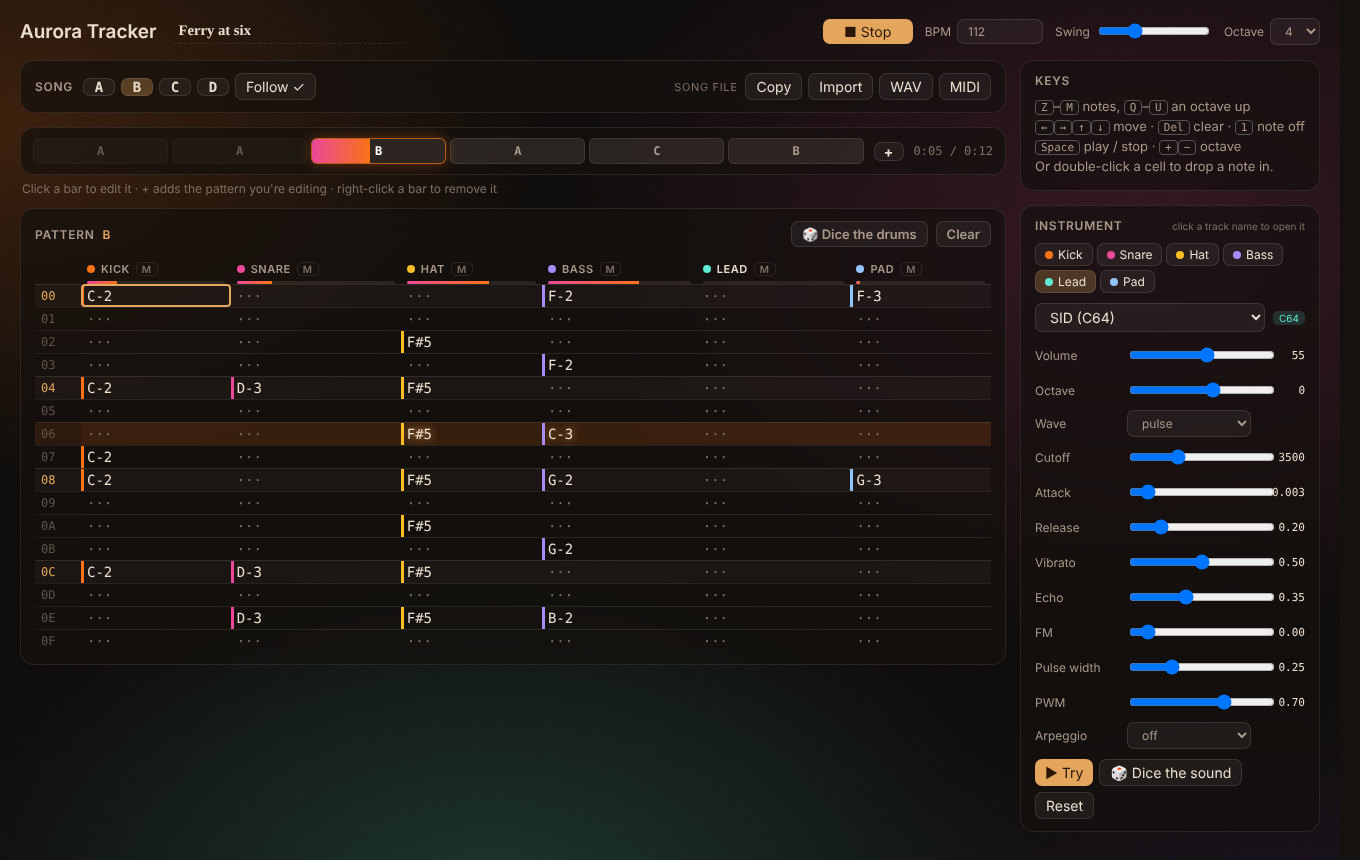
Making a song
Run Aurora Tracker: New song (or click the waveform icon in the ribbon). A new note opens in the tracker. To hear what it can do first, run Aurora Tracker: Open the demo song.
- Six tracks: Kick, Snare, Hat, Bass, Lead and Pad.
- Patterns A to D, each 16 rows. The pattern sequencer plays them in order: click a bar to edit it, + adds the pattern you're editing, right-click removes one. While it plays, the bar fills and played bars fade.
- Notes from the keyboard, the tracker way:
| Keys | What they do |
|---|---|
Z–M |
notes (Q–U an octave up) |
1 |
note off |
Del |
clear |
| arrows | move |
Space |
play / stop |
+ / − |
octave |
Or double-click a cell to drop a note in.
- 🎲 Dice the drums rolls a new groove for the pattern.
- BPM, swing, mute per track, and level meters that move with the music.
Sounds
Click a track's name to open its instrument: pick a preset, then shape it with the knobs. ▶ Try plays it, 🎲 Dice the sound rolls a variation, and Reset goes back to the preset.
| Track | Presets |
|---|---|
| Kick | Boom (808), Punch, Lo-fi, SID |
| Snare | Snare, Clap, Rim, SID |
| Hat | Closed, Shaker, Ride, SID |
| Bass | Saw, Sub, FM, Acid, SID |
| Lead | Square, Pluck, FM bell, Chip (8-bit), SID |
| Pad | Warm, Glass, Choir, SID |
Everything is synthesis, with no samples:
- Drums mix noise and FM. F# and G# on the hat track give an open hat.
- SID presets borrow the Commodore 64's character: the pulse wave with a moving width, and lightning-fast arpeggios at the C64's 50 steps a second.
- Octave shifts a whole track up or down.
Songs are text
A song is a tracker block in a note:
```tracker
title: Ferry at six
bpm: 112
order: A A B A C B
sound lead: sid wave=pulse cutoff=3500 pw=0.25 pwm=0.7 arp=off

pattern A
00 | C-2 ··· F#5 A-2 ··· A-3
01 | ··· ··· F#5 ··· ··· ···
```
- Play it in place: in reading view the block becomes a small player, with a play button, the song's patterns and Edit.
- Share it as text: Copy puts the song on your clipboard to paste anywhere, and Import turns pasted text back into a song. The sounds come with it.
- Export audio: WAV renders the whole song and MIDI writes it for any DAW. Both save into your vault, next to the song or in a folder you choose.
Works with
- The AshOtis players (Static FM, Hi-Fi Tuner, Aurora MP3): one plays at a time, unless you turn on Play alongside other players.
- Static Aurora: while a song plays, the theme glows in the tracker's colours. The aurora behind the editor pulses with the kick (you can turn both off).
Settings
- Songs folder and exports folder
- Play alongside other players
- Colour the Static Aurora theme
- Aurora background, with Glow and Darken
Privacy and network
Aurora Tracker makes no network requests. It reads and writes only the song notes you open with it, and saves WAV and MIDI files only when you export.
Support
If it makes you smile, you can buy me a coffee. Bugs and ideas: issues.
GNU AGPL v3 or later © AshOtis