Aurora MP3
 ashotis1 downloads
Play music from folders on your computer in a sidebar player with album covers, playlists, a queue, resume and daily note logging.
- Overview
- Scorecard
- Updates3
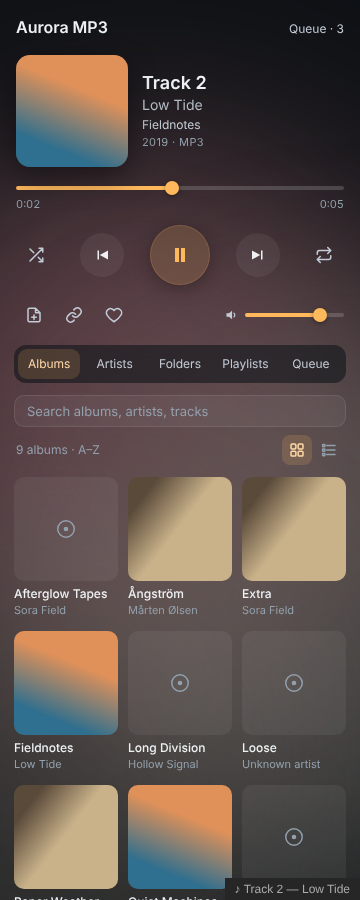
Play music from folders on your computer in an Obsidian sidebar player, with album covers, playlists, a queue, resume and daily note logging.
Features
- Your own music: point it at one or more folders, such as your Music folder. It scans subfolders and reads MP3, FLAC, M4A/AAC, Ogg, Opus and WAV.
- Tags and covers: reads titles, artists, albums, track numbers and embedded covers (ID3, FLAC, MP4 and Vorbis tags). If a file has no embedded cover, it uses a
cover.jpgorfolder.jpgfrom the album's folder. - Browse: albums (as a grid or a list), artists, folders, playlists and the queue, plus search across everything.
- Play: a queue with shuffle and repeat (off, all or one), favourites and playlists. Right-click any track, album, artist or folder for Play next, Add to queue or Add to playlist.
- Resume: after a restart, the last track is waiting where you left it. Long tracks (over 8 minutes, such as mixes) remember their own position.
- Notes:
- Listening log adds a line such as
- 14:32 ♪ Title — Artist (Album)to your daily note or to a note of your choice, either when you press the button or automatically for every track you listen to. You can also turn it off. The line format is set in settings. - Add to note puts a small player card (with a Play button) for the track, album, artist, folder or playlist into the note you're editing.
- Listening log adds a line such as
- Two looks:
- Glass: large covers and soft glows tinted by the album art.
- Terminal: calm monospace text.
- Media keys, now-playing in the status bar, and commands for everything. Set your own hotkeys in Settings → Hotkeys.
Getting started
- Open Settings → Aurora MP3 and paste the path of your music folder, for example
C:\Users\you\Music. Then click Add. - Click the disc icon in the left ribbon, or run Aurora MP3: Open player.
The first scan reads every file once. After that, rescans skip unchanged files and are quick.
Embeds
```aurora-mp3
album: Fieldnotes
artist: Low Tide
```
Also works with track: <file path>, artist: <name>, playlist: <name> and folder: <path>.
Permissions and privacy
The plugin directory flags file system access. Here is what it means:
- File system access (Node.js
fs): this is needed to play music stored outside your vault. Aurora MP3 uses it read-only. It lists the music folders you add in settings and reads the audio files in them (tags, covers and playback), plus acover.jpgorfolder.jpgbeside them. It never writes, moves or deletes anything outside your vault. Its own files (library.json,covers/anddata.json) are written through Obsidian's normal vault API, in the plugin's folder.
It doesn't use the clipboard, makes no network requests and has no telemetry. Nothing leaves your computer.
Desktop only
Reading folders outside the vault needs the desktop app.
Building from source
There are no dependencies. Run python3 build.py to write main.js, styles.css and manifest.json to dist/. The tag reader is written from scratch in src/tags.js.
Support
If you enjoy it, you can buy me a coffee. Questions or problems: open an issue, or email [email protected].
License
MIT © AshOtis