Assets Offloader
 marchell11 downloads
Upload vault attachments to S3-compatible storage and swap links; localize them back.
- Overview
- Scorecard
- Updates2
Keep vault notes light by uploading attachments (images, video, audio, PDF, zip, and other whitelist types) to your S3-compatible bucket, rewriting note links to public URLs, and downloading those files back when you want them local again.
Works on desktop and mobile. Needs Obsidian 1.13.0+ (settings search + Secret Storage). Access keys are never written to data.json.
Cloudflare R2 is the documented target. Other S3-compatible providers work if you fill endpoint, bucket, region, and a public URL base.
Setup
- Create a bucket and a public origin (custom domain or provider public URL). That origin is Public URL base in the plugin — no trailing slash.
- Create API keys with object list, read, write, and delete.
- In Obsidian, open Settings → Assets Offloader.
- Paste a bucket URL into Bucket URL and select Guess from URL, or fill Endpoint, Bucket, and Region by hand.
- Set Public URL base to the public origin from step 1.
- Pick Access key and Secret key in Secret Storage (do not paste them into plain settings text).
- Select Test connection. You should see a success notice.
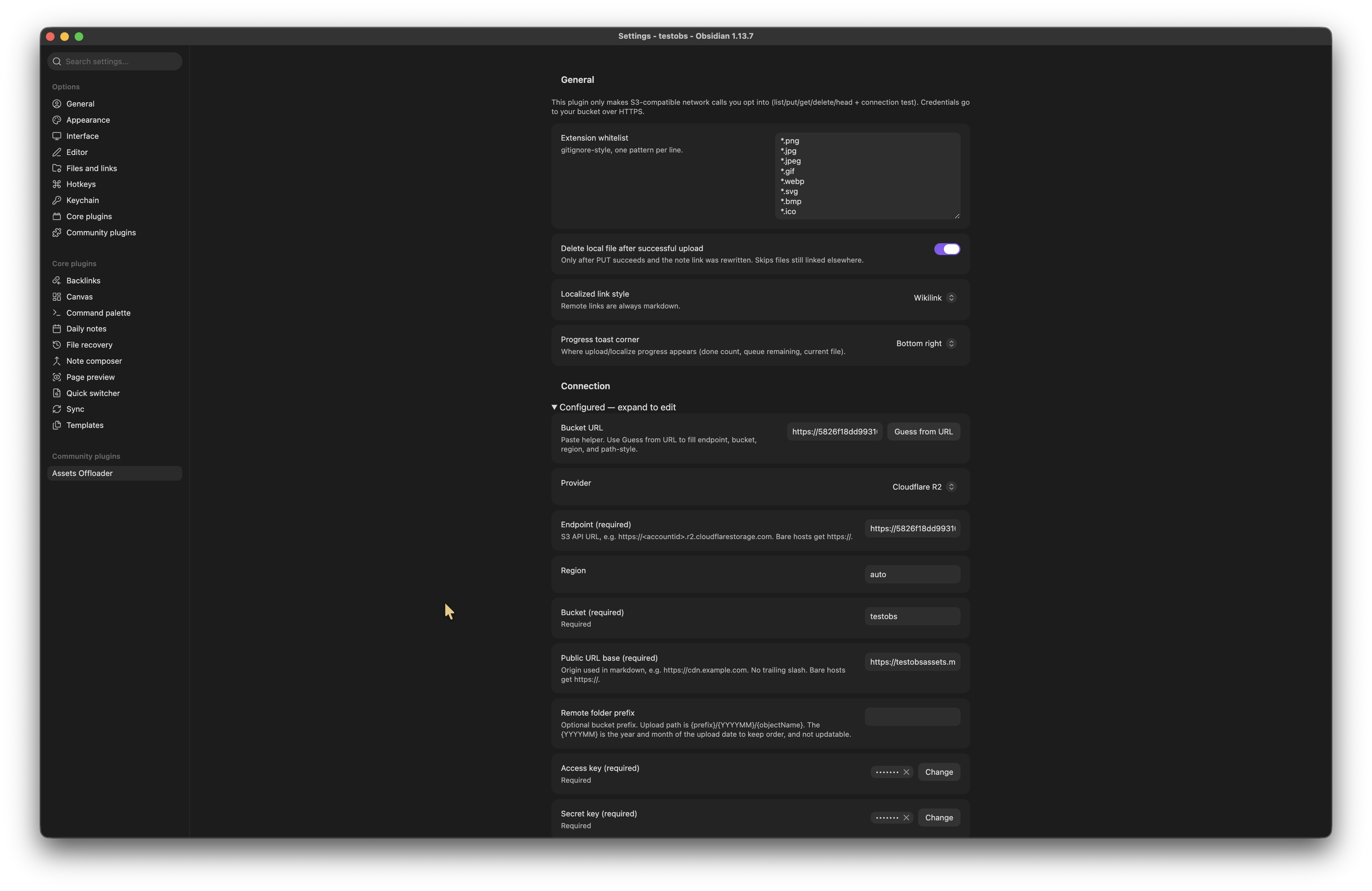
R2 field-by-field (endpoint host, CORS, token): docs/r2-setup.md.
How to use
Upload. Open a markdown note that embeds local files (![[photo.png]] or ). Run Upload current note's local assets. Matching whitelist files go to {prefix}/{YYYYMM}/{name} in the bucket, and the note links become markdown URLs under Public URL base. Upload current folder's local assets does the same for every note in the current folder (not recursive). Upload current folder's local assets recursively also includes nested folders — see the warning below.

Optional delete. If Delete local file after successful upload is on, the plugin trashes the local file only after PUT succeeds and the note was rewritten, and only if nothing else still links to that file.
Localize. Run Localize current note's assets (or the folder / recursive folder command) to download remote files using Obsidian’s attachment folder rules and rewrite links back to local paths.

Warning — recursive folder commands. Recursive upload and localize process every markdown note under the current folder, including all nested folders. If the active note is in the vault root, that is the whole vault. They can take a long time, upload or download many files, and rewrite many notes. A confirm dialog appears first; cancel does nothing. Prefer the non-recursive folder command unless you intend that scope.
Gallery. The ribbon (or Open remote asset gallery) lists objects in the bucket by month. Open a file to preview it, insert a link, or download it into the vault.

Convert links. The convert commands only change wikilink vs markdown syntax. They do not upload or download. Markdown→wiki leaves http(s) links alone.
Network use
This plugin makes no calls to a vendor we operate. There is no telemetry, analytics, or auto-update channel. Every request is one you opt into by configuring a bucket and running a command or opening the gallery.
| Remote host | Why |
|---|---|
S3 API endpoint you set (e.g. https://<accountid>.r2.cloudflarestorage.com) |
Signed HTTPS list / put / get / delete / head so the plugin can upload, list the gallery, download objects, and run Test connection. Access key and secret go only to this host. |
Public URL base you set (e.g. https://cdn.example.com) |
Unsigned HTTPS GET so localize can pull file bytes, and so the gallery / note preview can display images, video, and audio. |
Test connection overwrites a small probe object under .assets-offloader/ in the bucket. It does not delete.
If gallery thumbnails or in-note media fail to load, the Public URL base host needs CORS that allows GET from Obsidian (desktop is often app://obsidian.md).
Vault files
Local reads and writes stay inside the vault: markdown, attachments, and Obsidian’s trash (when delete-after-upload is on). The plugin does not read or write files on disk outside the vault. Remote objects live in your bucket, not on your machine, until you localize them.
Commands
| Command | What it does |
|---|---|
| Upload current note's local assets | Upload and rewrite links |
| Upload current folder's local assets | Same, every note in the folder (not recursive) |
| Upload current folder's local assets recursively | Same, including nested folders (confirm first) |
| Localize current note's assets | Download remotes into the vault |
| Localize current folder's remote assets | Same, folder, not recursive |
| Localize current folder's remote assets recursively | Same, including nested folders (confirm first) |
| Convert current note wikilinks to markdown links | Syntax only |
| Convert current note markdown links to wikilinks | Internal links only; leave http(s) |
| Open remote asset gallery | Same as the ribbon |
Development
npm i
npm run dev
Copy main.js, manifest.json, and styles.css into <Vault>/.obsidian/plugins/obsidian-assets-offloader/, then reload Obsidian.