Ante
 Antigma Labs271 downloads
AI second brain, continuous ingestion, indexing, and evolving. Powered by Ante agent core from Antigma Labs
- Overview
- Scorecard
- Updates19
English | 简体中文
Ante Obsidian is a desktop-only Obsidian plugin for Ante-powered Markdown workflows. It bridges note editing, diff review, interactive sidebars, and chat flows with a local agentic CLI, delivering an editorial, note-aware AI second brain.
The repository is organized as a monorepo:
packages/ante-obsidian-plugin— The core Obsidian plugin.packages/ante-sdk— The reusable TypeScript SDK for programmatically spawning and interacting with the Ante CLI.
About Ante
Ante is a lightweight, local-first AI agent runtime built in Rust (~15MB binary, zero dependencies). It supports 12+ providers (Anthropic, OpenAI, Gemini, etc.) and runs completely offline with local GGUF models.
Learn more:
🚀 Quick Start
0. For AI Agents (Automated Installation)
# Step 1: Get vault path (ask user or find from Obsidian config)
VAULT_PATH=$(osascript -e 'tell application "Obsidian" to return path of front window' 2>/dev/null || echo "")

# Step 2: If vault path not found, ask user to provide it
if [ -z "$VAULT_PATH" ]; then
  read -p "Enter your Obsidian vault path: " VAULT_PATH
fi

# Step 3: Run installation script
curl -sS https://raw.githubusercontent.com/AntigmaLabs/ante-obsidian/main/scripts/install.sh | bash -s -- "$VAULT_PATH"
1. Install or Update the Plugin
You can install the plugin via the official Obsidian Community Plugins catalog (once approved). For manual installs, use the automated installer script below inside your terminal. Running it again updates an existing manual install in the same vault:
curl -sS https://raw.githubusercontent.com/AntigmaLabs/ante-obsidian/main/scripts/install.sh | bash -s -- /path/to/your/vault
Replace /path/to/your/vault with your actual Obsidian vault path (same as Step 1 above).
[!NOTE] For manual extraction zip files or detailed developer compilation instructions, please refer to INSTALL.md.
2. Auto-Setup CLI
The plugin runs completely locally and relies on the ante CLI. Setup is fully automated after enabling the plugin:
- Open Obsidian Settings -> Ante Obsidian.
- Under the Runtime settings panel, click Install to set up the local
anteCLI automatically. - Configure your preferred provider (Gemini, Anthropic, or OpenAI) and verify your key configurations.
✨ Features
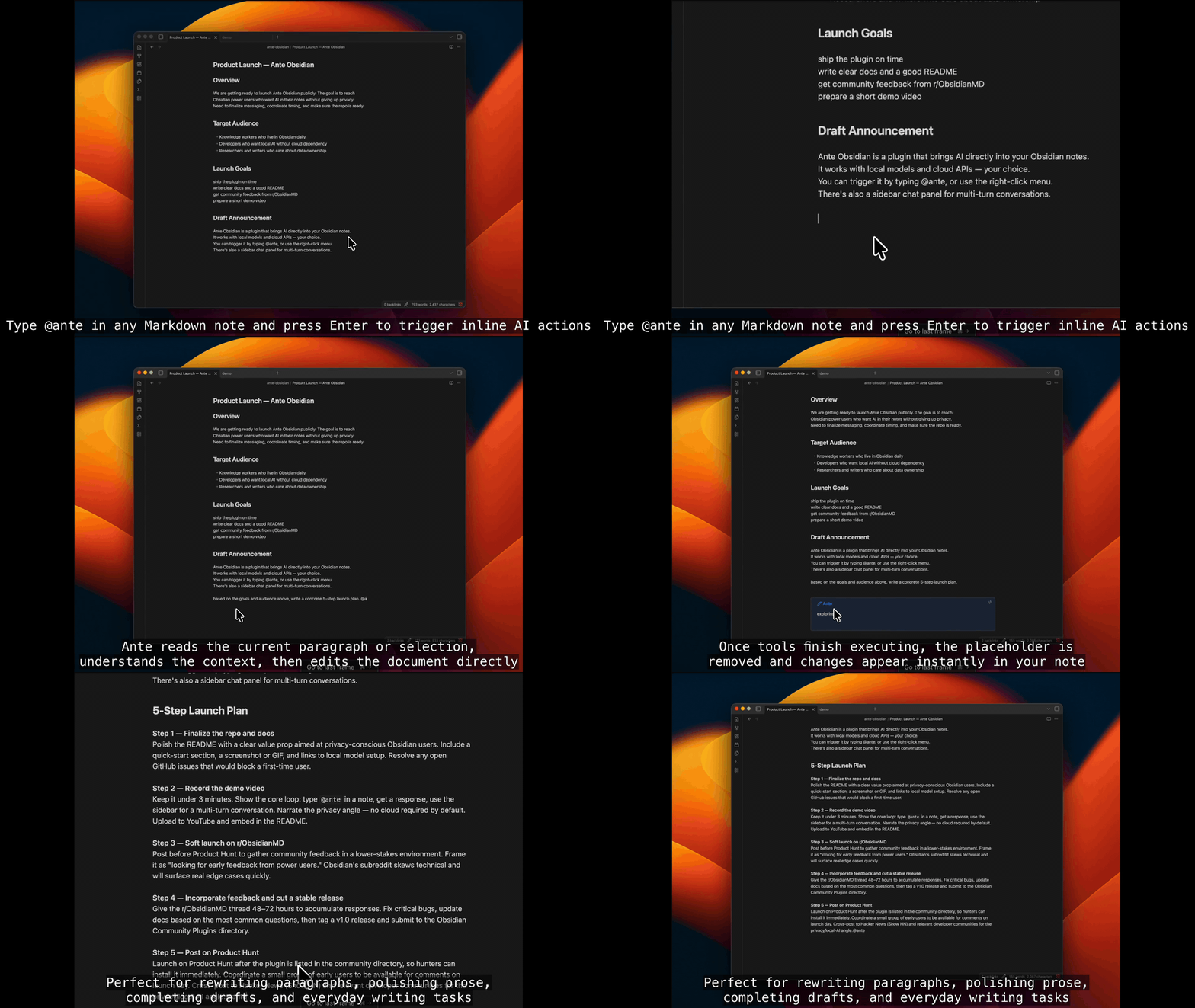
- ⚡ Inline Triggers: Run document operations directly in Markdown by typing
@anteand pressingEnter. - 📋 Context Menu Presets: Quick-access actions like
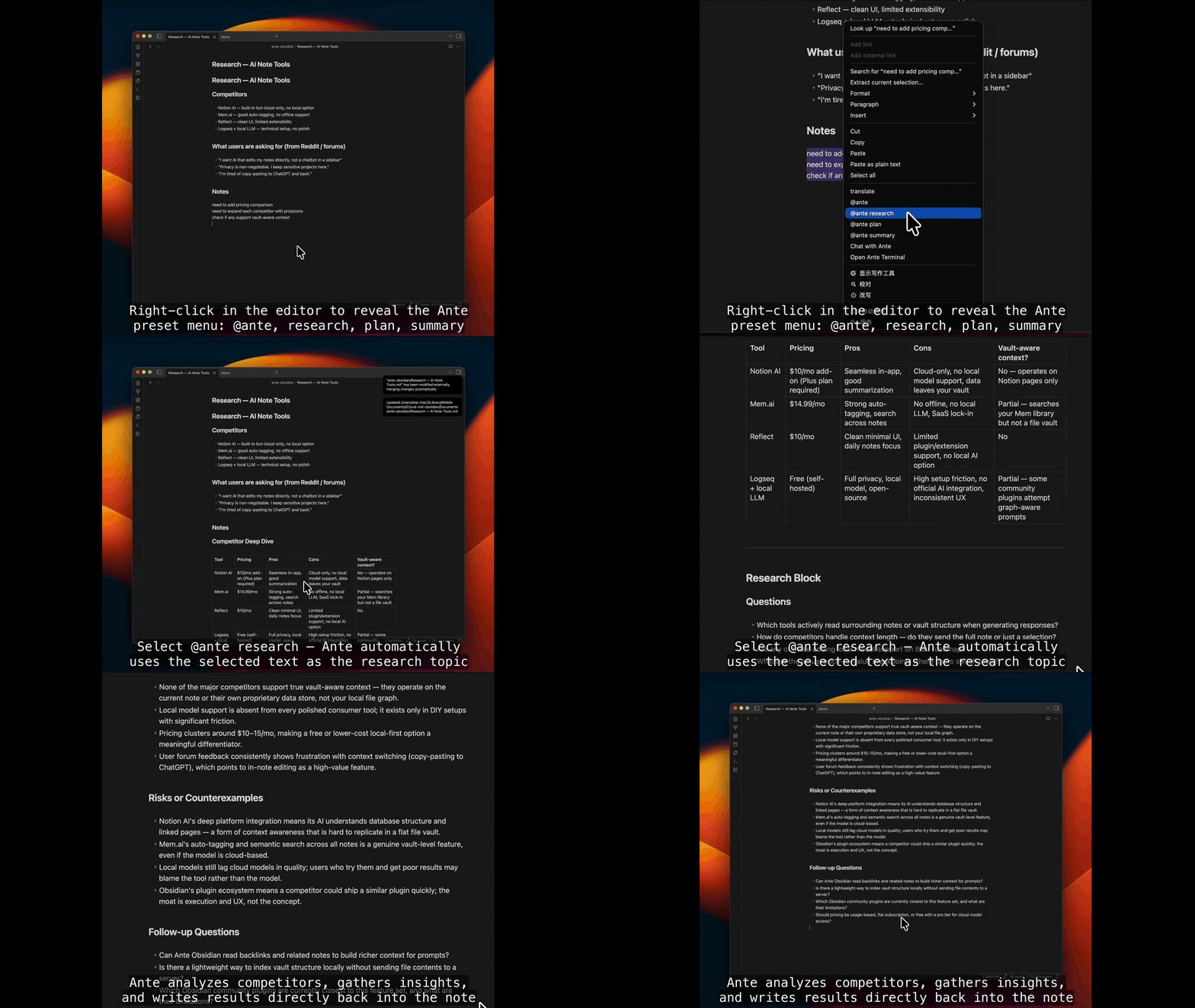
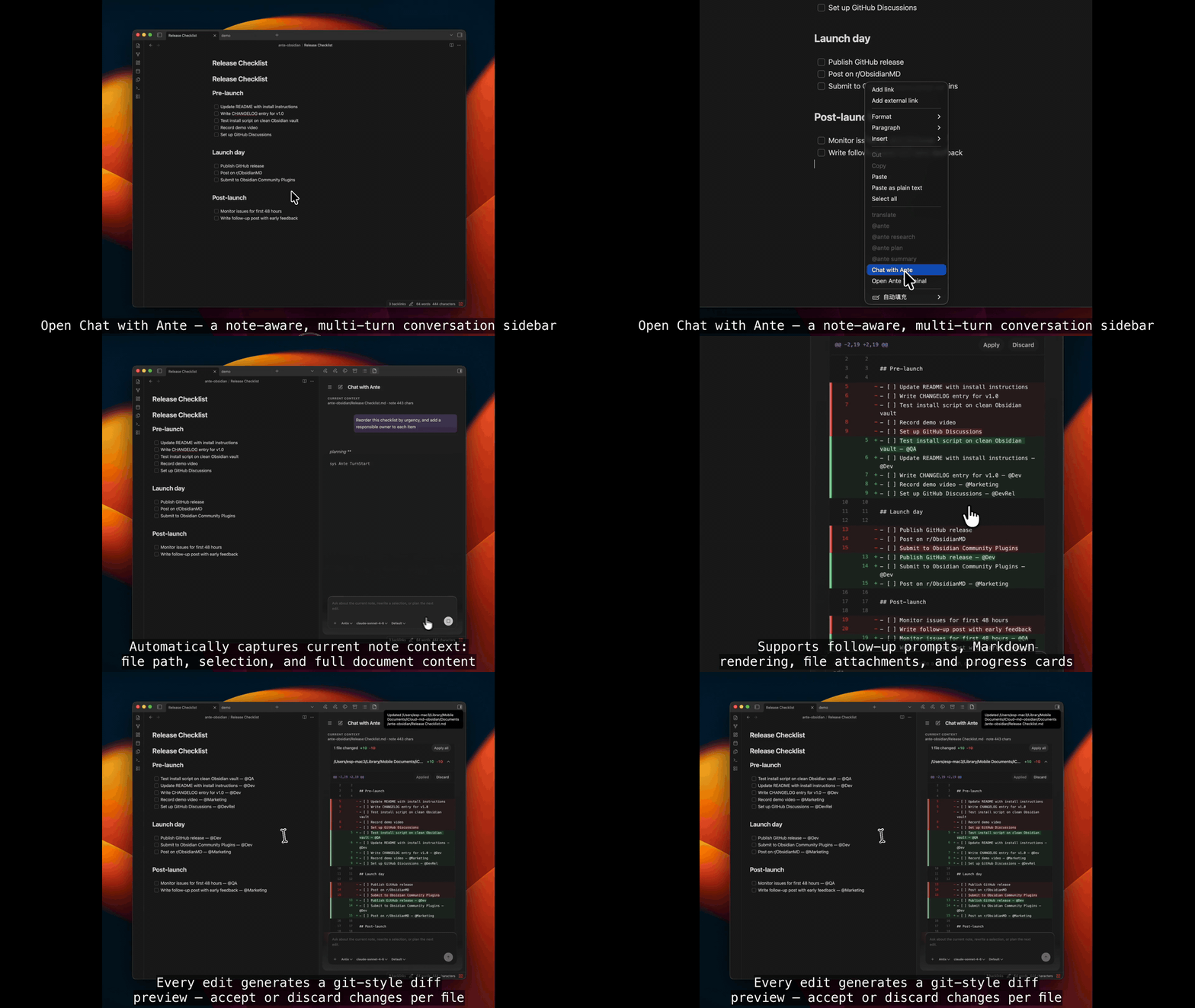
@ante research,@ante plan, and@ante summaryfrom the editor context menu. - 💬 Chat with Ante: A note-aware, multi-turn conversation panel focused on reading, editing, and diff-checking with context.
- 🛠️ Preset Customization: Create, reorder, or hide prompts using drag-and-drop right inside Obsidian settings.
Feature Demonstrations
Inline Triggers
Context Menu
Chat with Ante
⚙️ How It Works (Architecture)
Ante Obsidian leverages a lightweight, local-first agent architecture. It streams protocol messages directly over standard input/output (stdin/stdout) without needing PTY or heavy terminal emulation, ensuring maximum performance and complete privacy.
The plugin is desktop-only because it launches the local Ante CLI and reads local Ante defaults from ~/.ante/settings.json. Vault content is read and written through the Obsidian Vault API; temporary filesystem reads are limited to staged diff previews created by the plugin. Clipboard access is write-only and only happens after the user clicks a copy action.
graph TD
    Obsidian[Obsidian Editor UI] <-->|Inline Edits / Context Menu / Sidebar Chat| Plugin[Ante Obsidian Plugin]
    Plugin <-->|Protocol Messages / Sessions| SDK["@antigma/ante-sdk"]
    SDK <-->|Spawn stdio process| Runtime["Local Ante CLI<br>'ante serve --stdio'"]
    Runtime <-->|Agent Tool execution| Notes[".md Files / Vault Context"]
    Notes <-->|Live Workspace sync| Obsidian

    classDef default fill:#1A1B26,stroke:#7AA2F7,stroke-width:2px,color:#C0CAF5;
    classDef highlight fill:#2E1F47,stroke:#BB9AF7,stroke-width:2px,color:#E0AF68;
    class Obsidian,Plugin,Notes default;
    class SDK,Runtime highlight;
📚 Documentation & Guides
Here is a guide to the project's documentation and resources:
- System Design Guidelines: Refer to doc/DESIGN.md for visual systems, typography rules, and native UI integration goals.
- Standalone SDK: Check the @antigma/ante-sdk documentation for installation and programmatic examples.
- Detailed User Guide: Consult doc/USER_GUIDE.md to understand vault-aware context and inline behaviors.
- Changelog & Release Notes: Read doc/CHANGELOG.md to see the release history and feature additions.
🛠️ Development
# Install all dependencies inside the monorepo workspace
npm install

# Start local esbuild in watch mode to output the Obsidian plugin build
npm run dev
For detailed development workflows, portable test configurations, and SDK publication steps, please read doc/CONTRIBUTING.md.
📄 License
This project is licensed under the MIT License.
Made with ❤️ by Antigma Labs