Search...Search plugins and themes...
⌘K
Sign in
  • Get started
  • Download
  • Pricing
  • Enterprise
  • Account
  • Obsidian
  • Overview
  • Sync
  • Publish
  • Canvas
  • Mobile
  • Web Clipper
  • CLI
  • Learn
  • Help
  • Developers
  • Changelog
  • About
  • Roadmap
  • Blog
  • Resources
  • System status
  • License overview
  • Terms of service
  • Privacy policy
  • Security
  • Community
  • Plugins
  • Themes
  • Discord
  • Forum / 中文论坛
  • Merch store
  • Brand guidelines
Follow us
DiscordTwitterBlueskyThreadsMastodonYouTubeGitHub
© 2026 Obsidian

Advanced Ruby

peter-yanasepeter-yanase606 downloads

Enable multi-layered ruby annotation rendering usable for everything from Japanese furigana to layered commentaries.

Add to Obsidian
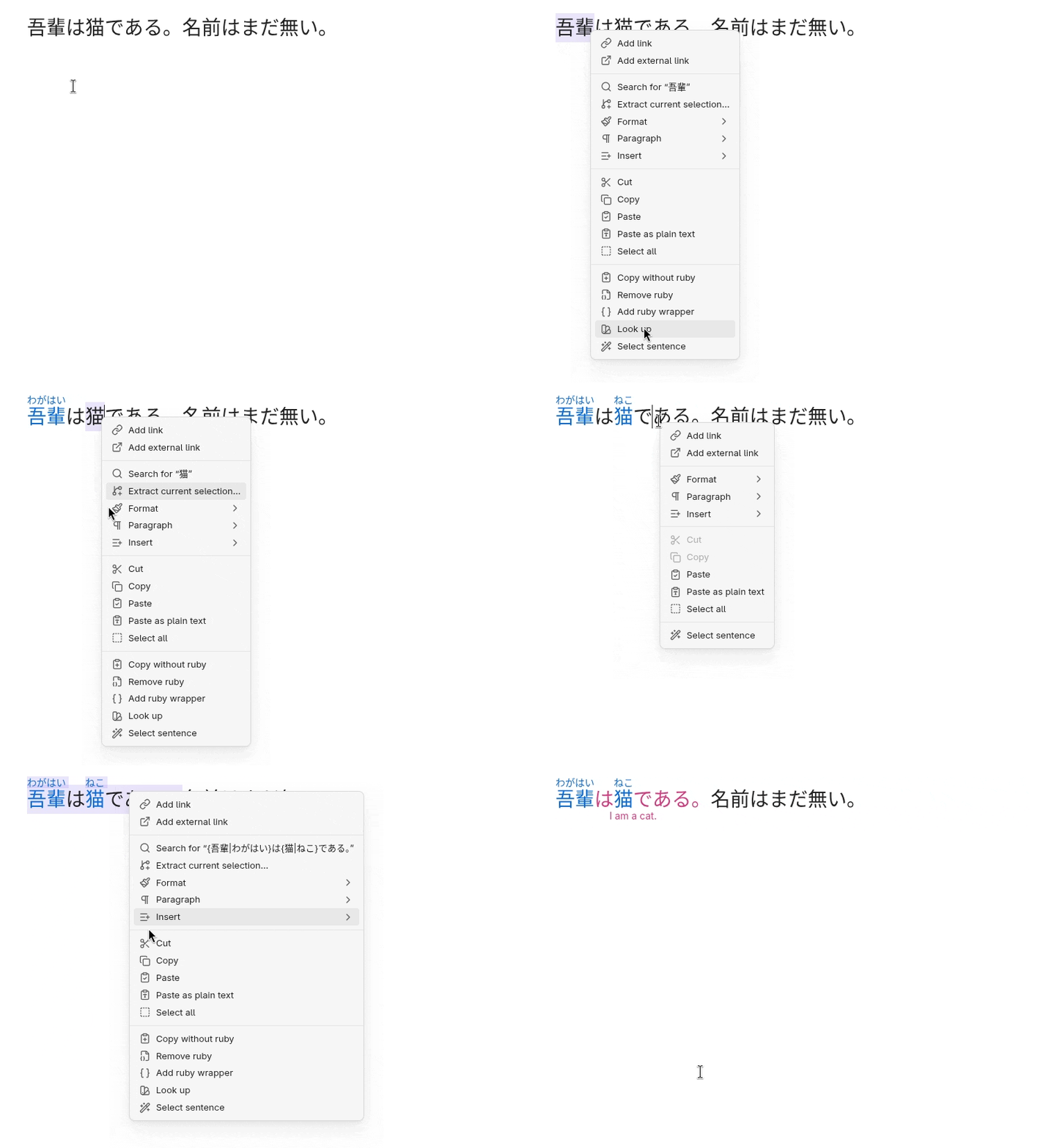
Advanced Ruby screenshot
  • Overview
  • Scorecard
  • Updates17

Advanced Ruby enables complex, language-independent ruby annotation rendering and editing.

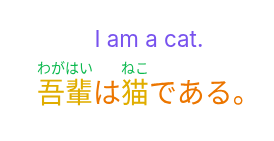
While ruby is commonly used to show the pronunciation of Japanese and other East Asian characters, it can be used to annotate any kind of text.

This plugin supports the full range of Unicode, making it suitable not only for phonetic guides but also for semantic glosses or layered annotations.

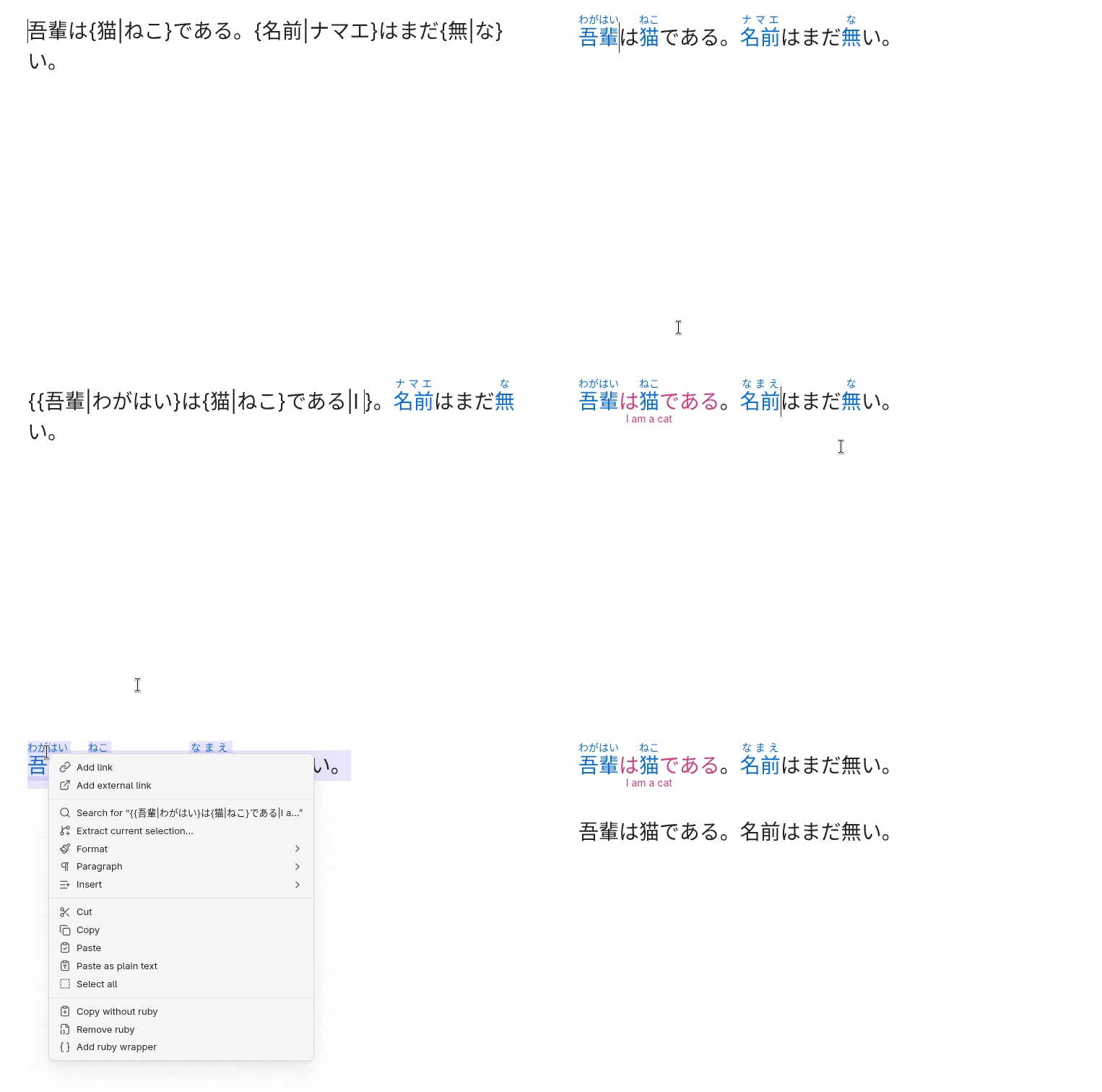
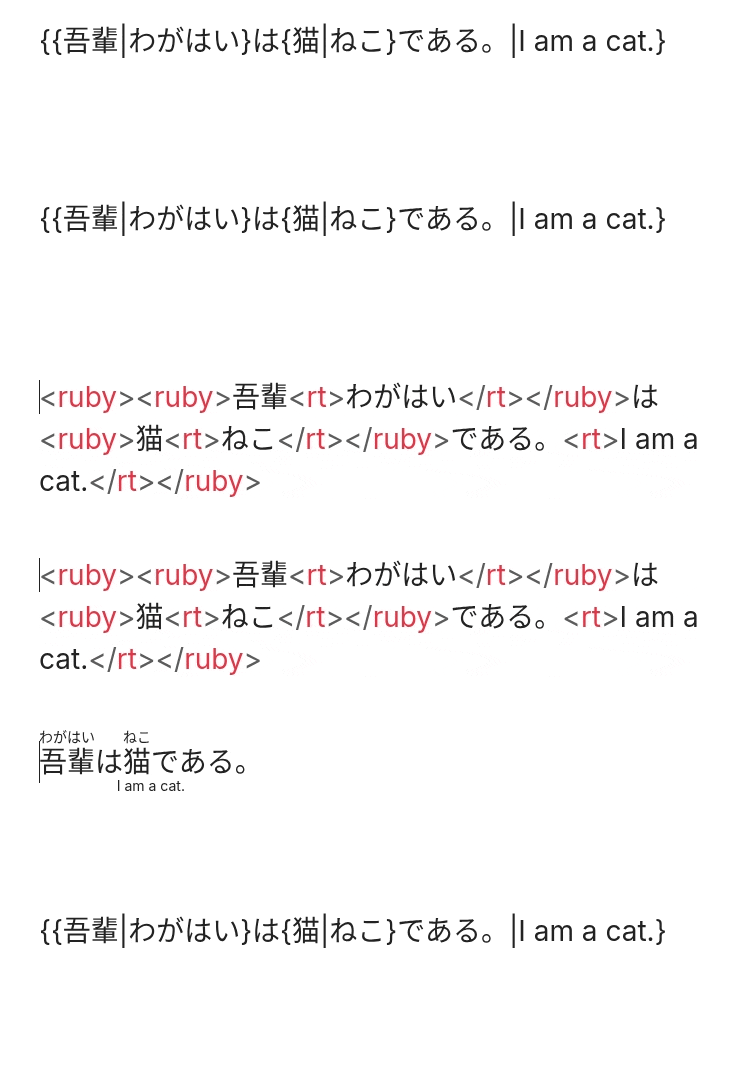
It renders Markdown ruby syntax ({base|ruby}) as HTML ruby tags (<ruby>base<rt>ruby</rt></ruby>) without modifying your notes.

In editing mode, you can insert Markdown ruby wrappers and convert between Markdown and HTML ruby syntaxes.

Features

  • Fast and efficient parsing
  • Code block skipping
  • Touch support for mobile
  • Granular style customization via the Obsidian Style Settings Plugin (up to two layers)
  • Non-destructive rendering
  • Support for complex nested markup
  • Intuitive UI

How to Use

  • Use the wrapper command to wrap the selected text or insert an empty wrapper. You can also use the context menu to wrap selected text. Alternatively, write ruby markup manually.
  • The plugin will render ruby in reading and editing mode but show raw markup in source mode. Ruby in code blocks or inline code will stay raw.
  • To edit existing annotation, click on it or step into it with the left and right arrow keys.
  • If smart arrows keys are enabled, the cursor will jump over ruby without revealing the raw markup. Press the arrow key in the opposite direction after a jump to edit the skipped text. You can disable smart arrows keys if you prefer to reveal the raw markup on cursor contact.
  • If the note contains any Markdown ruby, the conversion command will convert them to HTML. If the note contains only HTTML ruby, the command will convert all of them to Markdown ruby.

Design Choices

  • Markdown and HTML markup inside ruby annotations are not supported.

Roadmap

Feature requests, bug reports, and pull requests are welcome.

Coming

This plugin is considered feature-complete. No new features are planned beyond maintenance.

Security

  • This plugin does not store or transmit any data and requires no internet connection.
  • This plugin has zero dependencies
  • Using Obsidian Style Settings Plugin is optional

Licenses & Acknowledgments

Advanced Ruby starting from version 2.0.1 is available under the PolyForm-Perimeter v.1.0.1 license. Advanced Ruby from version 1.0.7 to version 2.0.0 is available under the GPL-3 License. Advanced Ruby up to version 1.0.6 is available under the MIT License. Copyright (c) 2025–2026 Peter Yanase

This project includes code derived from:

  • Markdown Furigana Plugin (Obsidian) (https://github.com/steven-kraft/obsidian-markdown-furigana), licensed under the MIT License. Copyright (c) 2021-2026 Steven Kraft.

  • Obsidian Furigana (https://github.com/uonr/obsidian-furigana), licensed under the MIT License. Copyright (c) 2021-2026 Koppa.

  • Japanese Novel Ruby Plugin for Obsidian (https://github.com/k-quels/japanese-novel-ruby), licensed under the MIT License. Copyright (c) 2024-2026 quels <@k-quels>.

  • Mahgen Renderer (https://github.com/MichaelFW-ui/mahgen-renderer), licensed under the MIT License. Copyright (c) 2024-2026 Michael Francis Williams.

  • Obsidian Outliner (https://github.com/vslinko/obsidian-outliner), licensed under the MIT License. Copyright (c) 2021-2026 by Viacheslav Slinko.

  • Obsidian Sample Plugin (https://github.com/obsidianmd/obsidian-sample-plugin), licensed under the OBSD License. Copyright (c) 2020-2026 by Dynalist Inc.

86%
HealthExcellent
ReviewSatisfactory
About
Render complex, language-independent ruby annotations from Markdown into HTML ruby tags without altering source notes. Insert or wrap selected text, convert between Markdown and HTML ruby syntaxes, and edit nested, full-Unicode annotations inline with touch and arrow-key support while skipping code blocks.
AnnotationMarkdownHTML
Details
Current version
2.0.2
Last updated
2 weeks ago
Created
8 months ago
Updates
17 releases
Downloads
606
Compatible with
Obsidian 1.9.14+
Platforms
Desktop, Mobile
License
OTHER
Report bugRequest featureReport plugin
Sponsor
Ko-fi
Author
peter-yanasepeter-yanase
GitHubpeter-yanase
  1. Community
  2. Plugins
  3. Annotation
  4. Advanced Ruby

Related plugins

markdown export

Export Markdown to a package, including images.

Importer

Import data from Notion, Evernote, Apple Notes, Microsoft OneNote, Google Keep, Bear, Roam, and HTML files.

Outliner

Work with your lists like in Workflowy or Roam Research.

Various Complements

Complete words similar to auto-completion in an IDE.

Linter

Format and style your notes. Linter can be used to format YAML tags, aliases, arrays, and metadata; footnotes; headings; spacing; math blocks; regular Markdown contents like list, italics, and bold styles; and more with the use of custom rule options.

Image Converter

Convert, compress, resize, annotate, markup, draw, crop, rotate, flip, align, drag-resize, rename with variables, and batch process images: WEBP, JPG, PNG, HEIC, TIF

HiNote

Add comments to highlighted notes, use AI for thinking, and flashcards for memory.

Fantasy Statblocks

Create, manage and view a Fantasy Bestiary with Dungeons and Dragons style statblocks.

Admonition

Admonition block-styled content.

Custom Frames

Turn web apps into panes using iframes with custom styling. Also comes with presets for Google Keep, Todoist and more.