Search...Search plugins and themes...
⌘K
Sign in
  • Get started
  • Download
  • Pricing
  • Enterprise
  • Account
  • Obsidian
  • Overview
  • Sync
  • Publish
  • Canvas
  • Mobile
  • Web Clipper
  • CLI
  • Learn
  • Help
  • Developers
  • Changelog
  • About
  • Roadmap
  • Blog
  • Resources
  • System status
  • License overview
  • Terms of service
  • Privacy policy
  • Security
  • Community
  • Plugins
  • Themes
  • Discord
  • Forum / 中文论坛
  • Merch store
  • Brand guidelines
Follow us
DiscordTwitterBlueskyThreadsMastodonYouTubeGitHub
© 2026 Obsidian

Activity Heatmap

zakhijzakhij2k downloads

Tracks and visualizes app activity, similar to GitHub's contribution chart.

Add to Obsidian
  • Overview
  • Scorecard
  • Updates6

A plugin for Obsidian that provides a GitHub-style activity heatmap visualization of your note-taking activity. Track your writing habits and vault changes over time with an intuitive visual representation!
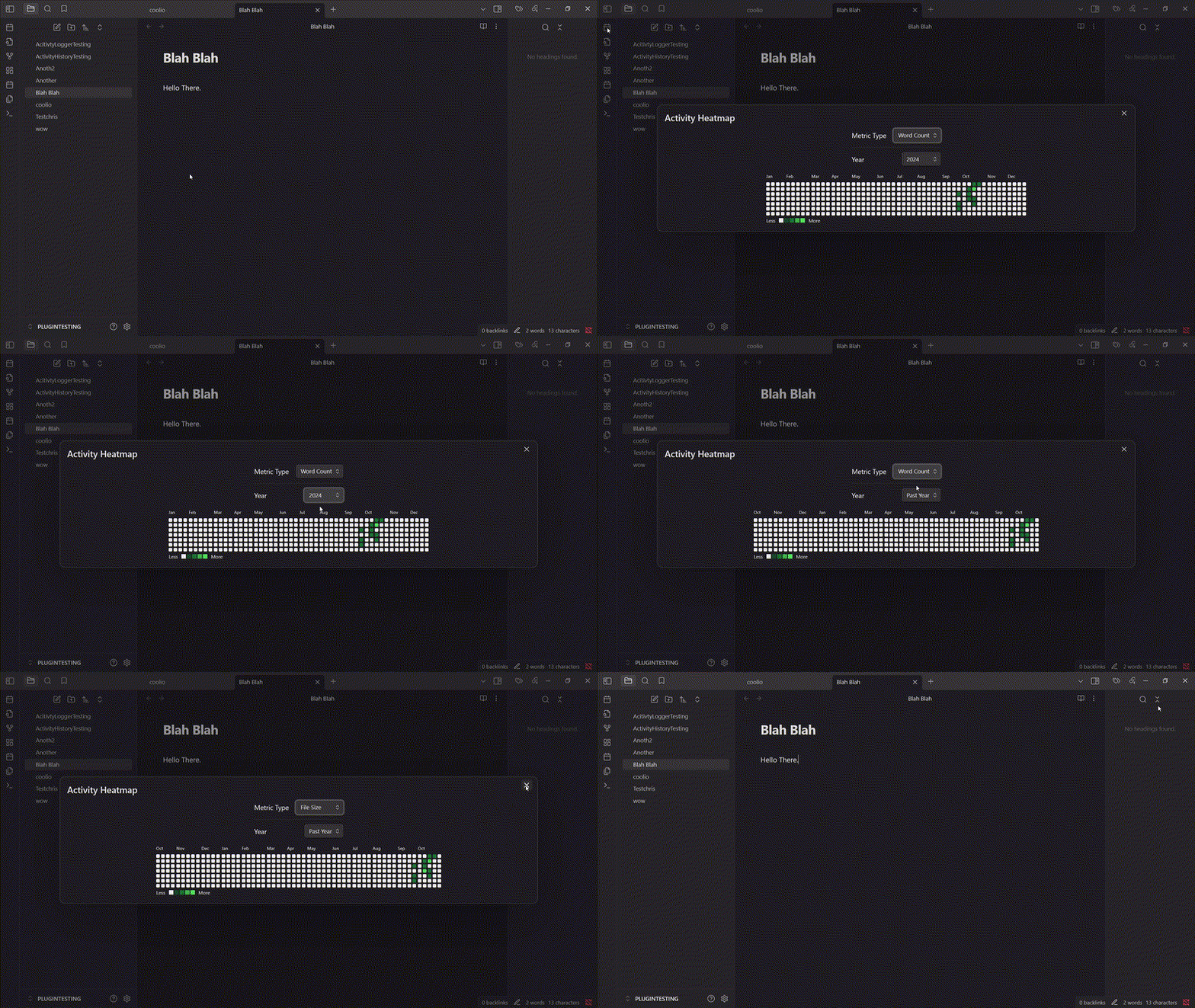
Demo

How it works

The plugin monitors activity metrics for all vault files. Upon each file change, it logs new values and compares them to previous checkpoint values to gauge activity. Currently, two metrics are tracked as proxies for activity: file size and word count. The heatmap is updated automatically in the background and available as a ribbon icon or through the command palette, displaying the activity data over the designated time period.

Usage

Opening the Heatmap

There are two ways to open the activity heatmap:

  1. Click the calendar icon in the ribbon (left sidebar)
  2. Use the command palette and search for "Open Heatmap"

Configuring the View

In the heatmap view, you can:

  • Switch between different metrics
  • Select different time periods (Past Year/Specific Calendar Year)
  • Hover over cells to see detailed activity information

Installation

The plugin is available in the Obsidian community plugins list.

  • Open Community Plugins settings page, click on the Browse button.
  • Search for "Activity Heatmap" in the search bar and find this plugin.
  • Click on the Install button.
  • Enable the Activity Heatmap plugin.

For manual installation, please download the files in the latest release and put them under .obsidian/plugins/activity-heatmap/ in your vault. Then, open your Obsidian settings > Community plugins, and turn on Activity Heatmap.

Contributing

If you have any ideas for improving the plugin, please open an issue or submit a pull request. In particular, I'd love to add more metrics for activity tracking.

70%
HealthGood
ReviewCaution
About
Visualize note-taking activity with a GitHub-style heatmap that tracks file size and word count over time. Update the map automatically as files change, switch metrics and time ranges, and hover cells to see detailed activity per file.
VisualizationCalendarFiles
Details
Current version
1.0.5
Last updated
Last year
Created
2 years ago
Updates
6 releases
Downloads
2k
Compatible with
Obsidian 0.15.0+
Platforms
Desktop, Mobile
License
MIT
Report bugRequest featureReport plugin
Sponsor
Buy Me a Coffee
Author
zakhijzakhij
github.com/zakhij
GitHubzakhij
  1. Community
  2. Plugins
  3. Visualization
  4. Activity Heatmap

Related plugins

Kanban

Create Markdown-backed Kanban boards.

Notebook Navigator

A better file browser and calendar inspired by Apple Notes, Bear, Evernote and Day One.

Local REST API & MCP Server

Unlock your automation needs by interacting with your notes over a secure REST API.

Advanced Canvas

Supercharge your canvas experience. Create presentations, flowcharts and more.

QuickAdd

Quickly add new notes or content to your vault.

Recent Files

Display a list of recently opened files.

TaskNotes

Note-based task management with calendar, pomodoro and time-tracking integration.

Omnisearch

Intelligent search for your notes, PDFs, and OCR for images.

Day Planner

Day planning from a task list in a Markdown note with enhanced time block functionality.

Claudian

Embeds Claude Code/Codex as an AI collaborator in your vault. Your vault becomes agent's working directory, giving it full agentic capabilities: file read/write, search, bash commands, and multi-step workflows.