
- Overview
- Scorecard
- Updates4
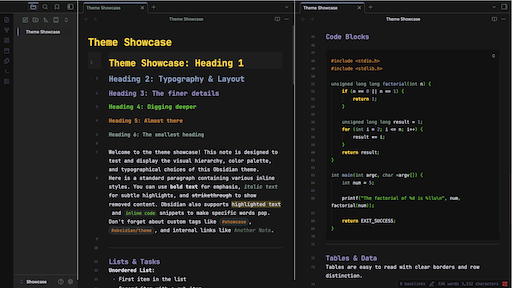
A faithful Obsidian port of the beloved Gruber Darker color theme.
Deep blacks. Rich warm accents. Comfortable at any hour.
Originally created for BBEdit by John Gruber, adapted for Emacs by Jason R. Blevins and Alexey Kutepov (rexim). Now brought to Obsidian.
View on the Obsidian community site →
Features
- Full dark mode with the canonical Gruber Darker palette, plus a warm light mode fallback
- Built on Obsidian's own CSS variables, with low-specificity selectors and no
!important, so your snippets can override anything - Respects Obsidian's built-in settings (font size, monospace font, line numbers, indentation guides, readable line length)
- Syntax highlighting in the editor and in reading view
- Headings H1-H6, each in its own palette color
- Style Settings support: recolor the whole palette, resize headings, change tab style and more without touching CSS
- Vim cursor: block / underline / bar shapes, colors for NORMAL, INSERT and VISUAL, 5 blink animations
- Vim mode status bar indicator, color-coded per mode
- OLED Mode (pure black) and Zen Mode (hides sidebars, ribbon and status bar)
- Callouts, tables, tags, blockquotes, properties, graph view, Canvas, Mermaid diagrams, PDF embeds
- No remote assets, so it works fully offline
See the full theme preview (a long image covering every element).

Installation
Requires Obsidian 1.13 or newer.
Via Community Themes (recommended)
- Settings → Appearance → Themes → Manage
- Search for
Gruber Darker - Click Install and use
Manual
- Create the folder
YourVault/.obsidian/themes/Gruber Darker/(the folder name must match thenameinmanifest.json) - Copy
theme.cssandmanifest.jsoninto it - Settings → Appearance → Themes → select Gruber Darker (reload Obsidian if it doesn't show up)
Style Settings
Install the Style Settings plugin to get the settings panel under Settings → Style Settings → Gruber Darker.
| Section | Options |
|---|---|
| Palette Overrides | All 17 palette colors, OLED Mode |
| Editor | Line height, readable line width, active line highlight, smooth scrolling, Zen Mode |
| Headings | H1-H4 sizes, text transform (none / uppercase / capitalize / lowercase) |
| Code Blocks | Code font size, border around code blocks |
| Interface | Tab style (default / underline / pill), hide ribbon, compact status bar |
| Callouts | Corner radius, icon blend mode |
| Vim & Cursor | Cursor color, Vim NORMAL cursor shape, blink style, per-mode colors, status bar indicator |
A few things to know:
- Obsidian's own settings stay in charge. Font size, monospace font, line numbers, indentation guides and the readable line length on/off switch live under Settings → Appearance / Editor. The theme's Readable line width slider sets how wide notes get when that switch is on.
- Some options are on by default only with Style Settings installed. Without the plugin, the active line highlight, code block borders and status bar colors stay off, and the theme uses its base look.
- Palette overrides apply to dark mode. Light mode is a fixed warm fallback.
Vim
Turn on Vim under Settings → Editor → Vim key bindings.
| Mode | Cursor | Default color |
|---|---|---|
| NORMAL | Block █, underline _ or bar | (your choice) | yellow #ffdd33 |
| INSERT | Caret | green #73c936 |
| VISUAL | Same shape as NORMAL, plus a tinted selection | wisteria #9e95c7 |
| REPLACE | Same as NORMAL (status bar only) | red #f43841 |
Blink styles: Static · Blink · Fade · Pulse · Expand.
REPLACE gets its color in the status bar only, because the editor doesn't expose that mode to CSS.
Status bar indicator
| Mode | Status bar |
|---|---|
| NORMAL |  |
| INSERT |  |
| VISUAL |  |
| REPLACE |  |
Needs one of these plugins:
- Vim Mode Status: works out of the box.
- Vimrc Support: turn on Display Vim mode in its settings. Its default labels are emoji; change them to text such as
NORMAL/INSERTto get the colored pill.
Palette
| Name | Hex | Used for |
|---|---|---|
| bg-1 | #101010 |
Deepest background: code blocks, gutters, ribbon, status bar |
| bg | #181818 |
Main editor background |
| bg+1 | #282828 |
Sidebars, inline code, table headers |
| bg+2 | #453d41 |
Borders, dividers, scrollbars |
| bg+3 | #484848 |
Text selection |
| bg+4 | #52494e |
Search matches, matching brackets, input borders |
| fg | #e4e4ef |
Body text |
| fg+1 | #f4f4ff |
Bold text |
| yellow | #ffdd33 |
H1, keywords, cursor, blockquote border, table headers |
| green | #73c936 |
H4, strings, inline code, success, Vim INSERT |
| niagara | #96a6c8 |
H2, links, tags, accent color, functions |
| wisteria | #9e95c7 |
H3, link hover, numbers, Vim VISUAL |
| brown | #cc8c3c |
H5, comments, warning callouts |
| quartz | #95a99f |
H6, muted text, italics |
| niagara-dim | #5f627f |
Faint text, line numbers, list markers |
| red | #f43841 |
Errors, HTML tags, danger callouts |
| red+1 | #ff4f58 |
Brighter errors |
Customizing with CSS snippets
The theme doesn't use !important, so a plain CSS snippet can override any of it. The palette lives in --gd-* variables, and everything else comes from Obsidian's standard variables:
/* .obsidian/snippets/my-gruber.css */
body {
  --gd-yellow: #ffcc00;        /* recolors H1, keywords, the cursor… */
}

.theme-dark {
  --h2-color: var(--gd-green); /* or override one Obsidian variable */
}
Values set in Style Settings take priority over snippets.
Contributing
Issues and PRs welcome. If you find an element that needs styling, or something looks off, please open an issue.
To try changes locally, symlink the repo's theme.css and manifest.json into a test vault's .obsidian/themes/Gruber Darker/ folder. Edits then show up after reloading the theme, with no copying.
License
Color palette ported from:
- Gruber Dark for BBEdit: © John Gruber, Daring Fireball
- gruber-darker-theme.el: © 2009-2016 Jason R. Blevins; © 2013 Alexey Kutepov (rexim)
Both released under the MIT License. This Obsidian port is also MIT licensed.
Changelog
2.2.0
- Fixed the Vim status bar indicator. It now works with Vim Mode Status and Vimrc Support (the old selectors matched neither plugin).
- Fixed the Vim cursor shapes and colors for Obsidian's current editor (CodeMirror 6). NORMAL, VISUAL and INSERT colors now apply to the cursor, and VISUAL also tints the selection.
- Fixed the code block border toggle in reading view, plus invisible hover states in the sidebar.
- Removed every
!important(65 → 0). The theme now goes through Obsidian's variables (--caret-color,--text-selection,--code-background,--file-line-width, …), so CSS snippets can override it. - The monospace font now uses
--font-monospace-theme, so Obsidian's Monospace font setting works again. - Removed settings that duplicated or broke Obsidian's built-ins: font size, sidebar width, line numbers, indent guides, readable line length toggle, and code block line numbers (which never worked).
- Palette overrides now carry through to tags, highlights, callouts, hovers and indent guides.
- Removed about 35 CSS variables that Obsidian no longer reads.
- Now requires Obsidian 1.13+ (callout colors use the new color format).
2.1.2
- Simplified frontmatter and properties styling for a cleaner look (#2).
2.1.1
- Added 'OLED Mode' under Style Settings (pure black background).
- Added Zen mode