Forest Phosphor
 steven-theuerl672 downloads
A public repo to house a custom theme for Obsidian
- Overview
- Scorecard
- Updates4
A modern CRT phosphor monitor theme for Obsidian.
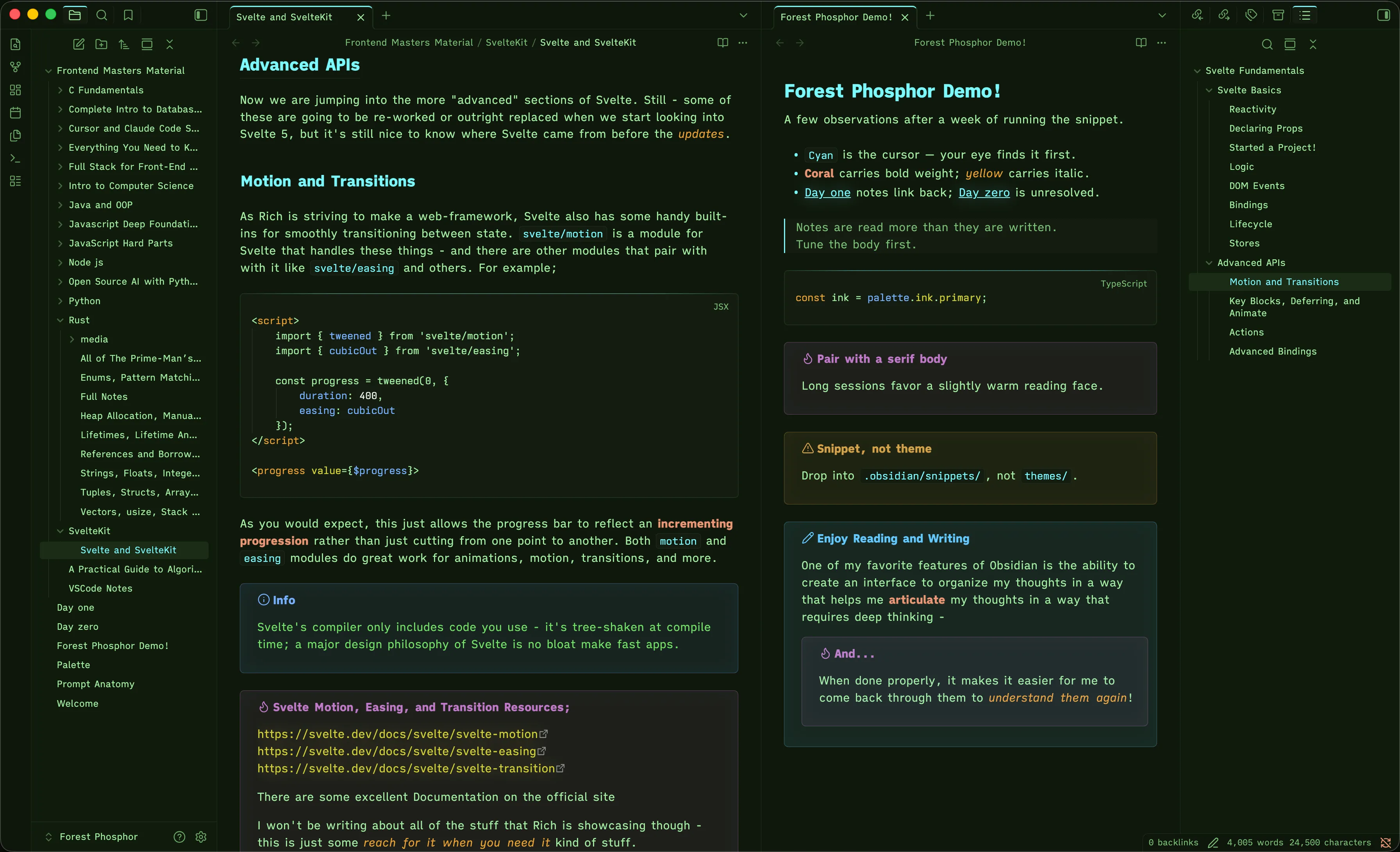
Saturated cyan, amber, and green glowing on dark glass — built around three classic phosphor types (P1 green, P3 amber, P11/P22 blue) layered over a deep forest substrate. Modern legibility, distinct accent contrast, and a glossy callout treatment that suggests phosphor bloom on glass.
Part of the Forest Phosphor family — a coordinated palette across Obsidian, VSCode, and iTerm2.
Install
From the community gallery: Settings → Appearance → Manage themes → Browse → search "Forest Phosphor"
Manual install:
- Download
theme.cssandmanifest.jsonfrom the latest release - Place them in
<your-vault>/.obsidian/themes/Forest Phosphor/ - Settings → Appearance → Themes → select Forest Phosphor
On modes
Forest Phosphor is dark-only by design. The aesthetic — phosphor glow on dark glass — depends on saturated highlights against a deep substrate; a paper variant would dilute the identity past the point of being the same theme.
The CSS handles light mode gracefully: both .theme-light and .theme-dark resolve to the same palette, so if you have system auto-toggle on, the toggle is just a no-op rather than a broken render.
Tested with
Confirmed clean rendering with: Daily Notes, Templates, Tasks, Calendar, Outliner, Style Settings. Most well-behaved community plugins should compose fine since Forest Phosphor uses Obsidian's standard CSS variables. If you find one that breaks, open an issue.
Customization
The theme exposes the standard Obsidian variables, so a snippet in .obsidian/snippets/ can override any single value without forking. For example, to make the callout glow more pronounced:
css .callout { box-shadow: inset 0 0 32px rgba(var(--callout-color), 0.08); }
It also composes with the Style Settings plugin if you'd rather tweak via UI.
Family
- Obsidian — this theme
- VSCode — forest-phosphor-vscode
- iTerm2 — forest-phosphor-iterm2
All three share the same hex values; switch between apps without losing the look.
Reporting issues
If you find an unstyled element or a plugin that doesn't render right, open an issue with a screenshot and the plugin name. Themes have long tails; user reports are how those gaps get found.
About
Built by Steven Theuerl (August) (@Steven-Theuerl). The full design system lives at forestphosphor.dev. Palette reference: traditional CRT phosphor types P1 (green), P3 (amber), P11/P22 (blue).
License
MIT — see LICENSE.