Search...Search plugins and themes...
⌘K
Sign in
  • Get started
  • Download
  • Pricing
  • Enterprise
  • Account
  • Obsidian
  • Overview
  • Sync
  • Publish
  • Canvas
  • Mobile
  • Web Clipper
  • CLI
  • Learn
  • Help
  • Developers
  • Changelog
  • About
  • Roadmap
  • Blog
  • Resources
  • System status
  • License overview
  • Terms of service
  • Privacy policy
  • Security
  • Community
  • Plugins
  • Themes
  • Discord
  • Forum / 中文论坛
  • Merch store
  • Brand guidelines
Follow us
DiscordTwitterBlueskyThreadsMastodonYouTubeGitHub
© 2026 Obsidian

Z-Tasking

zqDeJobzqDeJob1 downloads

Track long-term and ad-hoc tasks with daily logs, calendar, and Gantt. Each task is a Markdown note.

  • Overview
  • Scorecard
  • Updates1

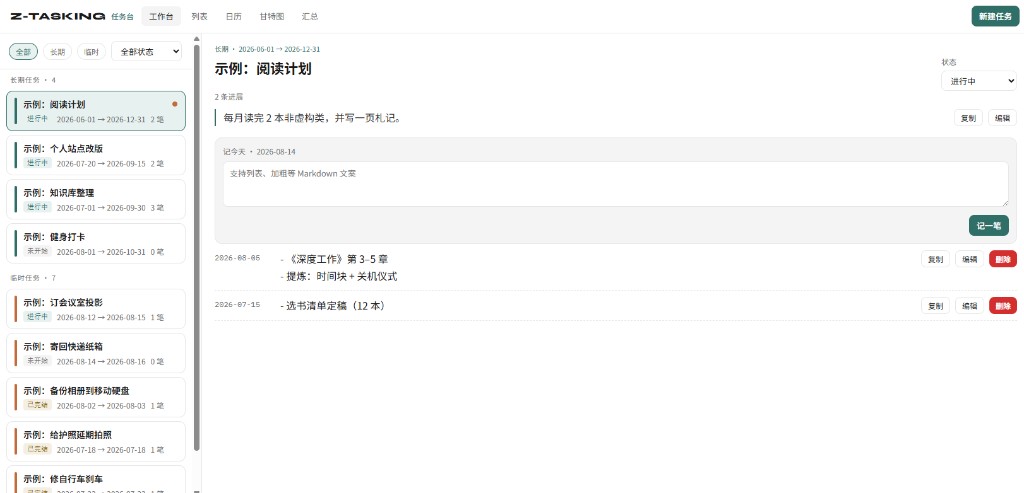
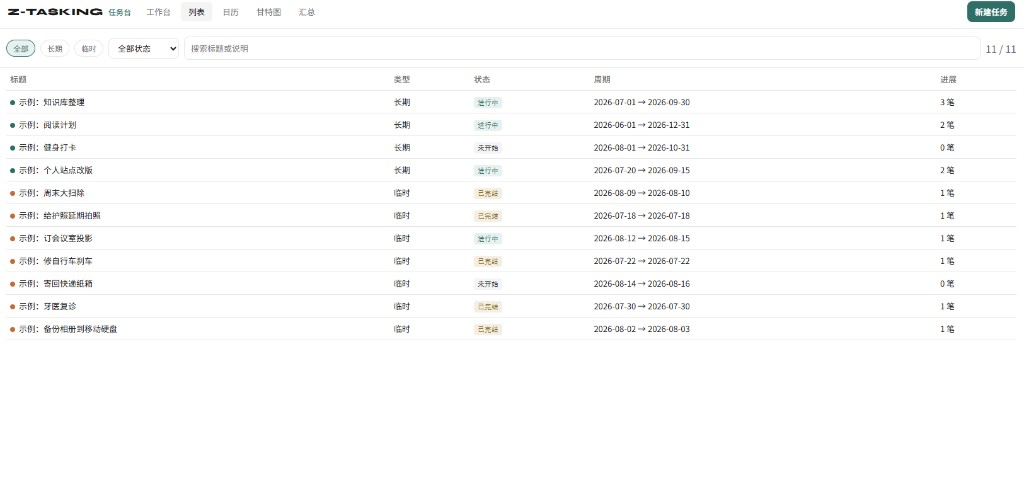
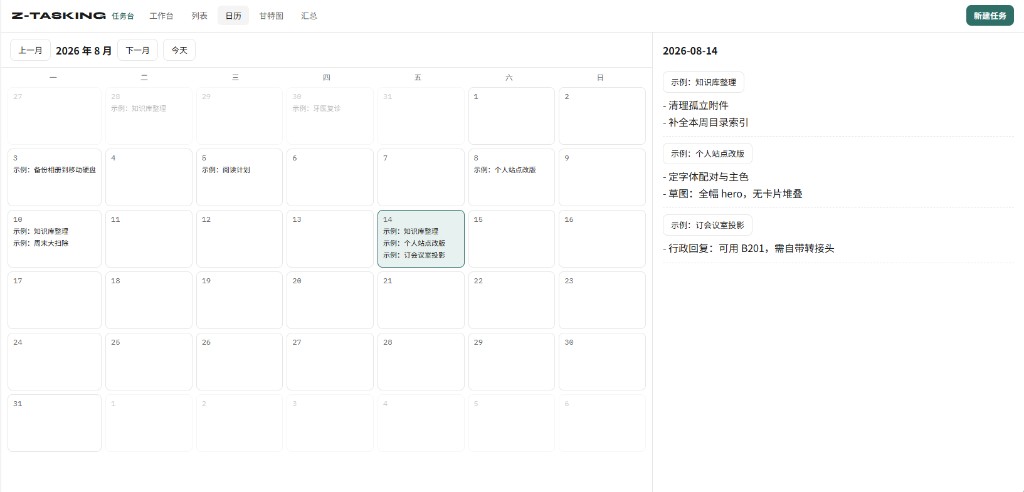
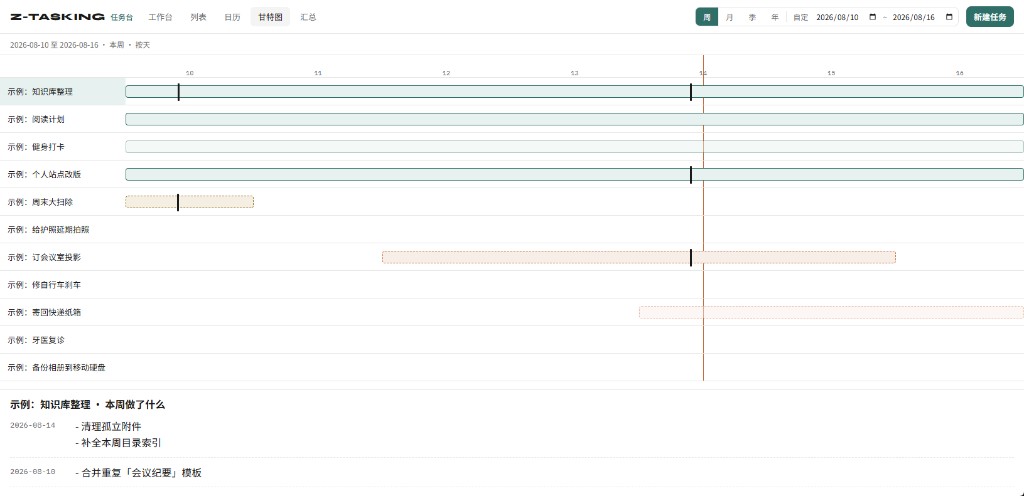
Obsidian 插件:长期 / 临时任务台。每个任务是一篇 Markdown 笔记,支持工作台记进展、全量列表、日历、甘特图和周期汇总。

插件 id:z-tasking(避免与社区里其他 tasking 插件冲突)

笔记结构

z-tasking/
  长期/
    某长期事项.md
  临时/
    某临时任务.md
---
type: long
status: doing
start: 2026-08-10
end: 2026-09-30
---

任务说明。

## 进展

### [[2026-08-13]]
今天做了什么。支持 **Markdown**、列表和 `[[双向链接]]`。

根目录可在设置里改,默认 z-tasking。

本地开发

npm install
npm run dev

把本仓库复制或 junction 到:

<Vault>/.obsidian/plugins/z-tasking/

需要这三个文件被 Obsidian 读到:

  • manifest.json
  • main.js(npm run build 或 npm run dev 生成)
  • styles.css

然后在 Obsidian:设置 → 第三方插件 → 启用 Z-Tasking。命令面板:Z-Tasking: 打开任务台。

界面预览

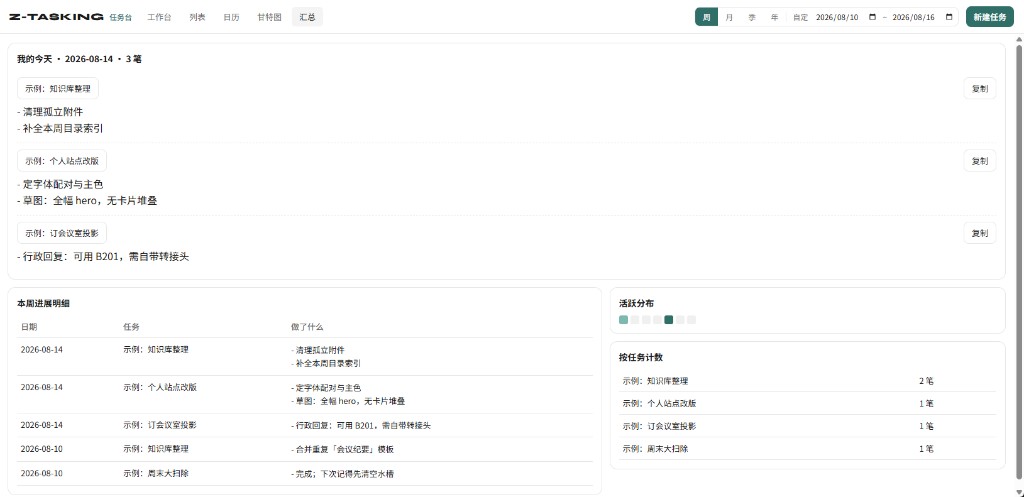
在线预览 · 截图来自交互原型(Mock 数据),点击可跳转体验。

工作台 列表
工作台 列表
日历 甘特图
日历 甘特图

汇总

原型里能看什么

工作台 / 列表 / 日历 / 甘特图 / 汇总;周月季年 + 自定时间范围;说明与进展的编辑/复制;侧边栏上限与点选不插队等。数据均为虚构示例,改完刷新页面即可。


发布到社区插件

按 官方流程。

发新版本(GitHub Release)

  1. 把 package.json / manifest.json 的 version 改成新版本(可用 npm version patch 等,会同步 versions.json)
  2. push 到 main 后打 tag(不要加 v 前缀,且必须与 manifest.json 的 version 一致):
git tag 0.2.0
git push origin 0.2.0
  1. GitHub Action .github/workflows/release.yml 会自动:npm ci → npm run build → 校验 tag === manifest version → 创建 Release,并上传 main.js、manifest.json、styles.css

首次提交社区目录

  1. 仓库保持 public,且已有与 manifest.json version 匹配的 GitHub Release
  2. 在 community.obsidian.md 登录,绑定 GitHub,Plugins → New plugin 提交本仓库
  3. 按自动审阅反馈修改;通过后约 24 小时内可在 Obsidian 社区插件里搜到

后续版本只需打 tag 发 Release,无需再向 obsidianmd/obsidian-releases 提 PR。

HealthExcellent
ReviewRisks
About
Manage long-term and temporary tasks as Markdown notes and record progress inside each note. View tasks in a workspace, list, calendar, Gantt chart, and periodic summaries with support for Markdown, lists, and wiki-style [[links]].
TasksCalendarProject management
Details
Current version
0.1.0
Last updated
Last month
Created
Last month
Updates
1 release
Downloads
1
Compatible with
Obsidian 1.5.0+
Platforms
Desktop, Mobile
License
MIT
Report bugRequest featureReport plugin
Author
zqDeJobzqDeJobzqdejob
GitHubzqdejob
  1. Community
  2. Plugins
  3. Tasks
  4. Z-Tasking

Related plugins

Operon

Task and project management system that unifies inline tasks and file-based tasks in the same workflows with Tables, Filters, Calendars, Kanban boards, Gantt views, Canvas, and time tracking.

TaskChute Plus

Execute TaskChute that slots today's tasks, tracks projects, adds comments, and keeps you focused on now.

TaskNotes

Note-based task management with calendar, pomodoro and time-tracking integration.

Tasks

Track tasks across your vault. Supports due dates, recurring tasks, done dates, sub-set of checklist items, and filtering. Maintained by Clare Macrae and Ilyas Landikov, created by Martin Schenck.

Day Planner

Turn tasks from daily notes, the Tasks plugin, and calendars into time blocks on an editable timeline, with built-in time tracker.

TickTickSync

Sync TickTick tasks.

dotpm

Full-featured task and project management: stunning Gantt charts, Kanban boards, Table views, customizable fields, due date notifications, dependancies

Base Board

Organize notes into Kanban boards using frontmatter properties. Drag and drop cards between columns powered by Bases.

Tasks Calendar Wrapper

Simple wrapper for Tasks Calendar and Tasks Timeline.

Apex Dashboard

Your personal command center — memos, todos, and projects in one stunning glassmorphism dashboard.