Xingyu Note Atlas
 Eventhorizon-XingYu 22 downloads
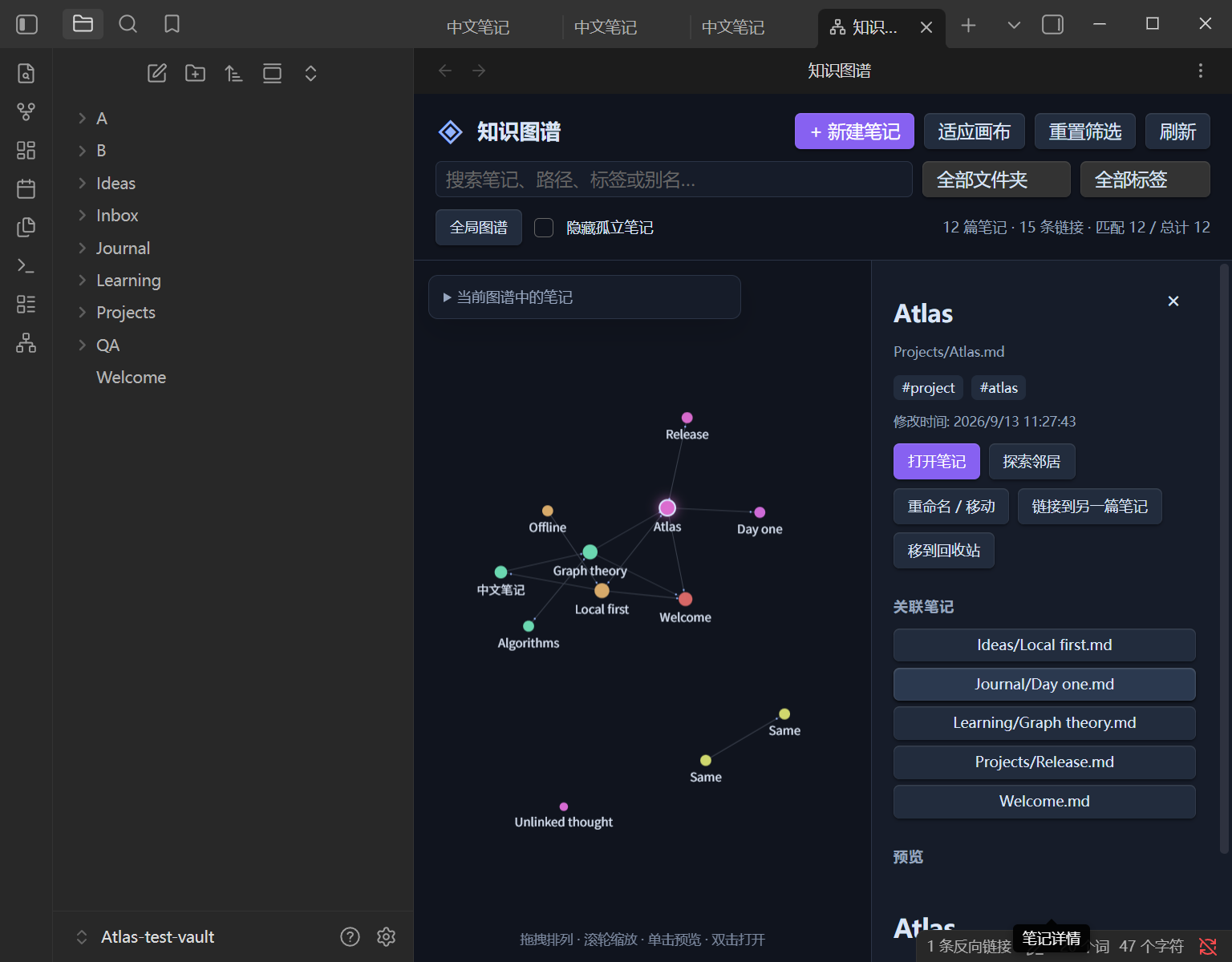
Explore and manage notes in an interactive graph with search, previews, local neighborhoods and live updates.
- Overview
- Scorecard
- Updates4
A native Obsidian plugin for exploring and managing Markdown notes in an interactive force-directed graph. No separate website, data export or server is needed.
Features
- Live graph from Obsidian's resolved internal links, colored by folder.
- Pan, zoom, drag-to-pin, animated links and selectable labels.
- Search filenames, paths, aliases and tags; filter by folder, tag or connected notes.
- Explore incoming and outgoing neighbors to a depth of 1–3.
- Native Markdown previews, open notes, create, rename/move, link and trash with confirmation.
- Chinese/English UI, dark or theme-aware canvas, reduced-motion support.
- Full-index filtering with a configurable drawing limit (default 1500, maximum 10000).
Install
Requires Obsidian 1.8.7+. Copy release files main.js, manifest.json and styles.css into <vault>/.obsidian/plugins/xingyu-note-atlas/, then enable Xingyu Note Atlas under Community plugins. Replace .obsidian if your vault uses a different configuration directory. Reload Obsidian if needed. Open via the ribbon network icon or the command Xingyu Note Atlas: Open knowledge atlas.
Download the assets from GitHub Releases. The plugin is now listed in the Obsidian Community directory, with automated review in progress. Manual installation works independently of review status.
The plugin ID is xingyu-note-atlas. This project is distinct from the third-party Knowledge Atlas plugin; never overwrite that plugin's installation with these files.
Usage and behavior
Click a node to preview; double-click to open. Expand the note list for keyboard-accessible selection. Dragging pins a node until the view closes; right-click to release it. Settings include language, appearance, animations, labels, exclusions, node limit and neighborhood depth.
New and renamed paths are relative to the current vault. Missing parent folders are created; existing files are never overwritten. Rename/move uses Obsidian's FileManager and respects its automatic link-update preference. Linking appends an internal link after confirmation using an atomic vault operation. Trash uses the host's configured deletion method after confirmation.
Only existing Markdown notes and resolved links are graph nodes/edges. Attachments and unresolved targets are not included. Metadata updates appear when the host completes indexing. Search uses the whole index even when drawing is limited; the UI explicitly reports the limit.
The plugin makes no network requests, collects no telemetry and bundles its runtime dependencies. Native Markdown previews may render remote embeds or content from other installed plugins, just as Obsidian normally does. No vault data or local paths are shipped in releases.
Build and contribute
Node.js 22+:
npm ci --ignore-scripts
npm run check
npm run package
The installable directory is dist/xingyu-note-atlas/. npm run dev watches source files. See testing, release instructions and contributing. The repository includes CI and a version-tag release workflow.
License
MIT. Bundled dependency licenses: THIRD_PARTY_NOTICES.md. Not affiliated with Obsidian.