xiaoji
 CH22 downloads
Capture, find and revisit your thoughts in plain Markdown. 简洁、原生 Markdown 的小记空间。
- Overview
- Scorecard
- Updates3
简洁、本地优先的 Obsidian 小记插件,让灵感、日常与待办留在自己的 Markdown 里。
A quiet, local-first memo plugin for Obsidian. Keep ideas, everyday moments and tasks in your own Markdown files.
功能 · Features
| 中文 | English |
|---|---|
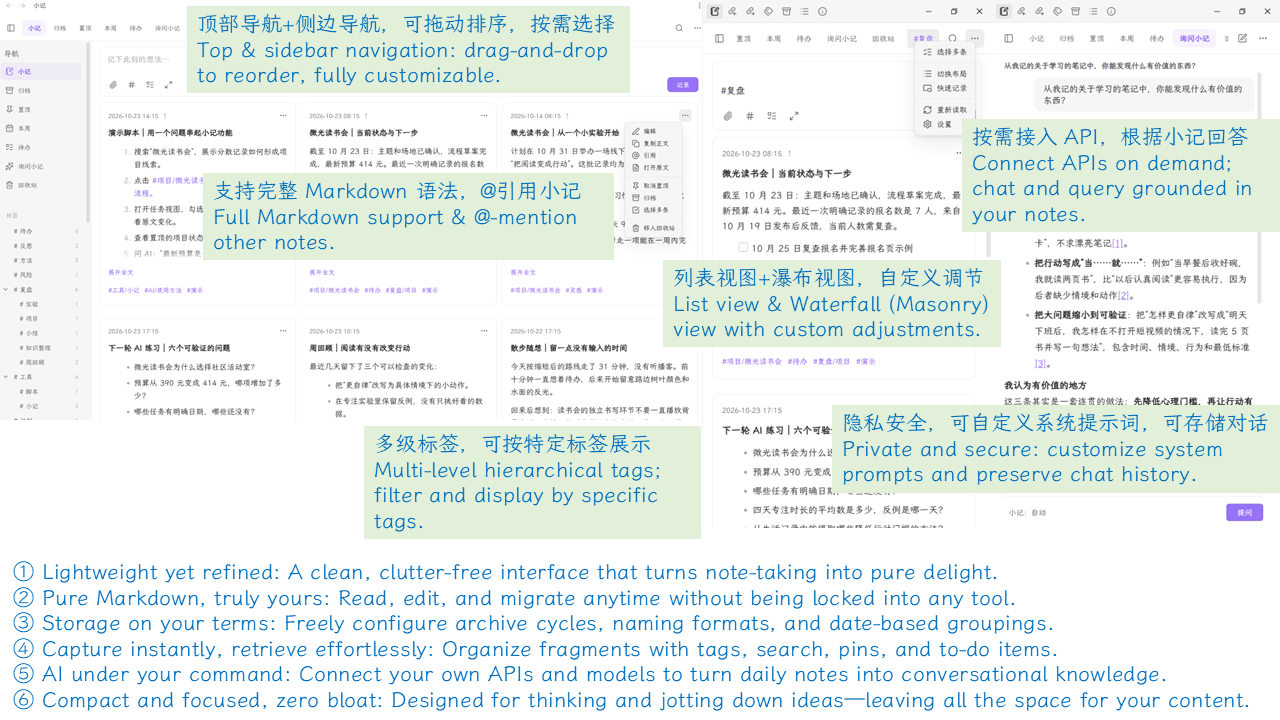
| 原生 Markdown,支持标签、待办、附件、代码、表格与公式 | Native Markdown with tags, tasks, attachments, code, tables and math |
| 列表与瀑布流、置顶、归档、层级标签、搜索与批量整理 | List and waterfall layouts, pins, archives, nested tags, search and batch actions |
| 顶部与侧栏独立配置,拖动排序 | Configure top and sidebar navigation separately; drag to reorder |
| 桌面快速记录小窗,可置顶并转回主页面继续编辑 | Desktop quick capture with always-on-top and transfer to the main composer |
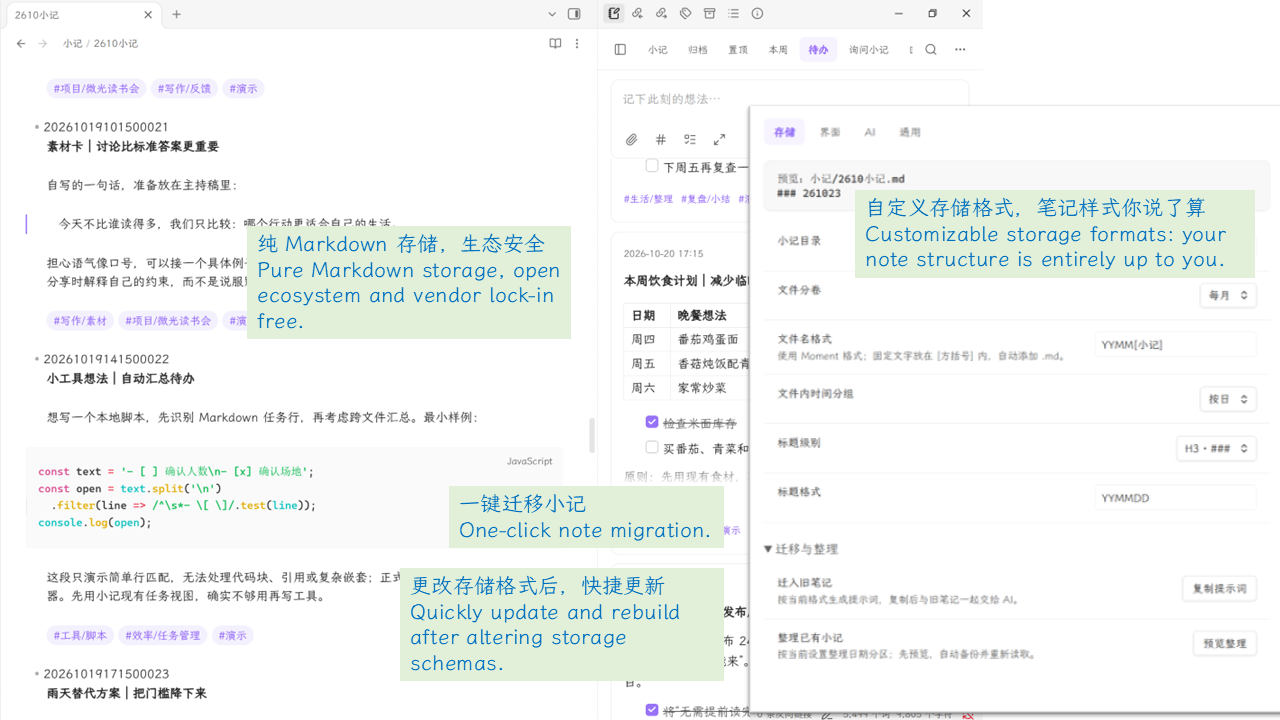
| 自定义存储、日期分组,Markdown 回收站与格式备份 | Flexible storage and date headings, Markdown Trash and formatting backups |
| 可选 AI:检索小记、自定义提示词、保存或临时对话 | Optional AI with memo retrieval, custom prompts, saved or temporary chats |
安装与升级 · Installation & updates
需要 Obsidian 1.8.7+;独立快速记录小窗仅限桌面端。
Requires Obsidian 1.8.7+. The standalone quick-capture window is desktop-only.
- 从同一版本的 Release 下载
main.js、manifest.json、styles.css;本仓库根目录也保留这三个文件。 Download these three files from the same release. They are also included in the repository root. - 放入笔记库的
.obsidian/plugins/xiaoji/,重新加载 Obsidian,在「第三方插件」中启用。 Place them in<vault>/.obsidian/plugins/xiaoji/, reload Obsidian and enable xiaoji under Community plugins. - 升级时只替换上述文件,保留
data.json、笔记与附件。 When updating, replace only these files. Keepdata.json, notes and attachments.
记录与整理 · Capture & organize
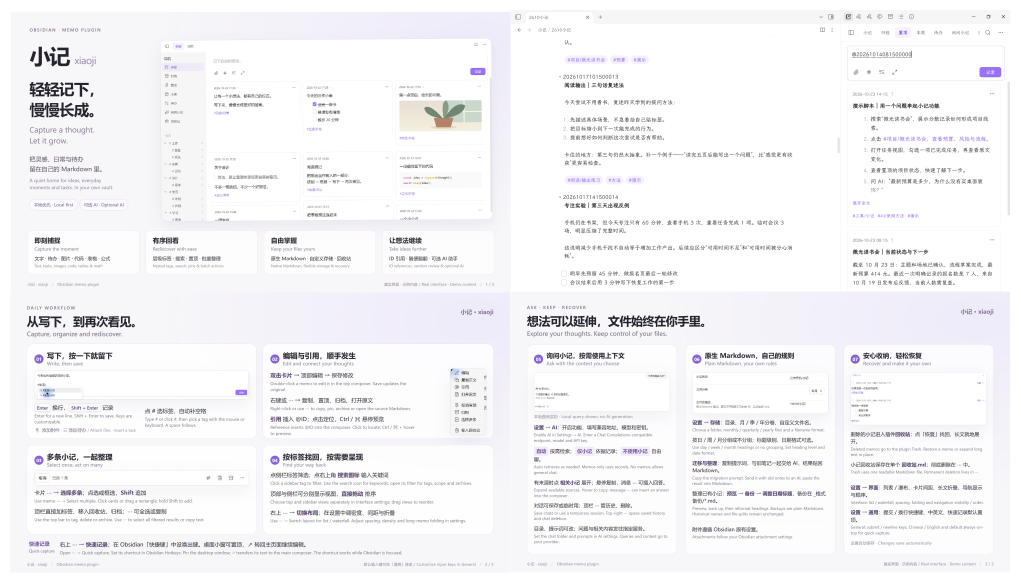
- 点击侧栏小记图标或从命令面板打开。Enter 换行,Shift+Enter 记录;快捷键可在「通用」中修改。 Open from the ribbon icon or command palette. Enter inserts a newline; Shift+Enter saves. Customize both keys in General.
- 输入
#或点击标签按钮选择标签;双击卡片回到顶部编辑,右键或⋯管理小记。 Type#or click the tag button for suggestions. Double-click a card to edit at the top; right-click or use⋯for actions. - 点击标签筛选;进入多选后,可点选或拖动框选,按住 Shift 追加选择。 Filter by tags. In selection mode, click or drag a rectangle; hold Shift to add to the selection.
- 点击
@ID引用定位,Ctrl/⌘ 悬停预览;删除的小记可在插件回收站恢复。 Click an@IDreference to locate its memo; Ctrl/⌘ + hover previews it. Restore deleted memos from the plugin Trash.
AI 与文件 · AI & files
- AI 默认关闭。启用后配置兼容 Chat Completions 的服务地址、模型和密钥;选择「自动」「仅小记」或「不使用小记」,有来源的回答可展开相关小记。 AI is off by default. Configure a Chat Completions-compatible endpoint, model and key. Choose Auto, Memos only or No memos; expand related sources when available.
- 可自定义对话目录、提示词,或使用临时会话。问题及按模式选择的小记内容会发送给服务商;临时模式不控制服务商的数据保留。 Customize the chat folder and prompts, or use temporary sessions. Questions and context selected by the mode go to your provider; temporary mode does not control provider retention.
- 普通记录与搜索无需联网。密钥使用 Obsidian 密钥存储;不支持时仅保留在当前会话,不写入笔记或插件配置。 Capture and search work offline. Keys use Obsidian secret storage; unsupported hosts keep them in memory only, outside notes and plugin settings.
- 可按月/季/年分卷,自定义文件名与日期标题。整理历史格式会先预览并备份,不自动重命名或重新分卷;迁移提示词只复制,不自动上传旧笔记。 Choose monthly, quarterly or yearly files and custom names/headings. Reformatting previews and backs up existing notes without renaming or repartitioning them. Migration prompts are copied; old notes are not uploaded automatically.
0.16.2 · 搜索与流畅度 / Search & responsiveness
- 搜索结果支持关键词、短语和标签词高亮,排除词不高亮;折叠或不可见的源文匹配提供上下文摘要。 Search highlights terms and phrases without highlighting exclusions; hidden source matches include a contextual excerpt.
- 导航展开与宽度变化不重新查询小记;宽度滑块即时预览并合并保存。 Sidebar and width updates reuse query results; appearance sliders preview immediately and coalesce saves.
- 屏幕附近按需挂载 Markdown,远处卡片释放组件并保留轻量高度占位;轻量占位数量随已加载记录增长。 Markdown components mount near the viewport and release offscreen, retaining lightweight height placeholders per loaded record.
开发 · Development
使用 Node.js 22.13+ 与 npm;验证包含代码检查、类型检查、回归测试和生产构建。
Use Node.js 22.13+ and npm. Verification runs lint, type checks, regression tests and a production build.
npm ci
npm run verify
npm run package
安装包输出到 dist/。更新记录见 CHANGELOG.md,兼容性说明见 REVIEW_NOTES.md。
Packages are written to dist/. See CHANGELOG.md for changes and REVIEW_NOTES.md for compatibility notes.
许可 · License
HealthExcellent
ReviewSatisfactory
About
Capture local Markdown quick notes via a compact top-entry or source editor with tag autocomplete, todos, attachments, pinning, archiving, hierarchical tags, list or waterfall views, search and batch actions. Open a floating quick-capture window, split files by month/quarter/year or keep single-file archives, use a single-file recycle bin and format-preview backups, and opt into Chat Completions–style AI conversations stored in custom folders.Details
Current version
0.16.2
Last updated
Yesterday
Created
Yesterday
Updates
3 releases
Downloads
22
Compatible with
Obsidian 1.8.7+
Platforms
Desktop, Mobile
License
MIT
Author