Write Good
 markahesketh4k downloads
Linter for English prose and improving writing style
- Overview
- Scorecard
- Updates6
An Obsidian plugin that integrates write good, a linter for English prose and improving writing style.
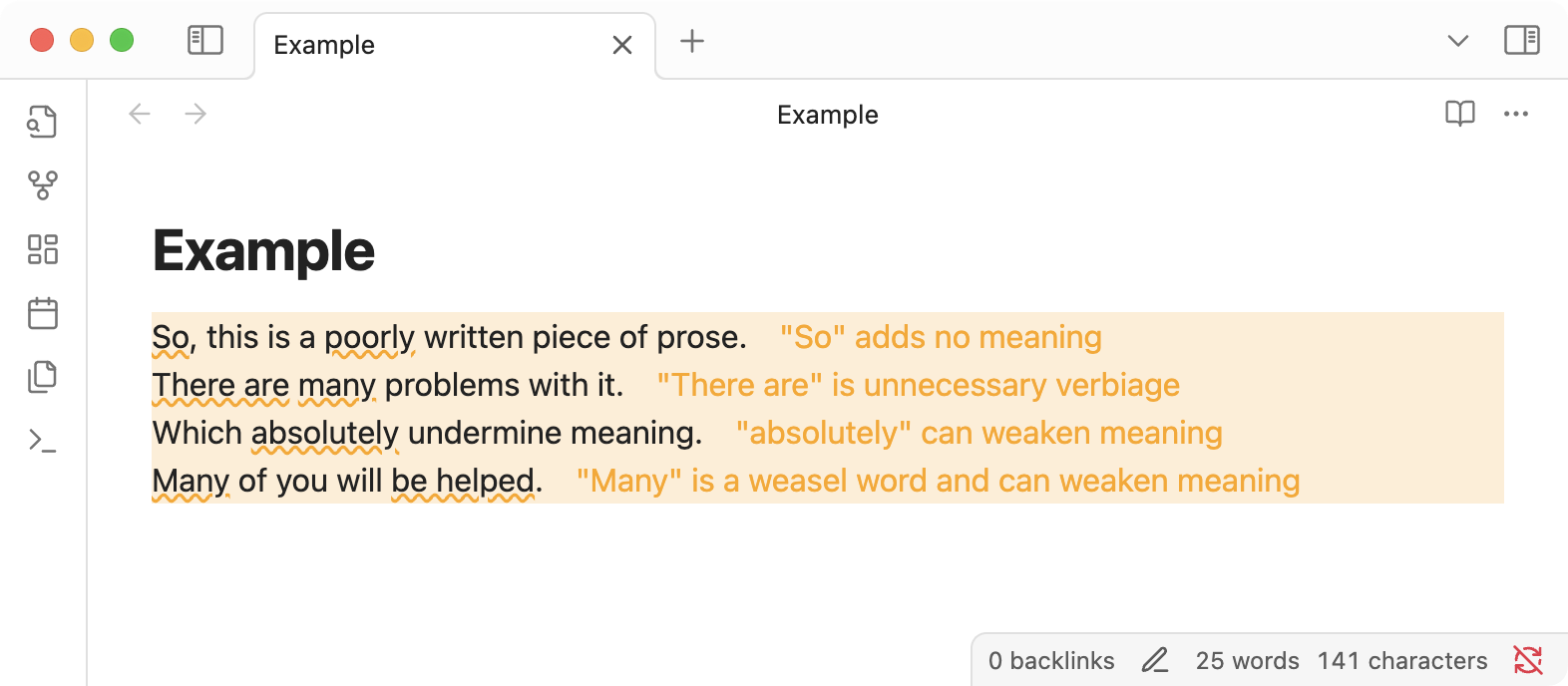
Features
- Identifies common writing issues in your notes
- Offers suggestions to improve clarity and style, including:
- Passive voice: Highlights use of passive voice
- Lexical illusions: Detects repeated words
- Sentence starts with "So": Flags sentences that start with "So"
- Sentence starts with "There is/are": Flags sentences that start with "There is" or "There are"
- Weasel words: Detects words like "many", "various", "very"
- Adverbs: Highlights adverbs (words ending in -ly)
- Wordy phrases: Flags wordy phrases that can be simplified
- Clichés: Detects cliches
- E-Prime: Flags use of "to be" verbs (E-Prime style)
- Toggle checks per note via the command palette or a custom hotkey
Settings
- Enabled by default: Automatically check newly created or opened notes
- Configurable checks: Turn individual checks on or off (e.g., passive voice, adverbs, etc.)
Installation
From Obsidian Community Plugins
- Open Obsidian Settings
- Go to Community Plugins and turn off Safe Mode
- Click Browse and search for "Write Good"
- Install the plugin
- Enable the plugin in your Community Plugins settings
Manual Installation
- Navigate to the latest release from the Releases page
- Download
main.js,manifest.json, andstyle.cssfrom the latest release - Move these files into your Obsidian vault's
.obsidian/plugins/write-good/directory - Reload Obsidian
- Enable the plugin in your Community Plugins settings
Usage
- Open any note in your vault
- Writing suggestions will automatically appear as you type
Development
- Clone this repository to your machine
- Run
bin/npm installto install dependencies - Run
bin/npm run devto start compilation in watch mode - Copy or symlink the repository to your Obsidian vault's plugins folder:
.obsidian/plugins/write-good-obsidian/
Contributing
Bug reports and pull requests are welcome on GitHub at https://github.com/markahesketh/write-good-obsidian.
License
This plugin is available as open source under the terms of the MIT License.
HealthGood
ReviewCaution
About
Check English prose for common issues and receive inline suggestions to improve clarity and style. Detect passive voice, repeated words, sentences starting with "So" or "There is/are", weasel words, adverbs, wordy phrases, clichés, and E-Prime "to be" verbs; toggle checks per note via the command palette or a hotkey.Details
Current version
1.2.1
Last updated
Last year
Created
2 years ago
Updates
6 releases
Downloads
4k
Compatible with
Obsidian 0.15.0+
Platforms
Desktop, Mobile
License
MIT