Vault Cleanup Dashboard
 lunan331 downloads
Visual dashboard for intelligently cleaning orphaned files and attachments with scheduled auto-cleanup and file protection.
- Overview
- Scorecard
- Updates2
An Obsidian plugin for intelligently cleaning up orphaned files and attachments in your vault.
Features
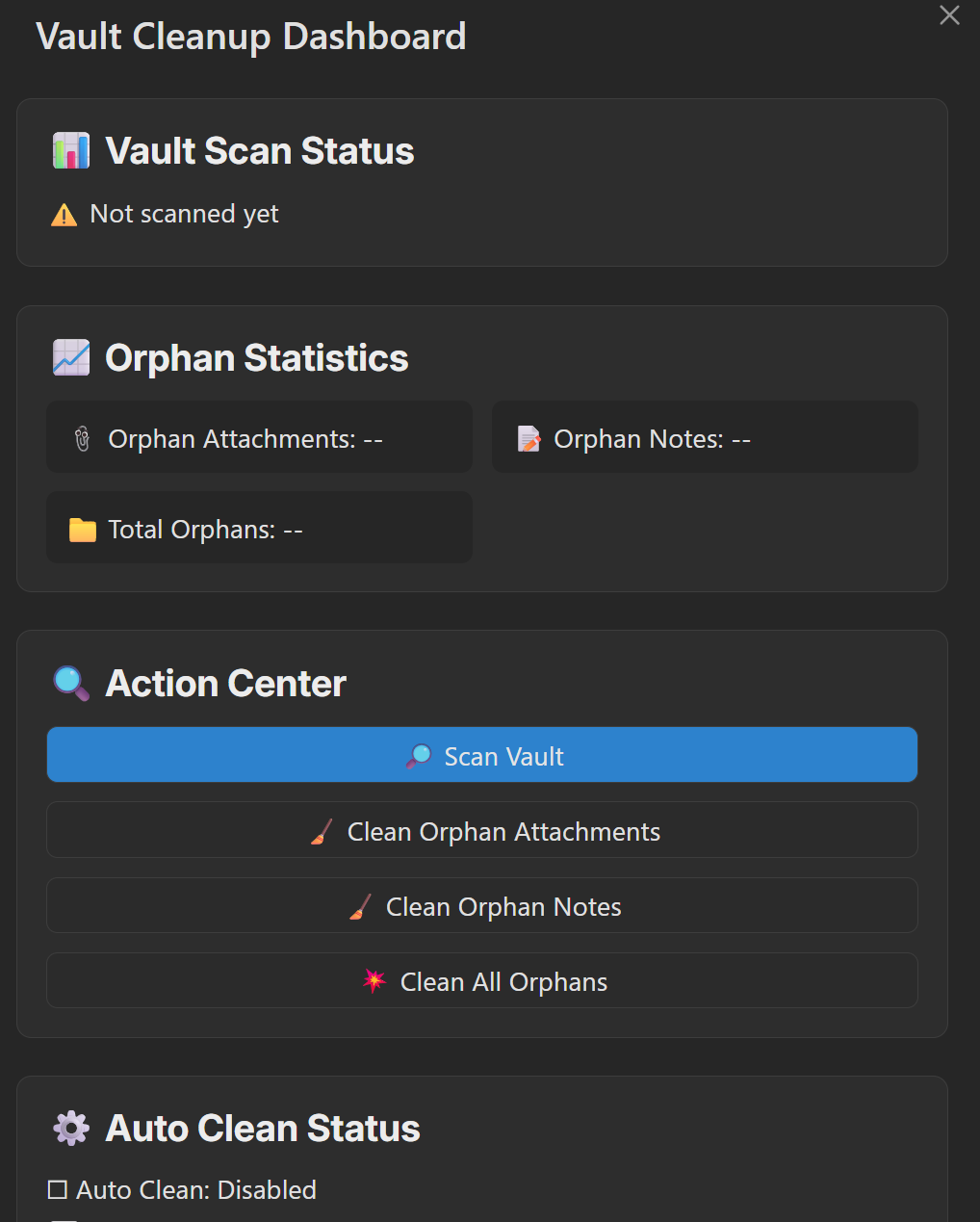
- Visual Dashboard: One-click access via ribbon icon with real-time scan status and statistics
- Smart Detection: Accurately identifies orphaned notes, attachments, and other files, including Canvas file links
- Selective Deletion: Preview and confirm files before deletion to prevent accidental loss
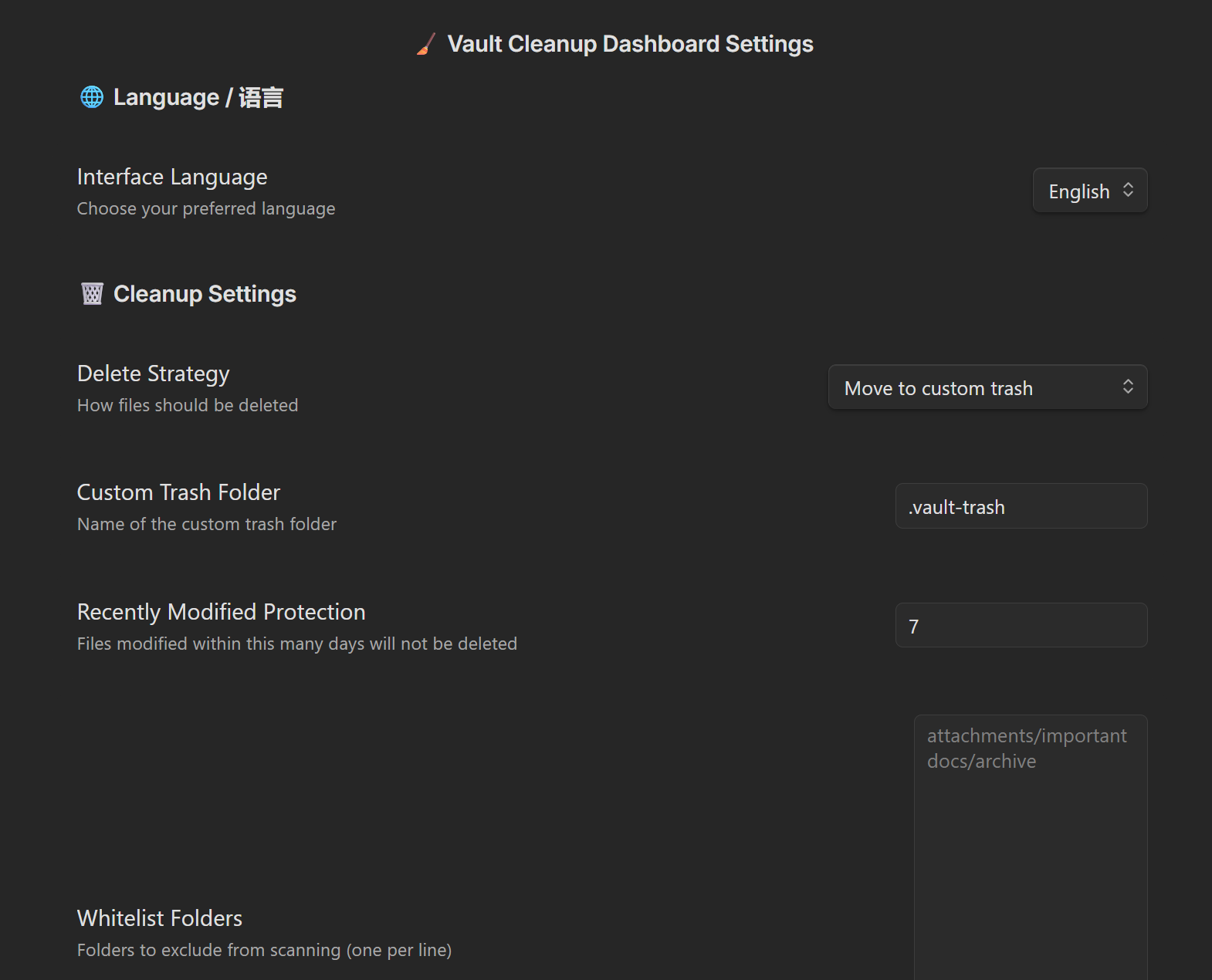
- Custom Recycle Bin: Deleted files are moved to a custom trash folder (default:
.vault-trash) for easy recovery - Scheduled Auto-Cleanup: Automatically scan and clean orphaned attachments at customizable intervals (in days)
- File Protection: Recently modified files are automatically protected (default: 7 days) to prevent accidental deletion
- Flexible Configuration: Supports whitelist folders, regex ignore patterns, custom attachment paths, and more
- Bilingual Interface: Full internationalization support with English and Chinese
How It Works
Orphan File Detection
A file is considered orphaned when it meets ALL of the following conditions:
- No inbound links: No other file links to it
- No outbound links: It doesn't link to any other file (including attachments - linking to an attachment means it's not orphaned)
- No canvas references: Not referenced in any Canvas file
Attachment Detection
A file is classified as an attachment if it matches your configured attachment paths:
| Path Type | Example | Matching Logic |
|---|---|---|
| Absolute path | attachments |
File parent path or file path starts with it |
| Relative path | ./attachments |
File path starts with attachments (default) or any parent directory name matches attachments (alternative algorithm) |
Excluded from Scanning
- Files in whitelisted folders
- Files matching ignore patterns (regex)
- Recently modified files (within protection period, default: 7 days)
- Files in
.obsidian/and other system folders
Screenshots
Usage
Quick Start
- Click the Vault Cleanup Dashboard icon in the sidebar to open the cleaning dashboard
- Click Scan Vault to find orphaned files
- Review statistics to see the number of orphaned files
- Choose to clean attachments, notes, or all orphaned files as needed
- Confirm the file list in the preview modal and execute cleanup
Command Palette
Quick access via Obsidian's command palette (Ctrl/Cmd + P):
- Open Dashboard - Open the visual cleaning dashboard
- Clean Orphaned Attachments - Scan and clean orphaned attachments only
- Clean Orphaned Notes - Scan and clean orphaned notes only
- Clean All Orphaned Files - Scan and clean all types of orphaned files
Installation
From Community Plugins (Recommended)
- Open Obsidian Settings → Community Plugins → Browse
- Search for "Vault Cleanup Dashboard"
- Click Install and Enable
Manual Installation
- Download the latest release from Releases
- Extract the plugin folder into your vault's
.obsidian/plugins/directory - Open Obsidian Settings → Community Plugins → Enable "Vault Cleanup Dashboard"
Configuration
Cleanup Settings
| Setting | Description | Default |
|---|---|---|
| Delete Strategy | Move to custom trash or permanent delete (dangerous) | Custom trash |
| Custom Trash Path | Folder location for deleted files | .vault-trash |
| Recently Modified Protection | Files modified within this many days are protected | 7 days |
| Whitelist Folders | Folders excluded from scanning (one per line) | None |
Auto-Cleanup Settings
| Setting | Description | Default |
|---|---|---|
| Enable Auto-Cleanup | Automatically clean orphaned attachments on schedule | Disabled |
| Cleanup Interval | Frequency of auto-cleanup execution (days) | 3 days |
| Check on Vault Open | Run auto-cleanup check when vault is opened | Enabled |
| Check on Plugin Load | Run auto-cleanup check when plugin is loaded | Enabled |
Note: Auto-cleanup only affects attachments and will not delete note files, ensuring your important content is safe.
Advanced Settings
| Setting | Description | Default |
|---|---|---|
| Override Attachment Folders | Custom attachment storage locations (one per line) | Follows vault settings |
| Ignore Patterns | Regex patterns; matching files will be excluded | None |
| Test Settings | Test if a path is ignored (red = ignored, green = kept) | - |
| Alternative Attachment Algorithm | Enable if attachments in subfolders are not detected | Disabled |
Development
Prerequisites
- Node.js (v16 or higher)
- npm or yarn
Setup
# Clone the repository
git clone https://github.com/wlunan/vault-cleaner.git
cd vault-cleaner

# Install dependencies
npm install
Development Commands
# Development mode with hot reload (watches for changes and rebuilds)
npm run dev

# Build for production
npm run build
Local Testing in Obsidian
Method 1: Using Test Vault (Recommended)
- Run
npm run devto start the development server - Open the
test-vaultfolder in Obsidian as a vault - Enable the plugin in Settings → Community Plugins
- Changes will auto-reload when you modify source files
Method 2: Copy to Your Vault
- Run
npm run buildto build the plugin - Copy the following files to your vault's
.obsidian/plugins/vault-cleaner/directory:main.jsmanifest.jsonstyles.css
- Enable the plugin in Settings → Community Plugins
- Run
npm run devfor auto-rebuild, then reload Obsidian to see changes
Method 3: Using hot-reload Plugin
- Install the hot-reload plugin in your vault
- Create a file named
.hot-reloadin your vault root - Run
npm run dev- changes will auto-reload without restarting Obsidian
Release
# Bump version (updates package.json, manifest.json)
npm run version

# Commit and tag
git add .
git commit -m "Release vX.Y.Z"
git tag vX.Y.Z
git push && git push --tags
Create a new release on GitHub with the built files (main.js, manifest.json, styles.css).
Project Structure
src/
├── main.ts              # Plugin entry point, registers commands and ribbon icon
├── dashboardModal.ts    # Visual cleaning dashboard
├── scanService.ts       # Orphan file scanning service
├── actionService.ts     # File operation service (delete/restore)
├── previewModal.ts      # Delete preview confirmation modal
├── autoCleanScheduler.ts # Scheduled auto-cleanup scheduler
├── settings.ts          # Settings interface
└── locales/             # Internationalization language packs
    ├── zh-CN.ts         # Chinese
    └── en-US.ts         # English
License
MIT
Acknowledgments
- This plugin is a fork of nuke-orphans-plugin, enhanced with a visual dashboard, scheduled auto-cleanup, file protection mechanisms, and more. Thanks to the original author for their excellent work.
- Thanks to all developers contributing to the Obsidian community.
HealthExcellent
ReviewSatisfactory
About
Scan the vault for orphaned notes, attachments, and other files via a visual dashboard with real-time scan status and statistics. Preview and selectively delete items, move removed files to a customizable vault trash for recovery, schedule automatic attachment cleanups, and protect recently modified files from deletion.Details
Current version
1.0.3
Last updated
4 months ago
Created
4 months ago
Updates
2 releases
Downloads
331
Compatible with
Obsidian 1.3.0+
Platforms
Desktop, Mobile
License
MIT
Author