wk image caption
 bcs594 downloads
Show elegant captions under images in both Live Preview and Reading Mode.
- Overview
- Scorecard
- Updates3
English | 简体中文
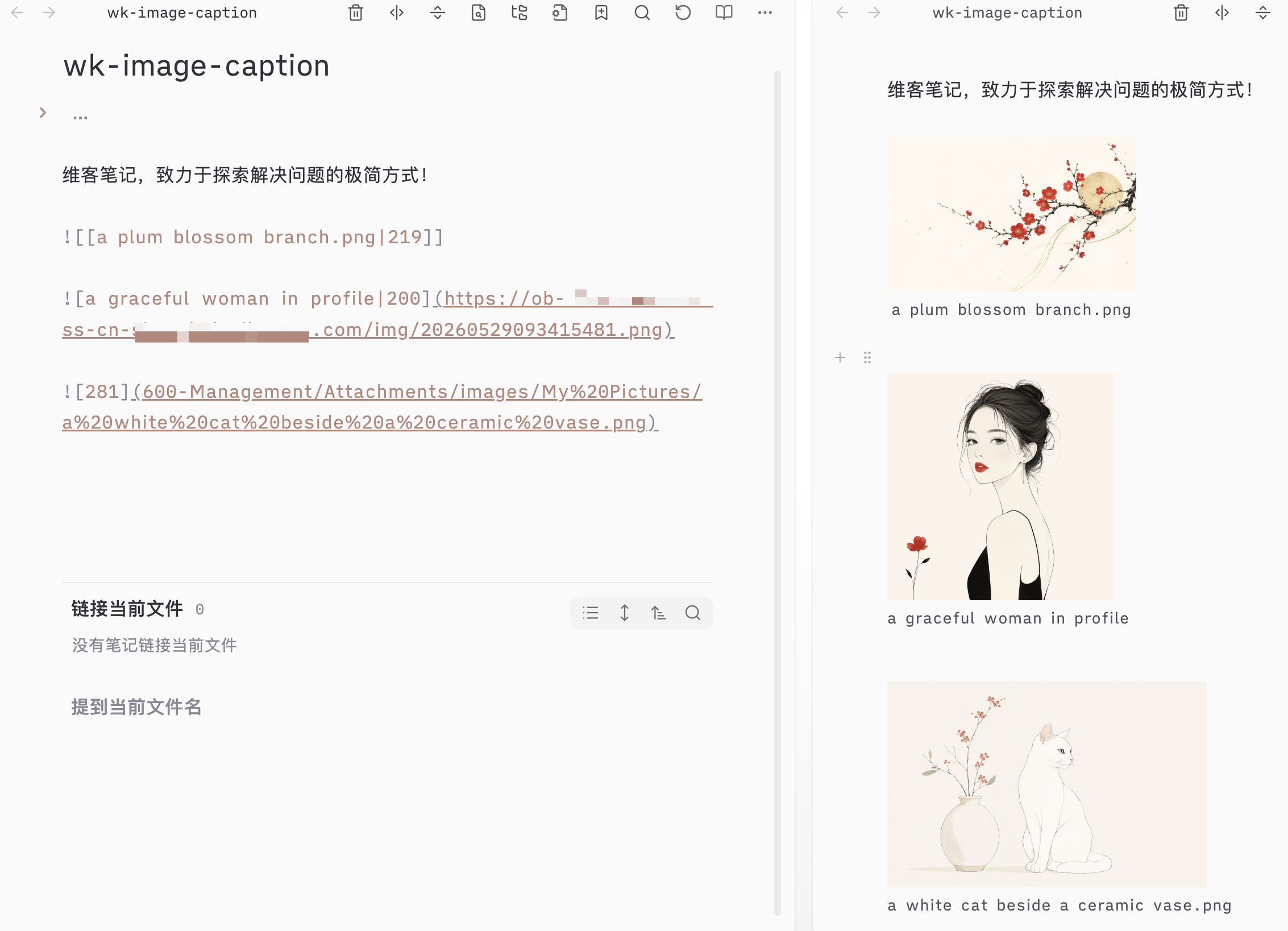
Show elegant, customizable captions under images in both Live Preview (Editing) and Reading Mode in Obsidian. Fully supports standard Markdown images, Wiki embeds, and external image hosts.
✨ Features
- 🔄 Dual Mode Support: Works flawlessly in both Reading Mode and Live Preview (Editing Mode).
- 📝 Syntax Autoclass: Supports both standard Markdown links
and Obsidian Wiki links![[image.png|alias]]. - 🏷️ Smart Size Filter: Automatically parses and strips out image resizing parameters (e.g.,
|300,|200x300) to extract only the pure caption text. If only size is specified (e.g.,![[image.png|300]]), no caption is displayed. - 🎨 Dynamic CSS Layout: Leverages CSS
:has()parent selector to automatically correct parent Flexbox layout (flex-direction: column) when captions are injected. No layout shifting, and zero overlapping. - 🪟 Multi-Window (Popout) Ready: Fully adheres to Obsidian's modern window management, using
activeDocumentand context-aware elements instead of globaldocument. Zero crashes when moving tabs to separate windows. - ⚙️ Customizable Settings:
- Toggle displaying file names as a fallback caption when no alt/alias text is set.
- Customize text alignment (Left, Center, Right).
- Customize text styling (Italic or Normal).
- Instant UI updates without reloading the plugin.
🚀 Installation
Option 1: Via Obsidian Community Plugins (Recommended)
- Open Obsidian Settings > Community plugins.
- Click Browse and search for
wk image caption. - Click Install, then Enable the plugin.
Option 2: Manual Installation
- Go to the Releases page and download
main.js,manifest.json, andstyles.css. - Locate your Obsidian Vault's plugins folder:
<vault>/.obsidian/plugins/. - Create a folder named
wk-image-captionand paste the downloaded files inside. - Open Obsidian Settings > Community plugins and toggle wk image caption on.
🛠️ Usage & Examples
1. Wiki Embed Format
# Show caption
![[landscape.png|A majestic view of the Swiss Alps]]

# Show resized image with caption (strips the size automatically)
![[landscape.png|Snowy mountain peaks|300]]

# Resize only (no caption shown)
![[landscape.png|400]]
2. Standard Markdown Format
# Local image

# External image host

💻 Development
Contributions are welcome! If you want to build this plugin from source:
- Clone this repository to your computer.
- Install dependencies:
npm install - Run the compiler in development mode (hot reloading on save):
npm run dev - Build for production:
npm run build
📄 License
This plugin is licensed under the MIT License.
简体中文
在 Obsidian 的编辑模式(Live Preview)和阅读模式下为图片显示优雅、可定制的说明文字(Caption)。支持标准 Markdown 图片、Wiki 嵌入图片以及外部图床图片。
✨ 核心功能
- 🔄 双模式完美渲染:同时适配 阅读模式 (Reading Mode) 与 实时预览模式 (Live Preview)。
- 📝 语法全兼容:兼容标准 Markdown
及 Wiki 内链![[image.png|别名]]。 - 🏷️ 智能尺寸过滤:自动识别并过滤图片缩放后缀(如
|300或|200x300),完美提取文字部分作为说明。若仅指定了尺寸,则保持界面清爽,不生成空白说明。 - 🎨 智能布局抗干涉:借助 CSS
:has()伪类关系选择器,仅在容器内含有说明文字时,动态将父 Flex 容器翻转为垂直排列(column),杜绝文字错位挤压到图片右侧的排版痛点。 - 🪟 完美兼容独立多窗口:遵循多窗口上下文安全规范。在 Obsidian 最新的独立标签页/分屏窗口(Popout Window)中进行编辑与阅读,100% 零崩溃、零报错。
- ⚙️ 即时生效的个性化设置:
- 支持未指定别名时是否以“图片文件名”作为兜底说明的开关。
- 支持对齐方式(靠左、居中、靠右)自定义。
- 支持字体风格(常规、斜体)自定义。
- 修改设置即时响应,无需重载软件。
🚀 安装方式
方法一:通过 Obsidian 社区插件市场安装(推荐)
- 打开 Obsidian 的 设置 > 社区插件。
- 点击 浏览 并搜索
wk image caption。 - 点击 安装,随后选择 启用。
方法二:手动安装
- 前往 Releases 下载
main.js、manifest.json和styles.css。 - 进入您 Vault 的插件目录
<vault>/.obsidian/plugins/。 - 新建名为
wk-image-caption的文件夹,将这三个文件放进去。 - 打开 Obsidian 的 社区插件 选项卡,启用该插件。
HealthGood
ReviewPassed
About
Show readable, customizable captions beneath images in Live Preview and Reading Mode, supporting standard Markdown images, Obsidian wiki embeds, and external hosts. Strip image sizing parameters to extract pure caption text, fall back to file names when none exist, and preserve layout (including popout windows) with CSS fixes.Details
Current version
0.2.2
Last updated
4 months ago
Created
4 months ago
Updates
3 releases
Downloads
594
Compatible with
Obsidian 1.4.0+
Platforms
Desktop, Mobile
License
MIT