Wiki.js Maintainer
 Johannes Kaindl132 downloads
Publish and sync notes from a folder of your vault to a Wiki.js 2.x instance over GraphQL, with drift detection before every push.
- Overview
- Scorecard
- Updates8
🇬🇧 English · 🇩🇪 Deutsch
Obsidian plugin that publishes and syncs notes from one folder of your vault to a Wiki.js 2.x instance over its GraphQL API.
Features
- Publish by moving. Notes in one folder of your vault (default
_published) become wiki pages; the folder structure maps 1:1 onto wiki paths. Moving a note in there is the decision to publish it. - Never overwrites silently. Before every write the plugin re-checks the page's remote timestamp. If it moved, you get a line diff and decide — the push does not proceed on its own.
- Two-way, as far as the MVP goes. Pages changed or newly created in the wiki can be pulled into the vault.
- Obsidian markdown is translated on the way out. Wikilinks become wiki links, callouts become Wiki.js blockquote classes; links to unpublished notes are defused to plain text instead of pointing nowhere, and counted in the sync report.
- Removing a note asks first, and defaults to unpublishing (reversible) rather than deleting.
- Collisions are caught, not resolved behind your back. Two notes that map onto the same wiki path block each other until you rename one.
Requirements
- Obsidian 1.11.4 or newer.
- A Wiki.js 2.x instance you can reach over HTTPS.
- An API key from a Wiki.js group with write access to pages (Administration → Groups → API Access).
Install
From Obsidian: Settings → Community plugins → Browse, search for "Wiki.js Maintainer". (Listed since 2026-08-12.)
Manual
- Copy
main.js,manifest.jsonandstyles.cssinto<vault>/.obsidian/plugins/wikijs-maintainer/. - Enable Wiki.js Maintainer under Settings → Community plugins.
From source
npm install
npm run build
# main.js manifest.json styles.css → <vault>/.obsidian/plugins/wikijs-maintainer/
Or, with the target folder in the environment: OBSIDIAN_PLUGIN_DIR=… npm run deploy.
Note that Obsidian keeps the previously loaded main.js in memory — after deploying,
toggle the plugin off and on (or restart Obsidian) to pick up the new build.
Configuration
Open the plugin's settings tab and fill in:
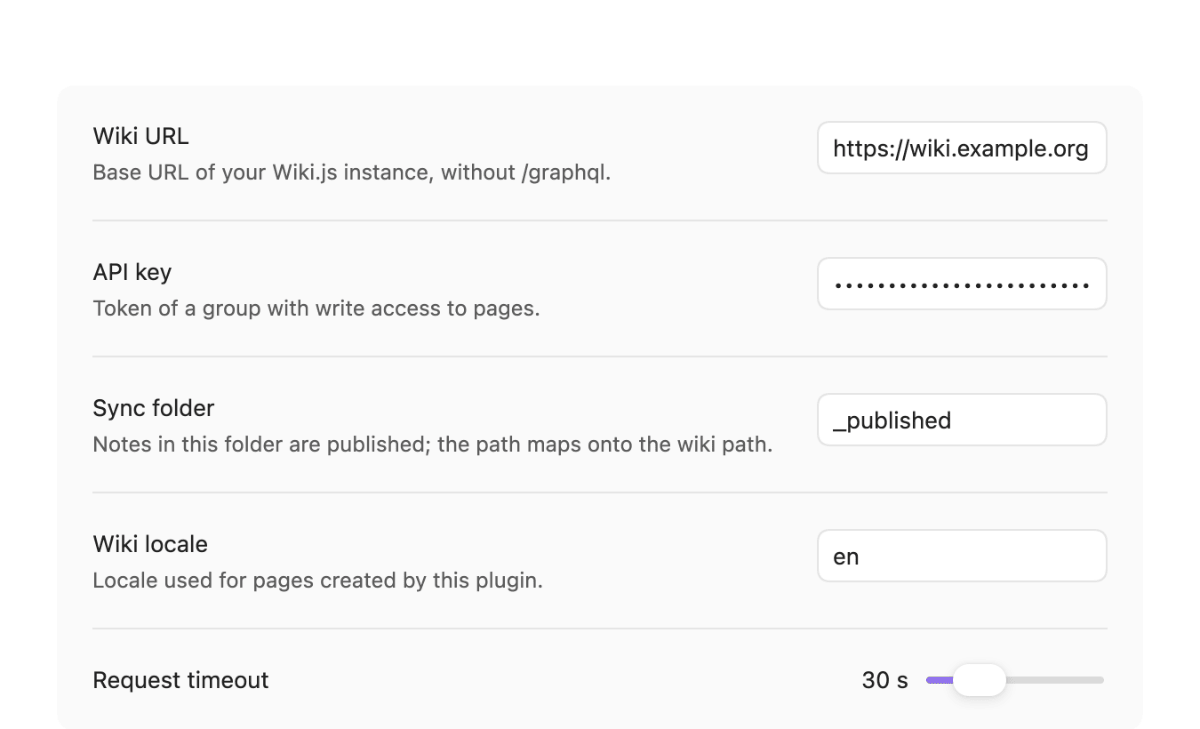
- Wiki URL — base URL of your Wiki.js instance, without
/graphql(e.g.https://wiki.example.org). - API key — a token from a Wiki.js group with write access to pages (Administration → Groups → API Access). A key without page-write rights fails every push with an authentication error, not a silent no-op.
- Sync folder — the vault folder whose notes get published (default
_published). Its structure maps 1:1 onto wiki paths:_published/Network/DNS-Setup.mdbecomesnetwork/dns-setup. Moving a note into this folder is a publication decision. - Wiki locale — the Wiki.js locale used for pages this plugin creates
(default
de). - Request timeout — per-request timeout in seconds (5–120, default 30).
Usage
Four commands, all from the command palette:
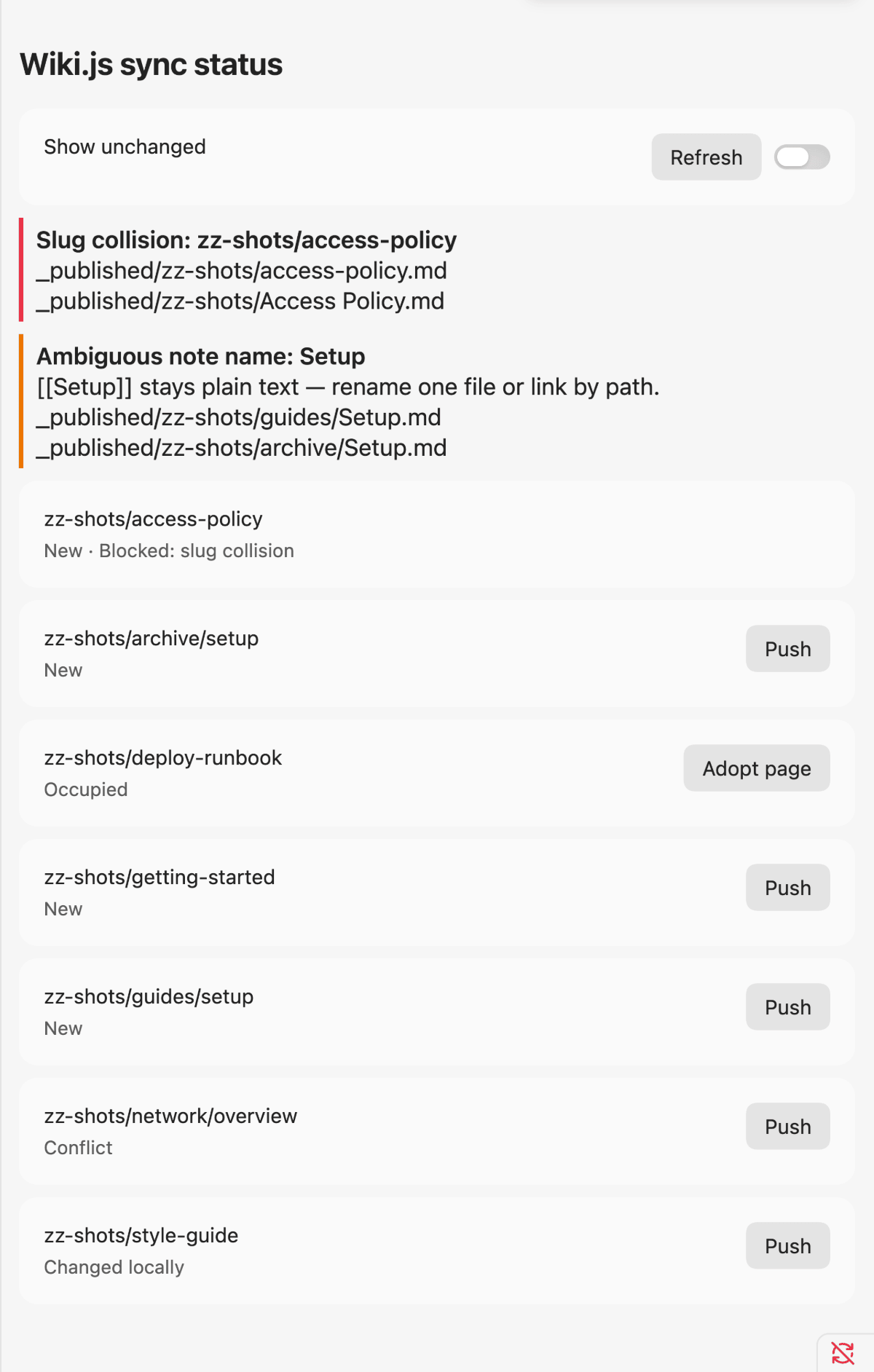
- Show sync status — opens a view listing every page under the sync root as new, changed, conflicting, removed, or unchanged. Not every row has a button: Push appears for "New", "Changed locally" and "Conflict"; Pull appears for "Changed on wiki" and "New on wiki". The other states ("Occupied", "Removed locally", "Removed on wiki", "Stale snapshot", "Unchanged") show status only — there is nothing to push or pull, or (for "Removed locally") the action needs the confirmation dialog that only a collect push shows. Slug collisions and ambiguous note names are called out above the list (see below).
- Push current note — publishes or updates the active note.
- Push all changes — runs the full sync plan. Continues past a failing page instead of stopping the batch; failures are collected and reported in a summary Notice at the end.
- Pull current note from wiki — pulls the active note's content from
the wiki when it changed remotely. A pull replaces only the text below the frontmatter: the note's frontmatter block (
title,tags,seitentyp,aliases, …) stays exactly as it is, because the wiki does not hold it.
How it works
- One vault folder maps onto one wiki, 1:1 by path. There is no multi-instance profile concept.
- Drift guard. Immediately before every write, the plugin re-checks the
page's remote
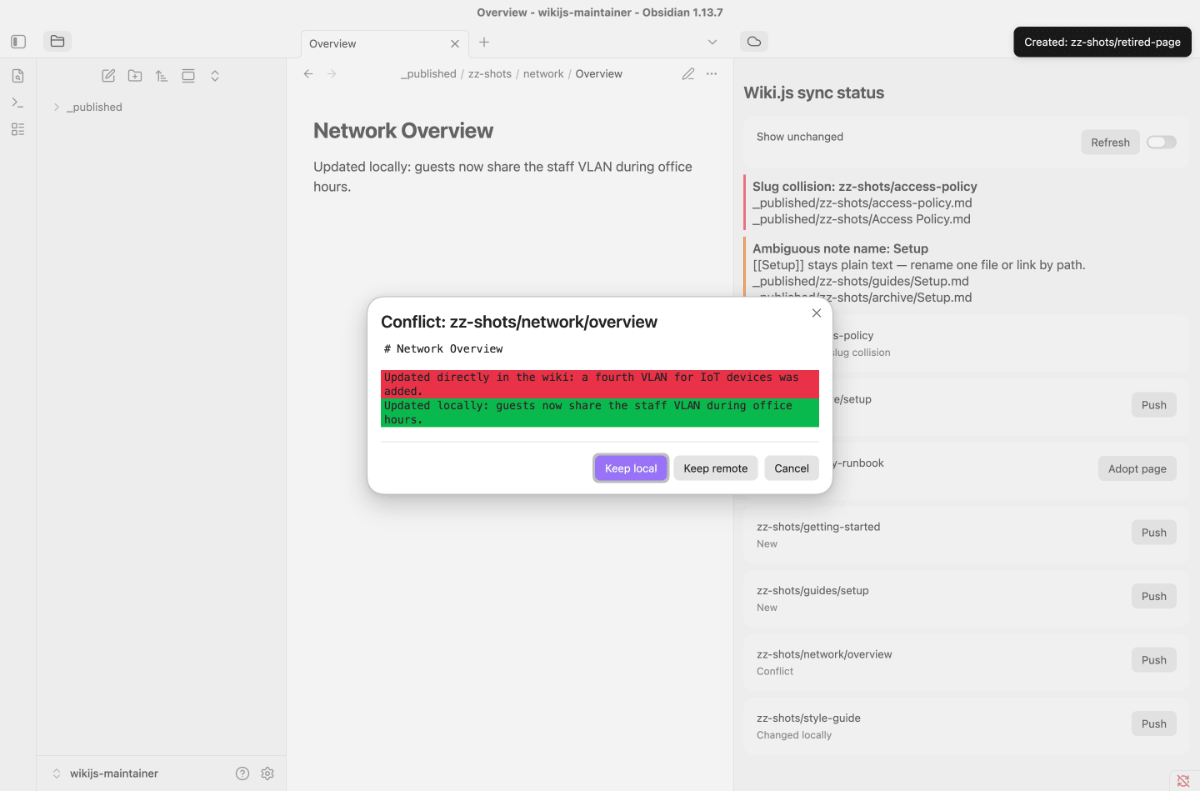
updatedAt. If it moved since the last plan — including if the wiki page was reset back to an older state — a conflict dialog opens showing a line diff between the wiki version and your local version. You choose "Keep local" (overwrite), "Keep remote" (abort the push and leave the wiki page untouched — this does not pull; see the note under "Limits of this MVP") or "Cancel" (leave the wiki untouched, same effect as "Keep remote").
- Slug collisions. Two local notes that map to the same wiki path block each other's push entirely; the status view shows the collision and both vault paths until you rename one file.
- Ambiguous note names. Two files with the same basename in different
folders make
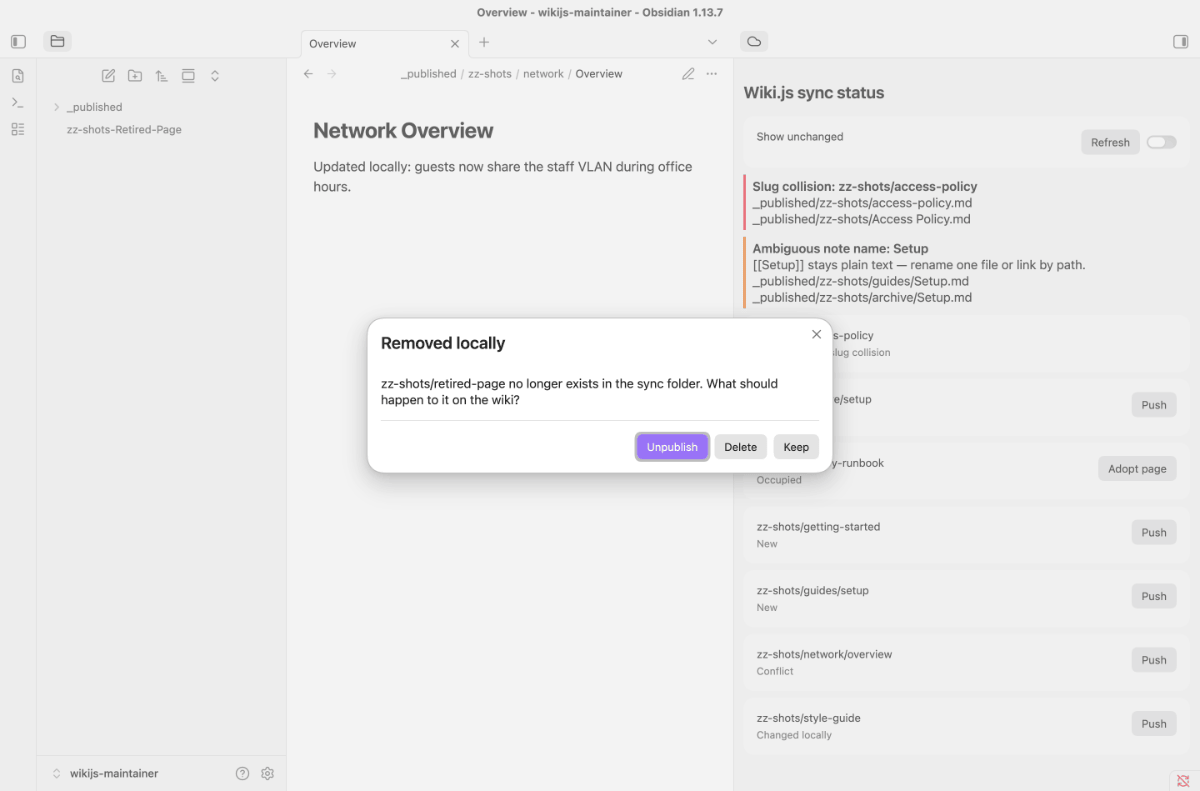
[[Name]]-style wikilinks ambiguous. This does not block publishing — the affected pages still push, but the ambiguous link is left as plain text instead of a wiki link. The status view shows a hint per ambiguous name; fix it by renaming a file or linking by full path. - Removing a note from the sync folder does not delete the wiki page by itself. A collect push asks what to do, defaulting to unpublish (reversible; the page's history stays intact). Pressing Esc or closing the dialog always means keep — never unpublish or delete by accident.
- Markdown conversion is one-way. Wikilinks become wiki links, callouts
become Wiki.js blockquote classes (
{.is-info}/.is-success/.is-warning/.is-danger). The transformed text is not translated back; the plugin keeps your raw note content and the pushed version as separate snapshots so a later merge can use both.
Limits of this MVP
- Text only. Images and other attachments are not synced — they are planned for a later version (asset upload + path rewriting).
- No merge. Conflicting changes are never combined automatically; you always resolve them by hand through the conflict dialog. A real three-way merge on top of the existing snapshots is planned for a later version.
- No automatic pull out of a conflict. As long as a page is both changed locally and changed on the wiki, the plugin gives you no button that fetches the wiki version into your vault — a conflicting entry is not pull-able (only "new on wiki" and "changed on wiki" states are). "Keep remote" in the conflict dialog only stops the push; it does not write anything. If you want the wiki's version, copy it out of the diff shown in the conflict dialog, or edit your local note by hand until it matches — once it does, the entry stops being a conflict.
- Removed on wiki. If a page is deleted directly in the wiki (e.g. via the Wiki.js admin) while its note still exists locally, the status view shows "Removed on wiki" and no push is offered for it. Recreating a deleted page from the local note isn't supported yet — that's planned for a later version. The snapshot for that page also isn't cleaned up on its own (see "Stale snapshots" below); nothing in the vault is affected.
- Occupied is only resolved when the page is provably yours. A page shows as "Occupied" when a local note and a wiki page map onto the same wiki path without a snapshot tying them together. The status view offers Adopt page, which fetches the wiki page and — only if its content matches your note character for character — writes the missing snapshot, after which the page syncs normally. That covers the way this state actually arises: the page was created successfully and writing the snapshot failed right after. If the content differs, the page is a different page and nothing is adopted; you are told so, and the fix stays manual (rename the local note, or remove the page in the wiki). Adopting never writes to the wiki.
- Stale snapshots are discarded on request, not automatically. If both the local note and the wiki page a snapshot pointed at are gone, the status view offers Discard snapshot for that row. Nothing is discarded on its own — a snapshot is the basis of every later drift check, so removing one is always your call.
Documentation
Start at the documentation index:
- Getting started — from the install to your first published page.
- Troubleshooting — the message you see, what it means, what to do.
For maintainers and contributors:
docs/SMOKE.md— the checklist this plugin is verified against, eleven points of it automated (npm run smoke:gui)docs/LAB.md— the GraphQL schema as measured against a running instance, including the two places where it deviates from what the schema declaresAGENTS.md— architecture and the decisions behind itCONTRIBUTING.md·SECURITY.md·CHANGELOG.md
License
Code: AGPL-3.0-or-later (LICENSE) — dual-licensing available, see
LICENSING.md.
Documentation and text: CC BY-SA 4.0 (LICENSE-DOCS).