VozNotas
 Fernando Abellan68 downloads
Talk to your notes by voice — a hands-free voice assistant that searches, reads and writes your vault.
- Overview
- Scorecard
- Updates3
Talk to your Obsidian notes by voice. Voice-first — not a chat window with a mic button, but an assistant built for talking: you speak, it searches and reads your vault, and answers out loud. Powered by the OpenAI Realtime API.
I wanted to talk to my notes instead of typing at them — ask a question while pacing around, have something read back, dictate without touching the keyboard. So I built it.
"voz-notas" is Spanish for "voice-notes".
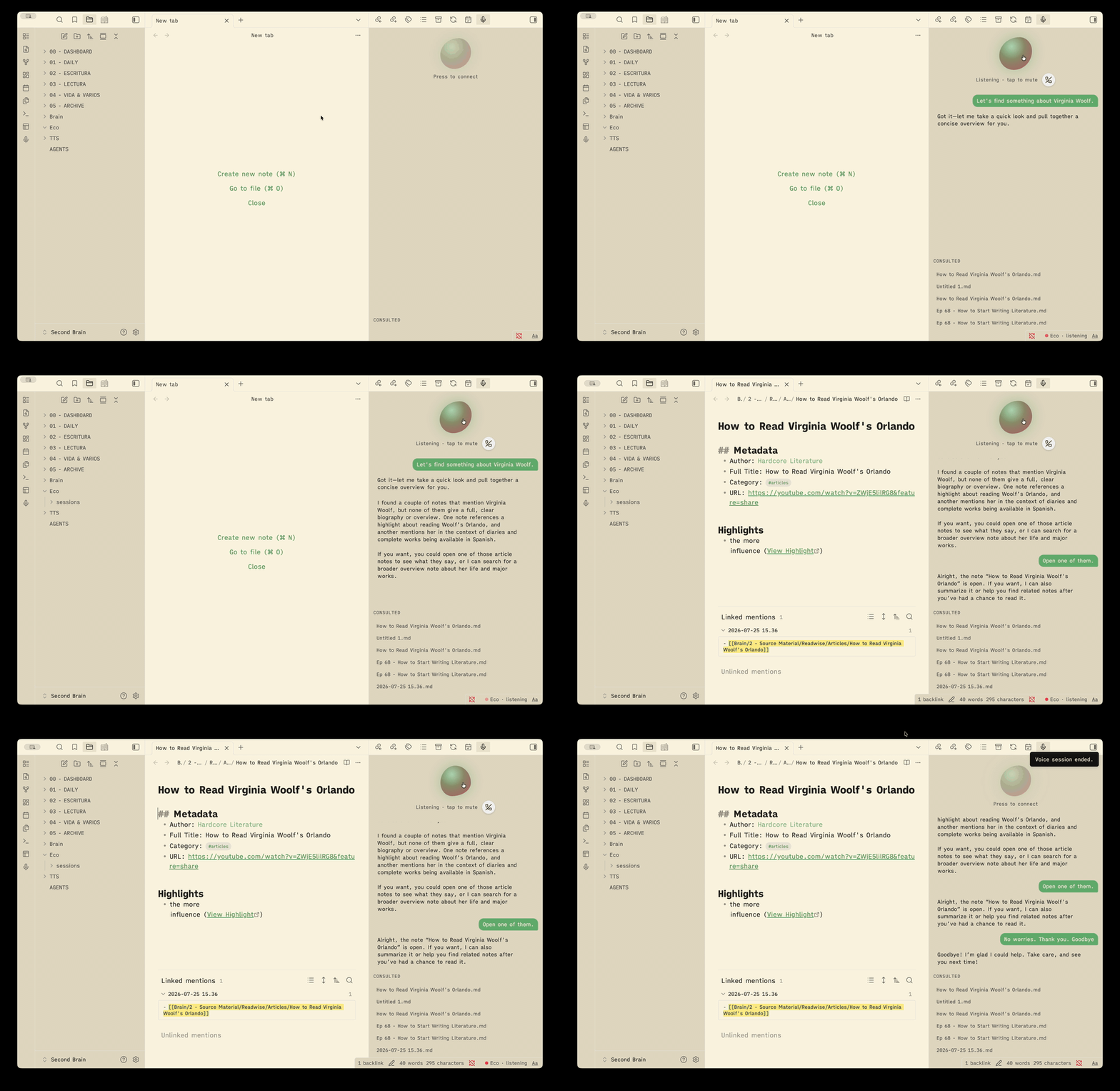
What it does
Start a session and just talk. The assistant can:
- Search & read your notes, open one in the foreground, or use the note you already have open.
- Follow the graph — read a note's
[[links]], its outline (headings), your#tags, and find notes by tag or by filename. - Write, with confirmation — append to the current note, insert text at the cursor, or create a new note (in a fixed folder), always asking first.
- Think harder when asked — it can delegate opinions and deeper analysis to a stronger reasoning model.
- Learn your preferences — tell it "from now on, always…" and it appends the
rule to your
AGENTS.md, which is merged into its instructions next time. - Remember conversations — each session is saved incrementally as a plain
Markdown note (in the assistant folder's
sessionssubfolder), with wikilinks to the notes it consulted. Sessions are searchable like any note, so past conversations become its memory — ask "what did we talk about yesterday?". - Hang up by voice — say goodbye and the session closes itself after its reply. There's also a hang-up button, and a status-bar indicator whenever the mic is live, even with the panel closed.
The side panel shows a voice orb that reacts to whoever is talking, the live transcript (both sides), and the list of notes it consulted (clickable).
How it works
- Voice is a direct WebRTC connection from Obsidian to the OpenAI Realtime API — low latency, no server in between.
- Your notes never leave your machine as a whole. The assistant reads your vault locally; only your spoken audio and the snippets it needs to answer a question are sent to OpenAI to generate the reply.
- Bring your own key (BYOK). Your OpenAI API key is stored locally in the
vault (
data.json) and only used to start sessions. There is no backend and no account.
Desktop only for now (it needs the microphone and WebRTC).
Network use, privacy & requirements
In plain terms, so you know exactly what this plugin does:
- Remote service used: OpenAI. The plugin talks to the OpenAI Realtime API (voice sessions over WebRTC, plus minting a short-lived session token) and, only when you use the "think" tool, the OpenAI Chat Completions API. It is needed because the voice conversation itself is generated by OpenAI's models.
- Remote control (optional, off by default): a pairing relay. If you enable it, the plugin keeps a WebSocket open to the relay URL you configure so a paired phone can use your vault's tools by voice. Tool traffic over the relay is end-to-end encrypted with a secret that travels only inside the pairing QR (screen → camera) — the relay forwards ciphertext it cannot read, stores nothing, and has no accounts. With remote control off, no relay is contacted.
- What gets sent: your microphone audio during a session, the assistant's
instructions (including your
AGENTS.mdif present), and the note snippets the assistant requests to answer you. Your vault is never uploaded or synced anywhere as a whole. - Requirements: your own OpenAI API key. Usage is billed to your OpenAI
account. The key is stored locally in the plugin's
data.jsoninside your vault and is only sent to OpenAI. - No telemetry. The plugin has no backend and collects no data — nothing is sent to the plugin author, ever.
- Microphone: used only during an active session; muting disables the audio track, and ending the session releases the mic.
Install (manual, while it's early)
- Download
main.js,manifest.json, andstyles.cssfrom a release. - Put them in
<your vault>/.obsidian/plugins/voz-notas/. - Reload Obsidian and enable VozNotas in Settings → Community plugins.
Setup
- Open Settings → VozNotas.
- Paste your OpenAI API key.
- (Optional) Pick the interface language (English / Español) and the reasoning model used by the "think" tool.
Use
- Click the mic icon in the left ribbon (or the orb in the panel) to start.
- Talk. Ask about your notes, ask it to open or read something, or dictate a new note.
- Click the orb while live to mute/unmute; click the mic icon again to end.
The spoken language follows your settings by default, and you can switch mid- conversation just by speaking another language.
Settings
| Setting | What it does |
|---|---|
| Language | Language of the plugin interface and the default spoken language (English / Español). |
| Assistant name | What the assistant is called (default Eco). |
| Assistant folder | Where it creates new notes and keeps session transcripts (default Eco). |
| Save session transcripts | Toggle saving sessions as notes (its memory). |
| OpenAI API key | Stored locally; only sent to OpenAI to start a session. |
| Reasoning model | Stronger model the "think" tool uses for opinions / analysis. |
| Instructions file | A Markdown file (default AGENTS.md) merged into the assistant's instructions. |
Build from source
npm install
npm run build   # bundles src/ → main.js
For development, symlink the repo into your vault's plugins folder so a rebuild updates the plugin in place.
Status
I built this for myself — it's early and evolving. If you use it and hit a rough edge or something's missing, open an issue.