Visible Git Graph
 si-xiyu28 downloads
Show the vault repository's Git history as a commit graph, with inline details and file diffs.
- Overview
- Scorecard
- Updates3
Visible Git Graph is a desktop-only Obsidian plugin that turns your vault's Git history into an interactive commit graph — commits, refs, inline details and file diffs, all in a side pane.
English | 简体中文
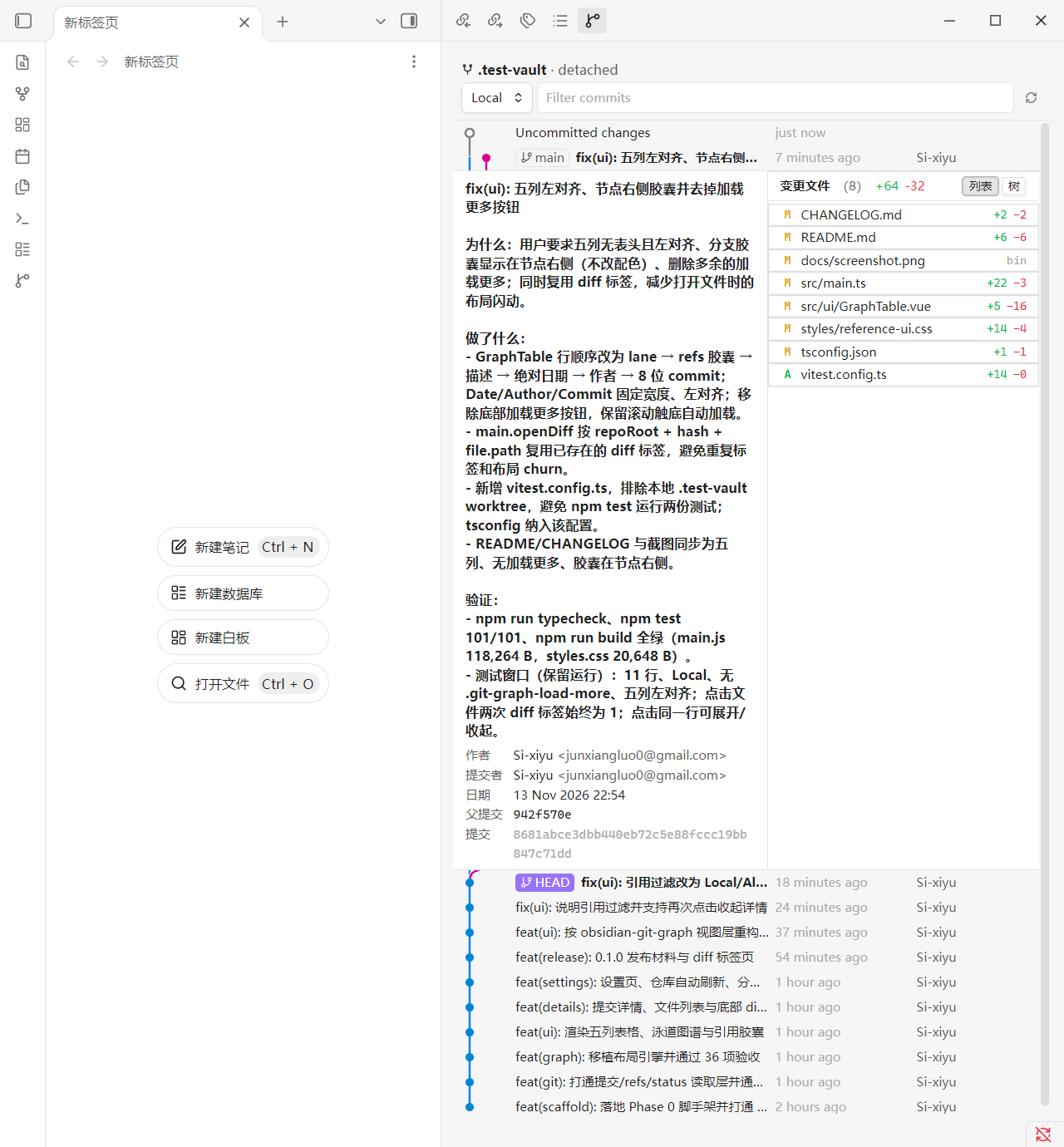
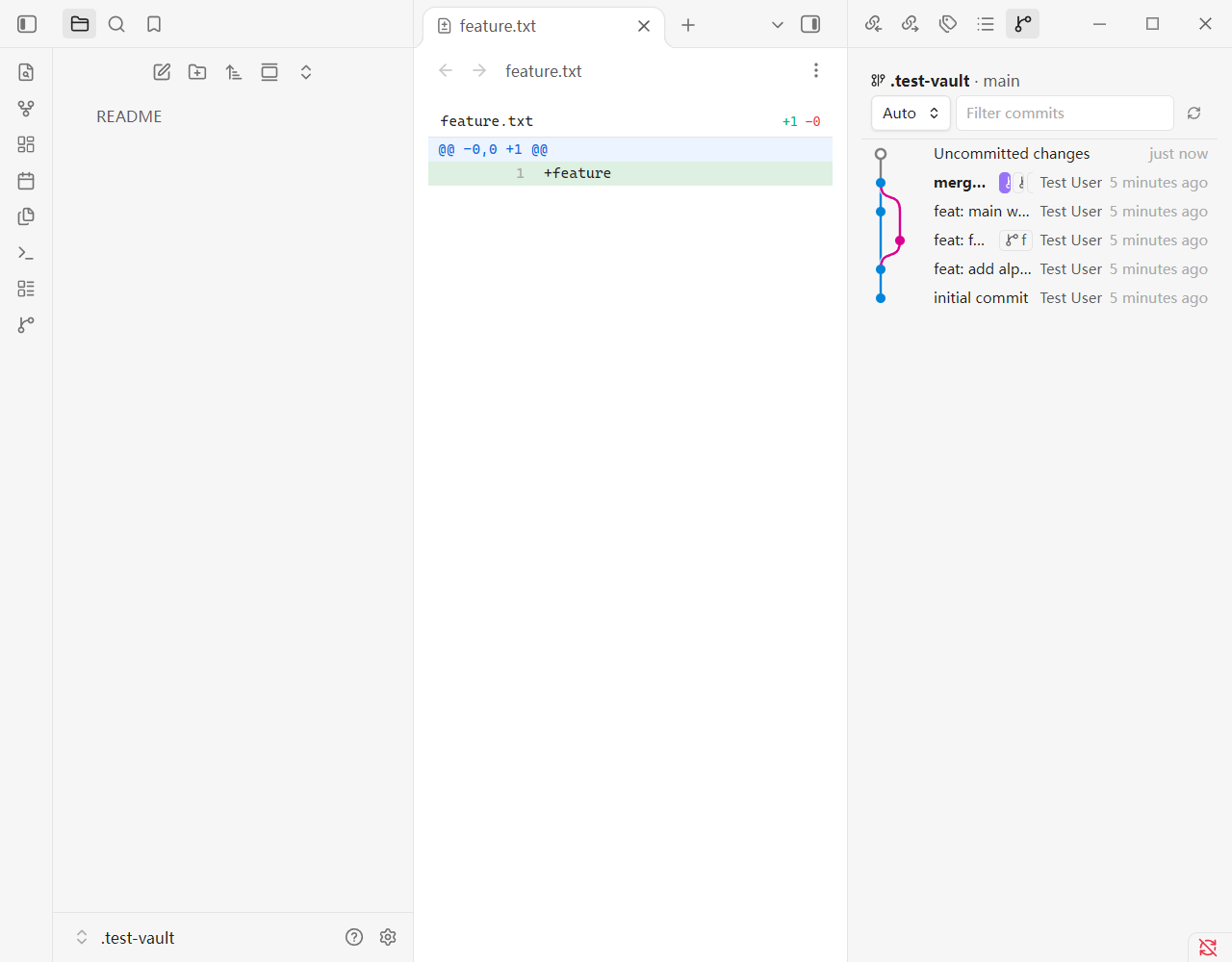
Visible Git Graph reads the repository that contains your vault and draws its history the way VS Code's Source Control graph does. Click a commit to expand its message and changed files in place; click a file to open that commit's diff in a new editor tab.
It is read-only. The plugin never commits, checks out, fetches, pulls or pushes, and it makes no network requests.
Quickstart
Install with one command
Set VAULT to your vault path, then run the whole block. It downloads the three release files into the plugin folder.
macOS / Linux
VAULT="/path/to/your/vault"
PLUGIN="$VAULT/.obsidian/plugins/visible-git-graph"
mkdir -p "$PLUGIN"
BASE="https://github.com/Si-xiyu/obsidian-visible-git-graph/releases/latest/download"
for f in main.js manifest.json styles.css; do
  curl -fL "$BASE/$f" -o "$PLUGIN/$f"
done
Windows (PowerShell)
$Vault  = "C:\path\to\your\vault"
$Plugin = Join-Path $Vault ".obsidian\plugins\visible-git-graph"
New-Item -ItemType Directory -Force $Plugin | Out-Null
$Base   = "https://github.com/Si-xiyu/obsidian-visible-git-graph/releases/latest/download"
foreach ($f in "main.js", "manifest.json", "styles.css") {
  Invoke-WebRequest "$Base/$f" -OutFile (Join-Path $Plugin $f)
}
Then open Obsidian → Settings → Community plugins, turn off Restricted mode and enable Visible Git Graph. If Obsidian is already running, reload it (Ctrl/Cmd + R inside the app) after copying the files.
Install from the community directory
Once the plugin is listed in the Obsidian community directory, open Settings → Community plugins → Browse, search for Visible Git Graph, then choose Install and Enable.
Manual install
Download main.js, manifest.json and styles.css from the latest release and put them in:
<vault>/.obsidian/plugins/visible-git-graph/
Let your agent install it
Paste this into your coding agent (Claude Code, Codex, DSH, …):
Install the Obsidian plugin "Visible Git Graph" from
https://github.com/Si-xiyu/obsidian-visible-git-graph into my vault.

1. Use this vault path: <VAULT_PATH>.
2. Create <VAULT_PATH>/.obsidian/plugins/visible-git-graph/ if it does not exist.
3. Download the latest release assets:
   https://github.com/Si-xiyu/obsidian-visible-git-graph/releases/latest/download/main.js
   https://github.com/Si-xiyu/obsidian-visible-git-graph/releases/latest/download/manifest.json
   https://github.com/Si-xiyu/obsidian-visible-git-graph/releases/latest/download/styles.css
4. Verify all three files exist and are non-empty, and that manifest.json contains
   "id": "visible-git-graph".
5. Do not modify any other file in the vault. Tell me to enable the plugin in
   Settings → Community plugins.
Machine-readable install notes for agents: AGENTS.md.
Features
- Commit graph — branch-coloured lanes, compact rows and ref capsules for local branches, remote branches, tags and
HEAD, with relative dates. - Inline commit details — author, committer, dates, parents and the full message, plus changed files with a list/tree toggle, status colours and
+n/-ncounts. - Diff tab — click a file to open its diff in a new editor tab: hunks, old/new line numbers, add/delete highlighting and virtual scrolling. The same commit and file reuse the existing tab.
- Live refresh — the pane watches the repository's
.gitdirectory and refreshes after a 300 ms debounce; the watcher stops when the pane closes. - Large repositories — beyond 1000 rows only the visible window plus 20 rows on each side is rendered, while the graph stays a single SVG.
- Clear failure states — "not a repository", "git not found" and command failures each show what happened; git's stderr is shown as-is with a retry button.
Usage
- Open the pane — click the Git branch icon in the ribbon, or run Open Git Graph from the command palette. It opens in the right sidebar.
- Inspect a commit — click any row to expand its details in place; click it again to collapse. Click a file to open its diff tab.
- Filter refs —
Localshows local branches and tags;Allalso shows remote-tracking refs. - Search — filters by description, author, hash or ref; the graph is hidden while filtering.
- Load more — scrolling within 25 px of the bottom loads the next page automatically.
Requirements
- Obsidian 1.7.2 or newer, desktop only.
gitinstalled. If it is not onPATH, set the executable in the plugin settings.
Settings
| Setting | Default | Meaning |
|---|---|---|
| Git executable | git |
Command or absolute path used to run git. |
| Commits per page | 200 | How many commits are loaded at once (10–5000). |
| Refs to show | Local |
Local: local branches and tags. All: also remote-tracking refs. |
| Date format | DD Mon YYYY HH:mm |
Shared by the list and details. Supports YYYY, YY, MM, M, DD, D, Mon, HH, H, mm, ss. |
What this plugin accesses
This plugin is desktop-only because it uses Node.js APIs. It runs git and reads the repository's .git directory; it never writes to the repository.
- The
gitprocess:child_process.execFile(never a shell) runs read-only commands such asrev-parse,log,for-each-ref,status,showanddiff-tree. There is no commit, checkout, fetch, push or pull. - The
.gitdirectory:fsreads it andfs.watchwatches it so the pane can refresh. When the vault is a folder inside a larger repository, that directory is outside the vault. - Vault files: opened through Obsidian's vault API only.
- No network requests, no telemetry, no analytics.
Limitations
- Desktop only; needs a local
git. - Read-only.
- Diff preview is text-only: binary files show a notice; very large files or lines may hit memory or rendering limits.
- The layout engine has an O(n²) risk on extreme topologies (many commits converging on the last row); rows beyond 1000 are virtualized.
- No automated Obsidian end-to-end tests; manual checks use an isolated test vault.
Development
npm install
npm run typecheck   # vue-tsc --noEmit
npm test            # vitest run
npm run build       # tsc --noEmit && vite build
Main folders:
src/git/      git process, commits/refs/status, details and diff parsing
src/graph/    layout engine port, data assembly, detail cache, repository watcher
src/ui/       GraphHeader, commit list, SVG canvas, details, diff viewer
src/view.ts   Obsidian ItemView (side pane)
src/diffView.ts  Obsidian ItemView (diff tab)
src/settings*  settings model and settings tab
tests/        vitest: engine contract/golden, real git repos, pagination/cache/watcher
License
MIT © 2026 Si-xiyu. Product behaviour and visual layout reference VS Code Git Graph; no code from that project is used. Third-party notices: THIRD_PARTY_NOTICES.md.