Search...Search plugins and themes...
⌘K
Sign in
  • Get started
  • Download
  • Pricing
  • Enterprise
  • Account
  • Obsidian
  • Overview
  • Sync
  • Publish
  • Canvas
  • Mobile
  • Web Clipper
  • CLI
  • Learn
  • Help
  • Developers
  • Changelog
  • About
  • Roadmap
  • Blog
  • Resources
  • System status
  • License overview
  • Terms of service
  • Privacy policy
  • Security
  • Community
  • Plugins
  • Themes
  • Discord
  • Forum / 中文论坛
  • Merch store
  • Brand guidelines
Follow us
DiscordTwitterBlueskyThreadsMastodonYouTubeGitHub
© 2026 Obsidian

VirtFolder

gr0griggr0grig5k downloads

Creating a hierarchical structure like Luhmann's Zettelkasten

Add to Obsidian
  • Overview
  • Scorecard
  • Updates32

A plugin for creating a hierarchical structure in Obsidian.

Allows you to quickly find notes by navigating the knowledge base like a book table of contents.
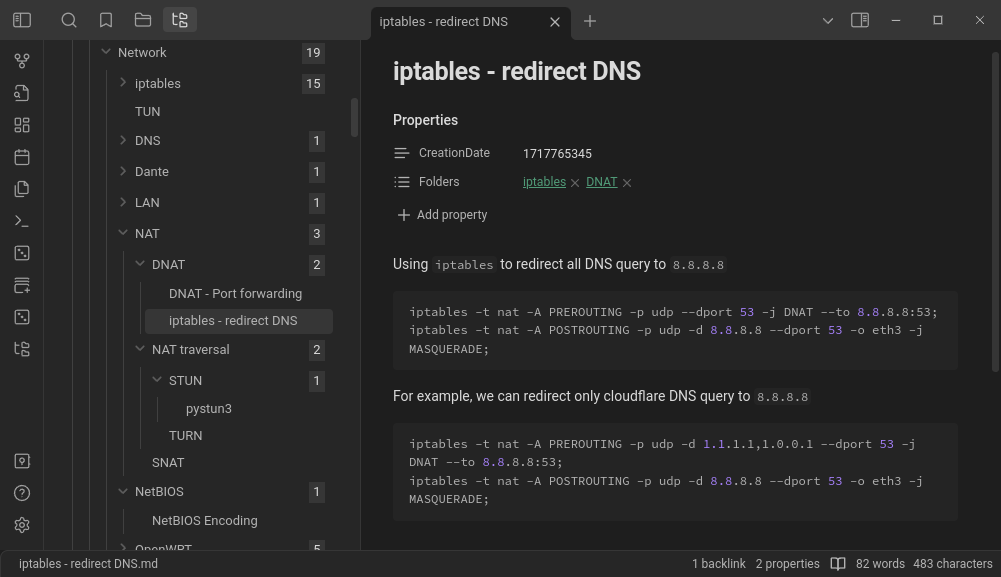
virt_folder_example

Articles

  • How to organize a knowledge base in Obsidian using the Luhmann method (en)
  • VirtFolder — Obsidian plugin overview (en)
  • VirtFolder — обзор плагина для Obsidian (ru)

Features

  • The ability to perform all operations using hot keys
  • Dragging and dropping notes with the mouse, including custom sort order
  • Creating and deleting notes via the right-click menu
  • Add files to virtual folders from the file explorer context menu
  • Emoji icon picker with categorized groups for notes
  • Tag-based note highlighting with configurable colors
  • Frontmatter as HTML data attributes for CSS styling
  • Optional string format for single-parent folder links
  • Create notes via Unique note creator
  • Front Matter Title plugin support
  • Database optimization

Documentation

The current documentation is available in the docs folder.

The old documentation is located on GitBook.

Example

https://github.com/user-attachments/assets/a4990b31-c8ea-48c8-815a-98521d81fc7d

79%
HealthExcellent
ReviewCaution
About
Create and manage hierarchical virtual folders to navigate notes like a book table of contents. Drag, drop, create and delete notes via mouse, context menus or hotkeys; add files from the file explorer, pick emoji icons, create unique notes, and use Front Matter Title support with database optimizations.
FoldersNavigationFiles
Details
Current version
1.1.22
Last updated
Last week
Created
2 years ago
Updates
32 releases
Downloads
5k
Compatible with
Obsidian 0.15.0+
Platforms
Desktop, Mobile
License
MIT
Report bugRequest featureReport plugin
Author
gr0griggr0grig
github.com/gr0grig
GitHubgr0grig
  1. Community
  2. Plugins
  3. Folders
  4. VirtFolder

Related plugins

Quick Explorer

Perform file explorer operations (and see your current file path) from the title bar, using the mouse or keyboard.

Notebook Navigator

A better file browser and calendar inspired by Apple Notes, Bear, Evernote and Day One.

Recent Files

Display a list of recently opened files.

Flexplorer

Enhance the file explorer with custom sorting, pinning, and hiding.

Open Tab Settings

Adds options to customize how tabs are opened, including open in new tab by default, preventing duplicate tabs, and more.

Remember cursor position

Remember cursor and scroll position for each note.

Custom File Explorer sorting

Manual or automatic config-driven reordering and sorting of files and folders in File Explorer.

Folder notes

Create notes within folders that can be accessed without collapsing the folder, similar to the functionality offered in Notion.

Multi Properties

Add properties to multiple notes at once. Either right-click a folder or select multiple notes and right-click the selection.

Home tab

A browser-like search tab for your local files.