Search...Search plugins and themes...
⌘K
Sign in
  • Get started
  • Download
  • Pricing
  • Enterprise
  • Account
  • Obsidian
  • Overview
  • Sync
  • Publish
  • Canvas
  • Mobile
  • Web Clipper
  • CLI
  • Learn
  • Help
  • Developers
  • Changelog
  • About
  • Roadmap
  • Blog
  • Resources
  • System status
  • License overview
  • Terms of service
  • Privacy policy
  • Security
  • Community
  • Plugins
  • Join the community
  • Discord
  • Forum / 中文论坛
  • Merch store
  • Brand guidelines
Follow us
DiscordTwitterBlueskyThreadsMastodonYouTubeGitHub
© 2026 Obsidian

Vim IM Select

aloneluralonelur11k downloads

Support auto select the apposite input method in different vim mode.

Add to Obsidian
  • Overview
  • Scorecard
  • Updates7

Chinese ver. 中文版本

This plugin is used to automatically switch the current input method of the system when vim key binding is used in Obsidian, to prevent non-English input method from causing key binding failure in vim normal mode.

本插件用于在Obsidian.md中使用Vim时,自动切换当前输入法,以防止非英文输入法 导致在Vim normal模式下按键失效。

Install

First, need to turn on vim key binding in Obsidian.

In setting of Obsidian, turn off safe mode then install this plugin.

Alternatively, manually install: copy main.js and manifast.json to VAULT_ROOT/.obsidian/plugins/vim-im-select/.

Usage

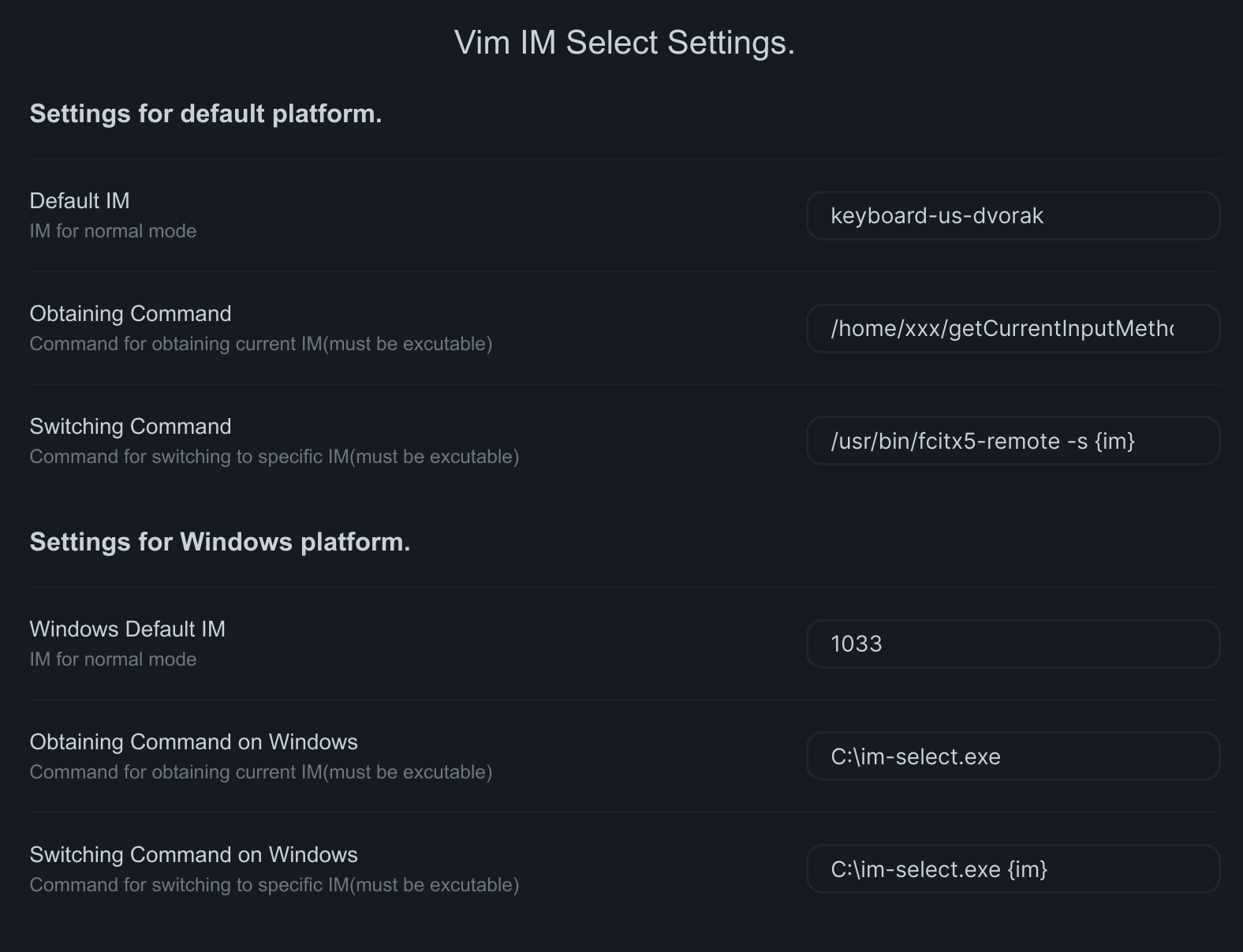
After enabling this plugin, you can find a setting tab in Setting.

The setting options are devided into two parts, the first is for default platform, the second is for Windows platform.

If you use Obsidian under the Windows platform, the plug-in will use the second part of the settings, otherwise the first part of the settings.

The options are similar in different platform.

Option Defination
Default IM specify the input method used in normal mode
Obtaining Command Command to obtain current input method (must be excutable)
Switching Command Command to switch current input method (must be excutable, use {im} as placeholder of target input method)

Following is a example: example

After activating the plugin in the first time and finishing setting, you need to restart Obsidian.

If you want to know more:

  • The solution for switching input method on Windowsim-select
  • Inspired from vscodevim

Credit

  • im-select
  • obsidian-vimrc-support
70%
HealthGood
ReviewSatisfactory
About
Switch the system input method automatically when using Vim keybindings in Obsidian to prevent non-English input methods from breaking normal-mode commands. Use platform-specific commands to detect and switch the current input method so Vim normal-mode keys behave reliably.
VimAutomationIntegrations
Details
Current version
0.2.1
Last updated
Last year
Created
4 years ago
Updates
7 releases
Downloads
11k
Compatible with
Obsidian 1.5.0+
License
MIT
Report bugRequest featureReport plugin
Author
aloneluralonelur
github.com/ALONELUR
GitHubalonelur
  1. Community
  2. Plugins
  3. Vim
  4. Vim IM Select

Related plugins

BRAT

Easily install a beta version of a plugin for testing.

Readwise Official

Sync highlights from Readwise to your vault.

Todoist Sync

Materialize Todoist tasks within your notes.

Shell commands

Define system commands that you want to execute via command palette, hotkeys, URI links or automated events. E.g. open external applications or perform automated file modifications.

Google Calendar

Interact with your Google Calendar.

Initiative Tracker

TTRPG initiative tracker.

Actions URI

Add additional `x-callback-url` endpoints to the app for common actions — it's a clean, super-charged addition to Obsidian URI.

Templater

Create and use dynamic templates.

Zotero Integration

Insert and import citations, bibliographies, notes, and PDF annotations from Zotero.

Maps

Adds a map layout to bases so you can display notes as an interactive map view.