Version Buttons
 Meet Vekaria11 downloads
Increment note-specific major, minor, and patch version properties using buttons or commands.
- Overview
- Scorecard
- Updates1
A lightweight Obsidian community plugin for incrementing a note's version property. Each note owns its configuration in a version-buttons fenced code block. No dependency on dataview or other external plugins.
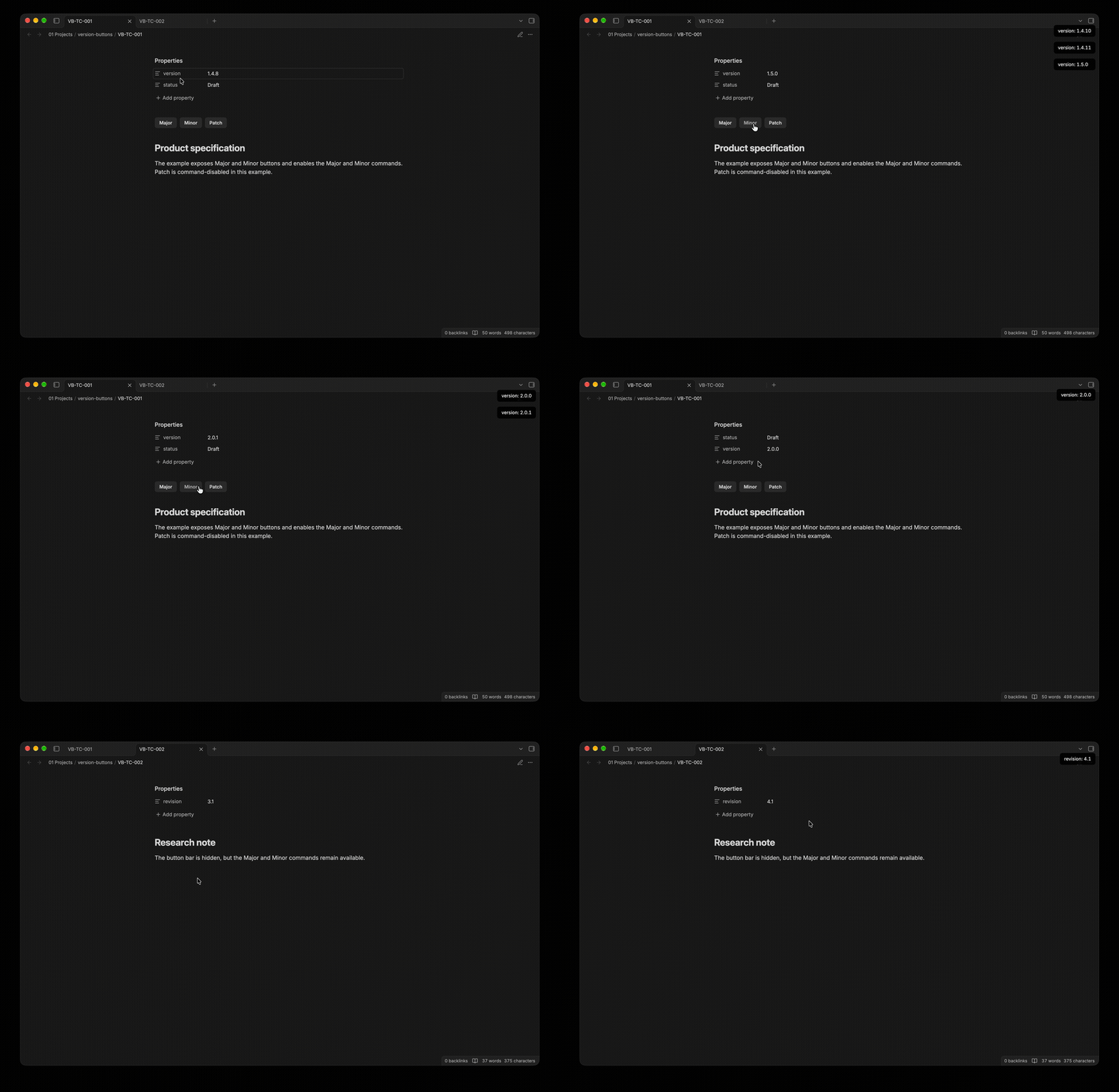
Features
- One-, two-, or three-component numeric versions (
3,2.4,2.4.7). - User-defined button labels for Major, Minor, and Patch components.
- Independent button and command enablement for each component.
- A note-level
showButtonsswitch that hides the entire bar without disabling commands. - Contextual native Obsidian commands; users assign their own hotkeys in Settings → Hotkeys.
- Atomic frontmatter updates through
FileManager.processFrontMatter(). - Strict configuration and existing-version validation; lower-order components reset after an increment.
- Theme-aware, responsive Reading View controls.
Quick start
- Install the plugin in
.obsidian/plugins/version-buttons/(or build it locally. - Add a
version-buttonsblock immediately after the note's YAML frontmatter. - Open the note in Reading View to see the buttons.
- Optionally assign shortcuts to Version Buttons: Increment major/minor/patch version component in Obsidian's Hotkeys settings.
Example
---
version: "1.4.8"
---

```version-buttons
{
  "digits": 3,
  "property": "version",
  "initialVersion": "1.0.0",
  "showButtons": true,
  "components": [
    { "name": "Major", "showButton": true, "enableCommand": true },
    { "name": "Minor", "showButton": true, "enableCommand": true },
    { "name": "Patch", "showButton": true, "enableCommand": true }
  ]
}
```

# Note content starts here
Behaviour
- Incrementing component 1 increments the first number and resets all following numbers to zero.
- Incrementing component 2 increments the second number and resets the third number to zero.
- Incrementing component 3 increments only the third number.
- If the configured frontmatter property is missing,
initialVersionis used as the starting value and the requested increment is then applied. - Existing values with the wrong number of components, non-numeric components, or unsafe integers are rejected without being overwritten.
- The
propertyfield defaults toversionand must be a simple YAML frontmatter key. showButtons: falsesuppresses the entire rendered bar. It does not change command enablement.- Each component's
showButtonandenableCommandflags are independent.
Compatibility and limitations
- Rendering is currently supported in Reading View using Obsidian's public Markdown code-block processor API.
- Live Preview and Source mode do not render the button bar. Commands work in Markdown Source mode because they read the active editor's Markdown source.
- Desktop and mobile are targeted.
Development
Requirements: Node.js 18.18+ and npm.
npm install
npm run dev       # watch and rebuild main.js
npm run lint      # ESLint including Obsidian-specific rules
npm run build     # strict TypeScript check and production bundle
npm run check     # lint + production build
For local testing, copy manifest.json, generated main.js, and styles.css into:
<Vault>/.obsidian/plugins/version-buttons/
Then enable Version Buttons in Obsidian's Community Plugins settings and reload the app after rebuilding.
Release checklist
- Update
versioninmanifest.jsonandpackage.jsontogether. - Add the version/minimum-Obsidian pair to
versions.json. - Run
npm run check. - Create a Git tag matching the manifest version (without a
vprefix). - Attach
main.js,manifest.json, andstyles.cssto the GitHub release. - Test installation and behaviour in a clean vault before submitting to the community plugin list.
Versioning
Update the version in package.json and manifest.json together. Use semantic versioning:
0.x.ywhile the feature set and public behavior are evolving.1.0.0when the core feature set is stable and tested across supported Obsidian versions.
Support
If you find issues or have feature requests, open an issue in the repository.
License
Apache License 2.0
Licensed under the Apache License, Version 2.0 (the “License”); may not use this file except in compliance with the License.
NOTICE
Version Buttons Copyright (c) 2026 MEET VEKARIA
Required attribution:
- "Version Buttons (Obsidian Plugin)" by MEET VEKARIA.
- Please retain this NOTICE file in redistributions, and display attribution in documentation or “About/credits” screens where third‑party notices normally appear.
Additional notices:
- Portions may include third‑party components; see their respective licenses in the distribution (if any).
- The contents of this NOTICE file are for informational purposes only and do not modify the License.
CREDITS
Created with ❤️ Meet Vekaria.
If you found this useful, I invite you to:
Buy Me a Coffee: "https://buymeacoffee.com/meet.v",
Be a GitHub Sponsor: "https://github.com/sponsors/meet-v"