Vault Publisher
 notenerd51 downloads
Publishes your vault as a static website, rendered by Obsidian itself, so Dataview, Bases and Mermaid output survives.
- Overview
- Scorecard
- Updates8
Publishes an Obsidian vault as a static website, rendered by Obsidian itself.
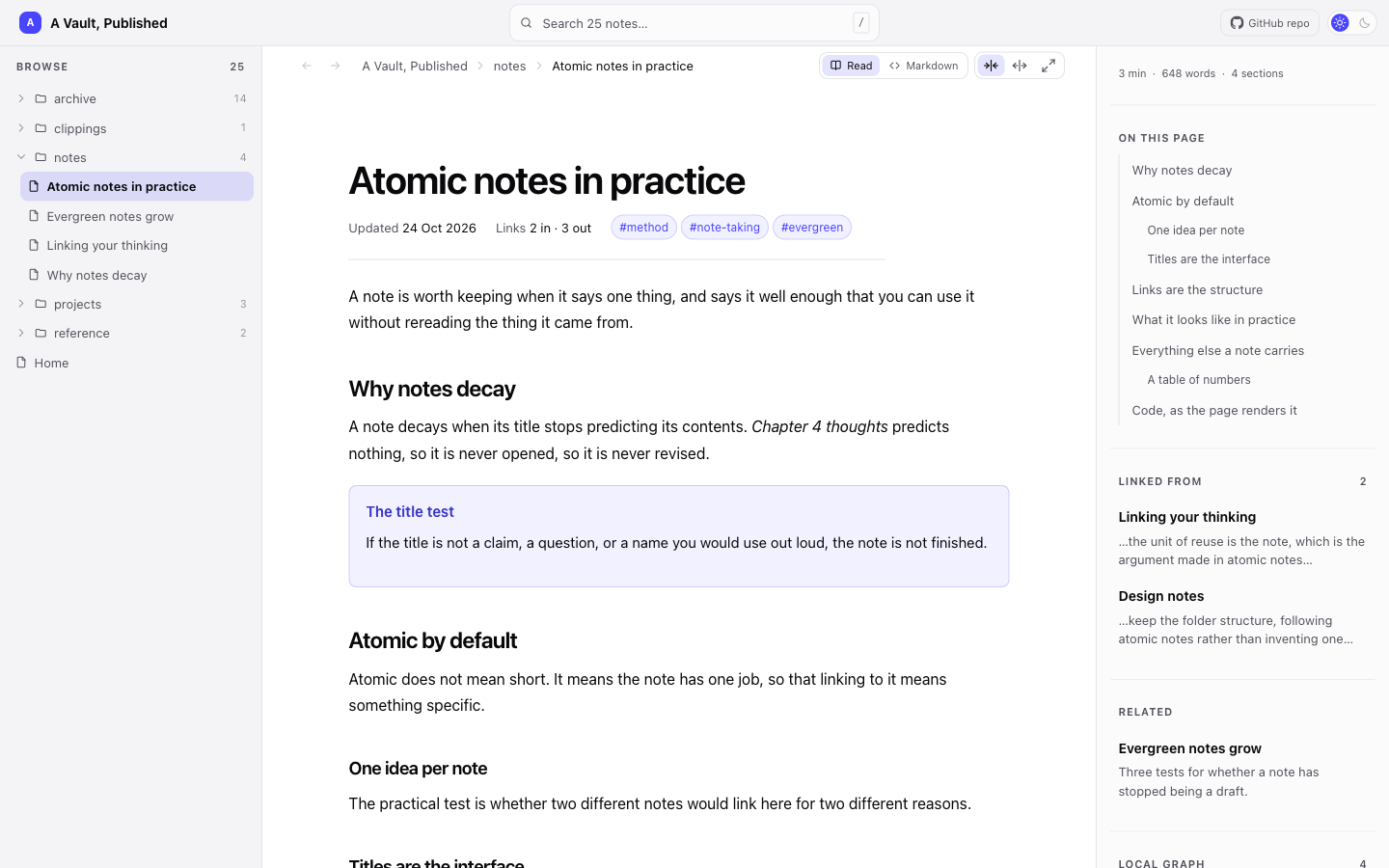
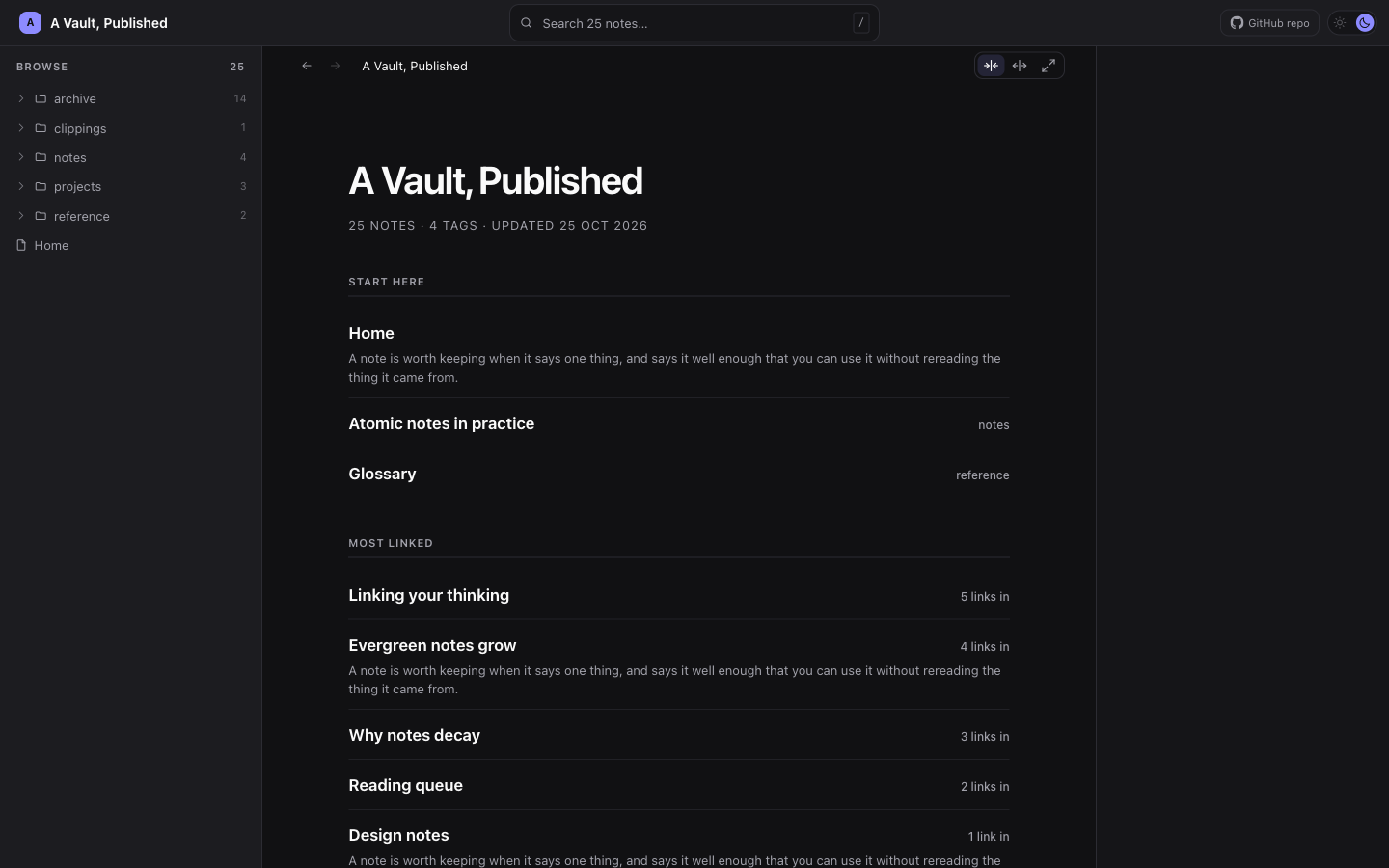
Every page is static HTML with one stylesheet and one script. Light and dark are both built, and a reader can pin either.
Status: working end to end. Render, build, incremental publish and the GitHub Pages path are all verified against a real repository, and the settings screen, the five site themes and the review overlay are built. What is still open is scale — see Known issues — and the design pass on the themes.
Why it renders in Obsidian
Dataview, Datacore, Bases and Mermaid output exists only inside a running Obsidian. Any publisher that converts Markdown outside the app has to reimplement them, which is why most alternatives either skip those features or hand you a static-site generator and leave it to you.
So the plugin renders each note through Obsidian's own renderer, waits for the asynchronous parts to finish, and serializes the result. The cost of that choice: publishing only happens from a running desktop Obsidian, and nothing can rebuild the site on a server.
Why there is no GitHub Actions workflow
Two reasons. A CI build cannot render Dataview, so it would have nothing to do. And Actions is frequently blocked on corporate networks, which is one of the places this is meant to be useful.
This is about publishing. The tests do run in CI, in .github/workflows/test.yml, because they never needed a running Obsidian: test/obsidian-stub.ts stands in for the package.
The plugin commits the built site through the Git Data API and points GitHub Pages at the branch. No git binary, no workflow file, no workflow token scope.
What decides whether a note is published
Three settings, of three different shapes, because a vault that keeps everything in one tree and a vault that is private by default want different answers:
- Scope. One folder, or the whole vault. The coarse answer.
- Excluded folders (
excludeFolders.ts). A list of paths subtracted from whatever the scope took in — publish everything exceptJournal,PeopleandArchive. No globs: a literal path has one failure mode, a path that is not in the vault, and the build report names each entry that excluded nothing. This is the weaker guarantee of the three and the settings screen says so, because a folder added to the vault tomorrow is published. - A frontmatter flag. A whitelist: every note opts in. The one that fails safe, so it is the setting for notes that would do real harm if they went out by accident.
Four more rules apply before any of them: the build's own output folders are
not input, dot-folders Obsidian hides are skipped, installed dependencies
(node_modules and its two cousins) are skipped because a package's
README.md is not a note, and privacy.ts scans each rendered page for
content a Dataview query pulled in from a note that is not being published —
the failure mode that makes a publisher dangerous rather than merely buggy.
Publishing a prototype as well as notes
A vault can hold a built web application, and publishing one is a different problem from publishing a note: nothing here renders it, and the question is only which of its files travel.
.html files publish as-is when the toggle is on — byte for byte, at
their own path, with no stylesheet or script of ours added. Off by default,
because vaults are full of HTML nobody wrote as a web page: saved articles, a
plugin's bundled help, an export somebody made once.
The files a page names travel with it. Scripts, stylesheets, images, and
the files a stylesheet names in turn — a @font-face src, a
background-image, an @import — resolved against the stylesheet rather than
the page, because that is what a browser does. A reference that resolves to
nothing is reported with the file that made it rather than silently dropped.
A folder can be published whole. Under Publish folders whole, add the
folder your build produces and every file in it is published, referenced or
not. This is for code splitting: a lazily loaded chunk is named only inside a
string in the minified JavaScript, so no scan will ever find it, and leaving
it behind is not a missing route — in React the dynamic import rejects and the
application unmounts, so one click turns the whole page blank. Point it at
dist or build, not at a project root. Excluded folders, hidden files,
node_modules and this build's own output are still left out, notes are still
published as rendered pages rather than as Markdown source, and every file
left out is reported with the reason.
And it can be published somewhere other than its vault path. Each folder has a second field saying where it lands:
| Publish at | Where the application ends up |
|---|---|
| (blank) | /proto/app/dist/ — its vault path, the default |
app |
/app/ |
/ |
the front page of the site |
A vault path is not an address anybody wants to send to a reviewer, which is
most of the reason. The other is that / is what makes an application the
site's front door: its index.html becomes the homepage, the overview the
build would have written is not written, and a homepage note moves to
/index-note.html — the one place a note does not win a collision, because
here it loses to an instruction rather than to another file that happened to
be there. The settings panel says which note is about to move, and the build
report says it again.
A destination says where a folder lands, not whether it may be published: the scope still decides that. Two folders cannot be sent to the same place, and the panel says so while it is still cheap to fix.
Two things decide whether the result works, and neither is ours:
- Build with a relative base —
vite build --base=./,ng build --base-href ./,"homepage": ".". The default is/, which resolves to the root of the domain, and a site published into a folder is not that. The build report names every reference that does this. - Publish what the build produced, not the source.
src/index.htmlis a shell with no application in it; nothing here compiles anything. A page with a framework root element and no<script>at all is reported as such.
The vault itself can be the project — the app at the root with its src, its
node_modules and a docs folder of notes beside them. Scope the site at the
whole vault, add dist as a folder published whole, and the notes publish as
pages while the application publishes wherever you point it: at /dist/ by
default, at /app/ if you say so, or at the front of the site with the notes
behind it.
Bringing your own colours and fonts
A theme here is a set of custom properties rather than a fork of the
stylesheet: every rule in theme.ts is written against the --osp-* names
themes.ts declares, so a sixth look is a palette and a type pairing instead
of a second copy of the layout to maintain.
That also makes the escape hatch cheap, for the vault that wants one of the
five with its own blue. Name a CSS file in the vault — Appearance → Custom
stylesheet — and its rules are appended to the end of assets/site.css on
every build, so redeclaring a token is the whole of it:
:root {
  --osp-link: #a8431a;
  --osp-font-body: "Iowan Old Style", Georgia, serif;
  --osp-measure: 64ch;
}
The theme's tokens are declared inside a cascade layer and an author's rules
are not, which is what makes that block hold in dark mode as well as light. A
dark value sits under a selector that outranks a bare :root, so without the
layer an override written the obvious way worked in light and quietly stopped
working when a reader's system went dark.
Two failures are reported rather than silent, because both produce a site that looks exactly like the one before it: a path that is not in the vault is flagged in the settings panel and lands in the build report's skipped list, and a path inside the plugin's own output folders is refused before it is read — appended to itself the stylesheet would double on every build.
The file's own vault path never reaches the output. assets/site.css is
published, so a banner naming the source would hand every reader of the site a
piece of the vault's folder structure.
Locking a site behind a password
A site on GitHub Pages is public, and a password prompt over a document that
already contains the text protects nothing: curl returns it in full. So a
password here is not a login. It encrypts the files at build time, and a
reader without it downloads ciphertext.
Each page is encrypted whole — title, navigation, search payload and all —
because publishing a navigation tree that lists Clients/Acme/Q3 Plan beside
an encrypted body would give away the thing worth keeping. Attachments are
encrypted beside their own names with .enc on the end. What stays readable
is the two stylesheets, the site and overlay scripts, the harvested fonts,
.nojekyll, CNAME, and a shell that says a password is needed.
PBKDF2-HMAC-SHA256 at 600,000 iterations (OWASP's current figure) then
AES-GCM: one salt per build, a fresh IV per file, the iteration count carried
in every payload so raising it later does not strand sites already published.
The derived key is cached in sessionStorage for the tab, so following a link
does not ask again.
A locked page is reassembled rather than merely decrypted. Its own files are encrypted too, so the markup names files that are not on the server, and the reader fetches them, decrypts them and hands them to the document as blob URLs. Anything the parser must have — scripts, stylesheets, and the files a stylesheet names — is put in place before the document is written, because a script element whose load has already failed does not try again; pictures are swapped in afterwards, so a page is readable before its images arrive.
It remains a shared secret rather than access control — one password for everyone, no revocation short of republishing, and anyone who has it can pass it on. Two consequences worth knowing before turning it on are in Known issues.
Reviewing a built site
src/overlay/ is a comment layer over a built site: pins anchored to blocks of
a page, a panel that lists every thread, and an export the reviewer sends back.
It runs over a local preview by default and can be shipped into the published
site as well, which is a separate switch — as is letting a reader of that site
write rather than only read.
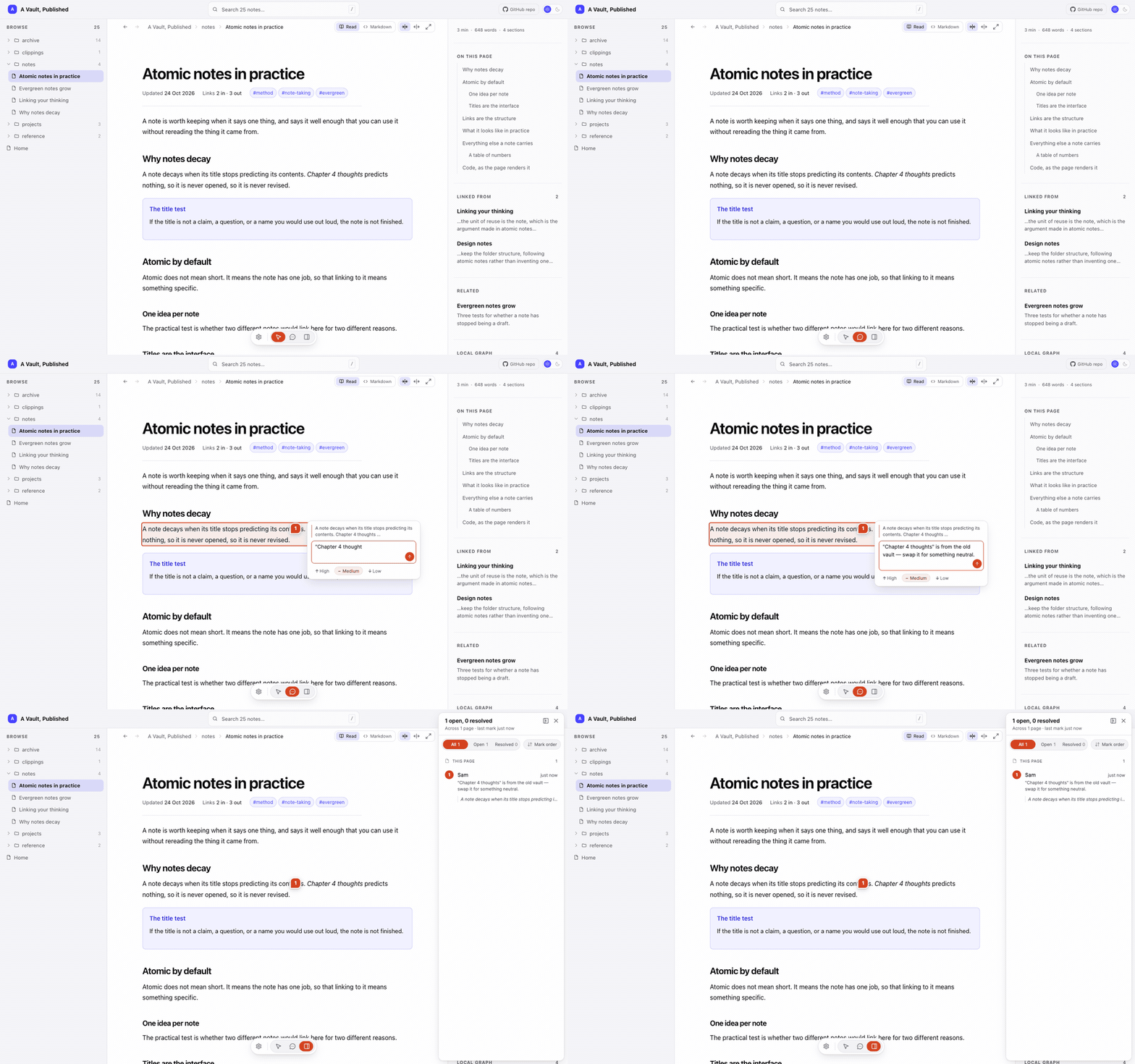
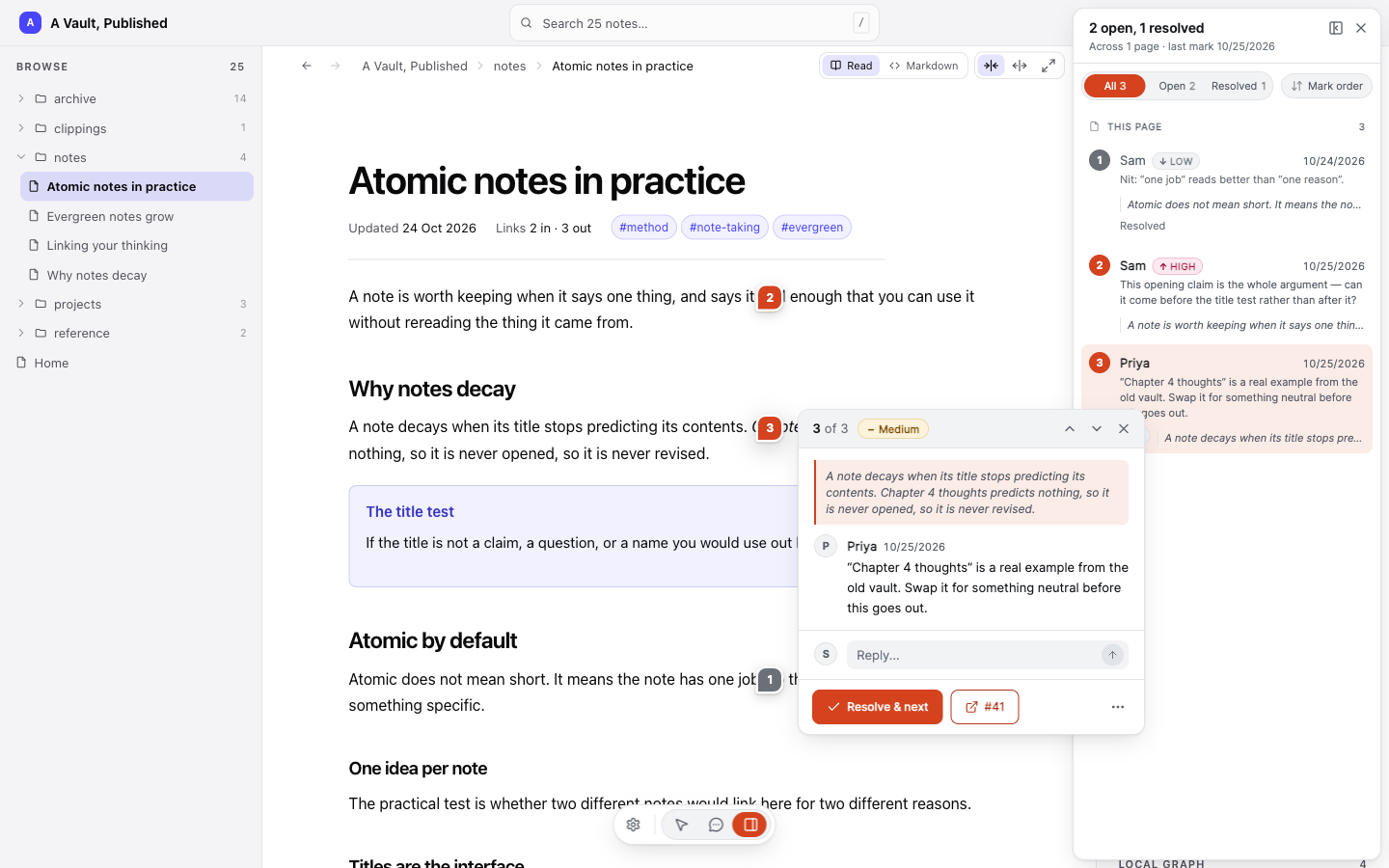
A pin remembers the point it was dropped on twice — in document coordinates, and as a fraction across the block it landed on — so it survives a rebuild that reflows the page. The panel sorts by time or by priority, filters open from resolved, and steps through a review one comment at a time:
A published page keys its comments on its own URL and never on the vault path
behind it, so no folder names reach a reader. pageMap.ts is the other half:
a publish records which note produced which page, in the vault beside the
review file, so an imported review links back to the writing rather than to the
HTML.
An open comment can be filed as an issue in GitHub, Jira or Asana and synced
back, which is what src/tracker/ is for. Filing goes through the plugin's
own local server, so the Send action exists in a preview opened in a browser
and in no published page: a static host has nothing to file through. Reviewing
a published site means exporting the comments, importing them, and filing from
a preview.
Layout
src/main.ts     the plugin: settings, commands, and the publish sequence
src/render/     rendering a note through Obsidian and knowing when it is done
  settle.ts       waiting for async plugin output; content-aware, not just a timer
  renderNote.ts   the offscreen host and the render/serialize cycle
  probe.ts        what came out, per block: ok, empty, error or blocked
  cssProbe.ts     which stylesheets are readable, and whose they are
  dataviewRefresh.ts  holding Dataview still while we photograph it
  diagnose.ts     samples a render over time when something renders incomplete
src/publish/    turning rendered HTML into a site
  normalize.ts    repairs markup that a browser would rearrange on reparse
  links.ts        wikilinks to relative URLs; unpublished targets degrade safely
  urls.ts         a vault path made safe to put in an attribute
  page.ts         document shell, heading ids and the control that copies
                  one, table of contents
  shell.ts        command bar, vault panel, context rail (markup only)
  nav.ts          the navigation model every page carries
  backlinks.ts    what links to this note, and what it is near
  graph.ts        the local graph, laid out at build time and emitted as SVG
  source.ts       a note's markdown, minus what the rendering hides
  assets.ts       the files a page points at, carried and rewritten
  htmlFiles.ts    the vault's own .html pages, published untouched, and what
                  each one -- and each stylesheet it carries -- asks for
  wholeFolders.ts folders published entire, for a build whose chunks nothing
                  references
  sourceLink.ts   which repository the site's bar links back to, if any
  excludeFolders.ts  folders the author keeps out of whatever the scope took in
  outputFolders.ts   the folders neither selector looks at, whatever the scope
                     says: build output, hidden paths, installed dependencies
  privacy.ts      content from unpublished notes that reached a published page
  landing.ts      the pages no note wrote: homepage, browse, a page per tag
  themes.ts       the themes a site can be built with, as custom properties
  theme.ts        the site's own stylesheet, written against those names
  customCss.ts    a stylesheet of the author's own, added to the end of it
  harvestCss.ts   lifts layout-critical rules from the running app
  bases.ts        re-emits Bases views as semantic tables and cards
  clientScript.ts the one script a published page carries
  stableIds.ts    deterministic ids in place of Obsidian's per-render random ones
  incremental.ts  hashes rendered output, so a publish uploads only what changed
  prune.ts        removing what the build no longer produces
  drift.ts        detecting a build that degrades as it runs
  encrypt.ts      PBKDF2 and AES-GCM, and the shape of a locked payload
  lockSite.ts     turning a finished build into an encrypted one
  unlockScript.ts the reader that turns an encrypted page back into a page
  buildSite.ts    selection, render, assemble
src/overlay/    reviewing a built site, and getting the comments back
  overlayScript.ts  the overlay as it runs in the browser
  overlayCss.ts     its stylesheet
  types.ts          its data model
  anchor.ts         anchoring a comment to a block of a built page
  pageLabels.ts     naming a page when four of them are called `index`
  pageMap.ts        which note produced which page, kept in the vault
  server.ts         a local server for the review preview
  importReview.ts   turning a saved review into a note in the vault
  relay.ts          turning a review comment into an issue in a tracker
src/tracker/    the trackers a comment can be filed with
  jira.ts, asana.ts   per-provider request and response shapes
  request.ts          the one HTTP call they make, and what to say when it fails
src/github/
  client.ts       Git Data API: blobs, tree, commit, ref, Pages
src/platform/   things only a desktop Electron host can do
  secrets.ts      token encryption via the OS keychain
  migrate.ts      carrying settings across a change of plugin id
  openExternal.ts opening a URL outside Obsidian
  response.ts     reading an HTTP response that might not be from the API
  backgroundThrottling.ts
src/ui/
  settingsTab.ts  the settings screen
examples/       folders to copy into a vault to try a feature out
media/          the screenshots and the recording in this README
scripts/        deploying a build into a vault, and generating a vault to
                measure against
Examples
Two folders in examples/ are meant to be copied into a vault and published,
each demonstrating one feature and explaining what to look for:
examples/note-header.md— the three frontmatter keys a published page's header is built from (updated,tags,pinned), what each one does, and what the header leaves out.examples/html-as-is/— a folder of hand-written HTML published byte for byte, with the stylesheet, script and images beside it carried along. Turn on Publish HTML files as-is first. Keep the folder together: the point of the feature is that a page and the files it references stay next to each other.
Read examples/html-as-is/about-this-demo.md before building that one. It is
published as an ordinary note and it is the tour.
Development
npm install
npm run build
echo /path/to/vault > .vault-path  # once, per clone; gitignored
npm run deploy                     # deploys to that vault
npm run deploy /path/to/vault
npm run build runs the tests, then tsc, then esbuild, so a failing test
cannot produce a bundle. npm run deploy does not build — run npm run build
first, or you deploy a main.js older than the change you just made.
The test vault lives outside this repo, so plugin source is never mixed up with the notes used to exercise it. Which vault is yours is local to your clone: write it to .vault-path, set VAULT_PUBLISHER_VAULT, or pass a path argument, which wins over both. There is no default — the script would be guessing at a directory to write into.
The plugin id is vault-publisher; it shipped during development as site-publisher-spike, and the first run under the new id imports the old settings and offers to delete the folder they came from.
The plugin's data.json has an autoRun key (spike, build, publish, diagnose) so a run can be triggered by deploying rather than by clicking. spike reports render timings for the publish scope — the same thing the Report render timings command does — and diagnose samples one note over time and needs a diagnosePath beside it, since the note worth sampling is whichever one is rendering wrongly. Driving a run from the deploy rather than from a click is what makes iteration measurable. Install hot-reload in the test vault and the deploy is enough on its own: the script writes the .hotreload marker the watcher looks for, and the reload fires on the change to main.js. It reports whether anything is actually watching, because a copy into an unwatched folder looks exactly like a successful deploy.
Nothing in media/ is anyone's vault. The site in those images is the
fixture one shell.preview.test.ts builds — "A Vault, Published", twenty-five
invented notes — which is also how to regenerate them:
OSP_PREVIEW=/tmp/preview npx vitest run shell.preview
That writes a browsable copy of the fixture site, rendered through the same
buildPage, shell.ts and siteCss a real build uses. Serve it and
photograph it. No real note, vault path, repository name or comment appears in
any of them, which is the point: a screenshot is published the moment it is
committed.
scripts/make-scale-vault.mjs generates a large vault for the scale work. It
deletes the directory it is given, so it has no default and refuses to run
without an explicit path.
Tests are co-located as src/**/*.test.ts. test/obsidian-stub.ts stands in
for the obsidian package, which ships types only, via an alias in
vitest.config.mts. The overlay ships to the browser as a string of
JavaScript rather than a linked module, so two rules exist twice — block
anchoring and page labelling — and both copies are run against each other
rather than trusted: anchoring in overlayScript.test.ts, labelling in
pageLabels.parity.test.ts.
Known issues
- A Vite source
index.htmlis not reported as an empty shell. The warning fires on a framework root element with no<script>anywhere, and Vite's source page does have one — pointing at/src/main.tsx, which is TypeScript no browser will run. It is still reported, by the rule about references resolved from the root of the server, but the message is about the base rather than about the page being unbuildable. Angular's sourceindex.htmlhas no script tag and is caught. - An application that computes a path at runtime still breaks. Publishing
a folder whole carries every file, but
fetch('/api/' + id)is asking for a server, and a static host has none. Nothing here can fix that. - A locked site cannot serve a code-split application. An as-is build
published into a locked site runs from a blob URL, and a module that
import()s another chunk resolves that import against its own URL — which a blob URL does not have. Single-bundle output works, as do the stylesheets and images a page names; a build that splits its code, or fetches its own data at runtime, needs the site published without a password. - A locked site cannot publish incrementally. Every build mints a fresh
salt and a fresh IV per file, so every encrypted file differs from the one
already published and the manifest matches nothing. A password therefore
costs a full upload on every publish, which is the opposite of what
incremental.tsexists for and matters most on exactly the large sites it was written for. - Excluded folders do not reach attachments or HTML companions. The list
is applied when notes and
.htmlpages are selected, but an image inside an excluded folder that a published note embeds is still carried, and still published under its vault path atassets/files/…. Same for a file an as-is HTML page references. For anything that must not go out, use the frontmatter flag. - Bases interactivity. Views are re-emitted as our own tables and cards, which fixed the layout and recovered numeric values that were publishing blank. Sorting and view switching are gone, as with all interactivity.
- Bases virtualization. The grid renders only visible rows, so a long base could publish truncated. A guard compares emitted rows against the count Bases reports and aborts the publish; it is written but not yet exercised against a large base.
- Mermaid is light-themed. Diagrams serialize with resolved colours from Mermaid's default light theme, so a dark site needs a re-render or a colour rewrite.
- Mermaid needs vault consent. Obsidian 1.14 gates diagrams per vault; the plugin detects this rather than bypassing it.
- dataviewjs is off by default in Dataview's settings, and its errors would publish verbatim.
- Interactivity is lost. Bases sorting, dataviewjs buttons and collapsed callouts are static once published.
- Scale is unproven. A clean vault builds 7 notes in 1,690ms, but 7 notes is not 500, and a long publish session may degrade its own environment. This is the next thing to test.