Vault Link Check
 Tomayachi343 downloads
Scan your vault for broken internal links and sort them into near-misses (a note that exists under a slightly different name) and planned notes you meant to write. Runs entirely on your device.
- Overview
- Scorecard
- Updates3
Find broken internal links in your Obsidian vault and, more usefully, tell them
apart. A broken [[wikilink]] is not one kind of thing. Some point at a note
that does exist under a slightly different name (you renamed it, or fat-fingered
it). Others point at a note you meant to write and never did. Those want opposite
responses: fix the first, revisit the second. This plugin sorts them for you.
Prefer not to install anything? There's a browser version of the same classifier at vault-link-checker.vercel.app. This plugin is the native version that reads your live vault index directly, so aliases and heading/block refs are resolved for you with nothing to upload.
What it does
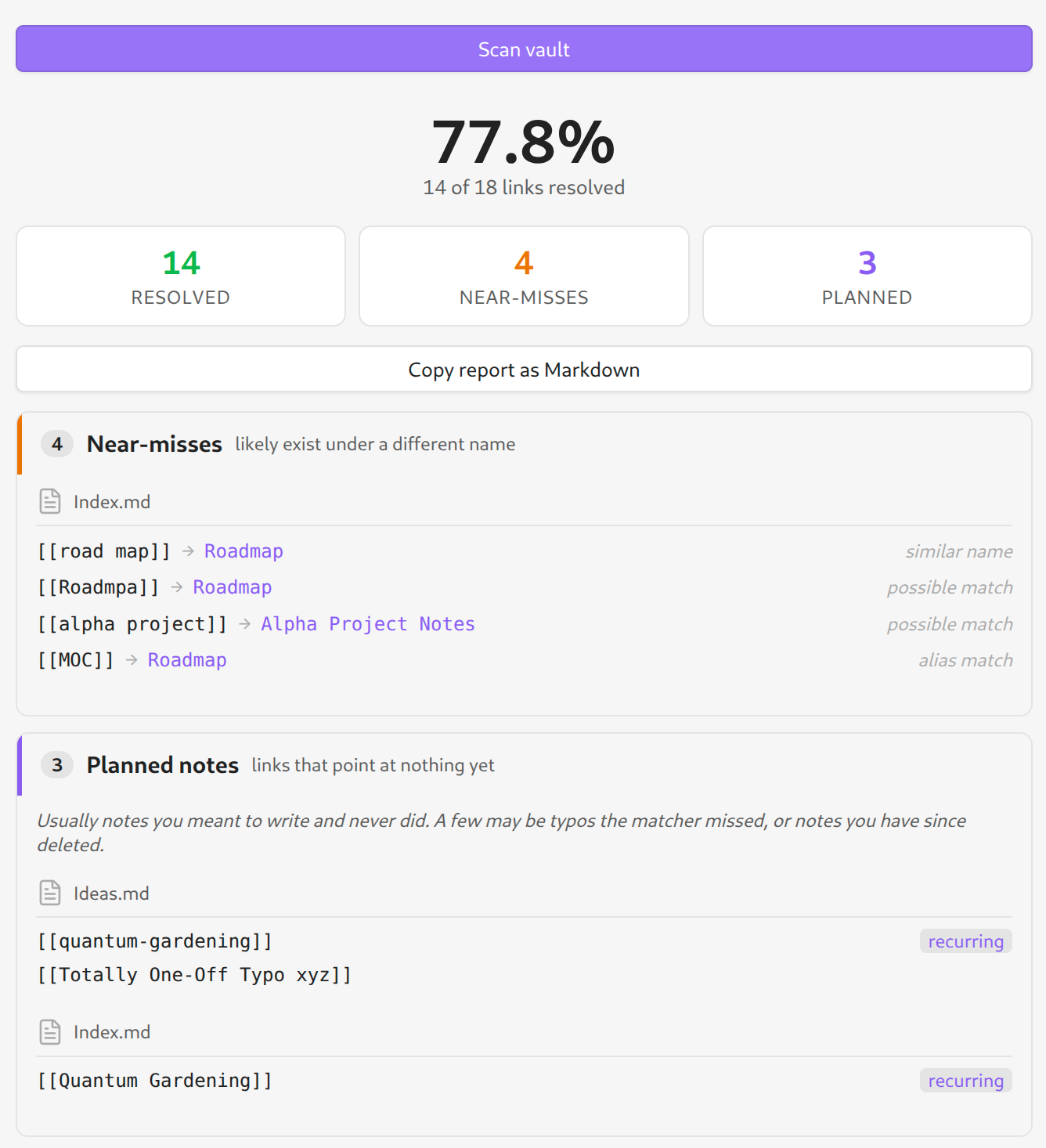
Run a scan and you get a report pane grouped into three buckets:
- Resolved — links that point at a note that exists. Just a count.
- Near-misses — the link is broken, but a real note is a close match: same name with different spacing or punctuation, a one- or two-character typo, or a frontmatter alias that lines up. Each row suggests the note it probably meant, so a rename or retype is a quick fix.
- Planned notes — links that point at nothing. Treated as dropped ideas,
not errors: a
[[link]]you wrote is a note past-you wanted and didn't get to. Ones you linked from more than one note are flagged recurring — a stronger signal it's worth writing. Copy the whole set out as a Markdown checklist to seed a backlog.
Everything runs on Obsidian's own link index (metadataCache), so aliases,
heading refs (#), block refs (^) and path-qualified links are all classified
correctly with no re-parsing.
How it's different from existing link plugins
Plugins like Dangling links and Find orphaned files and broken links answer "which links are broken?" and "which notes are unreferenced?" — they give you a flat list. Vault Link Check answers the next question: for each broken link, what should I do about it? The value is the classification — near-miss (with a suggested target) versus planned note — and the "recurring idea" signal, not just the detection. It reports; it never edits your vault.
Install
From Community plugins (once accepted): Settings → Community plugins → Browse → search "Vault Link Check" → Install → Enable.
Beta via BRAT: install the BRAT plugin, then "Add beta plugin" with this repository URL.
Manual: download main.js, manifest.json and styles.css from the latest
release into <vault>/.obsidian/plugins/vault-link-check/, then enable it.
Usage
- Click the unlink ribbon icon, or run "Vault Link Check: scan vault" from the command palette.
- Rows link back to the source note (and near-miss rows to the suggested target) so you can jump straight to a fix.
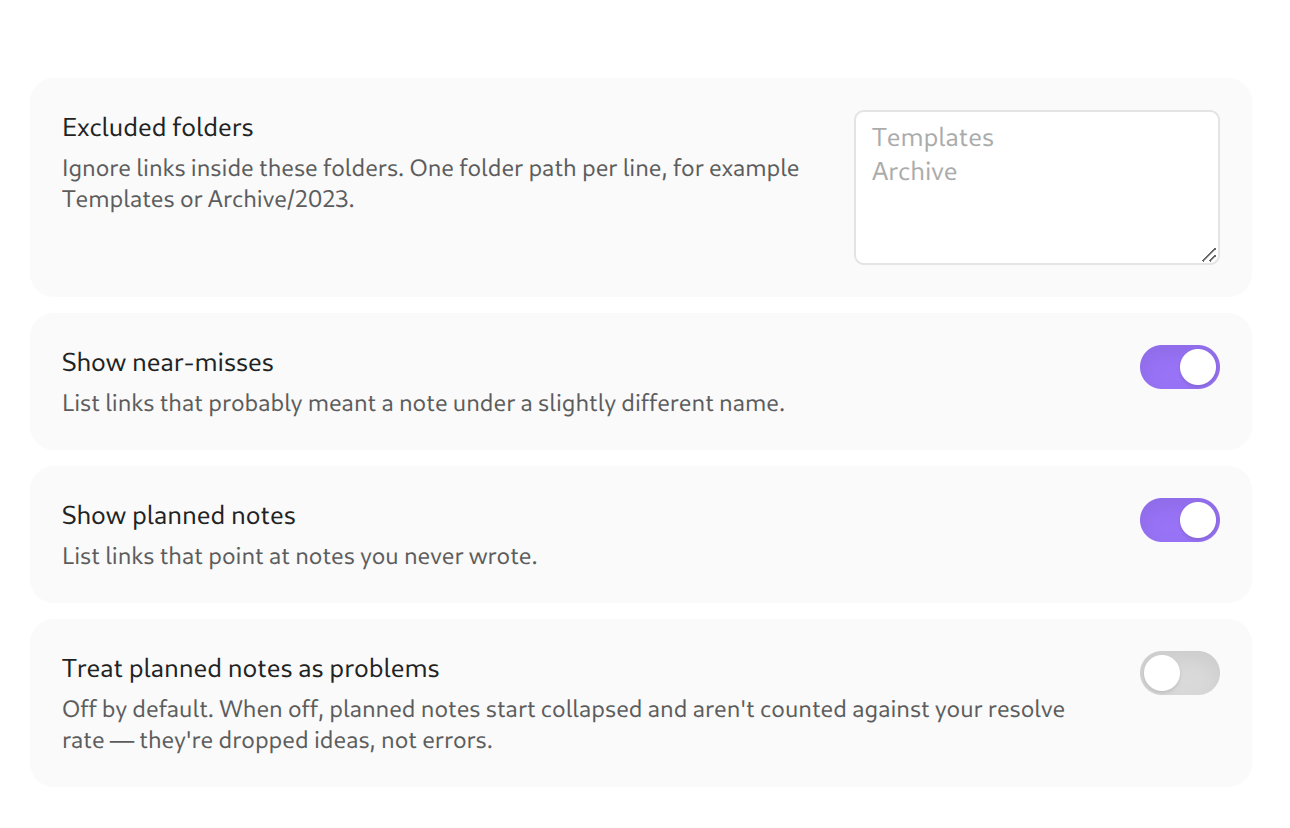
- Settings let you exclude folders (templates, archives), hide either section, and choose whether planned notes count against your resolve rate (off by default — they're ideas, not bugs).
Privacy
Runs entirely on your device. No network calls, no telemetry, no account, no
external assets. The source is here and the release bundle is a single generated
main.js you can inspect. It works with your connection disabled.
Development
npm install
npm test        # pure classifier tests via node --test
npm run build   # type-check + bundle to main.js
The interesting logic lives in src/scan.ts (a pure, Obsidian-free classifier)
so it can be unit-tested without a running app. src/adapter.ts is the only file
that reads the live vault.
License
MIT — see LICENSE.