Vault Crews
 Johannes Kaindl278 downloads
Run autonomous local LLM agent teams (crews) on your vault via LM Studio
- Overview
- Scorecard
- Updates22
Run autonomous local LLM agent teams ("crews") on your Obsidian vault, powered by a local LLM model (LM Studio or Ollama) — with a deterministic, orchestrator-led pipeline and a snapshot safety net under every run.
Local models are treated as weak, unreliable executors. The orchestrator decides flow, paths and writes; the model only ever decides content, inside narrow, schema-validated contracts. Every output is constrained, then verified, before it ever touches your vault.
🇬🇧 English · 🇩🇪 Deutsch
Features
- Deterministic pipeline, not a free-form agent loop. A crew ("team") is a
sequence of exactly three task kinds —
collector(deterministic context gathering),llm(one chat completion against a schema-validated contract), andactions(deterministic application of a validated action list to the vault). The model never controls flow and never touches the vault directly. - Constrain-then-verify before every write. Every LLM output is extracted, schema-validated against a built-in, versioned schema, and source-bound — a model cannot invent a file path or an enum value that didn't already exist in the collected material. A repair pass (one retry) handles malformed JSON.
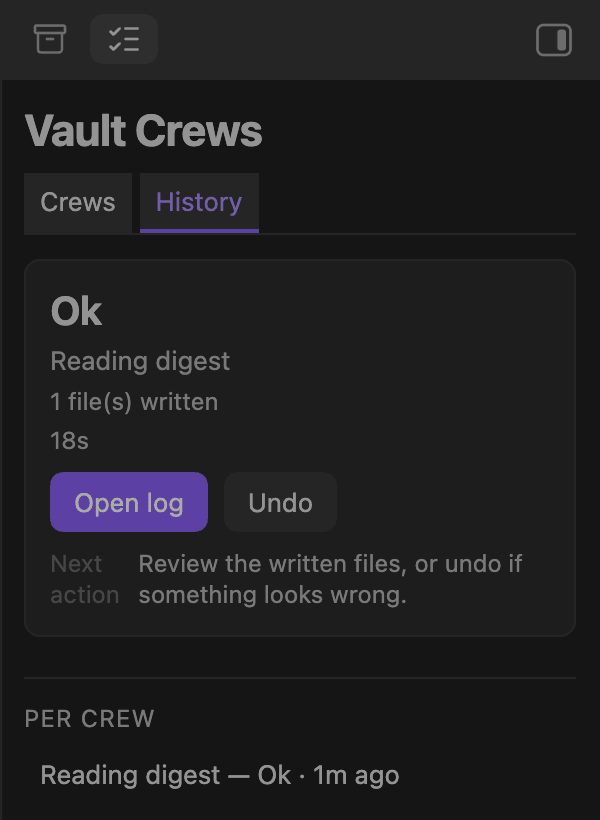
- Git-free snapshot undo, one click. Before a run touches a note, its pre-run state is snapshotted (copy-on-write) into a hidden store via the Obsidian vault/adapter API. "Undo last run" restores changed notes from the snapshot and moves run-created notes to the trash — no git repository required, works in any vault.
- Four shipped example crews, installable via a command: Task-Triage (reviews backlog TaskNotes, proposes metadata corrections on soft fields only), Daily-Briefing (summarizes open tasks into today's daily note), Notiz-Tagger (proposes tags for notes that have none) and Reifegrad-Tagger (estimates a note's maturity from its content and writes it to the frontmatter).
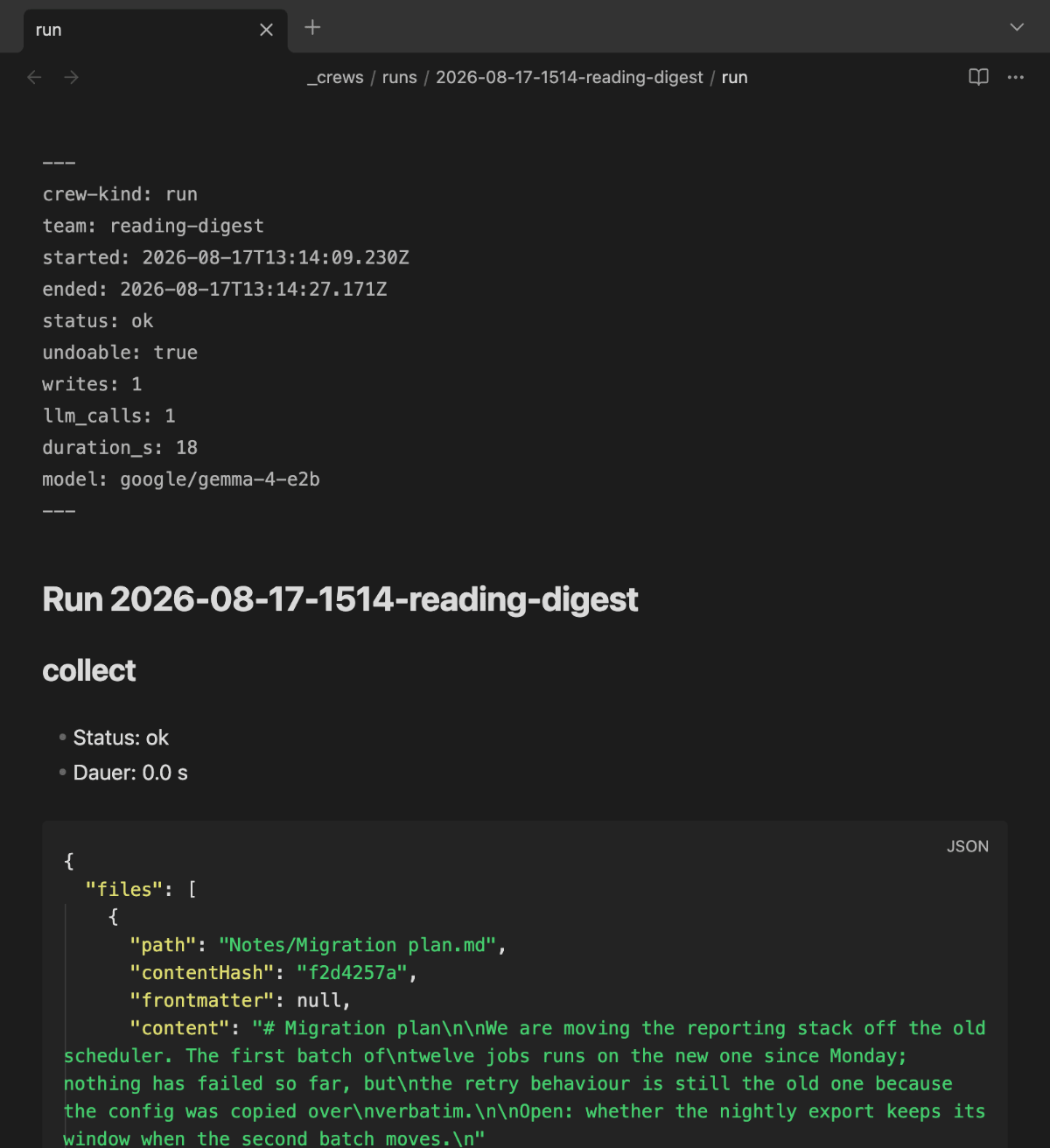
- Full observability, in the vault. Every run writes a human-readable
run.md(frontmatter + per-task detail, Bases-compatible) and a machine-readablestate.json, plus a shippedruns.basedashboard. - Crash recovery. An orphaned lock + a
state.jsonstill markedrunningare detected on the next plugin load, with one recommended action: finish the run (keep the partial changes — they remain undoable via the write-ahead snapshot). - English/German UI.
Requirements
- Desktop only (
isDesktopOnly: true— the plugin is built around a locally-hosted LLM served over HTTP, a desktop workflow). - A local LLM server: LM Studio (default port
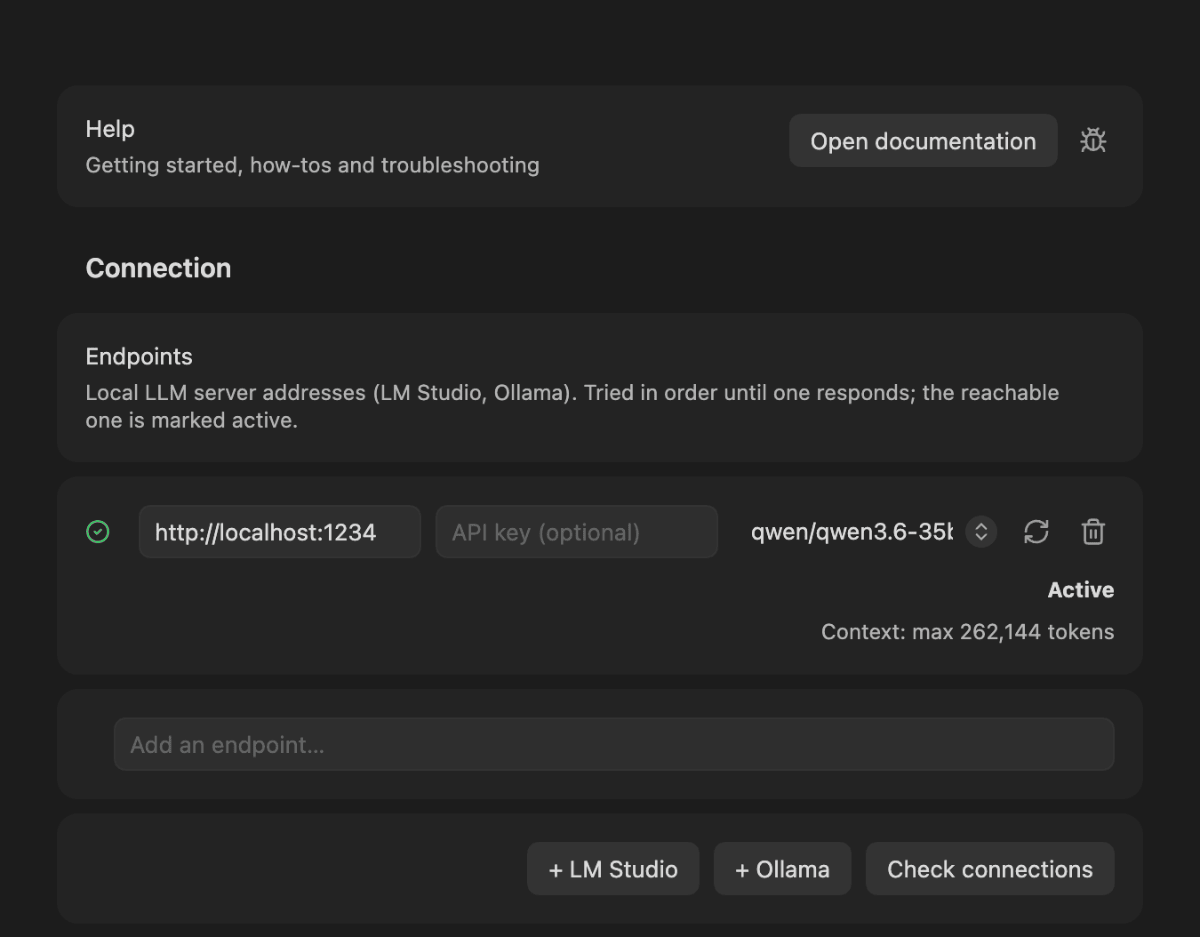
1234) or Ollama (default port11434), serving an OpenAI-compatible API. The endpoint is configurable in the plugin settings; just enter the URL (e.g.,http://localhost:1234/v1for LM Studio orhttp://localhost:11434/v1for Ollama). You can list several endpoints (one per line), and the plugin uses the first reachable one at each preflight. No provider selection needed — the plugin auto-detects context length and capabilities. - Enable CORS on your LLM server. The plugin streams model output via
XMLHttpRequestfrom inside Obsidian's renderer process (requestUrlcannot stream). LM Studio: Settings → Developer → Enable CORS. Ollama: set the environment variableOLLAMA_ORIGINS=<your-obsidian-app-url>(optional; without it, the plugin falls back to non-streaming mode, and results still arrive). - No git repository required. The undo net is a per-run snapshot taken via the Obsidian vault/adapter API, so it works in any vault — git repo or not. (Earlier versions required a git repo; as of 0.2.0 that requirement is gone.)
Live token streaming needs CORS enabled on your LLM server. The ticker runs as an
XMLHttpRequestfrom Obsidian's renderer, which always sendsOrigin: app://obsidian.md. LM Studio rejects that preflight unless the server was started with--cors(lms server start --cors), Ollama unlessOLLAMA_ORIGINSallows it. Without it the run still completes — the plugin falls back to a non-streaming request through Obsidian's main process — but the panel shows „Waiting for output…" until the task is done.
Install
Canonical repository: git.jkaindl.de/jkaindl/vault-crews, mirrored on GitHub where the releases are published.
Catalog (recommended)
Via AnySource Sideloader, which installs and updates plugins from any git forge. Subscribe to the plugin catalog once under Settings → AnySource Sideloader → Catalogs → Add:
https://git.jkaindl.de/jkaindl/obsidian-catalog/raw/branch/main/catalog.json
Vault Crews then appears in the sideloader's plugin list and updates like any other plugin; every download is checksum-verified. To install just this one plugin without the catalog, add its repository URL as a source instead: https://github.com/johannes-kaindl/vault-crews.
Manual
Download main.js, manifest.json and styles.css from the latest release into <vault>/.obsidian/plugins/vault-crews/, then enable the plugin under Settings → Community plugins. Each release also ships checksums.sha256, so you can verify what you downloaded with shasum -a 256 -c checksums.sha256.
cp main.js manifest.json styles.css "<your-vault>/.obsidian/plugins/vault-crews/"
From source
git clone https://git.jkaindl.de/jkaindl/vault-crews
cd vault-crews
npm install
npm run build   # produces main.js
Copy main.js, manifest.json and styles.css into <vault>/.obsidian/plugins/vault-crews/.
After enabling (whichever route), run the command "Install example crews" to seed _crews/
(default root, configurable in settings) with the four example teams (Task-Triage,
Daily-Briefing, Notiz-Tagger, Reifegrad-Tagger), their agents, and the runs.base dashboard. Installed files are never
overwritten by a second run — edit them freely afterwards.
Usage
- Start your local LLM server (LM Studio or Ollama) with CORS enabled, and load a model. The plugin resolves the first reachable endpoint at each preflight.
- Run "Install example crews" once — it seeds the crew root (
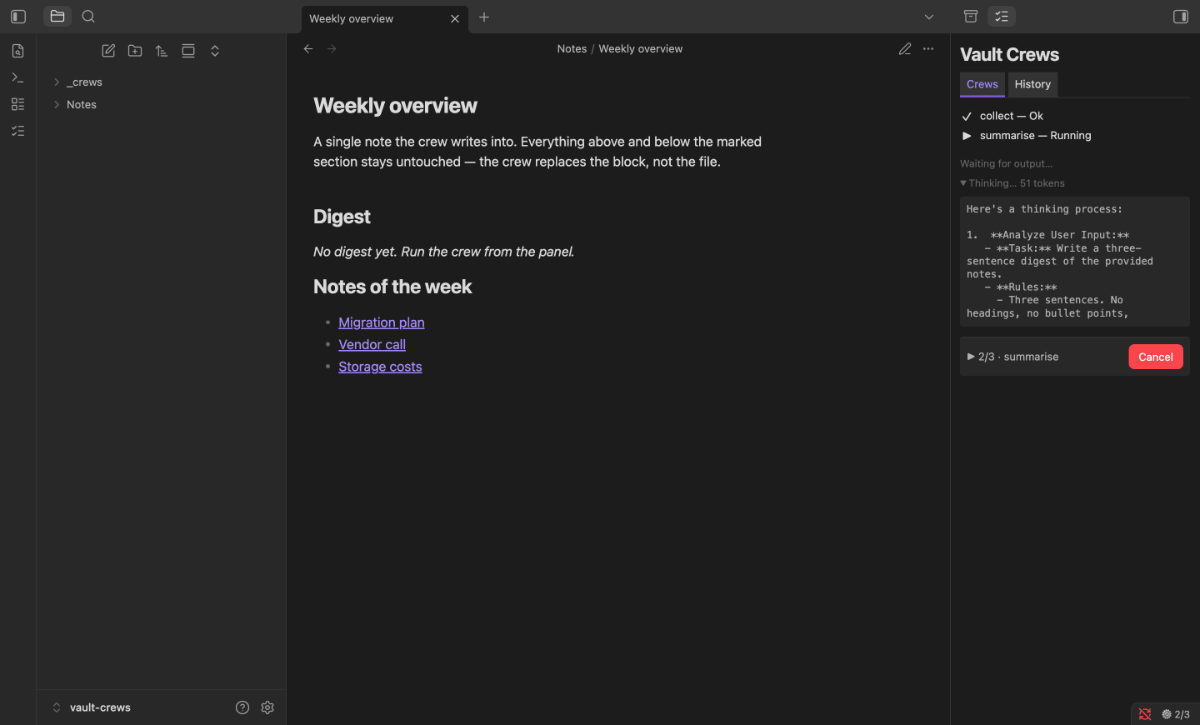
_crewsby default) with the four example teams, their agents, and theruns.basedashboard. - Open the crews panel (ribbon icon or Open crews panel). It lists the teams it found and, during a run, the current task with live token counts.
- Start a run with Run crew… and pick a team, or use the per-team command Run crew: <name> that every team registers under its own name.
- Watch it work. The panel shows each task's status (waiting, running, ok, failed, skipped, stale). Abort current run requests a stop, observed between tasks and inside the model stream.
- Read the log. Every run writes
run.md(human-readable, Bases-compatible) andstate.jsonnext to it; Open last run log jumps there, andruns.baselists all runs at once. - Undo if needed. Undo last run shows what it would restore (team, time, files) and asks before doing it — changed notes are restored from the snapshot, run-created notes go to the trash.
Writing your own teams and agents is plain Markdown in the vault — see Writing your own crews below.
Configuration
Settings → Community plugins → Vault Crews, in four groups:
| Setting | Default | Meaning |
|---|---|---|
| Endpoints | http://localhost:1234/v1 |
One row per endpoint, each with its own URL, optional API key (kept in Obsidian's secret storage, not in data.json) and model; the first reachable one is used per run. Check connections probes each row and reports refused / unknown host / timeout / not-an-LLM-API / access denied separately |
| Denied endpoints | localhost:8080, 127.0.0.1:8080 |
Never contacted — the default keeps the plugin off a port other local model servers commonly claim. A setting, not hardcoded |
| Request | (profile) | What a run sends with each model call: sampling values (temperature, top_p, top_k, …) and the thinking level, from a profile table per model family and backend. Collapsed section; shows what is sent and what has an effect on your backend, takes your own values per model family, lists the last request and any deviations seen this session. Values in an agent note override it for that agent. The row "Level picker in chat" has no effect in Vault Crews |
| Crew root folder | _crews |
Vault-relative folder holding agents, teams and run logs |
| Hide crew folder in the file explorer | off | Purely cosmetic: the crew root disappears from the explorer, its notes stay in the vault |
| Max writes per run | 10 | Plugin-wide cap; a team's own max_writes can only be lower |
| Wall-clock limit | 10 minutes | Aborts a runaway run, leaving its partial writes snapshotted and undoable |
| Undo history depth | 15 | How many run snapshots of the current day are kept. Older days thin out: one snapshot per day for a week, then per week (4 weeks) and per month (6 months), none after that |
| Call timeout | 300 s | Hard limit per model call — generous, because just-in-time model loading takes a while |
| Stall timeout | 60 s | Aborts if no new token arrives; only checked after the first data chunk, so loading is never mistaken for a stall |
| Verbose logging | off | Reserved — the setting persists but nothing reads it yet (see V1 limitations) |
If the LLM Endpoint Manager plugin is installed, the endpoint (and its API key and model) comes from there and the settings show the manager's picker instead of the list above; without it, the list above is used as before.
Endpoint and timeout changes take effect with the next run; no plugin reload is needed.
How it works
A run is an orchestrator walking a fixed pipeline, not a model deciding what to do next. Each team is a sequence of exactly three kinds of task:
collector— deterministic gathering. Code, not the model, reads the vault and assembles the material (e.g.tasknotes.queryover a folder, optionally with note content).llm— exactly one chat completion, answering against a schema declared by the task'soutput:block. The model sees only the collected material and produces only content — never a path, never a flow decision.actions— deterministic application. The validated action list is applied to the vault by code.
Between the model and your notes sit two independent checks. Stage 1
(output-validator) parses the raw response, validates it against a built-in versioned
schema, and binds every path and enum value back to the material actually collected —
a path the model invented has nothing to bind to and is rejected. One repair attempt
handles malformed JSON. Stage 2 (action-executor) re-checks each action immediately
before the write, independently of stage 1: against the write_scope allowlist and the
fixed denylist, the allowed action types and frontmatter keys, and a content hash — if
you edited the file after it was collected, that action is skipped rather than
overwriting your edit. If more than half of a task's actions fall away, the task fails
instead of applying a half-consistent state.
Writes are snapshotted write-ahead: a note's pre-run content is copied into a hidden per-run store through the Obsidian vault/adapter API before it is touched. That is why even a crashed or aborted run stays fully undoable, and why no git repository is needed.
Safety model
write_scopewhitelist, per team, plus a fixed denylist that always wins. Every team declares the vault-relative globs it may write to. A fixed denylist —.obsidian/**,.git/**,_crews/**,_vaultrag/**, dotfiles — overrides any whitelist unconditionally; crews can never read or write their own configuration (no self-triggering, no prompt-injection path into plugin control).- A snapshot under every write — one-click undo. Before each note is written, its
pre-run content is captured write-ahead into a hidden per-run store (under
.obsidian/plugins/vault-crews/undo/). Even a failed or aborted run with partial writes stays fully undoable. Undo last run restores changed notes and trashes run-created ones, showing exactly what it will undo (team, time, files) before you confirm — and warns if a note was edited after the run rather than silently overwriting it. Run-created notes go to the Obsidian trash, never a hard delete. - Write and wall-clock limits.
max_writesper run (team-configurable, capped by a plugin-wide maximum), a hard per-note size cap, an LLM call budget, and a wall-clock watchdog (default 10 minutes) that aborts a runaway run (leaving its partial writes snapshotted and undoable) rather than running forever. - Consistency threshold. If more than 50% of a task's proposed actions are rejected or stale, the whole task fails instead of applying a semantically inconsistent partial state; below that threshold, individual actions are skipped and logged.
- Constrain-then-verify, twice. Stage 1 (
output-validator) validates the raw model JSON against a built-in schema and binds every path/enum value to the material actually collected for that task. Stage 2 (action-executor) re-checks every action against the path whitelist/denylist, allowed action types, allowed frontmatter keys, and a content-hash staleness guard (if you edited the file since it was collected, that single action is skipped, never silently overwritten) — immediately before the write, independent of stage 1.
Network disclosure
- The plugin talks only to the endpoints you list in its settings. Out of the box that
is a local LLM server (LM Studio
http://localhost:1234/v1, Ollamahttp://localhost:11434/v1). No other host is ever contacted, no telemetry, no analytics, no update-check pings. - Endpoints may carry an API key, which makes hosted, OpenAI-compatible providers usable
as a fallback. Adding a key means requests — including the note content a crew collects —
leave your machine for that provider. The settings row says so explicitly once a key is
set, and the list is ordered: a reachable local endpoint above a hosted one is always used
first. Keys live in Obsidian's secret storage (the system keychain), not in your vault:
data.jsonkeeps only a reference, so a synced vault does not carry them. A key you entered before 0.14.0 moves there the next time the plugin resolves its endpoints. - Secrets in your notes are masked before a model sees them. Private keys (PEM blocks),
Bearertokens and common API-key formats (sk-…,ghp_…, …) in the text a crew sends become placeholders such as[redacted-token-1]; the answer gets the original back before the crew writes it. Notes reach the model as JSON text, so a restored PEM block keeps its line breaks written as\n. E-mail addresses and other personal data are not masked. - Keys never reach the run logs. Everything written into your vault (
run.md,state.json) and everything shown in the panel passes a redaction step first — including error bodies, which is the realistic leak path: some gateways echo the Authorization header back in a 401 response. - Port 8080 is denylisted by default (commonly reserved by other local single-consumer model servers) — this is a default setting, not a hardcoded behavior, and can be changed.
- No shell execution and no direct filesystem access: the undo net writes its
snapshots through the Obsidian vault/adapter API only, never
child_processornode:fs.
V1 limitations
Documented rather than silently missing:
- No mid-run transport retry / endpoint re-resolve. If LM Studio dies or the
connection drops mid-stream, the current call fails and the run ends
failedwith its partial writes snapshotted; the plugin does not attempt to reconnect or re-resolve the endpoint within a run. This is deliberately deferred — a failed run is always safe (undo snapshot + full log) and cheap to re-run:section.replaceis idempotent andnote.create/patch semantics refuse to double-apply, so simply re-running the same crew after restarting LM Studio is the supported recovery path. - Crash recovery assumes a single device. The orphaned-run detection (stale lock
state.jsonstillrunning) is designed for "Obsidian crashed on this machine mid-run". A vault synced across two concurrently-running Obsidian desktops (e.g. via iCloud/Syncthing while both are open) is explicitly out of scope for V1 — see design risk #8.
- Raw LLM output on validation failure is captured under
runs/<id>/artifacts/. Whenever a task's output fails schema/source-binding validation, the raw model response is written toartifacts/<taskId>-1.txt; if the one repair attempt also fails validation, its raw response is written toartifacts/<taskId>-2.txt. This feeds the test-fixture corpus of real broken model outputs and is written under the run directory — it is never counted as a vault write, never touchesmax_writes, and is not snapshotted for undo. Successful runs write no artifacts at all. verboseLogging(Settings → Advanced) is reserved, not yet wired. The setting exists and persists, but nothing currently reads it; full raw-output recording of every call (success or failure) — beyond the failure-caseartifacts/capture above — is not implemented.- The failure log opens
run.mdat the top, not scrolled to the failed task. "View failure" opens the run's log file viaworkspace.getLeaf().openFile()with no ephemeral scroll state — you land at the top of the note and scroll to the relevant##section yourself. - Aborting a run is cooperative — and the panel is honest about it. "Cancel" /
"Abort current run" sets the abort flag, which is observed between tasks and inside
the LLM stream; when it bites you get
status: abortedwith partial writes (undoable). With a fast local model a whole run can finish in 1–2 s, so a click can land after the last checkpoint and the run completes normally — that is correct (the work was already done), not a lost click. The panel reflects this truthfully: while aborting it shows "Abort requested…", and if the run finished first it states "the run finished before the abort took effect — nothing was aborted" rather than freezing on a spinner. There is deliberately no mechanism to throw away already-completed work.
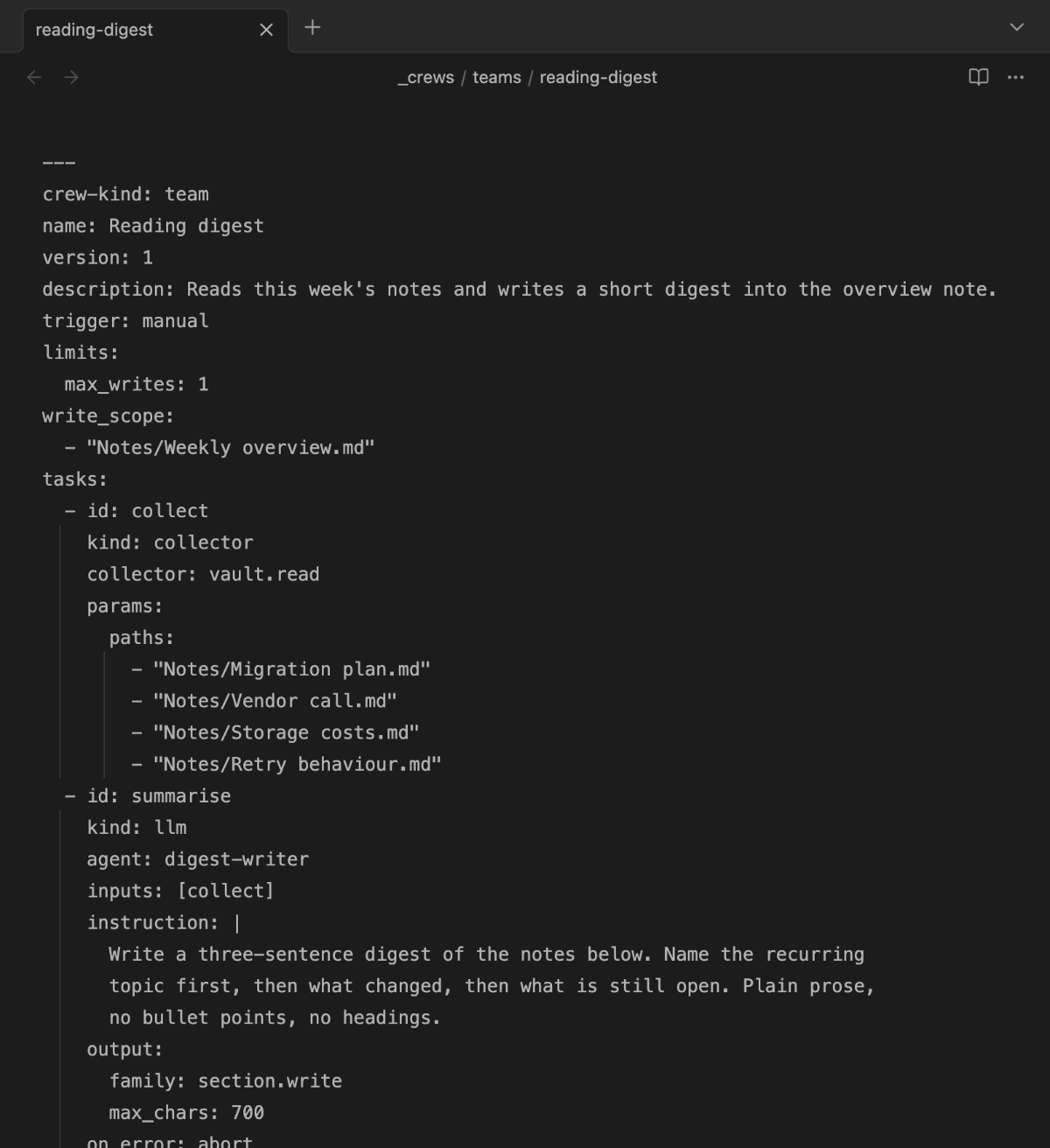
Writing your own crews
A crew is Markdown in the vault: a team (crew-kind: team) as a pipeline of
collector → llm → actions, plus agent notes (crew-kind: agent, system prompt in
the body). The crews that ship with the plugin (command "Install example crews") are
editable examples — copy them and adjust.
Model settings of an agent (temperature, max_tokens, thinking)
An agent note can set three model values in its frontmatter; all are optional and override the plugin's Request settings for that agent.
temperature is sent as given; without it the profile value for the model family applies (0.1 for crews). max_tokens is the agent's token budget (default 2048); a thinking level can raise it to the model family's reserve so thinking cannot eat the whole budget. thinking is off, on or auto (default): off asks the model not to think, on asks for the medium level, auto follows the Request settings, whose default is off.
Output vocabulary (output:)
An llm task declares its output format through an output: block:
frontmatter.set— the model proposes frontmatter values for source notes.allowed_keysrestricts which fields may be set. Paths are bound to the collected material (no hallucination); the structural enum constraint binds values to those actually present in the vault, but only takes effect once the field already has values in that folder — on the very first run (no values yet, no value table) a restriction comes from the instruction and the agent prompt alone.output: family: frontmatter.set allowed_keys: [tags, kategorie]section.write— the model writes Markdown text, whichsection.replaceputs into thetargetof the followingactionstask. Optionalmax_chars(default 16000).output: family: section.write
The older names output_schema: triage-v1 / briefing-v1 remain valid as shorthands.
Reading content (include_content)
By default tasknotes.query returns frontmatter only. For crews that need the note
text (taggers, summarizers), set include_content: true:
collector: tasknotes.query
params:
  folder: Notizen
  where_missing: [tags]
  include_content: true
Write safety (write_scope)
write_scope is a glob allowlist: a crew may write there and nowhere else. Set it as
narrowly as possible — and point the collector's folder and write_scope at the same
folder, otherwise proposals outside the write scope are discarded. The plugin-wide limit
"Max writes per run" caps every team's max_writes on top of that.
Documentation
- Documentation index — all guides in one place.
- Getting started — from the install to your first crew run and its undo.
- Troubleshooting — the exact message, its cause and the fix.
License
Code: AGPL-3.0-or-later — see LICENSE for the full text. Documentation: CC BY-SA 4.0 (LICENSE-DOCS). A commercial license is available on request — see LICENSING.md.