Search...Search plugins and themes...
⌘K
Sign in
  • Get started
  • Download
  • Pricing
  • Enterprise
  • Account
  • Obsidian
  • Overview
  • Sync
  • Publish
  • Canvas
  • Mobile
  • Web Clipper
  • CLI
  • Learn
  • Help
  • Developers
  • Changelog
  • About
  • Roadmap
  • Blog
  • Resources
  • System status
  • License overview
  • Terms of service
  • Privacy policy
  • Security
  • Community
  • Plugins
  • Join the community
  • Discord
  • Forum / 中文论坛
  • Merch store
  • Brand guidelines
Follow us
DiscordTwitterBlueskyThreadsMastodonYouTubeGitHub
© 2026 Obsidian

Unique Tab Labels

stephencarbonistephencarboni1 downloads

Attempts to make tab labels unique by prefixing the filename with the parent folders.

Add to Obsidian
  • Overview
  • Scorecard
  • Updates2

This Obsidian plugin attempts to make tab labels unique by prefixing the filename with the parent folders. If adding one parent folder does not result in unique labels, another is added, and so on.
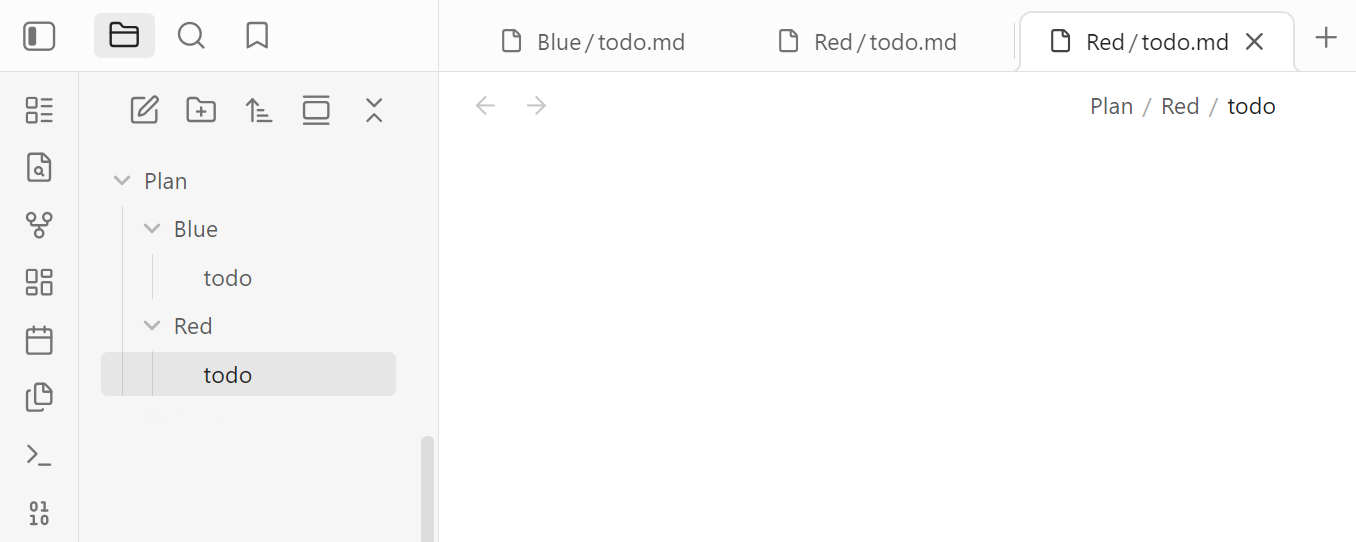
screenshot

Note that I'm using Bradley Wyatt's Autofit Tabs plugin in this screenshot.

Installation

Search "Unique Tab Labels" in the community plugins browser in Obsidian and install from there.

Usage

Simply enable the plugin. There are no settings.

Limitations

This plugin modifies Obsidian's tab labels by patching the rendered tab-header DOM. Obsidian does not currently expose a public API for changing built-in tab labels, so future Obsidian updates may break the plugin.

90%
HealthExcellent
ReviewSatisfactory
About
Make tab labels unique by prefixing filenames with parent folder names, adding additional parents until each label is distinct. Keep labels minimal by only adding as many folder levels as needed.
InterfaceFiles
Details
Current version
2026.5.11
Last updated
Yesterday
Created
2 days ago
Updates
2 releases
Downloads
1
Compatible with
Obsidian 1.12.7+
License
OTHER
Report bugRequest featureReport plugin
Author
stephencarbonistephencarboni
GitHubstephencarboni
  1. Community
  2. Plugins
  3. Interface
  4. Unique Tab Labels

Related plugins

Hider

Hide interface elements such as tooltips, status bar, titlebar, and more.

Commander

Customize your workspace by adding commands everywhere, create macros and supercharge your mobile toolbar.

Meta Bind

Make your notes interactive with inline input fields, metadata displays, and buttons.

Recent Files

Display a list of recently opened files.

Omnisearch

Intelligent search for your notes, PDFs, and OCR for images.

Iconic

Customize your icons and their colors directly from the UI, including tabs, files & folders, bookmarks, tags, properties, and ribbon commands.

Advanced URI

Control everything with URI.

Remember cursor position

Remember cursor and scroll position for each note.

Meld Encrypt

Hide secrets in your notes.

Thino

Quickly capture memos and display them in the sidebar with a heatmap. (Closed source)