Search...Search plugins and themes...
⌘K
Sign in
  • Get started
  • Download
  • Pricing
  • Enterprise
  • Account
  • Obsidian
  • Overview
  • Sync
  • Publish
  • Canvas
  • Mobile
  • Web Clipper
  • CLI
  • Learn
  • Help
  • Developers
  • Changelog
  • About
  • Roadmap
  • Blog
  • Resources
  • System status
  • License overview
  • Terms of service
  • Privacy policy
  • Security
  • Community
  • Plugins
  • Themes
  • Discord
  • Forum / 中文论坛
  • Merch store
  • Brand guidelines
Follow us
DiscordTwitterBlueskyThreadsMastodonYouTubeGitHub
© 2026 Obsidian

Typing speed

supercip971supercip97113k downloads

Show the current typing speed in the status bar.

Add to Obsidian
  • Overview
  • Scorecard
  • Updates8


Typing speed plugin for obsidian

This little plugin show the current typing speed in the status bar !
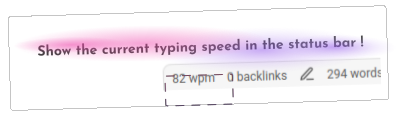
You can choose if you want the current speed being displayed in cps (character per second), cpm (character per minute) or wpm (word per minute).

License

The "typing speed plugin" source code is under the MIT license.

HealthFair
ReviewCaution
About
Display current typing speed in the status bar. Switch the display between cps (characters/sec), cpm (characters/min) or wpm (words/min) for real-time feedback while you type.
Status barEditing
Details
Current version
1.3.0
Last updated
2 years ago
Created
4 years ago
Updates
8 releases
Downloads
13k
Compatible with
Obsidian 0.12.0+
Platforms
Desktop, Mobile
License
MIT
Report bugRequest featureReport plugin
Author
supercip971supercip971
GitHubsupercip971
  1. Community
  2. Plugins
  3. Status bar
  4. Typing speed

Related plugins

Advanced Tables

Improved table navigation, formatting, and manipulation.

Meta Bind

Make your notes interactive with inline input fields, metadata displays, and buttons.

Outliner

Work with your lists like in Workflowy or Roam Research.

Creases

Tools for effectively folding Markdown sections.

LanguageTool Integration

advanced spell/grammar checks with the help of language-tool.

MetaEdit

Manage your metadata.

Various Complements

Complete words similar to auto-completion in an IDE.

Simplified Chinese Word Splitting

Adds Simplified Chinese word splitting support for the editor and Vim mode.

CSS Editor

Edit CSS snippet files.

Sort and Permute lines

Sort and Permute lines in whole file or selection.