TTRPG Sheet Kit
 Antonio Porcelli111 downloads
Interactive counters, checkbox tracks and multi-column layouts for tabletop RPG character sheets, saved as plain text in your notes.
- Overview
- Scorecard
- Updates3
Keep your tabletop RPG character sheet in Obsidian and update it with a click.
TTRPG Sheet Kit turns small YAML blocks into counters with −/+ buttons and checkbox tracks, and adds a columns callout to lay out the rest of the sheet. Every click writes the new value back to the note as plain text, so your sheet stays readable, searchable and synced like any other note.
It is system-agnostic: D&D, Fate, Pathfinder, Blades in the Dark, or your own homebrew.
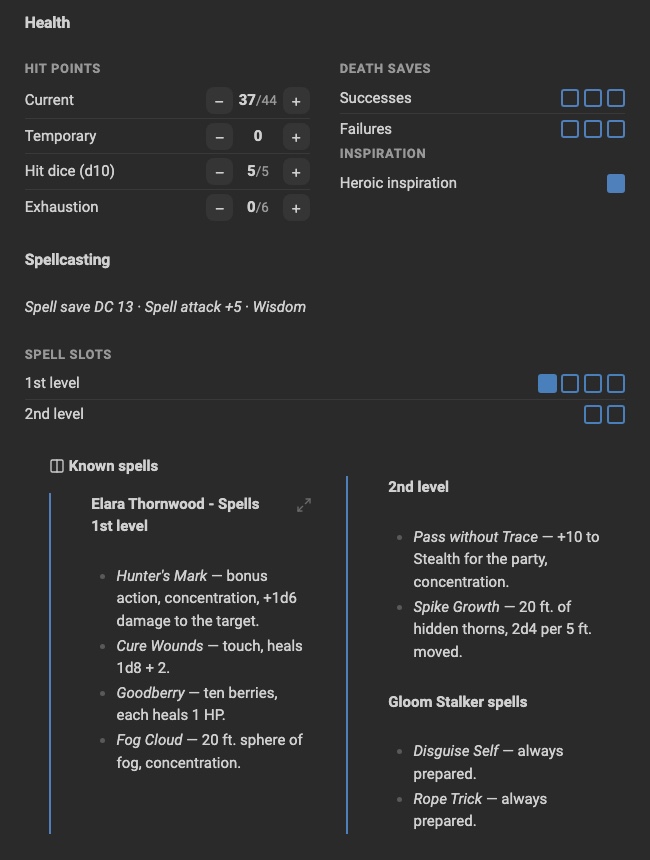
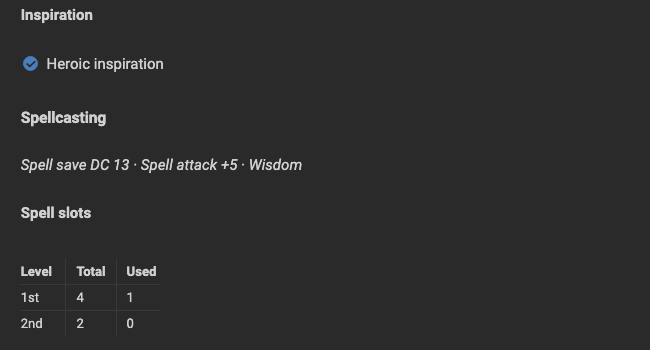
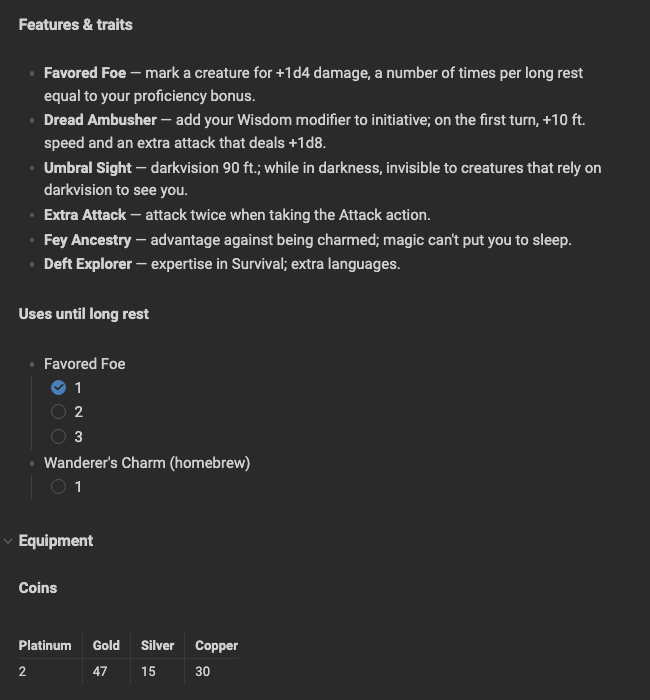
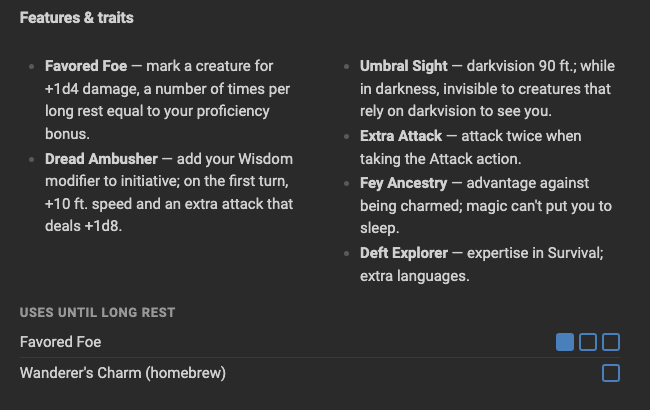
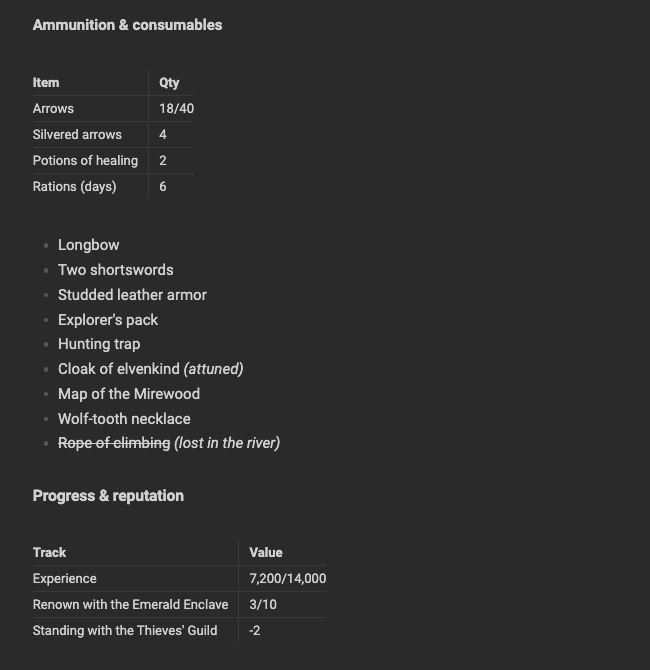
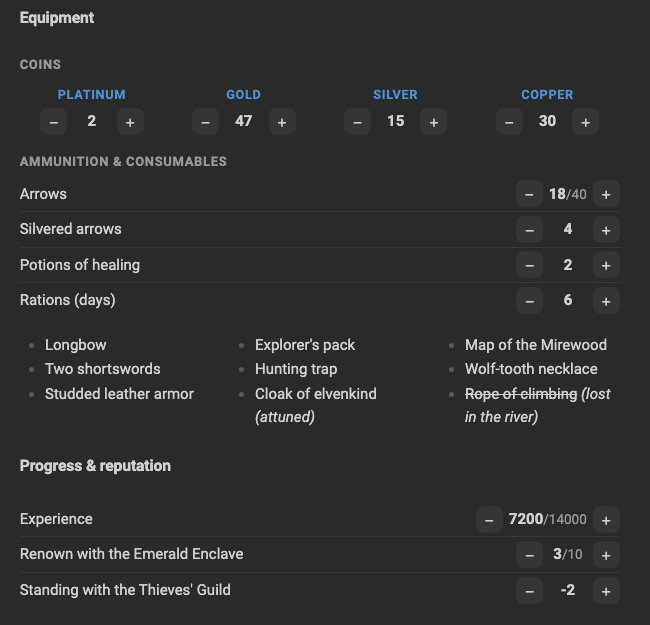
See the before and after comparison below.
Features
- Counters with −/+ buttons, optional minimum and maximum, custom step (Shift+click = ×5).
- Checkbox tracks for stress, spell slots, daily uses, inventory slots.
- Vertical or horizontal layout, with optional D&D ability modifiers (14 → +2).
- Groups: several titled groups in one block.
- Columns callout to put lists and text (even embedded notes) in two or three columns.
- Insert commands: pick a ready-made block from the command palette or the right-click menu, no syntax to remember.
- Works in Reading view and Live Preview, on desktop and mobile.
- Type a value directly:
25,+8(healing),-17(damage). - Resets for rests, sessions or days: one command brings every counter back to its starting point.
- Undo the last change, a whole reset included.
- Changes only the number that changed: your formatting and YAML comments are kept.
- Interface in English and Italian (follows Obsidian's language).
Installation
From Community plugins (once published): Settings → Community plugins → Browse → search "TTRPG Sheet Kit".
With BRAT: add progressify/ttrpg-sheet-kit in the BRAT plugin.
Manually: download main.js, manifest.json and styles.css from the
latest release into
<vault>/.obsidian/plugins/ttrpg-sheet-kit/, then enable the plugin in
Settings → Community plugins.
Quick start
- Open a note and run TTRPG Sheet Kit: Insert block… from the command palette (Cmd/Ctrl+P), or right-click in the editor and choose Insert TTRPG Sheet Kit block….
- Pick a template, for example D&D ability scores.
- Click −/+ to change the values.
Every template also has its own command (TTRPG Sheet Kit: Insert: …) that you can bind
to a hotkey in Settings → Hotkeys.
Counters
Short form
```ttrpgsk-counters
gold: 7
arrows: 18
fate_points: 2/3        # value/maximum
```
Long form
```ttrpgsk-counters
platinum_old: { label: "Platinum (old empire)", value: 6 }
hp:
  label: Hit points
  value: 24
  max: 30
stress: { type: track, max: 3, value: 1 }
```
| Field | Meaning | Default |
|---|---|---|
label |
displayed name (name works too) |
the key |
value |
current value, also as 2/3 |
0 |
max |
maximum | none |
min |
minimum (null = no minimum) |
0 |
step |
change per click (Shift+click = × 5) | 1 |
type |
number, or track for checkboxes (requires max) |
number |
mod |
show the D&D modifier, e.g. 14 → (+2) | false |
reset |
{ on: <moment>, to: max | min | <number> }, see Resets |
none |
In a track, clicking a box fills the track up to that box; clicking the last filled box empties it.
Typing a value
Click the number of a counter to type a value, then press Enter (Esc or clicking away cancels):
| You type | Result |
|---|---|
25 |
the value becomes 25 |
+8 |
adds 8 (healing) |
-17 |
subtracts 17 (damage) |
=-2 |
sets a negative value (needs min: null) |
Minimum and maximum are always respected. Anything else is refused and the field turns red.
Resets
Give a counter a reset to bring it back to a starting point at the end of a rest, a session, a day…
```ttrpgsk-counters
hp:     { value: 37, max: 44, reset: { on: long, to: max } }
slot_1: { type: track, max: 4, value: 3, reset: { on: long, to: min } }
second_wind: { type: track, max: 1, value: 1, reset: { on: short, to: min } }
fate:   { value: 1, reset: { on: session, to: 3 } }
```
onis the moment, any name you like:short,long,session,day…longalso resets what resets onshort.tois where the value goes back:max,minor a number. Both fields are required; if one is missing, a warning appears under the counter.- Counters with a reset show a small ↺ next to their name (hover it to see when and where it resets).
Run TTRPG Sheet Kit: Reset… from the command palette and pick the moment: every counter of the
open note with that reset goes back to its starting point at once. The command only appears in notes
that use reset. A notice lists what changed, with an Undo button.
Undo
TTRPG Sheet Kit: Undo last change puts back the last change made by the plugin in the open note: a click, a typed value or a whole reset. You can assign it a hotkey. It won't overwrite values you changed by hand in the meantime. The history lives in memory and is cleared when Obsidian closes.
Block options
| Option | Values |
|---|---|
label |
block title |
layout |
vertical (default) or horizontal |
mod |
true to show the modifier on every counter |
label, name, layout and mod are reserved: don't use them as counter names.
```ttrpgsk-counters
layout: horizontal
mod: true
STR: 10
DEX: 14
CON: 12
INT: 8
WIS: 13
CHA: 16
```
In the horizontal layout, counters wrap onto a new row when the page is too narrow.
Several groups in one block
Each group has its own options and its counters under items:.
```ttrpgsk-counters
coins:
  label: Coins
  layout: horizontal
  items:
    platinum: 0
    gold: 12
    silver: 30
abilities:
  label: Abilities
  mod: true
  items:
    str: { label: STR, value: 10 }
    int:
      label: INTELLIGENCE
      value: 13
```
Columns callout
Put any Markdown (lists, text, links, ttrpgsk-counters blocks) in columns:
> [!ttrpgsk-columns] Spells
> - Fireball
> - Magic missile
> - Shield
> - Invisibility
> [!ttrpgsk-columns|3]three columns> [!ttrpgsk-columns|plain]no border or title> [!ttrpgsk-columns|3 plain]both
It also works with an embedded note, whose content is split across the columns:
> [!ttrpgsk-columns|plain]
> ![[spells]]
On phones the callout falls back to a single column.
Example sheet
The examples folder contains a complete D&D 5e character,
Elara Thornwood, that uses every feature of the plugin:
ability scores with modifiers, hit points with a maximum, death saves and spell slots as
tracks, grouped coins and ammunition, negative values, and an embedded spell list in columns.
Copy it into your vault together with
Elara Thornwood - Spells to try it.
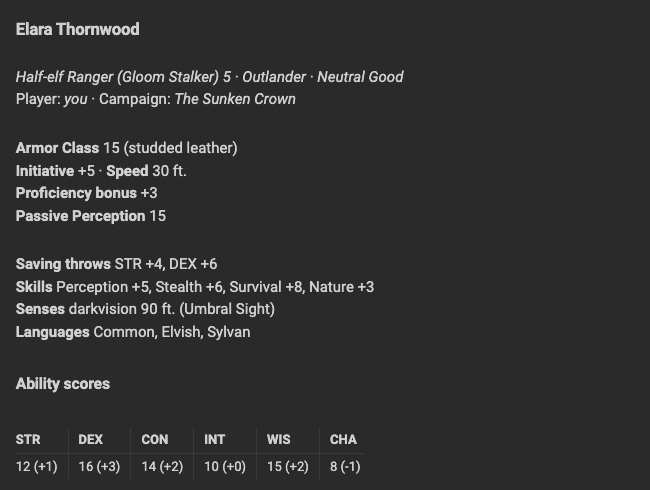
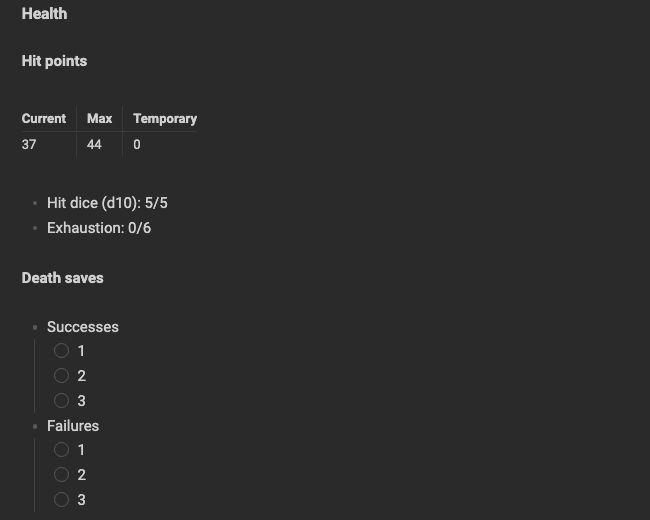
The same sheet written in plain Markdown, without the plugin, is in Elara Thornwood (without plugin).
Before and after
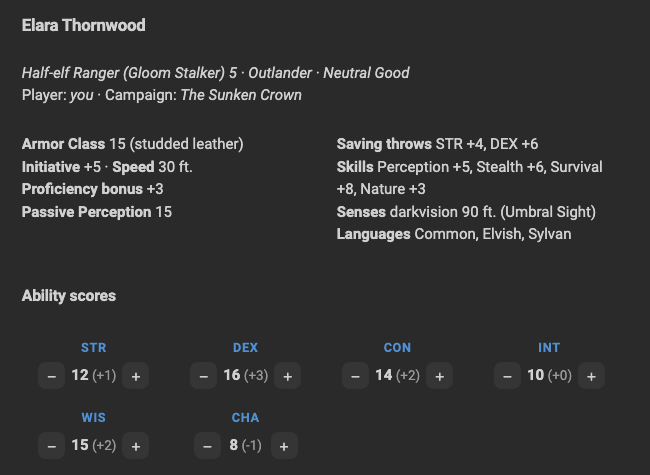
Same character, same data, same theme and window width.
| Plain Markdown | With TTRPG Sheet Kit |
|---|---|
 |
 |
  |
|
 |
 |
 |
 |
Generate sheets with AI
llms.txt is a compact reference written for AI assistants (ChatGPT, Claude, …).
Paste it, or its link, into a conversation and ask for a character sheet: the assistant will
write Markdown that works with TTRPG Sheet Kit.
Good to know
- Values live inside the
ttrpgsk-countersblock in your note, not in a database: you can edit them by hand at any time. - To edit a block's YAML in Live Preview, hover it and click the
</>button in the top-right corner. - If two devices edit the same counter at the same time, your sync service resolves it like any other text change.
Feedback and feature requests
I'd love to hear how you use TTRPG Sheet Kit at your table.
- Missing a feature? Need something for your game system, a new layout, a new kind of tracker? Open a feature request.
- Found a bug? Open an issue with a copy of the block that misbehaves and, if you can, a screenshot.
- Just want to share feedback on the current features, good or bad? Leave some feedback: every comment helps decide what to improve next.
Development
The plugin is plain JavaScript with no build step. See CONTRIBUTING.md for setup, conventions and pull requests.
npm test
To release: bump version in manifest.json, package.json and versions.json,
then push a tag with the same version (e.g. 0.2.0, no v). The GitHub workflow
runs the tests and creates a draft release with main.js, manifest.json and styles.css.
License
MIT © Progressify