Search...Search plugins and themes...
⌘K
Sign in
  • Get started
  • Download
  • Pricing
  • Enterprise
  • Account
  • Obsidian
  • Overview
  • Sync
  • Publish
  • Canvas
  • Mobile
  • Web Clipper
  • CLI
  • Learn
  • Help
  • Developers
  • Changelog
  • About
  • Roadmap
  • Blog
  • Resources
  • System status
  • License overview
  • Terms of service
  • Privacy policy
  • Security
  • Community
  • Plugins
  • Themes
  • Discord
  • Forum / 中文论坛
  • Merch store
  • Brand guidelines
Follow us
DiscordTwitterBlueskyThreadsMastodonYouTubeGitHub
© 2026 Obsidian

Truth Table+

max-schultenmax-schulten975 downloads

Generate truth tables quickly in your .md files

Add to Obsidian
  • Overview
  • Scorecard
  • Updates3

Allows users to create autofilled truth tables for quick note taking in logic-related fields.

Instructions


You can access Truth Table+ from the command pallete under 'Truth Table+: Generate truth table'. This will open a modal which will prompt you for a logical expression. Be sure to use JS logic operators such as && or ||. When inputted, Truth Table+ will generate a truth table with the appropriate values in your current editor tab.
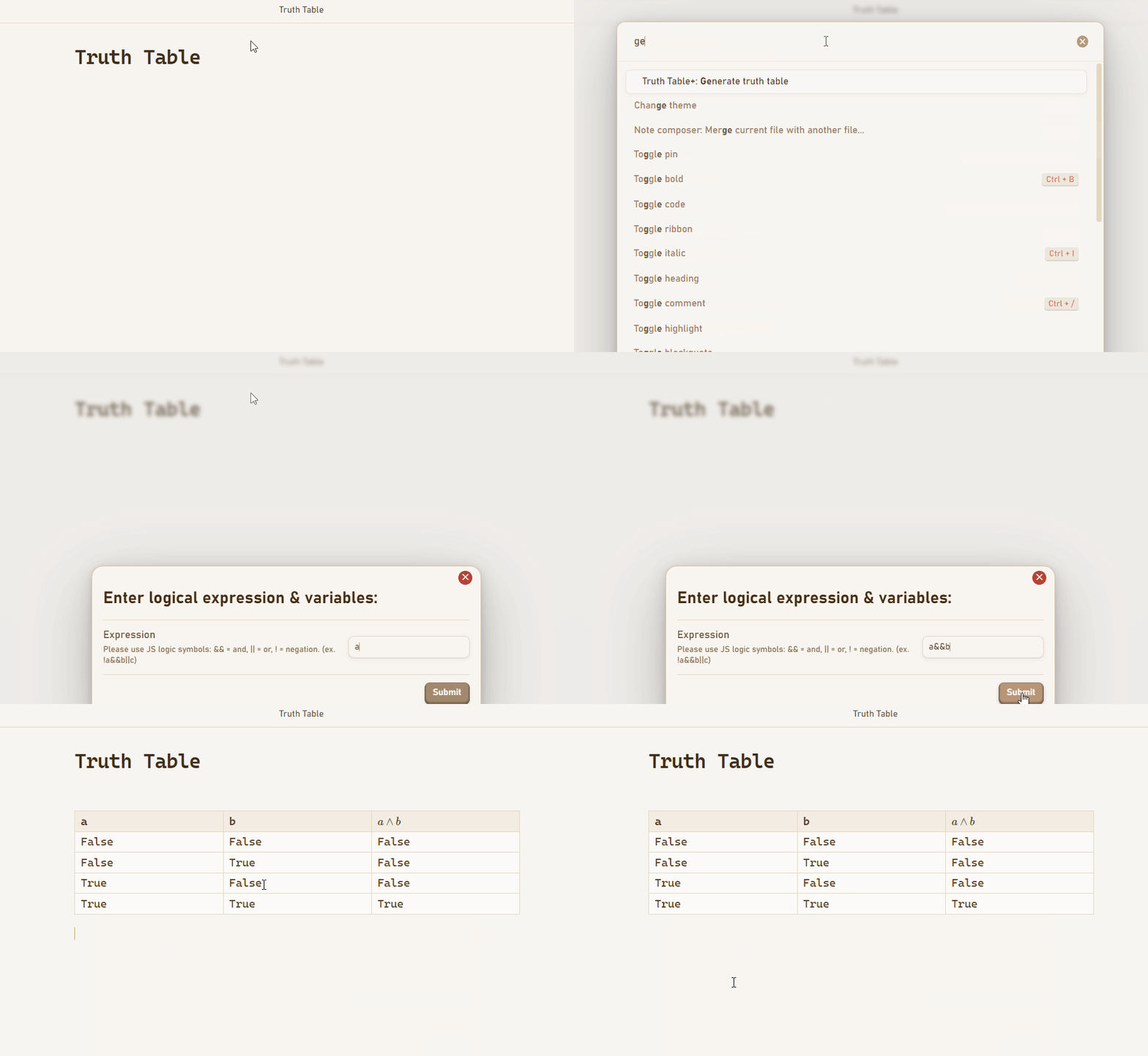
Example Gif

More Info


For any bugs please open a GitHub issue. Alternatively, for questions, shoot me an email at [email protected].

HealthGood
ReviewCaution
About
Generate autofilled truth tables from JavaScript-style logical expressions using operators like &&, ||, and !. Insert the completed table directly into the current note for quick logic-oriented note-taking and analysis.
TablesMathAutomation
Details
Current version
1.1.0
Last updated
7 months ago
Created
2 years ago
Updates
3 releases
Downloads
975
Compatible with
Obsidian 0.15.0+
Platforms
Desktop, Mobile
License
MIT
Report bugRequest featureReport plugin
Sponsor
Buy Me a Coffee
Author
max-schultenmax-schulten
maxschulten.info
GitHubmax-schulten
  1. Community
  2. Plugins
  3. Tables
  4. Truth Table+

Related plugins

Homepage

Open a note, base, or workspace on startup, or set it for quick access later.

Linter

Format and style your notes. Linter can be used to format YAML tags, aliases, arrays, and metadata; footnotes; headings; spacing; math blocks; regular Markdown contents like list, italics, and bold styles; and more with the use of custom rule options.

BRAT

Easily install a beta version of a plugin for testing.

Advanced URI

Control everything with URI.

Advanced Tables

Improved table navigation, formatting, and manipulation.

Lazy Loader

Load plugins with a delay on startup, so that you can get your app startup down into the sub-second loading time.

QuickAdd

Quickly add new notes or content to your vault.

Hot Reload

Automatically reload in-development plugins when their files are changed

Latex Suite

Make typesetting LaTeX math as fast as handwriting through snippets, text expansion, and editor enhancements.

Numerals

Turn any code block into an advanced calculator. Evaluate math expressions on each line of a code block, including units, currency, and optional TeX rendering.