Transmute
 Johannes Kaindl200 downloads
Search and replace by intent — a local LLM writes the regex, you review every match before it runs.
- Overview
- Scorecard
- Updates14
🇬🇧 English · 🇩🇪 Deutsch
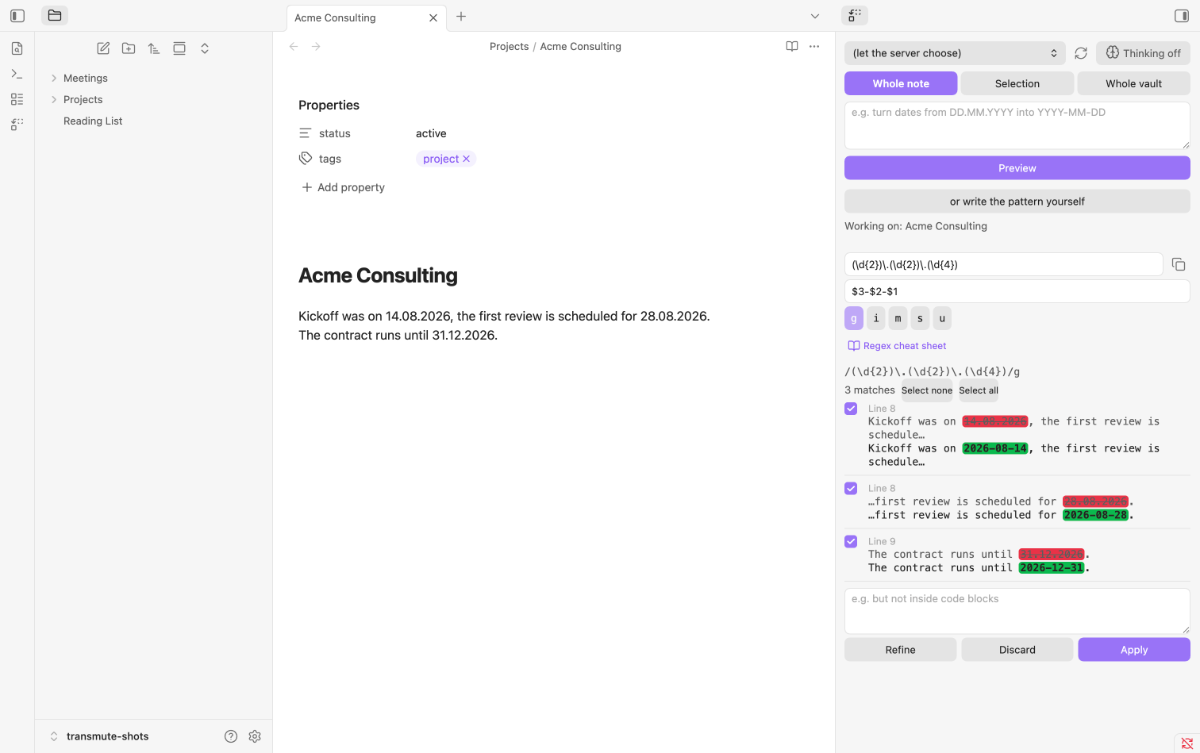
Describe what to replace in plain language — a local LLM writes the regular expression, and you review every match before anything is written.
Features
- Natural-language search & replace. Describe the change in your own words; a local OpenAI-compatible LLM turns it into a regular expression, a replacement and a plain-language explanation.
- Preview before anything is written. Every match is shown before/after with its own checkbox — only the checked ones are written.
- One undo step. Applying goes through the editor, so Cmd+Z reverts it in one step.
- Refine and go back. Follow up with "but not inside code blocks"; every round is kept in a history you can return to.
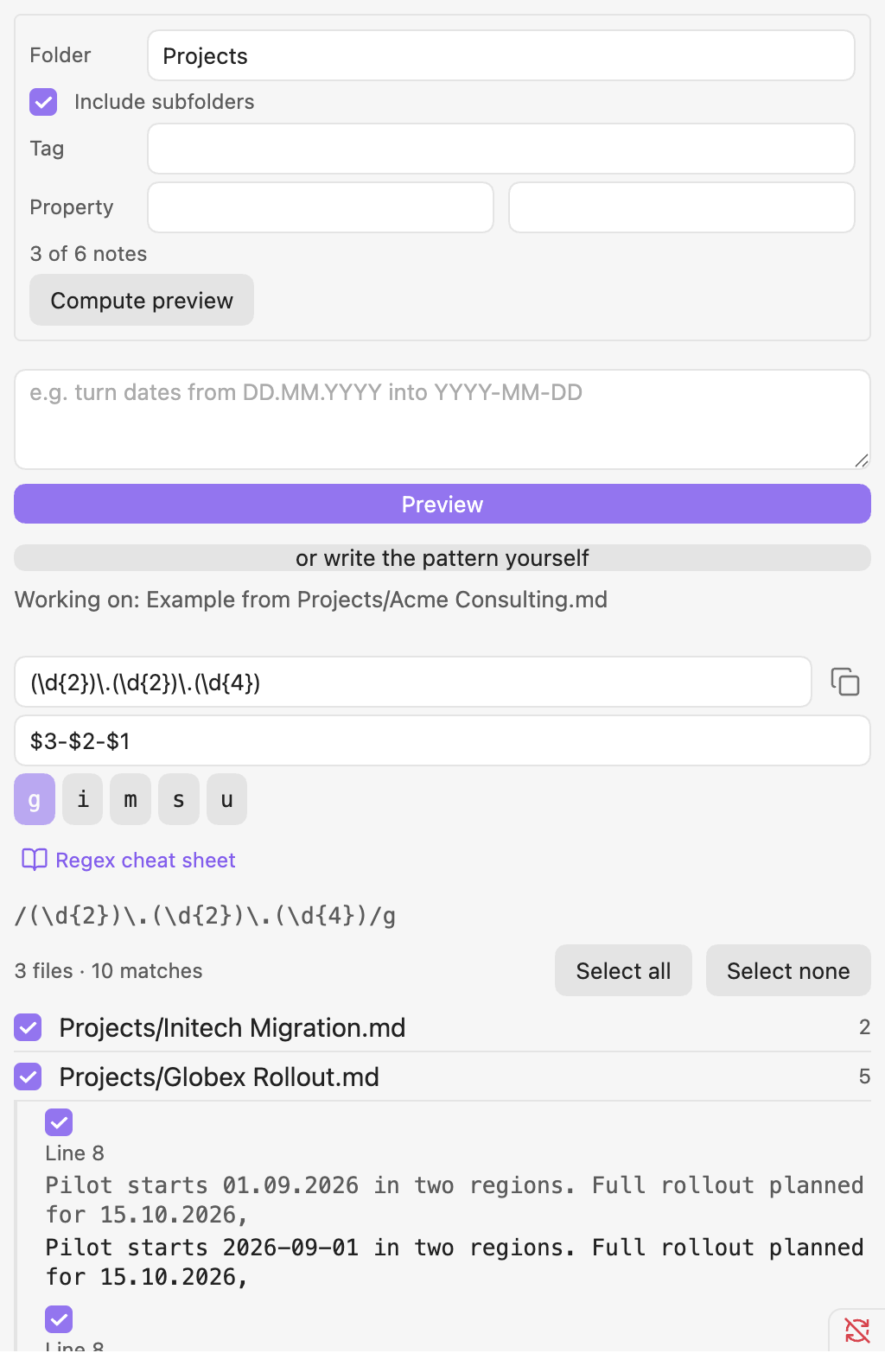
- Scope up to the whole vault, with a snapshot before every vault-wide replacement and a one-click restore.
- Safety by measurement. Generated patterns are screened for runaway backtracking; hand-written ones are timed on a sample before they run.
- "Why doesn't this match?" A button that measures relaxed variants of the pattern and explains the miss.
- Model-agnostic and bilingual. No model name is hard-coded, endpoints can be local or hosted, reasoning models are handled, the interface is English and German.
All features in detail: Features and usage.
Requirements
- Obsidian 1.8.7+ (desktop or mobile).
- An OpenAI-compatible local server (e.g. LM Studio or Ollama) with a chat-capable model loaded. New to local LLMs? The local LLM setup guide walks you through server, model and mobile access end to end. The endpoint and model are configured in the plugin settings — nothing leaves your machine.
- On model size, if your interface is not English. Transmute names the target language in every prompt, but a very small model may still drop that instruction while it is busy hitting the JSON format. Measured against a local LM Studio: a 35B mixture-of-experts model answered in German 5 times out of 5, a 2B model 4 out of 5. Patterns are unaffected — this is about the plain-language explanation and diagnosis. If you want reliable explanations in your own language, give it a mid-size model.
Install
Community plugins (recommended)
Search for Transmute in Settings → Community plugins → Browse, then click Install and Enable.
Manual
Download main.js, manifest.json, and styles.css from the latest release and place them in <vault>/.obsidian/plugins/transmute/, then enable the plugin under Settings → Community plugins. Or download transmute.zip from the release — it contains exactly these files — and unpack it into .obsidian/plugins/; checksums.sha256 lets you verify the download.
From source
git clone https://git.jkaindl.de/jkaindl/obsidian-transmute
cd obsidian-transmute
npm install
npm run build   # produces main.js
Then copy main.js, manifest.json, and styles.css into <vault>/.obsidian/plugins/transmute/ and reload Obsidian.
Usage
- Point the plugin at your local server and make sure a model is loaded — the endpoint and model are set under Settings → Community plugins → Transmute (see the settings table).
- Open the panel with the ribbon icon "Transmute" or the command "Open panel".
- Pick a scope: "Whole note", "Selection" or "Whole vault".
- Describe the change, e.g. "turn dates like 26.09.2026 into 2026-09-26", and click "Preview".
- Review the matches, deselect what you don't want, refine if needed.
- Click "Apply" — Cmd+Z reverts it in one step; a vault-wide run writes a snapshot first and offers "Undo".
The full walkthrough, the vault-scope differences and every setting: Features and usage.
Configuration
Open Settings → Community plugins → Transmute; the settings are grouped under "Connection" and "Behaviour". The ones you will touch first:
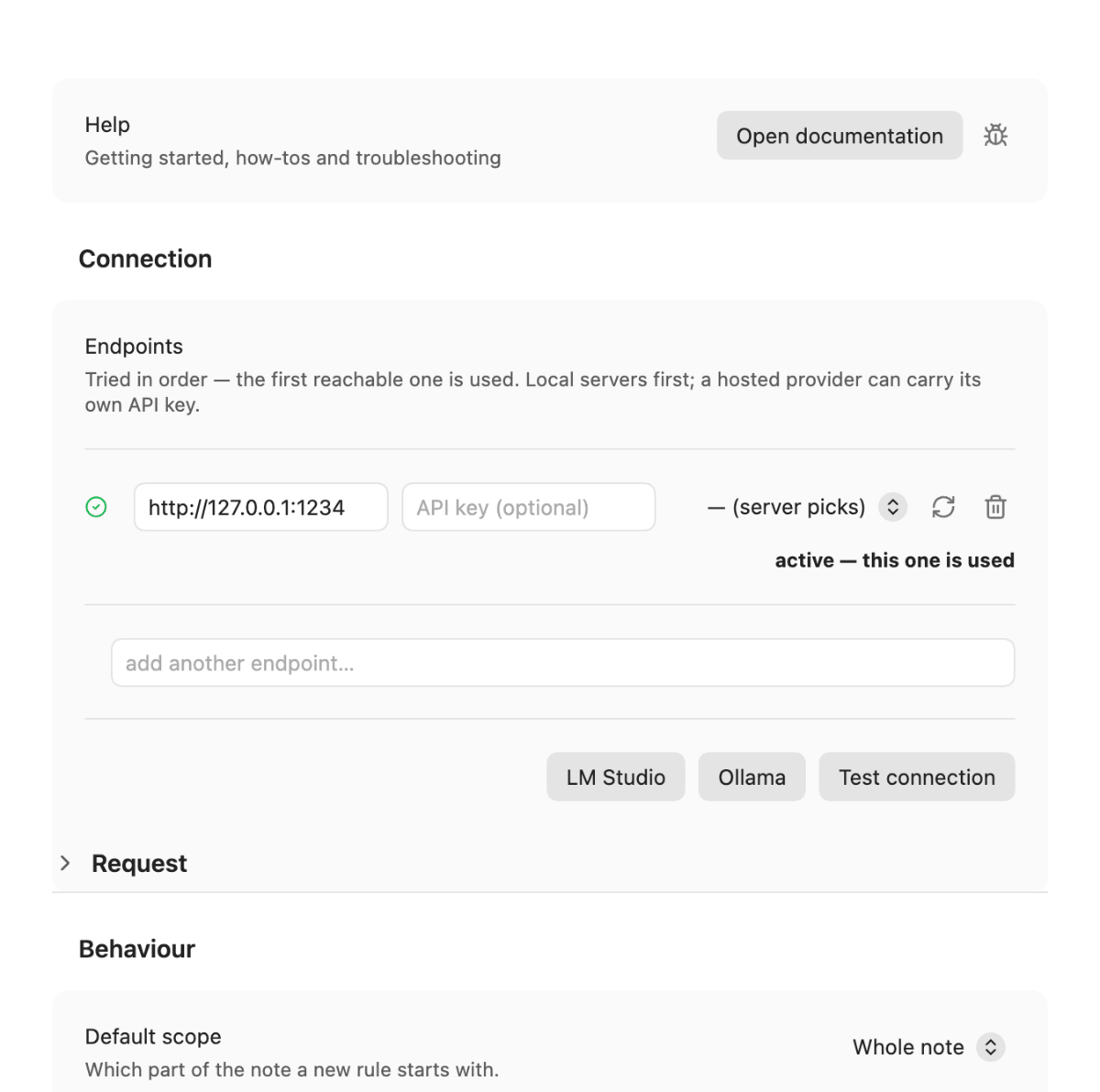
- Endpoints — an ordered list of OpenAI-compatible servers (local or hosted, each with an optional API key); the first reachable one is used. With the LLM Endpoint Manager plugin installed, endpoints and keys come from there. Enter the base URL without a trailing
/v1. - Model (per endpoint row) — each row carries its own model; empty lets the server pick whatever is loaded. The panel's model dropdown writes into the active row.
- Request — the sampling values and the thinking level that are sent (collapsible).
- Default scope — "Whole note", "Selection" or "Whole vault".
- Thinking (in the Request section, also a toggle in the panel) — off by default; faster and more reliable answers from reasoning-capable local models.
Every setting with its default and effect: settings table.
How it works
Transmute sends your instruction, plus a sample of the scope text, to the configured endpoint's /v1/chat/completions and asks for a single JSON object — regex, flags, replacement, explanation — never prose. The answer is parsed leniently (code fences and any <think> block are stripped, the first balanced JSON object is extracted), and one retry with the concrete error is sent back to the model if the first answer doesn't parse or validate.
Before the generated pattern ever runs, a static heuristic screens it for constructs known to cause catastrophic backtracking — nested quantifiers, quantified alternation over identical branches, unbounded backreferences — and rejects it with a plain-language reason if it looks dangerous. A pattern that passes is then executed line by line against the scope text under a configurable time budget; multi-line patterns (an s/m flag, or a literal \n in the pattern) run once against the full text instead, since a time budget only makes sense between discrete steps.
Nothing is written to your note until you click "Apply". At that point, only the checked matches are applied — in reverse order, so earlier replacements never shift the offsets of later ones — and the result is written through Obsidian's editor API (editor.replaceRange), which is what puts the change on the normal undo stack.
Documentation
New here? Start with Getting started. Something not working? See Troubleshooting. The documentation index lists everything; it follows the Diátaxis framework:
- Tutorial — get from zero to your first applied replacement.
- How-to guides — task-focused recipes (multiple endpoints, refining a rule, undoing, handling an unsafe-pattern error).
- Reference — settings, commands, error messages, the JSON contract.
- Explanation — why preview-before-apply is the core of the design, why there is no separate snapshot system, and why the safety guard has no web worker to lean on.
See the changelog for release notes.
Related
ksawl/obsidian-alchemist shares the alchemy/transmutation imagery but a different job: it is a general vault-hygiene toolkit. Transmute is narrowly about turning a plain-language instruction into a reviewed, applied regex replacement — it does not aim to cover vault hygiene more broadly.
Contributing
Contributions are welcome. Please read CONTRIBUTING.md for the workflow (test-driven, main always green, feature work in feat/<name>, Conventional Commits) and AGENTS.md for the architecture and module conventions. The canonical repository lives on Forgejo; GitHub (johannes-kaindl/obsidian-transmute) is a mirror.
License
- Code: AGPL-3.0-or-later. A commercial dual-license is available on request if the AGPL copyleft does not fit your use case.
- Documentation and text: CC BY-SA 4.0.
Copyright © 2026 Johannes Kaindl.