Trama
 Andrea Casarin23 downloads
Local-first AI for conversing with your vault through Voce, discovering related notes through Filo, and searching indexed notes through Lente.
- Overview
- Scorecard
- Updates12

Talk with your notes. Find the thread between them.
Trama brings AI chat, related notes, and search into Obsidian. Connect your models, index your vault, and explore what you've already written—from a question, a half-remembered idea, or the note in front of you.
Built for local models, with an index that stays on your device and read-only tools for exploring your notes.
Get started · Explore Trama · Privacy · Technical notes
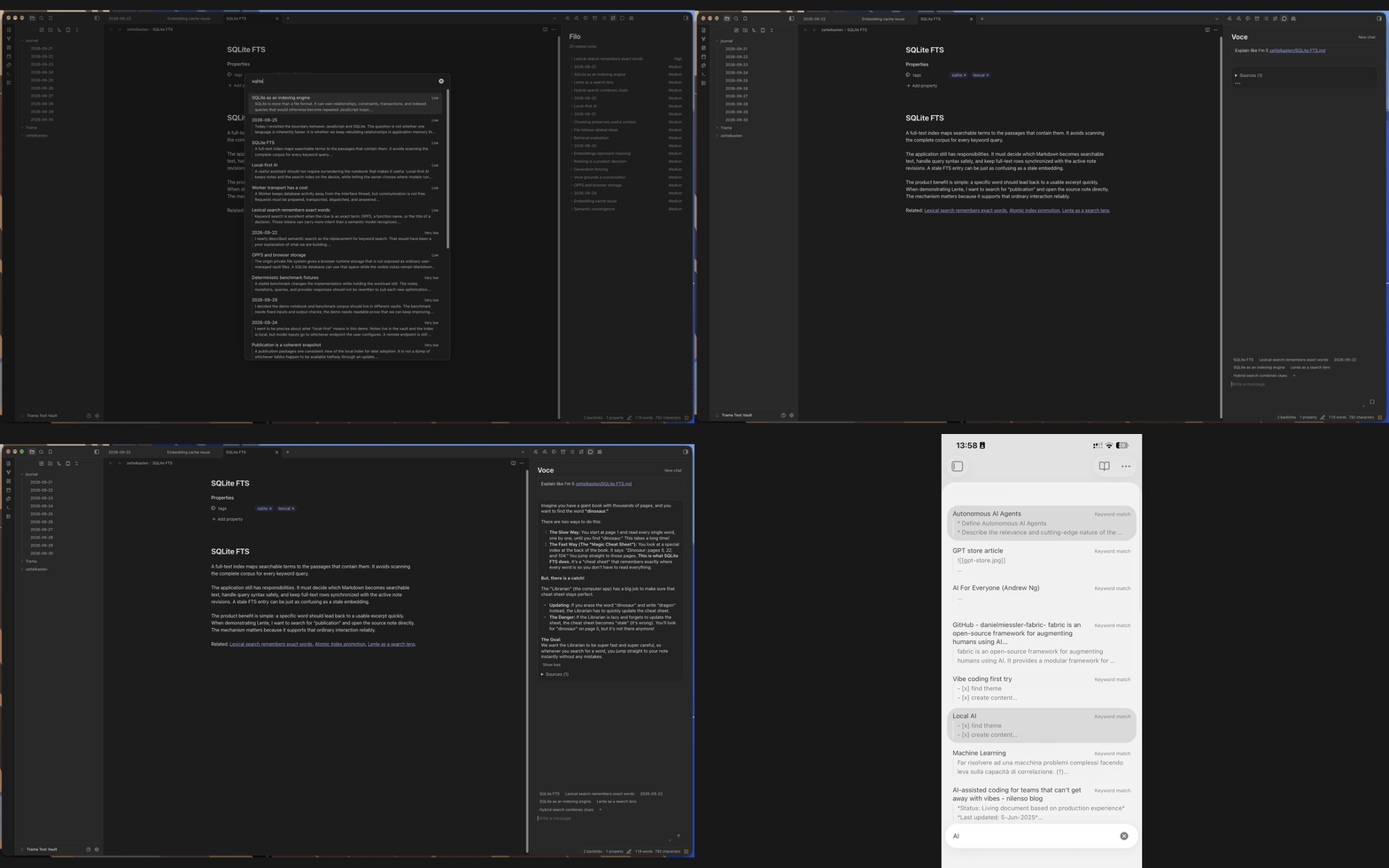
Three ways into your vault
| View | What it does | Try it when… |
|---|---|---|
| Voce · Voice | Chat with your notes, attach context, and follow sources back to your vault. | “What themes keep coming up in my journal?” |
| Filo · Thread | Discover notes related to the one you're reading. | You want to follow an idea beyond its existing links. |
| Lente · Lens | Search by keywords and meaning, then open the notes behind the results. | You remember the idea, but not the exact words. |
Open each view from Obsidian's command palette: Trama: Open Voce, Trama: Open Filo, or Trama: Open Lente.
Voce: a conversation with context
Ask a question, or bring a few notes into the conversation with [[wikilinks]],
@, or the plus button. The current note and related-note suggestions are optional;
you choose what to attach. Voce can also search and read notes through its vault
tools. Expand Sources below an answer to open the notes it used.
Use Enter to send, Shift+Enter for a new line, and Stop to interrupt a response. You can copy answers, edit an earlier prompt to take the conversation in a different direction, or start fresh with New chat.
Want a repeatable workflow? Write a skill as a Markdown note and invoke it with
/ in the composer. Create your first skill →
Filo and Lente: follow an idea
Filo surfaces related notes as you move through your vault, and Lente combines keyword and semantic search to find notes even when your wording has changed. Both views show the title and a qualitative similarity label; keyword-only Lente results say Keyword match, and unavailable similarity is labeled Similarity unavailable. In the sidebars, expand a result for a short note preview. When a semantic passage matched, Trama labels it Matched passage; otherwise it labels the text Preview. The command-palette Lente picker shows a compact preview under each result. Choose a result title to open the note. With Obsidian's Page preview enabled for Trama, hover over a result title to peek inside.
Get started
You'll need Obsidian 1.7.2 or newer and a running model server. Trama connects to OpenAI-compatible endpoints; chat requires the Responses API and tool calling, and semantic search requires an embedding model. You can configure chat and embeddings separately.
Trama supports desktop and mobile. Mobile use has been validated by the maintainer;
a model server running on another device needs a reachable network address, because
127.0.0.1 always means the device running Obsidian. The SQLite index uses the
app's browser storage (OPFS), outside the vault folder, to run the local SQLite
search engine. It is device-local and is not included in ordinary vault backups
or sync. Mobile requires a WebView with OPFS and AbortSignal.any support; older
mobile operating systems have not been validated.
1. Install Trama
- Download
main.js,manifest.json, andstyles.cssfrom Releases. - Create
<your-vault>/.obsidian/plugins/trama/and place all three files directly inside it. If your vault uses a custom configuration folder, use it in place of.obsidian. - Reload Obsidian, allow community plugins, and enable Trama in Settings.
The search engine and its worker are bundled into main.js; no extra runtime
files or startup downloads are needed.
2. Connect your models
Open Settings → Trama:
- Under Voce, set the chat endpoint and choose a chat model.
- Under Filo, set the embedding endpoint, model, and matching vector dimensions. You can also exclude folders from indexing here.
- Use Discover beside either model selector to load the models offered by that endpoint.
The default base URL is http://127.0.0.1:1234/v1. Use your server's base URL,
including any required prefix such as /v1.
Trama itself is free and needs no Trama account. Local servers such as LM Studio can provide chat and embeddings without a paid API. A remote OpenAI-compatible server or gateway may require an account and charge for inference, indexing, and search; eligible automatic index updates can also incur provider charges. Trama currently sends a fixed placeholder bearer token, not a configurable API key. Paid APIs such as OpenAI therefore require a compatible gateway that handles authentication; a direct API-key connection is not supported. Your server must allow requests from Obsidian (including CORS where applicable). Check your provider's prices, retention, and privacy terms before connecting it.
3. Index and explore
Under Maintenance, select Update index. Once it finishes, open Filo or Lente, or ask Voce a question about your notes.
After that first successful index, Trama keeps it up to date on startup and after Markdown changes, with a periodic check for missed changes. New or changed content may be sent to your embedding model during these updates. You can update manually or stop an operation at any time.
Semantic indexing excludes YAML frontmatter from passage embeddings. Titles, aliases, and frontmatter tags remain searchable as metadata; keyword search also indexes the original note text. See technical notes for passage boundaries, embedding limits, and how existing indexes refresh.
Your notes, your models
- Local storage. The search index lives on your device. Trama stores a vault
identity and reusable document embeddings in the configured storage folder,
which defaults to hidden
.trama/. Embeddings live in<storage-folder>/embeddings/; choose a visible folder such asTramaand include it in your sync service if you want to share them between devices. These files contain vectors and cache metadata, without note text, chat, or queries. - You choose the endpoint. Chat requests send your prompt, selected skill, attachments, and retrieved context to the configured chat server. Indexing sends note content to the embedding server; semantic search sends the query. With a local server, those requests go to that server. A remote endpoint receives that content instead.
- Read-only note tools. Voce can search and read notes. Its vault tools cannot edit or delete them. Folder exclusions apply to indexing only. The configured storage folder is excluded from both indexing and vault-reading tools.
- Diagnostics. Trama has no analytics or remote telemetry service. Its bundled SDKs cannot read host environment variables to enable LangSmith tracing. Optional Console Debug output stays in the local developer console and can include note paths or errors; remove private information before sharing it. Configured AI servers still receive the content described above and apply their own data policies.
- Session-only conversations. Trama does not save chat history to disk. Use New chat to clear it; closing the last Voce pane also resets the conversation.
- Local tracing. New structural trace events report fixed operation names and types, run and parent IDs, outcomes, durations, counts, and status; these events omit query text, paths, prompts, model configuration, tool arguments and results, raw errors, and secrets. This describes those trace events, not every existing console diagnostic. Trama supplies no tracing credentials or exporters; bundled SDKs do not inherit host environment settings that activate LangSmith.
Read about storage, cache sharing, and provider requests →
Common questions
Do I need both models?
Voce needs a chat model. Building the semantic index and using Filo need an embedding model. If embeddings become unavailable, search can fall back to keywords over an existing index.
What is the difference between Update, Rebuild, and Clear?
| Action | Use it to… |
|---|---|
| Update index | Index current notes and remove deleted or excluded notes from search. |
| Rebuild index | Replace the note index while retaining reusable embeddings. |
| Clear index and embedding cache | Remove the local index and cached embeddings, plus managed cache files in the vault. Notes and settings stay intact. |
Clear also pauses automatic indexing until you run Update or Rebuild again. Shared file deletion follows your vault's sync service; other devices keep their own local caches. If cleanup is interrupted, Trama reports it and you can retry.
I've changed my embedding model. What next?
Use the dimensions expected by the new model. Trama prompts before saving a local embedding configuration change when an index exists, and recommends Clear followed by Update or Rebuild. See model changes and cache reuse for the details.
The conversation hit a context limit.
Try fewer or smaller attachments, or adjust Context window tokens to fit your model. Trama summarizes older history as needed and tells you when it does. This setting controls Trama's request budget; it does not enlarge the model's own context window.
Build and contribute
Development uses Node.js 22.23.3, matching the Community verifier. The project
version is pinned in .tool-versions; dependency installation enforces Node 22.
Every build checks the plugin against both the current SDK and the exact public
API typings for the manifest’s minimum app version. This is a static compatibility
check, not an execution test on that historical app.
Normal builds use committed, checksum-verified SQLite/WASM inputs and need no
Docker or native compiler. CI also tests a clean install in a Node 22 container without Docker.
npm ci
npm test
npm run lint
The default eslint.config.mjs uses the pinned official Obsidian ESLint plugin,
TypeScript project-service options, and the documented Community baseline plus
stricter rules for newer submissions. Manifest and license validation also run
locally; advisory findings remain visible instead of being silently disabled.
npm run lint runs the Community, repository, and stylesheet checks. The
required npm run lint:styles check applies the Obsidian Action's CSS rules to
styles.css and uses its Electron 30 target for Obsidian 1.7.2. CI and the release
workflow run npm run lint:community after the production build so misplaced
generated files are visible to ESLint. CI also runs the
Obsidian GitHub Action
in advisory PR mode to run its pinned scanner rules against the built checkout.
The action pins an older Obsidian ESLint plugin. The Community directory’s
Review branch remains the check for the deployed scanner.
Release builds attest main.js, manifest.json, and styles.css through GitHub
Actions; the ZIP is retained for local installation tooling.
Only maintainers rebuilding the pinned native SQLite inputs need Docker:
npm run rebuild:sqlite
npm run verify:sqlite:rebuild
The first command updates the committed native inputs and their integrity record; the second independently rebuilds and compares them. See the SQLite build guide.
To build and install into the generated demo vault:
npm run install:plugin -- --test-vaults
This builds and installs the validated release ZIP into the demo vault, removes obsolete runtime sidecars, and preserves your notes and settings. Reload Obsidian or disable and re-enable Trama afterwards.
See the demo-vault guide for a walkthrough, technical notes for behavior and architecture, and the benchmark guide for performance checks. Issues are welcome—include what you expected, what happened, and steps to reproduce it. Remove private note content and endpoint credentials from anything you share.
License
Trama is MIT licensed. Dependencies keep their own licenses; see the dependency inventory. Release archives include the applicable third-party notices.