
- Overview
- Scorecard
- Updates3

A local, private futures journal for Obsidian.
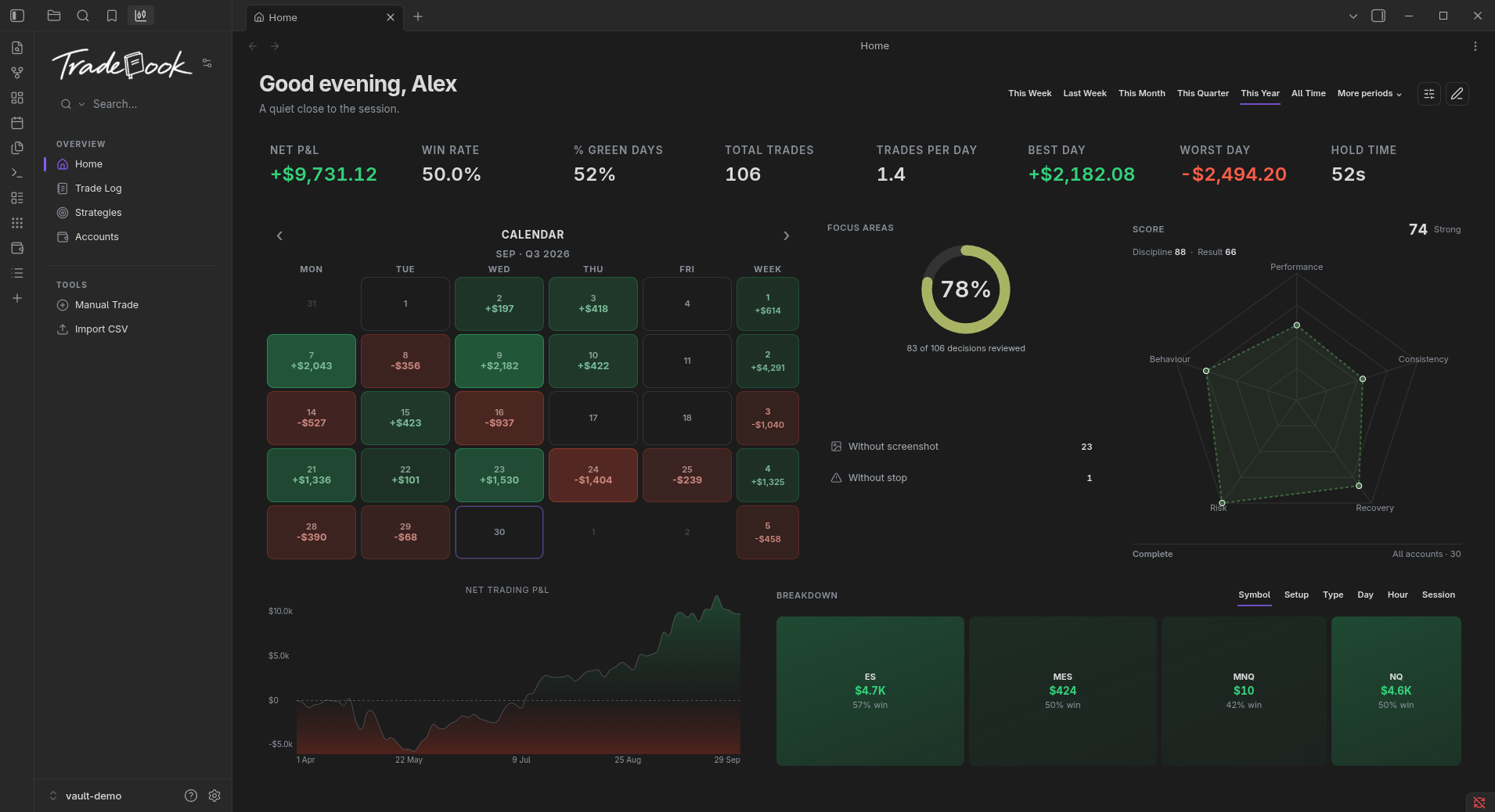
Tradebook is a local-first futures trading journal for Obsidian. It keeps a record of your trading as Markdown notes in your vault and helps you review the results. No Tradebook account, no cloud service, no telemetry.
Key features
- A local Markdown journal. Trades, notes and screenshots are Markdown files in your vault, and the plugin makes no network requests.
- Trade Log and review. Browse every trade, open the details, add setups, notes and screenshots, and mark a trade Reviewed.
- Accounts, evals, funded accounts and payouts. Track evaluation, funded and demo accounts with their rules and limits, and record deposits, payouts and corrections separately from trading results.
- Tradovate imports. Import Orders, Fills and Cash History, preview the result, and reimport without creating duplicates.
- Home overview. Period filters, Net Trading P&L, an equity curve based on your recorded trading data, a performance calendar, breakdowns by setup, session, symbol and day, and a Trading Score.
- Copy Trading. Define a leader and its copiers with a ratio and start date, and match a follower's real fills against the generated records.
Installation
Tradebook requires Obsidian 1.7.2 or newer. If you do not use Obsidian yet, download it from obsidian.md and open a vault — a new, empty vault is fine. If you already use Obsidian, continue below.
- Open Obsidian Settings.
- Go to Community plugins and select Browse.
- Search for Tradebook.
- Select Install, then Enable.
Tradebook's menu opens in Obsidian's left sidebar. Use it to move between Home, Accounts and Trade Log, or to add and import trades.
Obsidian checks for Community plugin updates. To update manually, use
Settings → Community plugins → Check for updates. A manual update replaces only
main.js, manifest.json and styles.css; keep your existing data.json.
Getting started
- Add an account. Choose Accounts in the Tradebook sidebar, then Add account. Select its type, firm, rules and limits.
- Bring in your trades. Choose Import CSV for Tradovate Orders/Fills and, when available, Cash History. Check the preview before importing. You can also choose Manual Trade to add a trade yourself.
- Review a trade. Open it from the Trade Log, add your notes and mark it Reviewed.
- Visit Home. Review your results and explore the trades behind them.
Your data and backups
Tradebook works locally and makes no network requests. Your trade notes remain in your vault when you disable or uninstall the plugin.
Settings and account configuration are stored in the plugin's data.json. Disabling
the plugin preserves that file; uninstalling removes the plugin folder, including it.
Before uninstalling, export a settings backup from Settings → Tradebook → Advanced → Export. Use Import backup in the same section to restore it. Keep a separate backup of your vault for the trade notes and attachments.
Known limitations
Generated copy trades are models, and reported costs cannot always be assigned to an individual trade with certainty. Other export formats are not currently supported. Tradebook can run on mobile, but phone and tablet layouts still need work. Known limitations explains how these cases, missing data and import formats are handled.
If Tradebook is missing from the list, check that Restricted mode is off and search for it again. If it does not load, check that Obsidian is 1.7.2 or newer, Restricted mode is off and Tradebook is enabled. If the sidebar is hidden, expand Obsidian's left sidebar and select the Tradebook tab.
If something is not working as expected, open an issue with what happened and the steps to reproduce it. Please remove personal and account information from screenshots or sample files.
Roadmap
Current priorities are everyday reliability, navigation, light mode, help and polish, with phone and tablet layouts still to improve. Later work covers strategy review and the analysis built around it. There are no dates and the order is not fixed.
See ROADMAP.md for the full list, and CHANGELOG.md for what has already shipped.
License
MIT — see LICENSE.
Prop-firm and broker names and logos belong to their owners and are used to identify accounts. Their inclusion does not imply affiliation or endorsement.