Top Aligned Search
 Sean local102 downloads
Search within the active note and align each next match's line to the top of the editor.
- Overview
- Scorecard
- Updates1
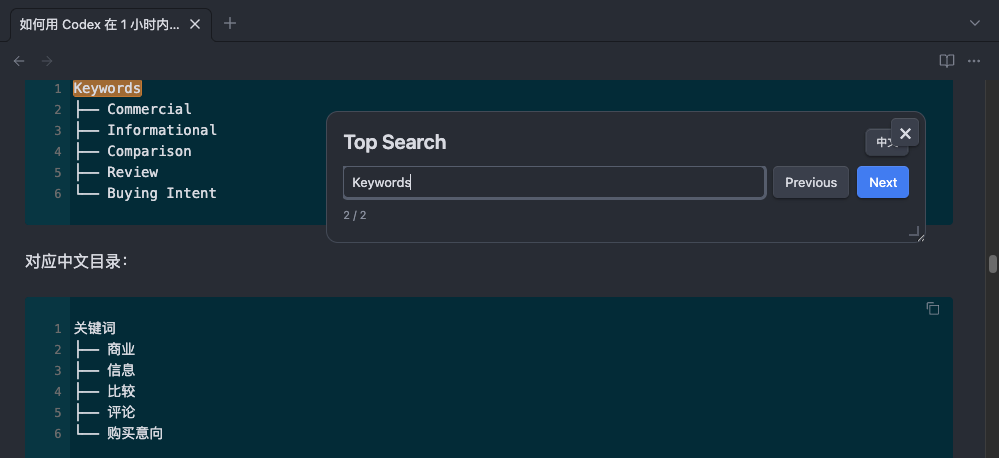
Top Aligned Search is an Obsidian plugin for searching inside the active Markdown note. It keeps the search window floating above the editor and, when you jump between matches, aligns the matched line to the top of the editor viewport.
This is useful when you want a browser-like find bar, but with more predictable reading position control in long notes.
Features
- Search within the current Markdown note.
- Highlight all keyword matches in the editor.
- Emphasize the currently selected match.
- Jump to the next or previous match from the current document position.
- Align the matched line to the top of the editor when jumping.
- Keep the search window floating above the document.
- Click and edit the document without closing the search window.
- Drag the search window to move it.
- Resize the search window from the bottom-right corner.
- Close the search window only by clicking its
xbutton. - Press
Escto close image previews without closing the search window. - Switch the interface language between Chinese and English.
- Open from the left ribbon icon, command palette, or hotkey.
Installation
Manual Installation
- Download or clone this plugin.
- Copy the plugin folder to your vault:
<your-vault>/.obsidian/plugins/top-aligned-search/
- Make sure the folder contains:
main.js
manifest.json
styles.css
README.md
- In Obsidian, open
Settings -> Community plugins. - Refresh installed plugins if needed.
- Enable
Top Aligned Search.
Usage
Open a Markdown note, then open Top Aligned Search in one of these ways:
- Click the search icon in the left ribbon.
- Run
Open top aligned searchor打开页顶搜索from the command palette. - Press
Ctrl/Cmd + Shift + F.
Type a keyword in the search box. The plugin will highlight matches but keep the document at its current position.
Use these controls:
Enter: jump to the next nearest result from the current document position.Shift + Enter: jump to the previous nearest result from the current document position.Next: jump to the next result.Previous: jump to the previous result.EN/中文: switch interface language.x: close the search window.
When jumping to a result, the matched line is moved to the top of the editor viewport.
Notes
- The plugin works on the active Markdown editor.
- Search is case-insensitive.
- The search window is not an Obsidian modal, so it does not darken the document and is not closed by
Esc. - Language preference is saved in the plugin data.
Development
This plugin is currently distributed as plain JavaScript and CSS:
main.js
styles.css
manifest.json
No build step is required for manual use.
data.json is generated locally by Obsidian to store plugin preferences and does not need to be committed.
License
Add your preferred license before publishing the repository.