TodoTxt Codeblocks
 benjamonnguyen4k downloads
Manage your tasks inside code blocks according to the Todo.txt specification.
- Overview
- Scorecard
- Updates17
A codeblock alternative to mvgrimes's obsidian-todotxt-plugin based on the Todo.txt specs.
Add your tasks to a todotxt codeblock to get started!
Link your codeblock to an existing *.txt file to synchronize changes.
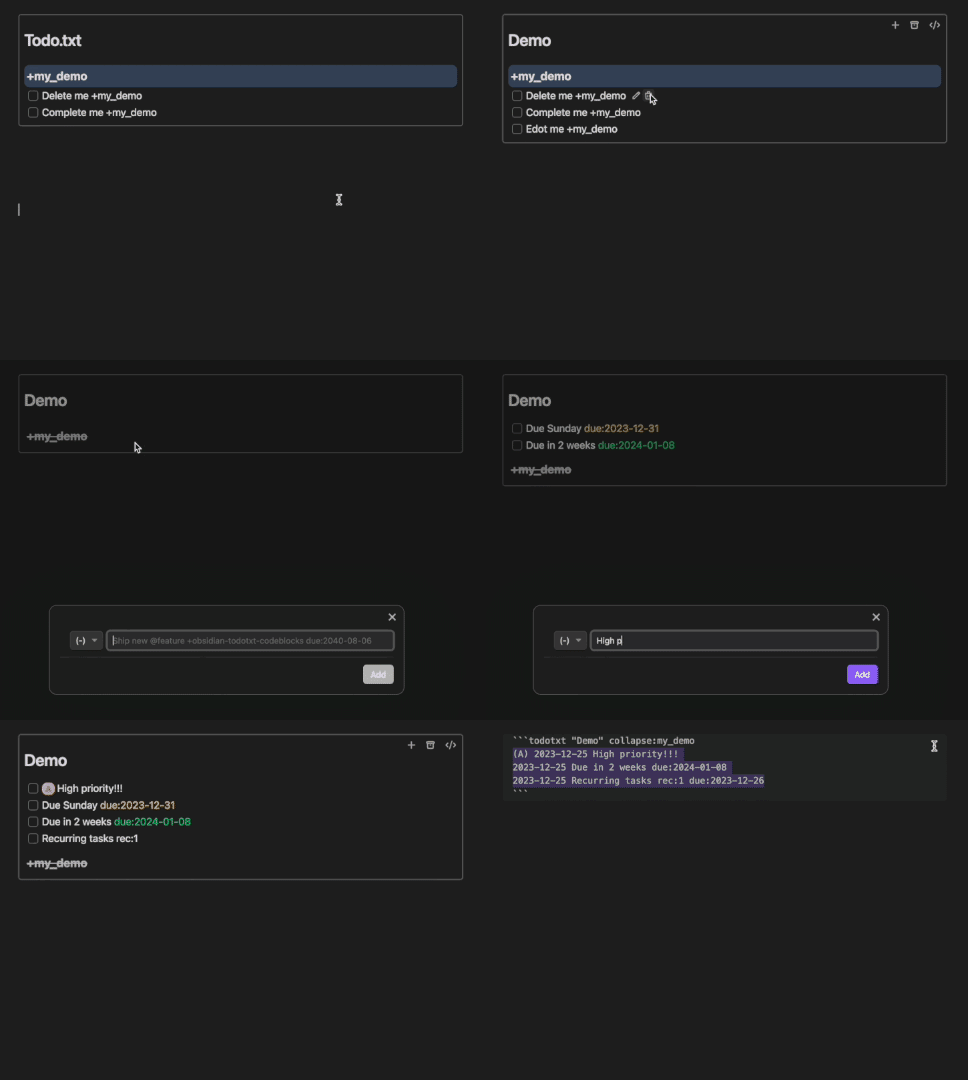
Features
- Sorting (listed in order of priority)
- string[]
proj(project)- ex. "sort:proj:Home,Work"
ctx(context)- "n/c" = no context
- ex. "sort:ctx:bug,feature,n/c,nice-to-have"
- desc/asc (defaults to asc)
statusprio(priority)completed(completed date)due(due date extension)created(created date)- ex. "sort:status sort:created:desc"
default(ex. "sort:default")
- string[]
- Live Preview
- Collapsible project groups
- Edit, add, delete buttons
- Render Markdown links
- Autocompletion for projects and contexts
- Archive completed tasks to
archive.txtfile- Auto-archive setting
- Configurable defaults
Commands
-
Create new task in focused list -
New codeblock at cursor
Extensions
-
due:(Due date) -
rec:(Recurrence frequency)
Language line options (not yet implemented)
-
get:Query for existing Todo.txt tasks and move to current codeblock -
src:Link a *.txt file to the todotxt codeblock -
filter:
Extensions
- date formats
- <YYYY-MM-DD> (ex. 1996-08-06)
- <MM-DD> (ex. 08-06)
- <n><[dateUnit]> (ex. 1w = 1 week from today)
- calculates date n number of dateUnits away
- dateUnits: d, w, m, y, b (business day)
- if only a number is provided, it will calculate days (ex. 0 = today, 1 = tomorrow, 7 = next week)
- <dayOfWeek> (ex. M = next Monday)
- calculates date for first upcoming dayOfWeek
- M, Tu, W, Th, F, Sa, Su
- dayOfWeek and dateUnits (except b) can be combined (dayOfWeek must come first)
- 1w2d = 9 days (1 week + 2 days)
- Su5d = first upcoming Sunday in 5 days
- if the
rec:value is prefixed with a plus (ex. rec:+1w), the date is determined from the original due date rather than the completed date
Donations
Feel free to support me if you enjoy the plugin!
Acknowledgements
Thanks to hieuthi's joplin-plugin-metis for the inspiration.
HealthGood
ReviewSatisfactory
About
Manage Todo.txt tasks inside Obsidian via todotxt-style codeblocks. Link codeblocks to .txt files for two-way sync, sort and group tasks by project or context, preview and edit tasks inline, autocomplete projects/contexts, render Markdown links, and archive completed tasks.Details
Current version
1.0.1
Last updated
2 years ago
Created
3 years ago
Updates
17 releases
Downloads
4k
Compatible with
Obsidian 0.15.0+
Platforms
Desktop, Mobile
License
MIT
Sponsor