TodoApp Blocks
 Max Dvorkin247 downloads
Embed a Todoist-like local-first task app inside any Obsidian note.
- Overview
- Scorecard
- Updates3
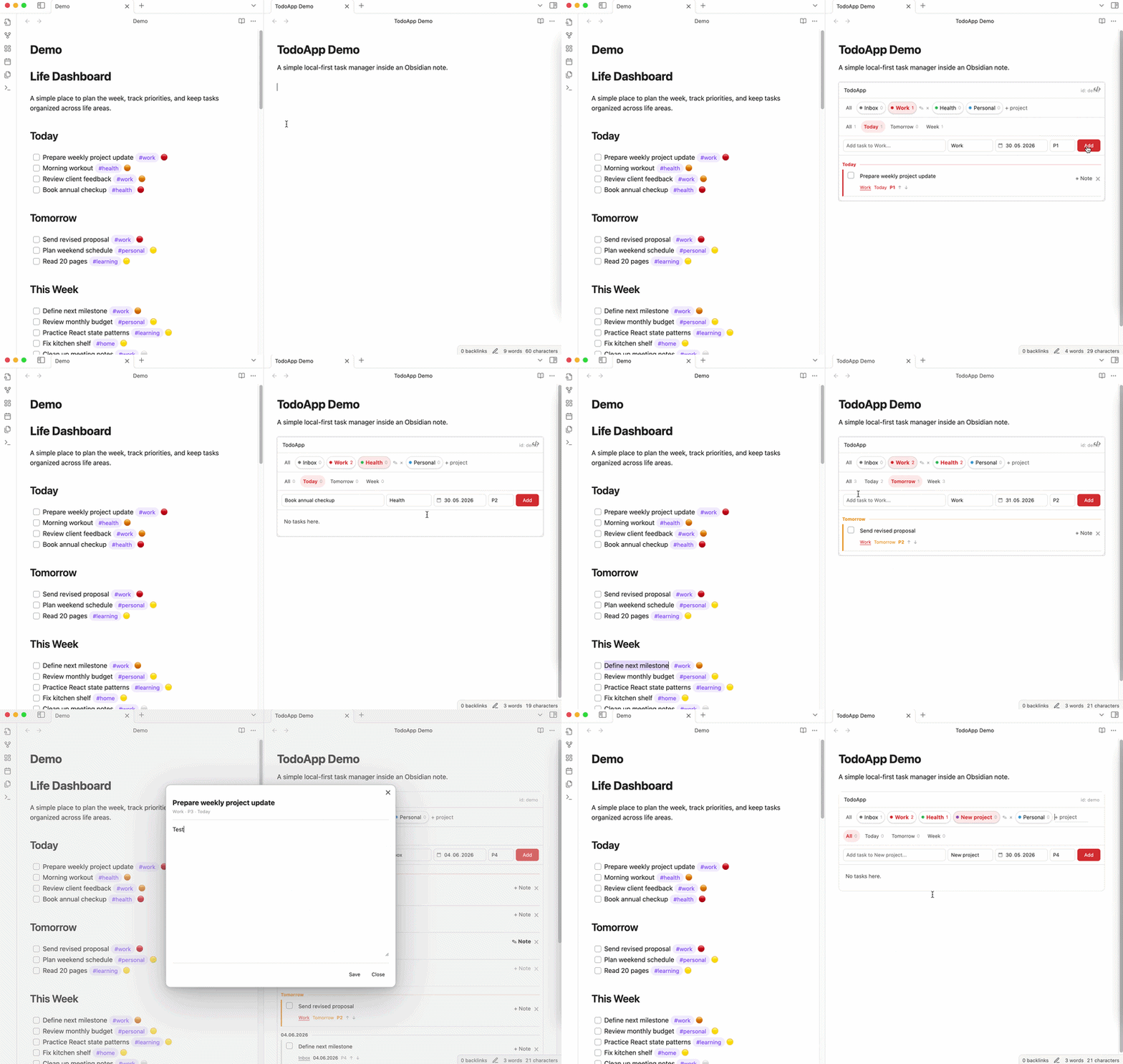
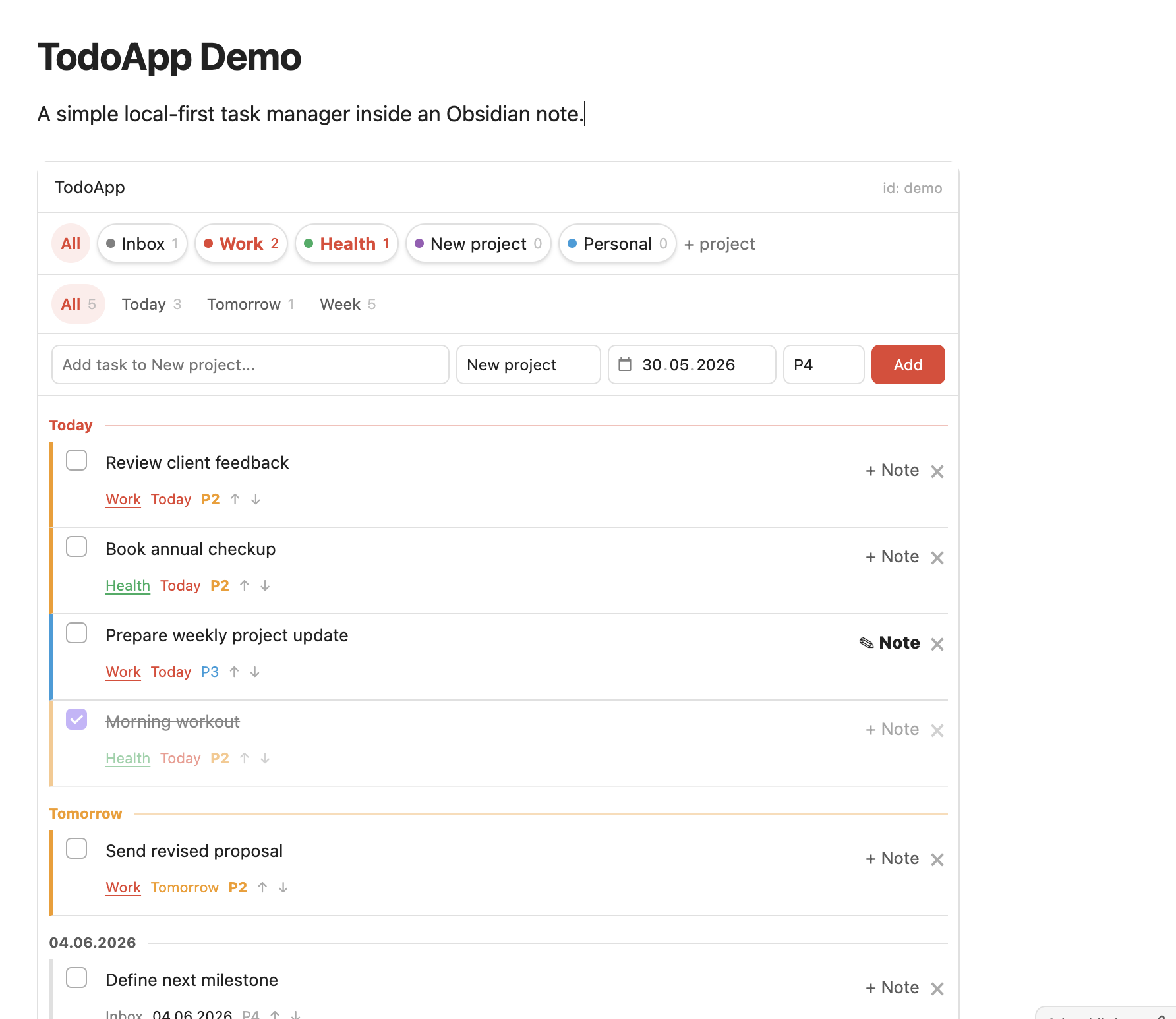
A Todoist-like task app embedded inside any Obsidian note.
TodoApp Blocks lets you add a clean, local-first task manager to any note with one simple code block:
```todoapp
id: life
```
No templates. No Dataview queries. No external account.
Just projects, dates, priorities, task notes, and a focused Todoist-style workflow inside your Obsidian vault.
Why TodoApp Blocks?
Obsidian is great for notes, but task management often requires too much setup: custom templates, tags, queries, plugins, and personal conventions.
TodoApp Blocks is built around a simpler idea:
Drop a block into a note and get a full task app instantly.
It is designed for people who want the convenience of Todoist while keeping their data private and local inside Obsidian.
Features
- Embed a task app inside any note
- Create multiple independent task spaces by
id - Projects with task counters
- Today, Tomorrow, Week, and All views
- Priorities from P1 to P4
- Inline task editing
- Task completion with strikethrough
- Task notes in a focused popup
- Local JSON storage inside your vault
- Markdown task notes stored as regular files
- No cloud, no sync service, no account
Quick start
Add this to any Obsidian note:
```todoapp
id: life
```
Open the note in Reading mode and start adding tasks.
You can create multiple task apps by changing the id:
```todoapp
id: work
```

```todoapp
id: personal
```

```todoapp
id: project-alpha
```
Each app keeps its own projects, tasks, priorities, and notes.
How data is stored
TodoApp Blocks is local-first.
Task data is stored in your vault as JSON:
.todoapp/<id>.json
Task notes are stored as regular Markdown files:
TodoApp Notes/<id>/
Your data stays in your vault. TodoApp Blocks does not require a Todoist account, API key, external server, or cloud sync.
Use cases
TodoApp Blocks works well for:
- Personal dashboards
- Daily planning notes
- Project pages
- Work/personal task separation
- Lightweight GTD-style workflows
- Private local task management
- Replacing external todo apps for simple workflows
Example
# Life Dashboard

```todoapp
id: life
```
# Startup Dashboard

```todoapp
id: startup
```
# Writing Projects

```todoapp
id: writing
```
Privacy
TodoApp Blocks is designed to be private by default.
- No telemetry
- No analytics
- No external requests
- No account required
- No third-party task service
- Data is stored locally in your Obsidian vault
Current limitations
TodoApp Blocks is intentionally simple.
It currently does not include:
- Recurring tasks
- Notifications
- Calendar sync
- Todoist sync
- Natural language date parsing
- Collaboration
The goal is to keep the core experience fast, focused, and easy to use.
Installation
Manual installation
- Download the latest release.
- Copy these files into your vault:
.obsidian/plugins/todoapp/
  main.js
  manifest.json
  styles.css
- Restart Obsidian.
- Enable TodoApp Blocks in Community Plugins.
Community plugin
TodoApp Blocks is intended for submission to the Obsidian Community Plugin directory.
Development
npm install
npm run dev
For production:
npm run build
License
MIT