Todo.txt Mode
 rioskit1k downloads
Support for todo.txt file format with syntax highlighting and task management
- Overview
- Scorecard
- Updates6
Todo.txt Mode is an Obsidian plugin that provides support for the todo.txt file format in Obsidian.
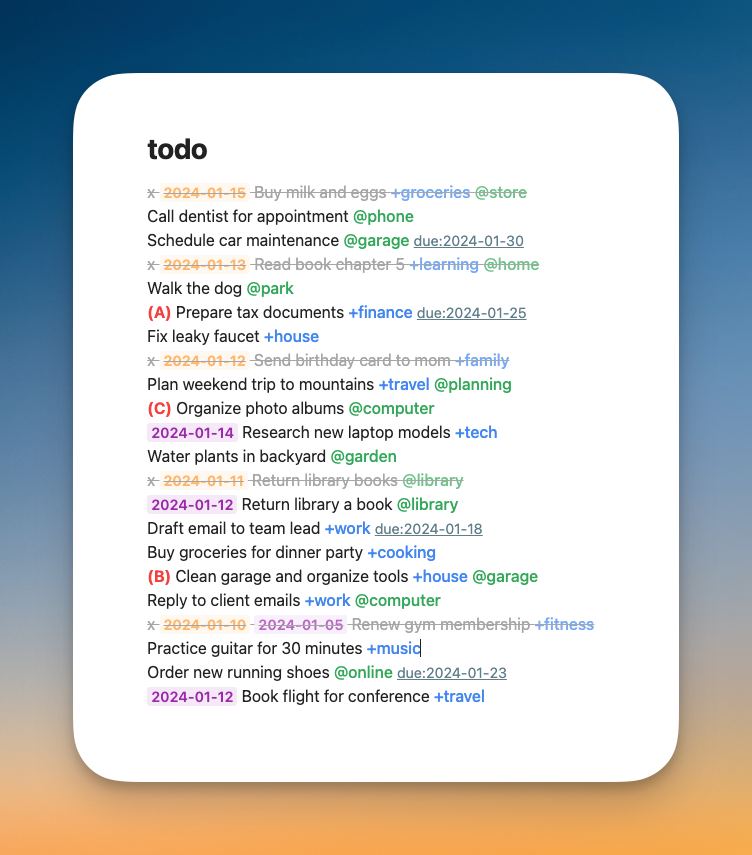
Features
Syntax Highlight:
- Automatic highlighting for todo.txt elements
- Completed tasks, project tags (
+project), context tags (@context), priority markers ((A),(B)), due dates (due:yyyy-mm-dd), recurring task markers (rec:d,rec:w,rec:m,rec:y)
- Completed tasks, project tags (
- Customize colors with the Style Settings Plugin
- Automatic highlighting for todo.txt elements
Automatic Completion Date:
- Automatically adds completion date when marking tasks as complete with
x
- Automatically adds completion date when marking tasks as complete with
Recurring tasks:
- Automatic recurring task generation using
rec:- attribute Intervals:
d(daily),b(business days),w(weekly),m(monthly),y(yearly)
- attribute Intervals:
- Numeric prefixes:
rec:3m(every 3 months) - Strict mode:
rec:+m(based on original due date)
- Automatic recurring task generation using
Task Management:
- Move completed tasks to done file
Todo.txt: Move completed tasks to done file
- Move completed tasks to done file
Task Sorting:
- Sort by priority, project, context, due date
Todo.txt: Sort by priority/project/context/due date
- Sort by priority, project, context, due date
About todo.txt format
Basic todo.txt format:
x 2023-05-08 Completed task +project @context
Today's task +work @office
(A) High priority task +project
A task with due:2023-05-15 date
Daily standup @work rec:d due:2023-05-08
Monthly review +personal rec:+m due:2023-05-01
Submit report @work rec:3b due:2023-05-12
Visit the official website for more details.
HealthGood
ReviewCaution
About
Highlight todo.txt elements: priorities, projects (+project), contexts (@context), due: dates, completion marks and rec: markers. Add completion dates, generate recurring tasks from rec: intervals, move completed tasks to a done file, and sort by priority, project, context or due date.Details
Current version
1.0.5
Last updated
Last year
Created
Last year
Updates
6 releases
Downloads
1k
Compatible with
Obsidian 1.8.0+
Platforms
Desktop, Mobile
License
MIT