Search...Search plugins and themes...
⌘K
Sign in
  • Get started
  • Download
  • Pricing
  • Enterprise
  • Account
  • Obsidian
  • Overview
  • Sync
  • Publish
  • Canvas
  • Mobile
  • Web Clipper
  • CLI
  • Learn
  • Help
  • Developers
  • Changelog
  • About
  • Roadmap
  • Blog
  • Resources
  • System status
  • License overview
  • Terms of service
  • Privacy policy
  • Security
  • Community
  • Plugins
  • Themes
  • Discord
  • Forum / 中文论坛
  • Merch store
  • Brand guidelines
Follow us
DiscordTwitterBlueskyThreadsMastodonYouTubeGitHub
© 2026 Obsidian

Todo Overview

yujiayujia87 downloads

Collect every task in the vault into one note, grouped by status and by source note, with four checkbox states and a hide button that never edits your notes.

Add to Obsidian
Todo Overview screenshot
  • Overview
  • Scorecard
  • Updates1

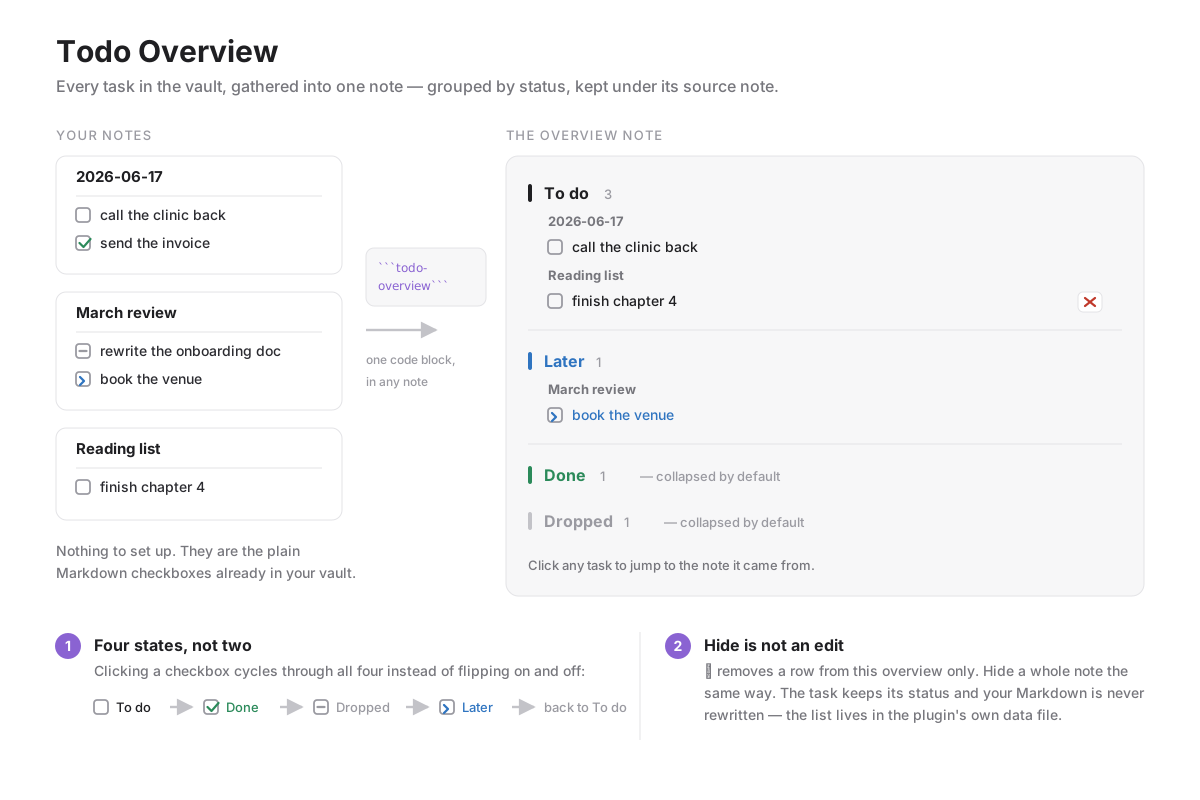
Collect every task in your vault into one note, grouped by status and kept under the note it came from. No front matter, no tags, no separate task syntax — it reads the plain Markdown checkboxes you already write.
How Todo Overview works

Usage

Put this code block in any note:

```todo-overview
```

That note becomes the overview. Every other Markdown file in the vault is scanned for checkbox lines, and the results are grouped into four statuses, then by source note. To do and Later start expanded; Done and Dropped start collapsed. Clicking a task opens the note it came from.

Four states, not two

Obsidian's checkbox flips between empty and x. This plugin cycles through four, both when you click a checkbox in a note and through the command Cycle the task status on this line (give it a hotkey in Settings → Hotkeys; it applies to every line in the selection):

Markdown Status
- [ ] To do
- [x] Done
- [-] Dropped
- [>] Later

These are ordinary characters inside the checkbox, so the notes stay readable, stay valid Markdown, and keep working if you ever disable the plugin.

Hiding is not editing

Some tasks do not need to be done and do not deserve to be marked done — they just do not belong in the overview. The ✕ on a row hides that one task; Hide this note hides everything from one file. Either way the task keeps its status and nothing is written to your notes: the hidden list lives in the plugin's own data.json. Press Hidden (n) in the toolbar to see what is hidden and restore any of it.

Notes

  • The overview is built on demand when the block renders. Use Refresh after editing tasks elsewhere.
  • The note holding the block is skipped, so the overview never lists itself.
  • Reading every Markdown file is how the overview is assembled; nothing leaves your vault and no network access is used.
  • The interface follows Obsidian's own language setting: Chinese when the app is in Chinese, English everywhere else.

Installing

Community plugins → Browse → search for Todo Overview.

Manually: download main.js, manifest.json and styles.css from the latest release into <vault>/.obsidian/plugins/todo-overview/, then enable it in Settings.

Development

npm install
npm run dev     # watch build into main.js
npm test        # smoke test against a stubbed Obsidian API
npm run build   # production build

Releases are built by GitHub Actions from a version tag and signed with build provenance.

License

MIT

HealthExcellent
ReviewPassed
About
Tasks pile up across daily notes, meeting notes and project notes, and there is no one place that shows all of them. Todo Overview gathers them into a single note from one code block, with no front matter, no tags and no special task syntax — it reads the plain Markdown checkboxes you already write. Tasks are grouped into four statuses and, inside each, by the note they came from. To do and Later start expanded, Done and Dropped start collapsed, and clicking a task opens its source note at once. Clicking a checkbox cycles through all four states instead of flipping between two: to do, done, dropped, later. They are ordinary characters inside the checkbox, so your notes stay valid Markdown with the plugin disabled. Some tasks do not need doing and do not deserve to be marked done. The hide button removes a task, or a whole note, from the overview only: the status is untouched and nothing is written to your notes. Hidden entries can be restored at any time.
TasksFiles
Details
Current version
1.0.0
Last updated
3 weeks ago
Created
3 weeks ago
Updates
1 release
Downloads
87
Compatible with
Obsidian 1.4.0+
Platforms
Desktop, Mobile
License
MIT
Report bugRequest featureReport plugin
Author
yujiayujiarainajia716
GitHubrainajia716
  1. Community
  2. Plugins
  3. Tasks
  4. Todo Overview

Related plugins

Notebook Navigator

A better file browser and calendar inspired by Apple Notes, Bear, Evernote and Day One.

Claudian

Embeds Claude Code/Codex and other local Agents as AI collaborators in your vault.

Advanced URI

Control everything with URI.

Thino

Quickly capture memos and display them in the sidebar with a heatmap. (Closed source)

Local REST API with MCP

Unlock your automation needs by interacting with your notes over a secure REST API.

ChatGPT MD

A seamless integration of ChatGPT, OpenRouter.ai and local LLMs via Ollama into your notes.

Tasks

Track tasks across your vault. Supports due dates, recurring tasks, done dates, sub-set of checklist items, and filtering. Maintained by Clare Macrae and Ilyas Landikov, created by Martin Schenck.

TaskNotes

Note-based task management with calendar, pomodoro and time-tracking integration.

Day Planner

Turn tasks from daily notes, the Tasks plugin, and calendars into time blocks on an editable timeline, with built-in time tracker.

Quick Explorer

Perform file explorer operations (and see your current file path) from the title bar, using the mouse or keyboard.