Search...Search plugins and themes...
⌘K
Sign in
  • Get started
  • Download
  • Pricing
  • Enterprise
  • Account
  • Obsidian
  • Overview
  • Sync
  • Publish
  • Canvas
  • Mobile
  • Web Clipper
  • CLI
  • Learn
  • Help
  • Developers
  • Changelog
  • About
  • Roadmap
  • Blog
  • Resources
  • System status
  • License overview
  • Terms of service
  • Privacy policy
  • Security
  • Community
  • Plugins
  • Themes
  • Discord
  • Forum / 中文论坛
  • Merch store
  • Brand guidelines
Follow us
DiscordTwitterBlueskyThreadsMastodonYouTubeGitHub
© 2026 Obsidian

TidyTasks

Finn-Christopher KrauseFinn-Christopher Krause96 downloads

Automatically move completed tasks to the bottom of each Markdown task list, keeping subtasks attached and surrounding text in place.

Add to Obsidian
  • Overview
  • Scorecard
  • Updates3

TidyTasks Banner

Automatically move completed tasks to the bottom of each Markdown task list, keeping subtasks attached and surrounding text in place.

Open tasks come first, in-progress tasks follow, and completed tasks come last. Within the completed group, the most recently completed task appears first.
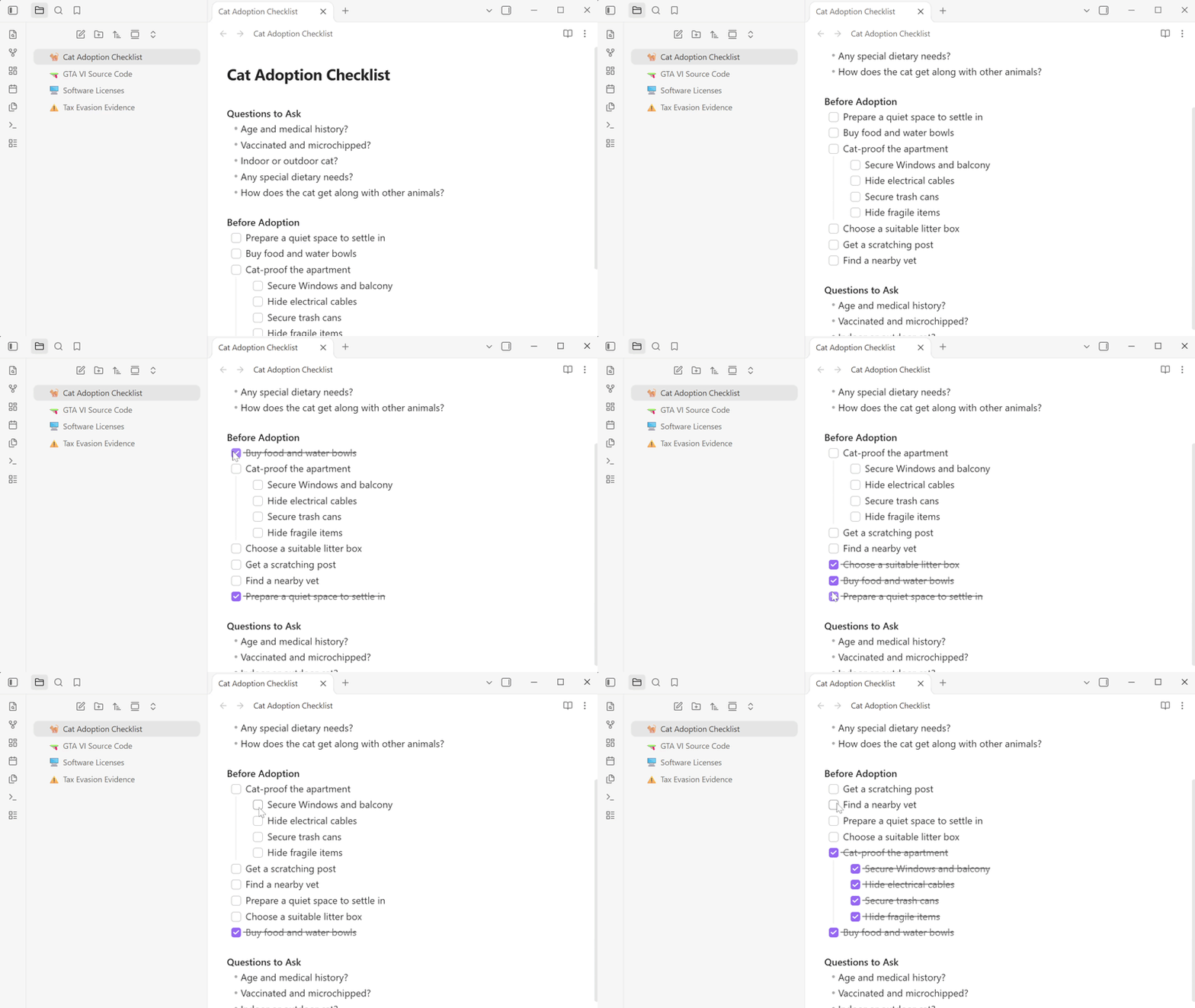
TidyTasks Demo

🖱️ How to use

  • After downloading and activating TidyTasks, you're all set. Every new list now sorts itself automatically.
  • Lists that existed before installation will also sort themselves the next time a task’s status changes (you can also sort them right away by ticking a checkbox and unticking it again).
  • You can also exclude specific notes from automatic sorting by right-clicking them in the file browser and selecting “Exclude note from automatic sorting”.

💡 Additional info

I’ve added some settings to the plugin menu that let you personalize your TidyTasks experience:

  • Automatic sorting: turn automatic sorting on or off for your entire vault.
  • Sort automatically in this note: turn automatic sorting on or off for the note you currently have open (same effect as right-clicking it and selecting “Exclude note from automatic sorting”).
  • Typing delay: change how long TidyTasks waits without further edits before it sorts, in case the default 500 ms is too fast or too slow for you.

💻 You might also like some other plugins I've made:

  • Notemoji - Assign emoji icons to notes and folders in the file explorer to make your vault feel a little cozier.
  • Cloudboard - Create Pinterest-style image boards with both local and online images, without requiring the use of Obsidian Canvas.

Thank you for using my plugins and supporting my work! My plugins are designed to work across Windows, macOS, Android, and iOS.

⚠️ Feedback and support

Found a bug or have a suggestion? Open an issue in this repository's GitHub Issues tab. Include your Obsidian version, device/platform, a small Markdown example and what you expected to happen. Please remove private note content before sharing examples.

Thanks for using my plugins and supporting my work! - Finn
TidyTasks Demo

HealthExcellent
ReviewSatisfactory
About
Move completed tasks to the bottom of each Markdown task list while keeping subtasks attached and surrounding text in place. Preserve native checkboxes and list order so open tasks appear first, in-progress second, and completed tasks last, with newest completed items shown first.
TasksAutomationEditing
Details
Current version
1.0.1
Last updated
4 weeks ago
Created
2 months ago
Updates
3 releases
Downloads
96
Compatible with
Obsidian 1.6.0+
Platforms
Desktop, Mobile
License
MIT
Report bugRequest featureReport plugin
Author
Finn-Christopher KrauseFinn-Christopher Krausefinnxwz
GitHubfinnxwz
finnxwz
  1. Community
  2. Plugins
  3. Tasks
  4. TidyTasks

Related plugins

MetaEdit

Manage your metadata.

Task Collector

Change task status and collect tasks within a document using hotkeys and context menus.

Homepage

Open a note, base, or workspace on startup, or set it for quick access later.

BRAT

Easily install a beta version of a plugin for testing.

Templater

Create and use dynamic templates.

LanguageTool Integration

Advanced grammar and spell checking, powered by LanguageTool.

Linter

Format and style your notes. Linter can be used to format YAML tags, aliases, arrays, and metadata; footnotes; headings; spacing; math blocks; regular Markdown contents like list, italics, and bold styles; and more with the use of custom rule options.

Meta Bind

Make your notes interactive with inline input fields, metadata displays, and buttons.

Advanced URI

Control everything with URI.

TaskNotes

Note-based task management with calendar, pomodoro and time-tracking integration.