Tekken Code Image
 omowne60 downloads
Convert Tekken fighting game notation DSL into SVG images.
- Overview
- Scorecard
- Updates8
Convert Japanese Tekken fighting game command notation into SVG images in Obsidian.
Installation
Obsidian Plugin
- In Obsidian, open Settings → Community plugins.
- Select Browse, search for Tekken Code Image, then select Install.
- Enable the plugin.
Web (Browser)
- Run
npm run build:webto generatedist-web/index.html. - Open the generated
dist-web/index.htmlin a browser (or deploy it to a static hosting service of your choice).
The web version allows you to test the command syntax—which is identical to that of the Obsidian plugin—directly in your browser. Settings are saved to the localStorage key tekken-code-image-settings.
Usage
Create a tekken code block and enter a command using numeric directions and attack buttons.
```tekken
6n23RP
```
The plugin renders the command as an SVG image. Open Settings → Community plugins → Tekken Code Image to adjust shape size, spacing, text styles, and attack button colors.
Development
Prerequisites
- Node.js (ES2020 対応)
- npm
Setup
npm install
Build
| コマンド | 出力 | 用途 |
|---|---|---|
npm run build |
dist/main.js + dist/manifest.json |
Obsidian プラグイン本番ビルド |
npm run build:web |
dist-web/index.html(インライン化) |
Web ブラウザ向け単一 HTML ビルド |
npm run build:all |
上記両方 | 両ターゲット一括 |
Develop (watch)
| コマンド | 用途 |
|---|---|
npm run dev |
デフォルト(--target 不指定)。watch モードで起動 |
npm run dev:obsidian |
Obsidian ターゲットのみ watch |
npm run dev:web |
Web ターゲットのみ watch。web/main.js を生成し、web/index.html から参照 |
Test
| コマンド | 用途 |
|---|---|
npm run test |
Vitest スイートを実行 |
npm run test:watch |
Vitest を watch モードで起動 |
npm run test:render |
Playwright による描画テストを実行 |
npm run typecheck |
tsc --noEmit による型チェック |
Project Layout
src/core/— 共通ロジック(parser, svg, settings, types)src/entries/obsidian/— Obsidian プラグインエントリsrc/entries/web/— Web ブラウザエントリと共通 API (integrate.ts)web/index.html— Web 版 UI の HTML(dev 時に参照)test/— Vitest と Playwright テスト
詳細は SPEC.md の「ディレクトリ構造」「エントリの責務分離」を参照。
日本語
概要
Obsidian のプラグインで、格闘ゲームの鉄拳におけるコマンドをSVG画像へと変換します。
対応しているコマンドは、主に日本で使われるテンキー形式です。例えば風神拳なら 6n23RP といった表記です。
markdown 上の ```tekken コードブロックにコマンドを記述することで、該当コードブロック上にSVG画像が生成されます。
Web版もあります。
記述ルール
方向、および、ボタン表記は画像のとおりです。
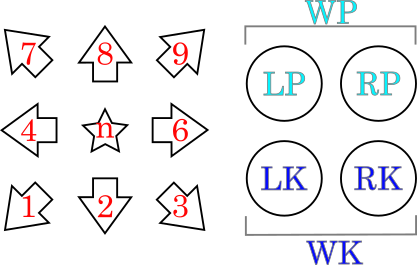
サポートしている記法:
- 方向
- 数字(
1, 2, 3, 4, 6, 7, 8, 9) nまたはN- ニュートラル
- 数字(
- 攻撃ボタン
LP- 左パンチRP- 右パンチWP- 左右パンチ同時押しLK- 左キックRK- 右キックWK- 左右キック同時押し
- スライド(攻撃ボタンを素早く順に押す)
[ 攻撃ボタン ]- なお、スライドとしての
WPWKは記述不可
- なお、スライドとしての
- 例:
[ LK RP ]
- 攻撃ボタンの同時押し
+を攻撃ボタンの間に記述- 例:
LP + RK
- セパレーター
>
- 任意のテキスト
- ダブルクォート記号
"で囲う。ただし、テキストとして"記号を含めることは出来ない。 - 例1:
"Counter Hit" - 例2:
"日本語も可能"
- ダブルクォート記号
- スペース、カンマ
- 効果は何もなく、単純に無視されます。
- 例:
LP, RP, LKとLP RP LKとLPRPLKは同じ意味
記述例
アリサの基本コンボ
```tekken
3RP > 4LP > "ws" LPRP > 9LP > 66 > 9LP
```
複数行のコードブロックを使うと、改行位置で図形が次の行へ送られます。連続する改行は1つにまとめられ、行送りの量は shapeSize + padding です。
```tekken
3RP > 4LP > "ws" LPRP > 9LP > 66 >
9LP
```
制限事項
- 現状、斜め方向(1, 3, 7, 9)の矢印図形は、他の矢印図形よりパディング(左右の隙間)が多いように見えます。バウンディングボックスを得るAPIによる都合です。
- 本編ゲーム中にあるようなパワークラッシュなどのアイコンには、現状は非対応です。代替として任意テキストを用いてください。
- コマンドの最大長は200文字としています。おそらく十分だとは思いますが、不都合があれば Issues から報告お願いします。
ライセンス
MIT ライセンス