Search...Search plugins and themes...
⌘K
Sign in
  • Get started
  • Download
  • Pricing
  • Enterprise
  • Account
  • Obsidian
  • Overview
  • Sync
  • Publish
  • Canvas
  • Mobile
  • Web Clipper
  • CLI
  • Learn
  • Help
  • Developers
  • Changelog
  • About
  • Roadmap
  • Blog
  • Resources
  • System status
  • License overview
  • Terms of service
  • Privacy policy
  • Security
  • Community
  • Plugins
  • Themes
  • Discord
  • Forum / 中文论坛
  • Merch store
  • Brand guidelines
Follow us
DiscordTwitterBlueskyThreadsMastodonYouTubeGitHub
© 2026 Obsidian

TaskNotes Agenda Wrapper

toyotathieftoyotathief188 downloads

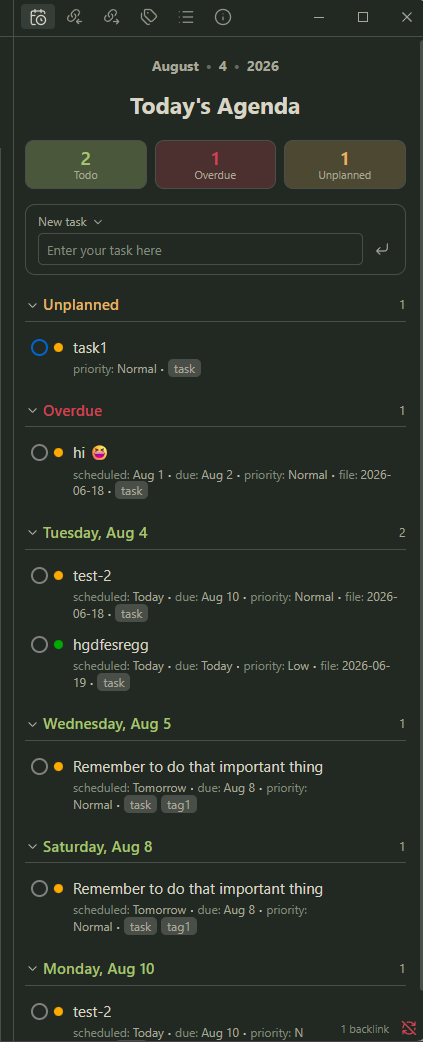
A simple, styled Today's Agenda window for TaskNotes — stats, a date-grouped list, and quick task entry, for a sidebar pane or embedded in a note.

Add to Obsidian
  • Overview
  • Scorecard
  • Updates4

A simple display of all your task notes in a today's agenda window for. It gives you stats, date-grouped, quick task entry, and list for the sidebar or embedded.
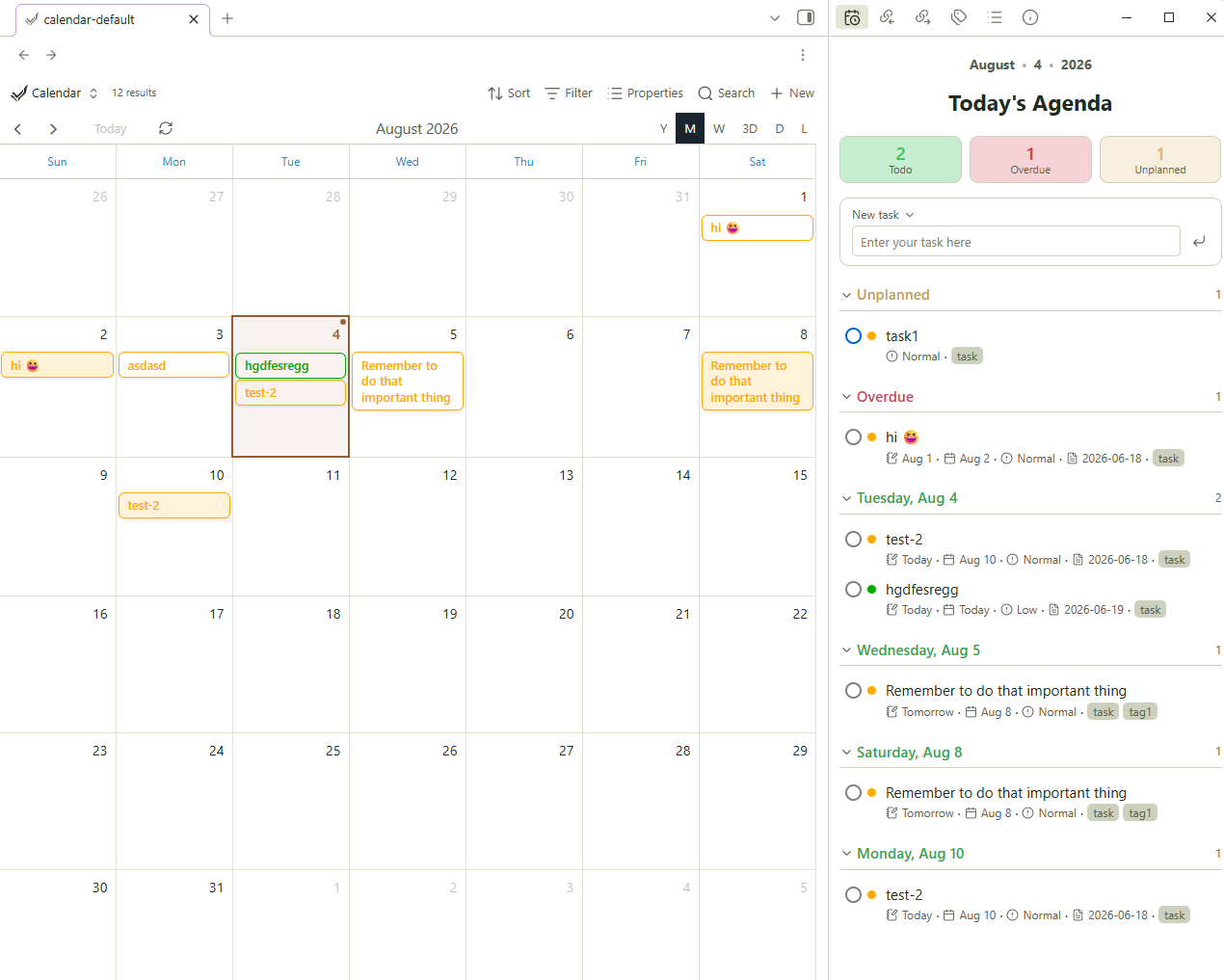
Requires the TaskNotes. plugin. This reads your TaskNotes tasks; it does not manage tasks on its own.

Features

  • Today's Agenda pane - open it in the sidebar (or anywhere) from a ribbon icon or command.
  • Stat tiles - Todo / Overdue / Unplanned counts. Click a tile to filter the list to that category; click again to clear
  • Emoji view - change subtext to emojis
  • Date-grouped list — an Unplanned section, then Overdue, then each upcoming day. Every section is collapsible
  • Quick task entry - type a title, press Enter (or the button), and a formatted TaskNotes task note is created. Hit the dropdown next to 'New task' to topen TaskNotes creation modal
  • Native TaskNotes styling - status and priority dots use your TaskNotes status/priority colors; the widget inherits your theme via Obsidian CSS variables
  • Interactive - click a task title to open it; click its status ring to change status
  • Embeddable - with code block

Usage

As a sidebar pane

  • Click the calendar-clock ribbon icon, or
  • Run the command "TaskNotes Agenda Wrapper: Open Today's Agenda".

The pane opens in the right sidebar. Drag its tab anywhere you like.

Embedded in a note

Add a code block:

```tasknotes-agenda
```

Optional settings inside the block:

```tasknotes-agenda
title: This Week
days: 7
```
  • title — the header shown under the date line (default: Today's Agenda).
  • days — how many days ahead to include (default: 14).

How it reads your tasks

It reads TaskNotes' own settings at runtime and falls back to TaskNotes defaults if they can't be read. A task is any note carrying your tag. Dates, status, and priority, projects, and tags come from your configured frontmatter fields. Creating and completing tasks writes standard TaskNotes frontmatter, which TaskNotes then re-indexes.

Installation

From the community plugins browser (once approved)

Settings → Community plugins → Browse → search TaskNotes Agenda Wrapper → Install → Enable.

Manually

  1. Download main.js, manifest.json, and styles.css from the latest release.
  2. Copy them into <your-vault>/.obsidian/plugins/tasknotes-agenda-wrapper/.
  3. Reload Obsidian → Settings → Community plugins → enable TaskNotes Agenda Wrapper.

Via BRAT

Add toya-co/tasknotes-agenda-wrapper as a beta plugin in BRAT.

License

MIT © Toyo Co.

HealthExcellent
ReviewSatisfactory
About
Display today's TaskNotes agenda in a sidebar pane or embedded block with collapsible Unplanned, Overdue, and upcoming day groups and stat tiles for Todo, Overdue, and Unplanned counts. Add quick TaskNotes-formatted tasks, open notes or change task status from the widget, and read TaskNotes data at runtime (requires TaskNotes plugin).
TasksSidebarDates
Details
Current version
1.2.1
Last updated
12 hours ago
Created
3 weeks ago
Updates
4 releases
Downloads
188
Compatible with
Obsidian 1.4.0+
Platforms
Desktop, Mobile
License
MIT
Report bugRequest featureReport plugin
Author
toyotathieftoyotathieftoyotathief
GitHubtoyotathief
  1. Community
  2. Plugins
  3. Tasks
  4. TaskNotes Agenda Wrapper

Related plugins

Tasks

Track tasks across your vault. Supports due dates, recurring tasks, done dates, sub-set of checklist items, and filtering. Maintained by Clare Macrae and Ilyas Landikov, created by Martin Schenck.

Day Planner

Turn tasks from daily notes, the Tasks plugin, and calendars into time blocks on an editable timeline, with built-in time tracker.

Day Planner OG

Day planning from a simple task list in a Markdown note (bare bones, preserves the features and behavior of the original plugin).

Checklist

Consolidate checklists across all files into a single view.

Rollover Daily Todos

Rollover any unchecked checkboxes from your last daily note into today's note.

Chronology

A calendar and a timeline of the note's creation and modification.

Apex Dashboard

Your personal command center — memos, todos, and projects in one stunning glassmorphism dashboard.

Todoist Board

A Todoist tasks board with sidebar and embedded views. Full 2-way sync.

Notebook Navigator

A better file browser and calendar inspired by Apple Notes, Bear, Evernote and Day One.

TaskNotes

Note-based task management with calendar, pomodoro and time-tracking integration.